iPhone Data Protection and Secure Enclave Recovery
Modern iPhone recovery depends on preserving the original hardware-bound key hierarchy that transforms encrypted APFS files back into plaintext — raw NAND access alone is not equivalent to data access.
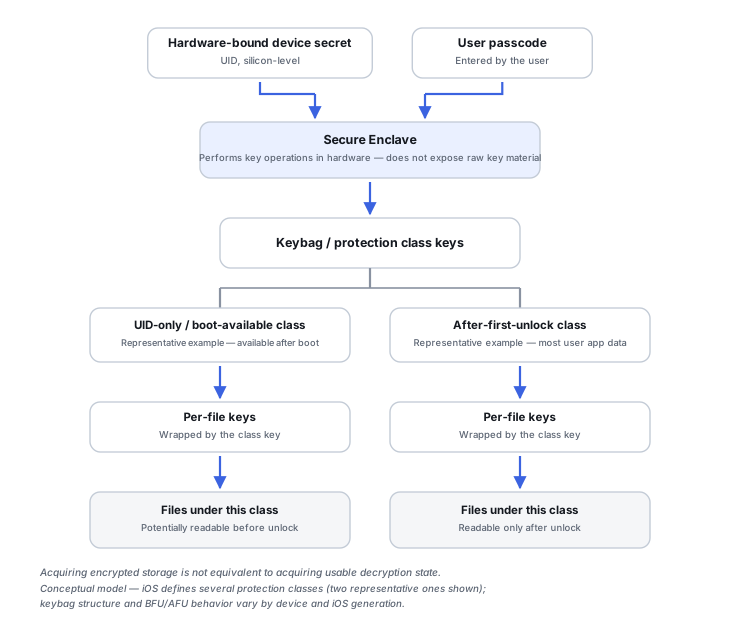
Files are encrypted per-file, not with one device-wide key
Apple's Data Protection creates a per-file encryption key for each file, and APFS can go a step further with per-extent keys. That granularity is deliberate: it's what lets the system apply different protection rules to different files rather than treating the whole disk as one all-or-nothing encrypted blob.
Class keys form the wrapping hierarchy
A per-file key isn't used directly — it's wrapped by a Data Protection class key, and that class key's own availability depends on the device's hardware UID and, for some classes, the user's passcode. Recovering the wrapped key material from filesystem metadata is not the same thing as being able to unwrap it: the wrapped key can be intact and still cryptographically useless without the class key that protects it.
The hardware UID and the Secure Enclave
Apple describes the Secure Enclave as an isolated secure subsystem built into Apple SoCs, and it's where sensitive key operations actually happen. Key handling here is hardware-mediated rather than a matter of reading plaintext key material out of flash, which is exactly why replacing a damaged logic board can destroy access to the original cryptographic identity even when the storage chips physically survive intact.
Keybags hold wrapped keys, not usable plaintext
Apple's keybag structures (user, device, backup, escrow and iCloud Backup keybags among them) store wrapped class keys under Secure Enclave-managed protection. A keybag is metadata about the key hierarchy, not a way around it — obtaining one doesn't substitute for the hardware state needed to actually unwrap what it contains.
Before First Unlock and After First Unlock are different cryptographic states
A phone that has booted but not yet been unlocked (BFU) and the same phone after the user enters their passcode (AFU) are in genuinely different cryptographic states, not just different UI states — certain class keys are only available once the device has been unlocked at least once since boot. This distinction changes what's actually reachable at any given moment, independent of whether the phone appears to be running normally.
A restart can move a running device backward
Apple documents Automatic Restart in recent iOS/iPadOS versions: after a device stays locked for a prolonged period, it can restart on its own and transition from AFU back to BFU, purging transient security keys from memory in the process. A device that's been running and unlocked, and the same device after that kind of restart, are not cryptographically equivalent recovery states — which is a reason to avoid unnecessary power cycles on a device that still needs to be preserved, not a reason to attempt to manipulate the restart timing.
Keychain is a second, deeper key hierarchy
Keychain items get their own protection, with separate encryption for metadata and for the secret value itself, and secret-value operations again involve the Secure Enclave. A recovered Keychain database file doesn't imply that every secret inside it can be decrypted independently of the original security context — and because Keychain can hold passwords, passkeys and application credentials, a recovered Keychain secret can matter more than a recovered file, since it may be what actually unlocks a cloud account, backup or encrypted app container.
Factory reset destroys keys, not just files
Apple documents that Data Protection relies on effaceable key material, and erasing that key material renders the associated files cryptographically inaccessible without needing to overwrite every NAND cell. A factory reset should be treated as a cryptographic destruction event, not a reversible housekeeping action — "try a reset, restore from backup later" only makes sense once a verified, sufficiently complete backup already exists.
Don't repeatedly guess a passcode. iOS imposes escalating delays after failed attempts, and some configurations can erase the device after enough failures. If the passcode is uncertain and the data matters, preserve the device's current state instead of testing guesses.
Related: Android FBE, Keystore and Hardware-Bound Recovery · Mobile Device Recovery State and Board-Level Preservation · Mobile Device and Cloud Recovery Tools · Phone or Tablet Data Loss · LUKS Headers, Keyslots and Volume-Key Recovery