Independent reference catalog
What actually happens when you lose data — and what to do about it
Thirty-nine common data-loss scenarios, explained honestly: what's going on technically, how recoverable it really is, and — just as important — when the right move is to stop and get professional help rather than make things worse.
We start from your situation, not from a piece of software. Start with what happened to your data. We connect the symptoms and failure scenario to the recovery methods that may apply, the tools that may be required, and the point where professional recovery becomes the safer option.
How this site helps
From the problem to a recovery plan
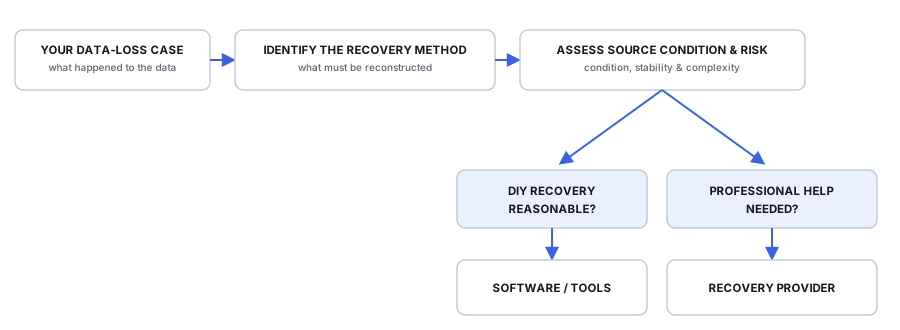
The recovery path depends on both the type of data loss and the condition of the source. A stable logical problem may be suitable for software recovery, while unstable media, physical damage or complex storage can require controlled acquisition or professional recovery. The goal is to choose the safest appropriate path before attempting recovery — professional help is one possible outcome, not the default path.
Explore the site
Explore the data recovery catalog
Cases
Start with what happened.
Real data-loss situations organized by symptoms and failure type.
Methods
Understand how recovery works.
Recovery principles including imaging, file-system reconstruction, carving, RAID reconstruction, repair and validation.
Software
Find software with the required capabilities.
Recovery applications documented by capabilities, intended use and technical limitations.
Tools & Hardware
Understand what software alone cannot do.
Imaging, write protection, diagnostics, adapters, hardware acquisition and specialized recovery equipment.
Providers
Find professional help when it is justified.
Recovery providers for cases where DIY recovery is unsafe, impractical or requires specialized equipment and expertise.
Full catalog
Browse by data-loss scenario
Common symptoms & uncertain causes
Drive Not Detected or Keeps Disappearing
Proceed carefullyA drive that vanishes from the OS, Disk Management, or even firmware can fail at several layers. Where it is still detected is the first useful clue.
Drive Shows the Wrong Capacity
Proceed carefullyZero bytes, a tiny capacity, or the wrong size can point to a device, bridge, firmware, partitioning, or storage-translation problem.
External USB Drive Not Working
Proceed carefullyThe cable, power supply, USB bridge, enclosure, or the drive itself may be responsible — and some bridges also affect how the data is represented.
Files Missing but Space Is Still Used
Often DIY-friendlyWhen capacity remains occupied but files disappear, the data may still be referenced through damaged metadata, hidden structures, or another logical layer.
Recovered Files Won't Open
Investigate the recovery resultA filename and size do not prove successful recovery. Overwrite, fragmentation, wrong reconstruction, or false file matches can leave unusable output.
Computer Won't Boot, but the Drive May Be Healthy
Protect data before repairA boot failure is not automatically a storage failure. OS, boot configuration, encryption, file-system, and hardware problems need different responses.
Deletion, formatting & overwrite
Accidental Deletion
Often DIY-friendlyFiles or folders deleted unintentionally can remain recoverable when the source is preserved, but later writes and SSD deallocation can change the result quickly.
Why Deleted Files Usually Can't Be Recovered on an SSD
Proceed carefullyTRIM can make deleted SSD blocks stop returning their old contents, while later garbage collection may erase the underlying flash — timing and behavior vary by storage stack.
Accidental Formatting
Proceed carefullyA quick format mainly replaces file-system metadata and may leave old file content recoverable; a full format or secure erase can be far more destructive.
Data Overwritten After Deletion or Formatting
Recovery may be limitedOnce new data occupies the same logical or physical storage, recovery changes from finding old metadata to determining what content actually survived.
Data Lost to an OS Reinstall
Professional help recommendedInstalling an OS over old data starts a race against ongoing writes — stopping immediately matters more than any single tool.
Partition & file-system damage
Partition Loss
Often DIY-friendlyA missing or damaged partition map can make storage appear unallocated even when the old filesystem remains, but similar symptoms can also come from other storage-layer problems.
Drive Shows as "RAW"
Proceed carefullyWhen Windows reports a drive as RAW, it's lost track of the file system, not necessarily the data on it.
Drive Asks to Be Initialized
Do not initialize if data is neededWindows reports a disk as Not Initialized. Understand what that state means before writing a new MBR or GPT to a drive that may still contain recoverable data.
File System Corruption
Proceed carefullyA drive that mounts but throws errors has inconsistent bookkeeping, not necessarily damaged data — until a repair tool is run carelessly.
APFS Container or Volume Corruption (macOS)
Proceed carefullyAPFS corruption can affect a container, volume or metadata generation; snapshots or older consistent structures may help in some cases, but they are not guaranteed recovery copies.
Physical, media & device failure
Bad Sectors and a Failing (but Working) Drive
Proceed carefullyGrowing read errors, bad-sector reports or SMART warnings can indicate a degrading source. If access is still stable enough, preserving readable sectors before further testing or repair can protect the remaining recovery opportunity.
Mechanical Hard Drive Failure
Professional help recommendedClicking, grinding, spin-up problems or unstable reads can indicate mechanical or media damage. Repeated DIY attempts can turn a recoverable failure into a more difficult one.
SSD Controller Failure
Professional help recommendedAn SSD that disappears can have controller, firmware, power, translation or NAND-access problems; the recovery path depends heavily on the model and failure mode.
USB Flash Drive Failure
Proceed carefullyA flash drive may fail through its connector, controller, NAND, translation metadata, or power path; a visible device does not guarantee stable access to its data.
Power Surge or Electrical Failure
Professional help recommendedAn electrical event can damage the power path, enclosure, PCB or internal electronics. Recovery depends on where the damage stopped, and a straight donor-board swap is often insufficient.
Water or Fire Damage
Professional help recommendedWater, contamination or heat can damage electronics and media directly, while powering a compromised device can make the damage worse. Preserve it in its current state.
Multi-disk & networked storage
RAID Array Failure
Proceed carefullyOne or more disks in an array fail or drop out. Recoverability depends heavily on which of three very different failure types actually occurred.
NAS Device Failure
Proceed carefullyA NAS failure can involve the appliance, storage pool, RAID members, filesystem or network layer. Preserve member state before assuming the disks can simply be read separately.
Drives Unreadable After Removal From a Server or NAS
Proceed carefullyDrives that worked inside a server, NAS or enclosure show nothing usable elsewhere. Compare what was read before and now, and keep every member and the original hardware before changing anything.
Failed or Interrupted RAID Rebuild
Professional help recommendedA rebuild that stops, fails or is interrupted can leave different members and address ranges representing different points in time. Preserve the current member state before retrying the rebuild.
RAID Disks Removed and Their Order Is Unknown
Proceed carefullyDisks were pulled from a RAID or NAS without a reliable record of their slots. Preserve every disk and its history, and test candidate orders on images instead of on the original controller.
Storage Pool or Composite Volume Failure
Proceed carefullyMultiple disks can remain visible while the pool, virtual disk or logical-volume metadata that joined them no longer reconstructs the original address space. Preserve member state before repair, reset or recreation.
Virtual & enterprise storage
Virtual Machine Disk Corruption
Proceed carefullyA VM that won't boot may have a damaged virtual-disk container, snapshot chain, guest file system, or underlying host storage — identify the failed layer first.
SAN (Storage Area Network) Failure
Professional help recommendedA SAN LUN can become inaccessible because of array, pool, thin-provisioning, snapshot, controller or presentation state. Preserve the storage configuration and identify the failed layer or layers before reconstruction.
Backup Tape or LTO Cartridge Unreadable
Professional help recommendedAn unreadable tape can be a cartridge, drive, positioning, LTFS, catalog, backup-format or encryption problem. Preserve the media and identify the failed layer before relabeling, rewriting or reusing it.
Encryption-related loss
Locked Out of an Encrypted Volume
Proceed carefullyAn encrypted volume no longer unlocks, even though the cause may be missing key material, damaged encryption metadata, or unstable storage underneath it — and there's no realistic way to brute-force around strong modern encryption itself.
Ransomware Encryption
Professional help recommendedRansomware can leave encrypted files, older plaintext copies, backups or recoverable deleted originals depending on the variant and what it changed. Identify the incident before choosing a recovery path.
Mobile & specialized media
Phone or Tablet Data Loss
Proceed carefullyModern phones and tablets rely on hardware-backed encryption and device-specific key state. Preserving access to the original device, credentials and secure-hardware context can be critical to recovery.
Memory Card Not Recognized or Asks to Be Formatted
Proceed carefullyAn SD or microSD card can fail at the reader, filesystem, controller or flash layer. A format prompt or RAW state does not identify the cause, so preserve stable access before formatting or repair.
Corrupted or Deleted Video from a Memory Card
Often DIY-friendlyDeleted, fragmented or interrupted recordings on a memory card can require reconstruction of the correct video extents before container repair is meaningful. Preserve the card before further recording or repair.
Application & container file damage
Outlook PST/OST Corruption
Proceed carefullyA damaged OST can often be rebuilt when the server copy is confirmed complete. A PST may contain unique local or archived mail, so identify the authoritative copy before repair.
Database Corruption (SQL Server, MySQL)
Professional help recommendedPreserve a consistent copy of the database state before repair. Some engine repair modes can rebuild structures safely, while destructive modes may discard damaged rows or pages.
Corrupted Video File (MP4/MOV Won't Play)
Proceed carefullyA video can retain media data while its container metadata, timing or sample map is damaged — or the file may simply be truncated or reconstructed from the wrong source extents. Identify which layer failed before attempting repair.
Cloud, crypto & modern loss
Cloud Storage & Sync Data Loss
Proceed carefullyA synced file can disappear from every endpoint while an older server-side version, trash entry, backup or independent replica may still exist. Preserve available history before retention windows expire.
Cryptocurrency Wallet Recovery
Professional help recommendedWallet recovery depends on which signing material still exists — wallet data, seed, passphrase, private keys, derivation information, device state or multisig policy. Preserve every remaining credential source before experimenting.