Android FBE, Keystore and Hardware-Bound Recovery
Modern Android recovery can require two independent cryptographic layers: filesystem decryption through File-Based Encryption’s Credential and Device Encrypted storage, and application-key access through Android Keystore — recovering one layer does not guarantee the other. Even when both work, whether the recovered app data is actually usable is a third, separate question.
- DE storage is still encrypted; it is available before unlock only to the OS and Direct Boot-aware apps, not as plaintext in a raw dump.
- CE storage becoming available after unlock does not mean any tool can read every file, or that every app key can be used.
- A non-exportable Keystore key can still be used by its app under its policy; non-exportable does not mean plaintext is always unreachable.
- Filesystem decryption, app-key use and real data usability are separate outcomes and have to be checked separately.
- Reset, bootloader unlock, app reinstall or credential changes can erase data or make keys unusable; exact effects depend on the model and key policy.
File-Based Encryption replaced one disk-wide key
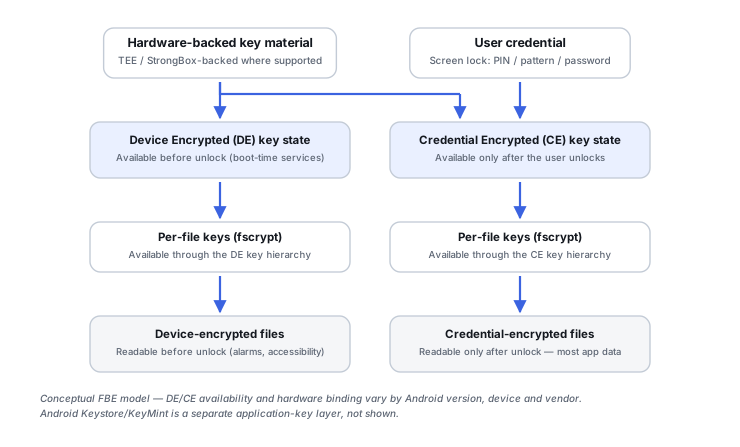
Modern Android devices generally use File-Based Encryption (FBE) rather than the legacy full-disk encryption model. That shift matters for recovery because FBE doesn’t protect the whole storage volume under one key the way older full-disk encryption did — it distinguishes storage classes with different availability rules. Android provides a reference implementation of FBE, and manufacturers can adapt parts of it to their system-on-chip, so details on a specific device have to be checked against that model and Android build rather than assumed from the reference design.
Device Encrypted and Credential Encrypted storage are different domains
Device Encrypted (DE) storage is available after boot, before the user unlocks, to support Direct Boot-aware functionality. That availability is limited: it applies to the operating system and to apps that declare Direct Boot support, inside the rules the OS and each app set. DE is not an unencrypted area. Its contents are encrypted on flash and protected by keys tied to the device’s secure hardware and trusted boot state, so a raw dump of the storage does not by itself expose DE files as readable data.
Credential Encrypted (CE) storage — the default location, where user applications normally keep the sensitive parts of their data — only becomes available once the user unlocks. CE being available is still not the same as every file being retrievable. What an extraction tool can actually read depends on the access path it has on that device and build, on per-app sandboxing, and on whether the app encrypted its own data with a separate key. A booting Android phone can therefore expose some system-level data while the main user dataset stays cryptographically locked. Apple uses related but different terms and mechanisms; for what “BFU” and “AFU” do and do not mean as recorded device states, see Mobile Device Recovery State and Board-Level Preservation.
Cold boot, first unlock and a re-locked screen
Three device states are easy to blur together, and they are not equivalent. They describe storage availability; they do not on their own decide whether a particular application key can be used.
Scroll horizontally to see the full table →
| State | Storage picture | What it does not establish |
|---|---|---|
| Cold boot, not yet unlocked | DE available to the OS and Direct Boot-aware components; CE storage locked until the first unlock since boot | That DE content is readable outside the running, trusted OS, or that any CE data can be reached |
| Unlocked at least once since boot | CE storage for that user has been unlocked | That every file is reachable by a given tool, or that app keys with their own authentication requirement can be used |
| Screen locked again after an unlock | Depends on the implementation, version and profile; do not equate it with either of the other two states | That app keys requiring recent or per-use authentication are still usable; such keys can be unusable while CE storage is still available |
A restart returns the device to the first state, which is one reason not to power-cycle a phone whose current state matters. These states only partly correspond to Apple’s BFU/AFU vocabulary, and the correspondence is not a universal rule.
CE keys depend on the credential and the hardware root of trust
In the AOSP reference design, internal-storage CE keys are encrypted using a key derived from the user’s synthetic password. Protecting that synthetic password involves the credential and hardware-enforced mechanisms. Other FBE keys are wrapped with their own Keystore keys. These are related parts of the key hierarchy, not one identical wrapping rule for every storage class. Hardware root of trust and Verified Boot are bound to KeyMint initialization, so FBE keys cannot be unlocked unless a trusted operating system has booted.
Verified Boot is a condition, not another password and not a standalone decryption key: it determines whether the hardware will release key operations to the booted software, but it supplies no secret that decrypts data by itself. That combination is why raw UFS or NAND acquisition doesn’t automatically hand over CE plaintext — chip-off alone is no more sufficient here than it is on a modern iPhone.
Android Keystore is a separate layer from FBE entirely
This is the distinction worth being precise about: FBE protects data at the filesystem level, while Android Keystore (with KeyMint/Keymaster underneath) separately protects application-level cryptographic keys. An app can perfectly well store an encrypted database on the filesystem while keeping that database’s own decryption key inside Keystore — which means decrypting the filesystem doesn’t automatically unlock the application data sitting on top of it.
TEE and StrongBox: two levels of hardware isolation
Keystore keys can be enforced by a Trusted Execution Environment (TEE) or, on devices that include it, a dedicated StrongBox secure element, and attestation can identify which level actually backs a given key. Neither is universal at the app level. StrongBox is optional, supports only some algorithms and key sizes, and Android’s own guidance says most apps do not need it; a key is only hardware-bound when the device’s secure hardware supports the combination of parameters the key is authorized for. Some apps use Keystore with TEE-backed keys, some use StrongBox, and some use their own scheme or none. For recovery purposes, the attestation protocol itself is beside the point — what matters is that some application keys are deliberately bound to hardware that’s difficult or impossible to reproduce on a different board, and which ones those are differs from app to app.
Non-exportable is not the same as unusable
Android Keystore separates two things that are often merged. Key material can be non-exportable: it never enters the app’s process, and when it is bound to secure hardware it is never exposed outside that hardware. Yet the app can still use the key: it hands data to the system, which performs the encryption, decryption or signing operation under the key’s authorizations. KeyMint/Keymaster can enforce which operations a key may be used for, whether the user must authenticate (for a period of time or for each individual operation), and its hardware security level, and these authorizations cannot be changed after the key is created.
The practical consequence runs both ways. Not being able to read a key’s raw bytes is not a universal barrier to plaintext: on the original, working device, in the right state, the app may still decrypt its own data through Keystore. But a recovered file is useless if no permitted operation with its key is available any longer. This is especially relevant for password managers, banking apps, secure messengers, crypto apps and enterprise apps. Some invalidation conditions are documented per key; for example, a key restricted to biometric authentication is by default invalidated when new biometrics are enrolled.
Illustrative example: the database survives, the app key does not
A phone is unlocked with the known credential, CE storage is available, and an app’s encrypted database file is extracted complete and intact.
Filesystem decryption has succeeded, but the database is encrypted with an app key held in Keystore. That key may require its own user authentication that can no longer be satisfied, or its key material may be gone, for instance after the key was invalidated or the original hardware was lost.
Record the device state and do not change credentials, biometrics or the app installation. Check whether the app has its own backup, sync or export path, and involve a specialist familiar with that app’s storage scheme.
A different app on the same phone can use an entirely different scheme: not every app key is hardware-backed or StrongBox-backed, and some apps do not use Keystore at all. One app’s result does not predict another’s.
Three outcomes to check separately
A recovery report for an Android device is clearer when it keeps three results apart instead of reporting one “decrypted” status.
Scroll horizontally to see the full table →
| Outcome | What it means | What it does not prove |
|---|---|---|
| Filesystem decryption | DE and, where reached, CE files can be read as decrypted files | That app-level encrypted content inside those files can be opened |
| App-key use | A permitted Keystore operation with the app’s key is available, or the app’s own scheme can be satisfied | That the decrypted data is complete, current or consistent |
| Usable data | The content opens and has been checked against what the owner actually needs | Anything about other apps or data sets on the same device |
For checking the last row, see How to Validate Recovered Data.
Hardware-assisted rate limiting closes the offline-guessing shortcut
Modern Android enforces lock-screen credential rate limiting through TEE or Secure Element mechanisms, which means trying a credential offline against a raw flash image is not equivalent to trying it through the device’s own security path. That’s another reason raw-storage acquisition doesn’t bypass modern mobile security the way it might have on much older hardware.
Board replacement breaks the hardware root of trust
Where FBE and Keystore keys are hardware-bound, pairing the original UFS chip with a replacement motherboard does not reproduce the original hardware root of trust or key hierarchy, and moving a set of chips to another board is not a guaranteed route to data either. That’s why mobile recovery on a damaged Android device often prioritizes board-level repair and preserving the original SoC and security components over swapping in working replacement electronics. General board preservation, hazard assessment and the split between repair and export are covered in Mobile Device Recovery State and Board-Level Preservation.
Reset, bootloader unlock, reinstall and credential changes
Several ordinary-looking operations change the security state the keys depend on, and some are irreversible:
- Factory reset is designed to erase user data; it is not a troubleshooting step for a phone whose data still matters.
- Bootloader unlock: Android’s bootloader guidance says the device should perform a factory data reset after the user acknowledges the unlock warning, to prevent unauthorized data access.
- Reinstalling or clearing an app can remove its data and its relationship to its Keystore keys; a reinstalled app does not necessarily regain access to what the previous installation encrypted.
- Changing the credential or security state: in the reference design, changing the lock-screen credential deletes the binding of the synthetic password to the old credential, securely on devices with Weaver or rollback-resistant keys. Changing biometrics or removing the screen lock can also invalidate keys that depend on them, depending on how each key was created.
The exact consequences depend on the model, the Android build and each key’s policy. A PIN change does not always destroy every key, but none of these operations should be tried as an experiment on a phone that still holds the only copy of the data.
What to record before handing the phone to a specialist
Write down what is already known; do not power-cycle, unlock, update or otherwise change an unstable phone just to complete the list.
- Manufacturer, exact model and, if already visible, the Android version or build.
- Current state: powered on or off, whether it has been unlocked since its last boot, whether the screen is locked now, and the bootloader status if known.
- Whether the screen-lock credential is known, and whether it or the biometrics were changed recently.
- The nature of the damage or failure: liquid, impact, boot loop, failed update, and when it started.
- History of resets, repairs, board or screen replacements and app reinstalls.
- Which apps and data actually matter, so effort goes to the right layer.
- Alternative sources: cloud backups, account sync, app-specific backups or exports, other devices signed in to the same accounts.
Android device and OEM diversity is real — version, SoC vendor, FBE generation, TEE/StrongBox support and app-specific encryption all vary. There’s no single universal extraction recipe; the useful question for any given case is which of these layers is actually in play.
Technical references: Android Open Source Project: File-based encryption — CE and DE storage and Direct Boot availability, Keystore-wrapped FBE keys, Verified Boot bound to KeyMint initialization, synthetic password and LSKF protection, binding deletion on credential change · Android Developers: Android Keystore system — non-exportable key material used through a system process, TEE/SE binding, optional StrongBox, user-authentication modes, biometric-enrollment invalidation · Android Open Source Project: Lock and unlock the bootloader — factory data reset after bootloader unlock. These pages describe the Android reference implementation and platform APIs; OEM builds, Android versions and individual apps can differ, so device-specific behaviour has to be checked for the model and build in question.
Related: iPhone Data Protection and Secure Enclave Recovery · Mobile Device Recovery State and Board-Level Preservation · How to Validate Recovered Data · Mobile Device and Cloud Recovery Tools · Phone or Tablet Data Loss · Encryption Key Hierarchies and Recovery Metadata