PhotoRec vs Disk Drill
This pair answers a question that comes up constantly on this site: when is a specialist carver enough, and when does filesystem reconstruction actually matter? PhotoRec is the clearest reference example of pure signature-based carving on this catalog. Disk Drill is a useful counterexample to a common shortcut — the assumption that any product's "Deep Scan" is just carving under a different name.
Tables below use a small symbol set: ● confirmed/full, ◐ partial or qualified, — confirmed absent/not supported. Not confirmed* is a separate, deliberate state — it does not mean "unsupported," only that current official material wasn't specific enough to justify a Yes/No claim.
Quick comparison
A compact orientation for anyone who doesn't need the full technical breakdown yet. The detailed sections below explain what each line actually covers.
| Criterion | PhotoRec | Disk Drill |
|---|---|---|
| Best for | Specialist signature-based carving when filesystem metadata is unusable, with custom-signature support | Filesystem-aware recovery first, with signature recovery as one mechanism among several |
| Cost | Free, open source | Free tier (100 MB Windows) + paid PRO |
| Filesystem metadata undelete | — Not core; that's TestDisk's job | ● |
| Damaged filesystem reconstruction | — | ● |
| Lost partition recovery | — Use TestDisk | ● |
| Signature carving | ● Core function | ● Deep Scan (File Signatures) |
| Custom user-defined signatures | ● photorec.sig rule files | — No current user-facing custom-signature system |
| Names/tree from metadata | — Not applicable to carving | ● Where metadata survives |
| RAID | — | ● Automatic reconstruction |
| NAS/SSH | — | ● |
| Disk image input | ● | ● |
| Image creation | — Not PhotoRec's function | ● Byte-to-byte Backup |
Filesystem metadata undelete and lost-partition search are TestDisk's job, not PhotoRec's — the two ship together but do different work. See TestDisk vs R-Studio for how TestDisk's side of that pairing compares to a full recovery environment.
Two different recovery models
Per CGSecurity's own documentation, PhotoRec is a file carver: it recognizes file structures by their internal content patterns rather than depending on filesystem namespace metadata, which lets it work on filesystems that are damaged, reformatted, or of a type it doesn't otherwise understand. It recognizes more than 300 file families and roughly 480 extensions, can carve a whole partition or restrict itself to unallocated space on filesystems it supports, validates or rejects some invalid matches, and includes a JPEG bruteforce option for extra fragmented-JPEG attempts. What it does not do, because it isn't designed to, is reconstruct the original filesystem's directory structure — recovered files come back with generic, numbered names.
Disk Drill takes a layered approach. Current CleverFiles documentation explicitly separates Quick Scan (metadata, recently deleted files), Deep Scan (File System) (low-level metadata such as NTFS MFT or Ext inode tables, parsed to reconstruct names and hierarchy where that metadata survives), and Deep Scan (File Signatures) (content/signature recovery without the original namespace, functionally the same broad category as PhotoRec's carving). Disk Drill normally attempts the filesystem-aware layer first and uses signature recovery as a fallback rather than a starting point.
That makes Disk Drill a useful counterexample to a shortcut worth avoiding: not every "Deep Scan" across the industry is carving in disguise. See File-System Recovery vs. File Carving for the general distinction this page applies.
Core mechanism comparison
| Mechanism | PhotoRec | Disk Drill |
|---|---|---|
| Filesystem metadata undelete | — Not core | ● |
| Damaged filesystem reconstruction | — | ● |
| Lost partition recovery | — Use TestDisk | ● |
| Signature/content carving | ● Core function | ● One mechanism among several |
| Custom user-defined signatures | ● photorec.sig / .photorec.sig, with extension/offset/magic rule fields | — Large internal signature library; no current user-facing custom-signature editor found |
| Original names/tree from metadata | — Not applicable | ● Where metadata survives |
| Carve unallocated space only (on supported filesystems) | ● | ◐ Scan methods vary; not the product's defining feature |
| Disk image input | ● | ● |
| Image creation | — Not PhotoRec's core function | ● Byte-to-byte Backup |
| RAID reconstruction | — | ● Automatic reconstruction documented |
| NAS/SSH recovery | — | ● |
| BitLocker | ◐ Requires the volume to already be unlocked | ● Targeted BitLocker support documented |
Custom signatures: PhotoRec's clear advantage
This deserves its own section rather than a single table row. PhotoRec supports user-defined custom signatures through photorec.sig / .photorec.sig rule files, with fields for extension, offset and the signature/magic bytes themselves — genuinely useful when the case involves a file type PhotoRec doesn't recognize out of the box, or a variant signature specific to one device or application. Disk Drill ships a large internal signature library, but no current official user-facing system for defining custom signatures was found in CleverFiles' documentation. For expert, format-specific carving work, that makes PhotoRec the more flexible tool of the two, independent of anything else in this comparison.
"Ignores the filesystem" is an oversimplification
PhotoRec's own documentation sometimes describes it as ignoring the filesystem, but the detailed manual shows a real nuance: it can use filesystem allocation knowledge to search unallocated space only on FAT, NTFS and Ext-family filesystems, and its expert mode uses filesystem block-size/offset assumptions to carve more precisely. The accurate statement is narrower than "ignores the filesystem entirely": PhotoRec does not rely on normal filesystem file records to reconstruct the recovered namespace, but it can use limited filesystem/allocation information to constrain where it carves. Disk Drill, by contrast, has full filesystem-aware recovery engines — not just allocation-boundary awareness — for each filesystem it supports.
Fragmentation
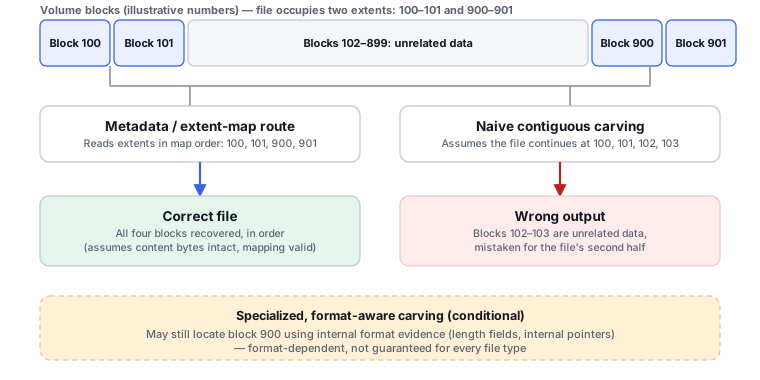
For PhotoRec, fragmented files are a known and documented limitation of carving: some formats get consistency checks, and the JPEG bruteforce option can attempt some additional fragmented-JPEG recovery, but content-based carving generally can't reassemble a file whose data isn't stored contiguously. Disk Drill's filesystem-aware Deep Scan can use metadata extents/chains where they survive to reconstruct a fragmented file's layout, and its Advanced Camera Recovery adds fragment-reconstruction logic specifically for camera/media formats, including limited fragmented MOOV reconstruction per current release notes.
The teaching point here is mechanism, not superiority: fragment reconstruction using surviving filesystem metadata is a fundamentally different operation from reconstructing fragments based on file or container internal structure, and each approach has cases where it works and the other doesn't.
Safety
PhotoRec's recovery model is copy-out by design, and CGSecurity's own documentation explicitly warns never to save recovered files back to the source being scanned — a simple rule that's easy to follow because PhotoRec doesn't offer any writing-to-source functionality to begin with. Disk Drill's core scan/recovery workflow is likewise read-oriented, with an image-first option available through Byte-to-byte Backup; its Recovery Vault and Guaranteed Recovery features are separate, preventive, write-by-design tools meant to be enabled before a loss happens, not after.
Which one fits which job?
PhotoRec
The right choice when filesystem metadata is unusable or untrustworthy, when the case calls for transparent, customizable, free, cross-platform carving, or when a custom or unusual file signature needs to be defined by hand.
Disk Drill
The better starting point whenever filesystem reconstruction is possible at all — it can preserve filenames, paths and extents that carving would simply discard, and adds RAID, NAS, imaging and encrypted-storage handling PhotoRec doesn't attempt.
If Disk Drill can reconstruct the filesystem and preserve filenames, paths and extents, falling back immediately to PhotoRec-style carving would discard useful metadata — carving is worth reaching for once filesystem-aware recovery has been tried or ruled out, not as the first move.
Evidence and scope
This page uses CGSecurity's own PhotoRec and custom-signature documentation, and current CleverFiles product/technical documentation for Disk Drill — not third-party "top 10" comparison sites. No overall winner is declared: the two tools solve overlapping but distinct problems, and which one is "enough" depends on whether the source filesystem is reconstructable at all.