TestDisk vs R-Studio
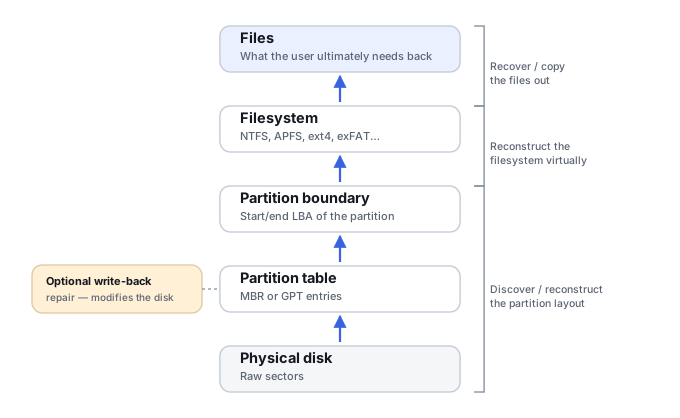
This isn't a same-class comparison, and framing it as free vs. paid would miss the point. It's a workflow-philosophy question: should the user repair and write a lost partition structure back to the disk with TestDisk, or reconstruct and recover the data virtually with a full recovery environment such as R-Studio? TestDisk can restore storage metadata in place; R-Studio is primarily designed to reconstruct access virtually and copy data out. That makes safety and workflow more important here than price or feature count.
Tables below use a small symbol set: ● confirmed/full, ◐ partial or qualified, — confirmed absent/not supported. Not confirmed* (abbreviated NC) is a separate, deliberate state — it does not mean "unsupported," only that current official material wasn't specific enough to justify a Yes/No claim.
Quick comparison
A compact orientation for anyone who doesn't need the full technical breakdown yet. The detailed sections below explain what each line actually covers.
| Criterion | TestDisk | R-Studio |
|---|---|---|
| Core philosophy | Repair/write-back: restore partition & boot metadata in place | Virtual reconstruction/copy-out: rebuild access, recover data elsewhere |
| Cost | Free, open source | $79.99 — full R-Studio for Windows |
| Interface | Text-mode / terminal | GUI |
| Lost-partition search | ● | ● |
| Partition table / boot-sector write-back | ● Explicit Write operation | ◐ Some editions/features expose write functionality, separate from normal recovery |
| Metadata undelete | ◐ FAT12/16/32, exFAT, NTFS, ext2 only | ● Broad, filesystem-aware (IntelligentScan) across its supported matrix |
| Built-in signature carving | — PhotoRec is the separate carving tool | ● Scan for Known File Types, custom signatures |
| RAID reconstruction | — Not a full manual RAID environment | ● Broad RAID/storage-manager support, including automatic parameter recognition |
| Disk images | ◐ Can operate on images made via other tools (e.g. ddrescue) | ● Create/process images, load VMDK/VHD/VHDX/VDI |
| Network/remote recovery | — | ● Corporate edition |
"Free" and "beginner-friendly" are not the same thing here — TestDisk's text interface often requires more structural understanding than R-Studio's GUI does for the equivalent case.
Two different recovery philosophies
CGSecurity documents TestDisk's typical workflow as: analyze the current partition table, search for partitions, inspect and list files, then optionally Write the selected partition structure back to the disk. When it succeeds, this can restore normal OS boot/mount access — a genuinely useful outcome TestDisk is specifically built to produce.
R-Studio's typical recovery workflow is different in aim, not just in polish: scan the physical/logical source or an image of it, find recognized partitions and filesystems, open the reconstructed filesystem virtually, and copy recovered data to another destination. The core recovery goal is not to make the original source boot or mount again — it's to get the data off it safely.
For classical data recovery where the state of the source drive is uncertain, the second model is generally the safer default. That doesn't make TestDisk's repair functions bad — it means they're a different kind of operation, one that carries write-back risk that R-Studio's normal recovery workflow doesn't.
Filesystem scope: detection vs. recovery depth
TestDisk's filesystem detection is broad, but detection is not the same claim as full recovery depth, and this page keeps that distinction rather than crediting TestDisk with capability it hasn't documented. Per CGSecurity's documentation, metadata undelete is explicitly supported for FAT12/16/32, exFAT, NTFS and ext2; on ext3 and ext4, TestDisk cannot reconstruct deleted file data the same way, because those filesystems don't retain the block-location information its undelete method relies on. For filesystems outside that undelete set, TestDisk may still detect partitions, list structures, or perform specific repair operations without offering comparable file-level recovery.
R-Studio, per R-Tools Technology's own documentation, provides filesystem-aware recovery engines across a considerably broader supported matrix: FAT12/16/32 and exFAT, NTFS and NTFS5, ReFS, HFS and HFS+, APFS (including encrypted APFS), Ext2/3/4, XFS, UFS1/UFS2 (little- and big-endian, covering FreeBSD/OpenBSD/NetBSD/Solaris), and ISO9660. Its IntelligentScan technology reads actual filesystem metadata structures — boot records and MFT entries on NTFS, ReFS metadata blocks, HFS B-tree nodes, APFS nodes and superblocks, ext superblocks — which is why it can often return original names and folder paths where pure carving couldn't.
| Filesystem operation | TestDisk | R-Studio |
|---|---|---|
| Partition detection | ● Broad | ● Broad |
| Read/list files on an intact filesystem | ◐ Supported filesystems only | ● Across its documented matrix |
| Scan/recover deleted files (metadata undelete) | ◐ FAT12/16/32, exFAT, NTFS, ext2 only | ● Filesystem-aware across its matrix, incl. Ext2/3/4, XFS, UFS1/2, HFS+/APFS |
| Repair/write-back to source | ● Partition table, boot sector, selected filesystem repair | ◐ Some write functionality exists, separate from normal recovery |
A flat "supports filesystem: Yes" row would overstate TestDisk here — detecting a partition and recovering deleted files from it are different capabilities, and TestDisk's undelete set is genuinely narrower than its detection range.
Known-content recovery: TestDisk relies on a separate tool
TestDisk itself is not CGSecurity's carving tool — when filesystem-based recovery isn't enough, CGSecurity directs users to PhotoRec, distributed alongside it. R-Studio has its own built-in Scan for Known File Types and supports custom file signatures directly, without needing a companion product.
| Capability | TestDisk | R-Studio |
|---|---|---|
| Filesystem metadata recovery | ◐ Selected filesystems only | ● Broad |
| Built-in signature carving | — PhotoRec is a separate tool | ● Scan for Known File Types |
| Custom signatures | — Not in TestDisk itself (PhotoRec has this) | ● |
| Original namespace from filesystem metadata | ◐ Possible, on supported filesystems | ● Where metadata survives, via IntelligentScan |
RAID and storage managers
TestDisk recognizes a broad range of partition and storage structures and can work around Linux RAID/LVM contexts to some extent, but it isn't a full manual virtual-RAID reconstruction environment. R-Studio's standard product includes RAID 0/1/4/5/6 plus 10/1E/5E/5EE/6E, parity-delay handling, custom layouts, and automatic RAID 5/6 parameter recognition, alongside documented support for Windows Dynamic Disks and Storage Spaces, Mac software RAID/CoreStorage/FileVault/Fusion Drive, and Linux LVM/LVM2 and mdadm arrays — genuine reconstruction depth built into the base product, not an add-on tier. This is a decisive difference for anything RAID-shaped.
Imaging
TestDisk and PhotoRec can operate on disk images, and CGSecurity commonly recommends an image/ddrescue-based workflow ahead of running either tool on damaged media — but TestDisk itself doesn't create or manage those images. R-Studio's standard edition can create images of entire disks, partitions or specific ranges, process an image as if it were the disk itself, use its own byte-by-byte image format, and load VMDK/VHD/VHDX/VDI virtual-disk images directly. Standard R-Studio has a considerably more integrated imaging workflow than TestDisk on its own; advanced multi-pass/runtime imaging is reserved for R-Studio Technician.
Safety
TestDisk's read/copy workflow — search, list, copy files elsewhere — avoids source write-back, but still adds read workload. Prefer a preserved image; unstable access requires an acquisition plan rather than repeated exploratory scans. Its source-modifying workflow — rewriting the partition table, boot-sector repair, other filesystem repair — intentionally writes to the source, and CGSecurity's own documentation notes that for maximum security, deleted-file recovery copies files to another destination rather than un-erasing them in place. R-Studio's standard recovery workflow is likewise read-oriented and copies data elsewhere by default; some editions or features expose destructive/write functionality, but those are separate from normal scan/recovery.
Not "TestDisk unsafe, R-Studio safe." TestDisk places repair/write-back operations close to its partition-recovery workflow, so the user has to consciously stop before Write if the goal is evidence-preserving, classical data recovery. R-Studio's normal workflow is virtual reconstruction and copy-out recovery by default. Write/repair capability is disclosed here for transparency, never scored as a recovery-capability advantage for either product — see Partition Table & Filesystem Discovery and Recovery Copies for the general read-only-discovery-before-write-back model this page follows.
Pricing and audience
TestDisk is free, open source, text-interface, and genuinely useful for a technically competent user who understands what a Write operation will do. R-Studio is commercial, GUI-driven, and priced across a tiered lineup: the base full-featured edition — the one this page compares, with the broad filesystem support, RAID and imaging described above — is $79.99. Narrower R-Studio NTFS and R-Studio FAT editions are also available, at $59.99 and $49.99 respectively, but they should not be used as the price reference for the full capability set compared on this page since they don't include it. Corporate (adding network recovery and virtual-disk image creation) is $179.99, and Technician (commercial/third-party servicing, forensic image formats, DeepSpar hardware integration) is $899.99. Being free doesn't make TestDisk the beginner-friendly option — it often demands more structural knowledge than R-Studio's guided GUI does for the same case.
Prices checked: September 2026, directly from R-Tools Technology's own order pages, in USD.
Which one fits which job?
TestDisk
Exceptionally useful when the problem is specifically a lost partition, damaged boot sector, or a selected filesystem structure (FAT/exFAT/NTFS/ext2), and the user understands the consequences of writing a repair back to the source.
R-Studio
The broader choice when the goal is to virtually reconstruct filesystems or RAID arrays, combine metadata recovery with signature recovery, work from disk images, or copy recovered data out without first repairing the source — especially once the case is even mildly RAID-shaped.
The distinction that actually matters: restoring the source structure vs. recovering the data. TestDisk is built for the first; R-Studio is built for the second.
Evidence and scope
This page uses CGSecurity's own TestDisk documentation (partition recovery, presentation, undelete pages) and current R-Tools Technology product/pricing pages for R-Studio — not third-party "top 10" comparison sites. TestDisk's filesystem-detection breadth is deliberately not converted into a broader recovery-depth claim than its own documentation supports.