PhotoRec vs Recuva
Both are free (or free-to-start) recovery utilities that don't require a technical background to run, which makes it tempting to treat them as interchangeable. They aren't — their core recovery logic is fundamentally different. PhotoRec is a file carver: it searches raw data for content signatures and reconstructs files independently of the filesystem's own records. Recuva is primarily a filesystem-metadata undelete tool for Windows, with a separate carving-style Deep Scan as its fallback. The central question this page answers is metadata-aware undelete or signature-based recovery, not which tool finds more files.
Tables below use a small symbol set: ● confirmed/full, ◐ partial or qualified, — confirmed absent/not supported. Not confirmed* is a separate, deliberate state — it does not mean "unsupported," only that current official material wasn't specific enough to justify a Yes/No claim.
Quick comparison
A compact orientation for anyone who doesn't need the full technical breakdown yet. The detailed sections below explain what each line actually means.
| Criterion | PhotoRec | Recuva |
|---|---|---|
| Best for | Signature/known-content recovery when filesystem metadata is unusable | Deleted-file recovery on Windows when metadata still survives |
| Recovery approach | File carving (core method) | Filesystem-metadata undelete, with Deep Scan carving fallback |
| Metadata-aware undelete | Not its primary method | Yes |
| Signature recovery | Core method | Yes, via Deep Scan |
| Original names/folders | Lost through carving | Kept when metadata survives; lost through Deep Scan |
| Custom signatures | Yes | Not documented |
| Fragmentation | Limited, format-dependent | Limited; explicitly constrained on FAT |
| Host OS | Windows, macOS, Linux, BSD, Solaris, DOS | Windows only |
| Source safety | Read-only recovery workflow | Read-only recovery workflow; separate Secure Overwrite function available |
| Price | Free, open source | Free; Professional $24.95 |
This quick view is an orientation layer, not a score. The detailed comparison below breaks each line down by exact mechanism, and "Which workflow fits which case?" further down covers scenario-based fit.
What each program actually does
Per CGSecurity's own documentation, PhotoRec doesn't depend on filesystem namespace metadata to reconstruct files — its core method is signature and content-based carving, though it can still use limited filesystem information (such as block size and offset) to constrain its search or restrict itself to unallocated space where the underlying filesystem is supported. It recognizes more than 300 file families and roughly 480 extensions, is free and open source, and runs on Windows, macOS, Linux, BSD, Solaris and DOS.
Per Piriform/CCleaner's own documentation, Recuva is a Windows-hosted utility for deleted files, damaged disks and newly formatted drives. Its normal scan reads surviving filesystem records to find and name recently deleted files quickly, keeping original filenames because the metadata pointing to them is still there. Deep Scan is the documented fallback when that metadata is gone or unreliable.
Metadata recovery vs. carving
These are two different recovery mechanisms, not two competing brands of the same thing. Filesystem-metadata undelete reads the storage's own bookkeeping — directory entries, allocation records — to find files it already knows the name, location and structure of. Signature-based carving ignores that bookkeeping entirely and recognizes file content directly, which works even when the bookkeeping itself is gone but comes at the cost of names, folder structure and reliability on fragmented data. See File-System Recovery vs. File Carving and Metadata Recovery vs. Raw Recovery for the general-purpose version of this distinction.
Recuva Deep Scan vs. PhotoRec carving
Recuva as a whole product is not a carving tool — but Recuva's Deep Scan specifically is carving-like. Official documentation states that Deep Scan searches the entire drive for file headers and reconstructs files without using the MFT, and current support material confirms Deep Scan cannot recover original filenames, returning numbered names such as [00001].jpg instead.
| Mechanism | PhotoRec | Recuva (Deep Scan) |
|---|---|---|
| Signature-based carving | ● Core method | ● Core method for Deep Scan specifically |
| Custom signature definitions | ● User-defined via photorec.sig | — Not documented in current official product |
| Signature offset rules | ● | — Not exposed as a user feature |
| Format consistency checks | ● For selected formats | Not documented at comparable technical depth |
| Recovery from formatted/repartitioned storage | ● Via carving | ● Especially via Deep Scan / "Scan for non-deleted files" |
Recuva Deep Scan and PhotoRec are much closer to each other in recovery mechanism than the two products are as a whole — Recuva's normal scan is a metadata undelete tool; its Deep Scan is a small, built-in carving engine.
Filenames and folder structure
PhotoRec's core carving method does not reconstruct original names or paths — recovered files come back as generic, numbered filenames grouped by recovery run, full stop, regardless of which format was recovered. Recuva keeps original filenames and folder structure when its normal scan's underlying metadata survives, but loses both the moment a file is found only through Deep Scan. Neither product's signature-based path is a way around this — it's an inherent property of recovering from content rather than from a directory record.
Fragmented files
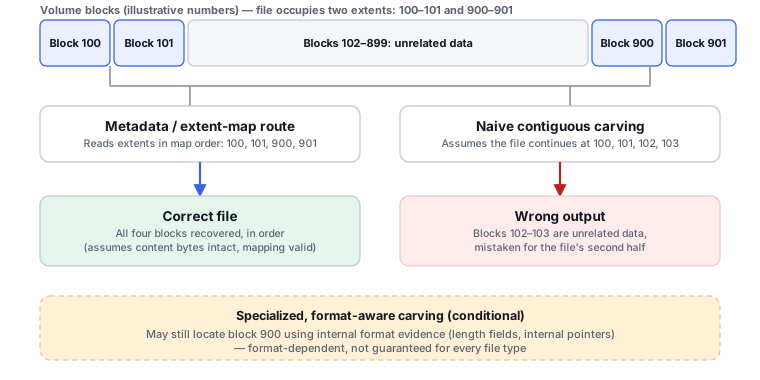
Fragmentation deserves two separate lines rather than one Fragmented files: Yes/No row, because metadata-based and signature-based recovery hit the problem differently.
| Capability | PhotoRec | Recuva |
|---|---|---|
| Metadata-based fragmented-file recovery | N/A — not PhotoRec's core method | ◐ Fragmented NTFS files may be recoverable, with reduced probability |
| Fragment handling in signature recovery | ◐ Some formats get consistency checks, length inference and retry logic for preceding blocks — enough to recover some fragmented files, but fragmentation remains a major limitation | — Official FAQ states fragmented FAT files cannot be recovered |
Both vendors are explicit about this limitation rather than silent about it — treat "Deep Scan" or "carving" as a way to find more file types, not as a fix for fragmentation.
Custom signatures
PhotoRec's custom-signature syntax is confirmed and documented: an extension, a signature offset, and a text or hexadecimal magic value, saved as a user-created photorec.sig file. This is a real differentiator for edge-case or proprietary formats PhotoRec doesn't already recognize. Current official Recuva material — product page, support documentation, FAQ and release history — documents the fixed file types Deep Scan recognizes, but no user-defined custom-signature mechanism was found after checking that material. Classification: custom signature definitions — PhotoRec ● / Recuva — not documented in current official product.
Damaged and formatted storage
Both tools can work on formatted or repartitioned storage through their respective carving mechanisms — PhotoRec as its normal method, Recuva through Deep Scan or its "Scan for non-deleted files" mode aimed specifically at damaged or reformatted drives.
Safety
| Capability | PhotoRec | Recuva |
|---|---|---|
| Default recovery workflow | ● Read-only — CGSecurity explicitly advises stopping use of the source and recovering to another destination | ● Read-only for normal scan/recovery |
| Separate source-modifying operations | — None documented | Present, separate from recovery — Secure Overwrite offers several modes that explicitly write over file data |
Recuva's Secure Overwrite is a deliberate, separate destructive function, not evidence the product is generally unsafe — and it should not be counted as a recovery advantage either way.
Price and licensing
| PhotoRec | Recuva | |
|---|---|---|
| Free tier | Free, open source (GNU GPL v2+), no recovery-size limit | Free — advanced file recovery, no size cap |
| Paid tier | None — there is no paid PhotoRec edition | Professional: $24.95 — adds virtual hard drive support, automatic updates and priority support over the same recovery engine |
Price checked: September 2026. Prices and license terms change more often than documented technical capability — treat the figure above as a snapshot and confirm current pricing directly with the vendor before a purchase decision.
Which workflow fits which case?
PhotoRec
Best fit when filesystem metadata is unusable or unreliable and the goal is known-content/signature recovery across many formats — especially when a proprietary or unusual file type needs a custom signature. Cross-platform, and there's no paid tier to consider.
Recuva
Best fit when deleted-file metadata still survives and the priority is filenames, folder structure and a Windows GUI — while retaining Deep Scan as a carving-style fallback for the cases metadata alone can't solve.
No overall winner — a fragmented FAT drive with no surviving directory structure and a recently-deleted file on an intact NTFS volume call for different tools, sometimes both in the same case.
Evidence and scope
This page uses current official documentation, wikis and support articles from CGSecurity (PhotoRec) and Piriform/CCleaner (Recuva) — not third-party "top 10" comparison sites. Recovery mechanism claims reflect what each vendor documents about its own product; relative recovery quality on the same damaged or fragmented dataset is not something documentation can establish and is not claimed here.