TestDisk vs Active@ Partition Recovery
This isn't simply free versus paid. Both products can search for lost or deleted partitions, inspect partition structures, and recover or access data from what they find — and both can also perform source-modifying repair operations that rewrite partition tables or boot sectors. That last point is the real subject of this comparison: both products blur the line between data recovery and repair/write-back, and knowing exactly where that line sits in each tool matters more here than a feature count.
Tables below use a small symbol set: ● confirmed/full, ◐ partial or qualified, — confirmed absent/not supported.
Quick comparison
A compact orientation for anyone who doesn't need the full technical breakdown yet. The detailed sections below explain what each line actually means — the repair/write-back section especially.
| Criterion | TestDisk | Active@ Partition Recovery |
|---|---|---|
| Best for | Broad, free, cross-platform partition/filesystem discovery and scriptable repair | Guided Windows workflow around QuickScan/SuperScan with built-in signature recovery |
| Partition search | ● Quick Search + Deeper Search | ● QuickScan + SuperScan |
| Deep partition search | ● Deeper Search, low-level | ● SuperScan — old/reformatted/damaged partitions |
| Partition write-back | ● Explicit (rewrite table, MBR) | ● Explicit (fix table/MBR/GPT, rollback) |
| Boot/filesystem repair | ● FAT/NTFS boot sector, NTFS MFT-from-mirror, HFS+ header | ● Manual VBS correction, partition restore |
| Metadata-aware file undelete | ● FAT/exFAT/NTFS/ext2 — not ext3/ext4 | Only where explicitly documented; not credited beyond that |
| Built-in signature recovery | — Defers to PhotoRec, a separate tool | ● Last Chance |
| Disk images | ◐ Present in advanced toolset; ddrescue recommended for damaged media | ● Built-in create/scan/restore-from-image workflow |
| Host OS | Windows, macOS, Linux, BSD, Solaris, DOS | Windows, plus WinPE/Linux LiveCD boot environments in higher tiers |
| Interface | Text / terminal | Graphical Windows UI |
| Safety | Read-only search available; explicit write-capable repair functions are prominent | Read-only scan/inspection available; source-modifying repair is a core capability |
| Price / license | Free, GPL v2+ | Freeware / Standard / Professional / Ultimate — see official site |
This quick view is an orientation layer, not a score. Both products deserve a strong "partition search" rating — the real differences are in repair depth, carving, host environment and edition boundaries, covered below.
Partition search model
Both vendors document a two-tier search: a fast pass for recently-lost partitions, and a deeper, low-level pass for older, reformatted or damaged ones. TestDisk's Quick Search covers the ordinary case, with Deeper Search as the low-level fallback. Active@ Partition Recovery names the same split QuickScan (recently deleted partitions, not yet reformatted or overwritten) and SuperScan (low-level detection of old, reformatted or damaged partitions). Both can find partitions after formatting in the relevant cases, and both let a user preview or list files before any write-back happens.
Filesystem and partition breadth
Partition-structure detection breadth and file-recovery filesystem support are different capabilities and shouldn't be collapsed into one vague "Supported filesystems" row.
Official CGSecurity documentation lists detection/search support for a very broad set of partition and filesystem structures, including several Linux/Unix and older systems — FAT/exFAT, NTFS, HFS/HFS+, Ext2/3/4, JFS2, ReiserFS, UFS/UFS2, Linux RAID, LVM/LVM2 and more. This breadth is one of TestDisk's real strengths, though detection, listing and recovery depth is not identical across every filesystem in that list.
The current Active@ Partition Recovery product page emphasizes its Last Chance signature-recovery engine around NTFS, ReFS, APFS and FAT/exFAT specifically. The broader LSoft recovery kernel historically covers more filesystems across the company's other products, but that shouldn't be imported into Partition Recovery unless Partition Recovery's own documentation supports the claim — the two products are not the same tool.
File recovery vs. partition recovery
TestDisk's confirmed undelete support covers FAT12/16/32, exFAT, NTFS and ext2, and it can search ext2/ext3 superblocks directly when the primary one is damaged. On ext3 and ext4, though, it cannot reconstruct deleted file data the way it does on ext2 — those filesystems don't retain the block-location information TestDisk's undelete method relies on, so PhotoRec, CGSecurity's own carving tool, is the documented fallback for that case.
Active@ Partition Recovery extends beyond partition-table restoration into file recovery: file/folder recovery from images, and Last Chance signature recovery documented for NTFS, ReFS, APFS and FAT/exFAT contexts, with 2026 release notes adding WEBM, SDOCX and HEIC signatures. This shouldn't be confused with the broader, separate Active@ File Recovery product.
Last Chance vs. PhotoRec dependency
This is a genuine architectural difference. TestDisk is not itself a carving engine — CGSecurity's own documentation explicitly directs users to PhotoRec when TestDisk cannot recover the lost files. Active@ Partition Recovery bundles its Last Chance signature-based engine directly into the same application.
| Capability | TestDisk | Active@ Partition Recovery |
|---|---|---|
| Built-in generic file carving | — Use PhotoRec (separate, free CGSecurity tool) instead | ● Last Chance, built into the same application |
Having carving built into one application is a meaningful convenience for Active@ Partition Recovery, but it shouldn't be conflated with partition-structure reconstruction — they're still two different recovery mechanisms, just packaged together.
Image workflow
TestDisk contains image-creation functionality in its advanced toolset, and CGSecurity's own documentation also recommends ddrescue-based workflows for damaged media — but TestDisk is not positioned as a professional unstable-drive imaging engine. Active@ Partition Recovery documents a more integrated GUI workflow: create a disk image, scan or recover from that image, restore a partition from the image, or use another destination entirely. Neither should be equated with dedicated, hardware-assisted professional acquisition.
Repair and write-back: the central safety distinction
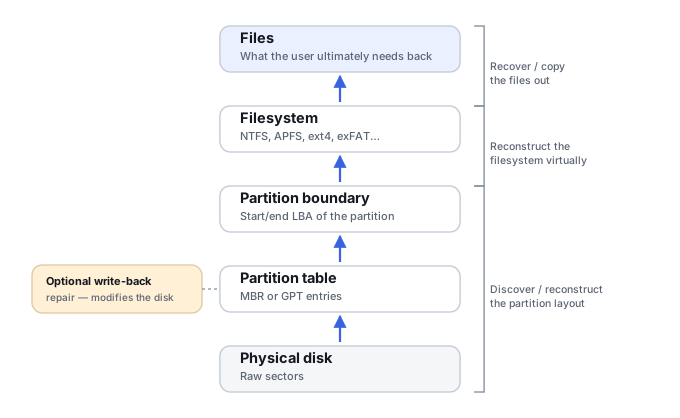
Both products can explicitly modify the source, and this deserves more attention than a simple "safe/unsafe" label. TestDisk's confirmed write operations include rewriting the partition table and MBR, restoring or rebuilding the FAT boot sector, restoring or rebuilding the NTFS boot sector, repairing the NTFS MFT from its mirror, and restoring the HFS+ volume header from backup — CGSecurity's documentation makes the Write step explicit and often lets the user list files first. TestDisk's file-undelete workflow itself intentionally copies recovered files to another destination rather than "undeleting" them in place.
Active@ Partition Recovery explicitly markets restoring a lost partition to a working state, fixing the partition table, fixing MBR/GPT, manual boot-sector correction, and restoring a partition from an image — all source-modifying repair or reconstruction operations.
| Source handling | TestDisk | Active@ Partition Recovery |
|---|---|---|
| Read-only search/analysis | ● | ● |
| Copy recovered files elsewhere | ● | ● |
| Write partition structures | ● Explicit | ● Explicit |
| Boot/filesystem repair | ● | ● |
| Image-first workflow | External tooling (ddrescue) recommended depending on workflow | Built-in disk-image workflow documented |
The safest classical data-recovery path is to image first, inspect and reconstruct virtually where possible, and treat any Write/Repair action as a separate, deliberate decision — on either product. Neither "TestDisk is unsafe" nor "Active@ is unsafe" is an accurate summary; both expose real write-capable repair functions alongside genuinely read-only discovery.
Host environments
TestDisk runs on Windows/Windows Server, Linux, macOS, DOS and BSD variants, through a primarily text/terminal interface, and can run from many live/rescue environments. Active@ Partition Recovery's primary application is a Windows GUI, with WinPE-based Active@ Boot Disk and Linux-based Active@ LiveCD available depending on the package tier. This is a straightforward user-experience distinction, not a recovery-quality judgment.
Licensing
| TestDisk | Active@ Partition Recovery | |
|---|---|---|
| License | Free, GPL v2+, no capacity restriction | Freeware, Standard, Professional, Ultimate tiers |
| Edition boundaries | N/A — one build, full feature set | Standard: core rebuild + QuickScan/SuperScan/signature recovery. Professional adds a disk editor, LastChance mode, file organizer and copy-all-data. Ultimate adds WinPE/Linux LiveCD boot environments plus the bundled Active@ File Recovery tool. |
| Price | $0 | See official site — pricing is rendered dynamically per tier and license type |
Features verified: September 2026, against current official product pages, manuals and documentation from CGSecurity and LSoft Technologies. Active@ Partition Recovery's price table changes with promotions; confirm the current amount on the official site before buying.
Which tool fits which job?
TestDisk
Best fit for a broad, free, cross-platform partition/filesystem utility with unusually wide structural detection and powerful, explicit repair/write-back functions — particularly for users comfortable with a text interface, scripted/non-interactive use, or a non-Windows host.
Active@ Partition Recovery
Best fit for a more integrated Windows GUI workflow around QuickScan/SuperScan, built-in disk-image handling, partition restoration and Last Chance signature recovery in one application — with WinPE/Linux boot environments available in the higher tiers for a system that won't boot at all.
For strict classical data recovery, both should be used in a read-only, image-first manner until a source-modifying repair is a deliberate decision — not the first thing tried.
Evidence and scope
This page uses current official product pages, documentation, release notes and technical articles from CGSecurity (TestDisk) and LSoft Technologies (Active@ Partition Recovery) — not third-party "top 10" comparison sites. Where a capability is described as a documented product boundary rather than a general limitation, that reflects current vendor material rather than an assumption.
TestDisk official wiki →
Active@ Partition Recovery official page →