File Carving and Signature-Based Data Recovery
Terms like Deep Scan, Raw Recovery, Signature Search, File Type Search and Known File Types get used almost interchangeably in product marketing, but they aren't always the same mechanism — and none of them are the same thing as filesystem-aware recovery. File-System Recovery vs. File Carving and Metadata Recovery vs. Raw Recovery cover that top-level distinction; this page goes one level deeper into how carving and signature detection actually work, because that detail is exactly what a fair software comparison needs and a feature checklist usually hides.
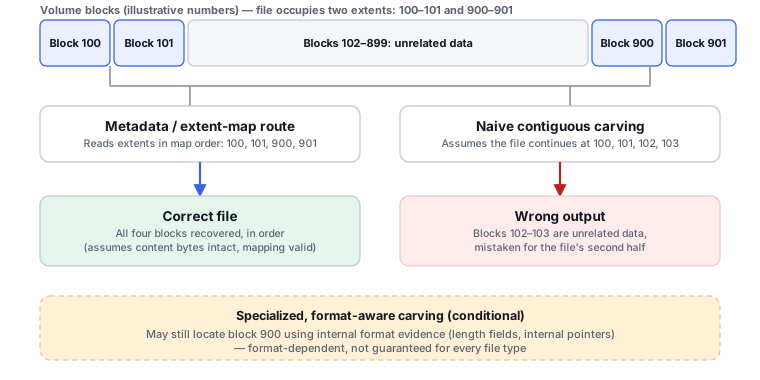
What carving actually does
Carving reconstructs files primarily from content patterns rather than the filesystem's own file records. The general sequence is: scan raw sectors, find a recognizable file header or signature, identify the probable format, determine or estimate the file's extent, extract the content, then validate it using the format's own structure, footer or content checks. A filesystem-aware path works differently — it starts from filesystem metadata, follows a file record, inode or catalog entry to its allocation or extents, and arrives at content already carrying a name, path and timestamps. Carving arrives at content with none of that context by default.
A signature is more than a file extension
A real file signature can involve fixed magic bytes, magic bytes at a non-zero offset, a full header structure, a footer, length fields, internal tables, container structure, or consistency checks — not just a three- or four-letter extension. PhotoRec supports custom signatures made of an extension, a signature offset and a magic value, and its deeper format handlers can add content checks, size controls and footer detection on top of that. Two products can both claim to recognize the same file extension while reconstructing it with very different reliability, which is why “supports 500+ file formats” is not a meaningful quality measure on its own — it says nothing about how carefully each format is actually parsed.
Determining where a file ends
Carving has to solve a second problem after it finds a header: knowing where the file stops. The available strategies include a fixed known size for the format, a size value stored in the header itself, an explicit footer marker, parsing internal format structures to compute the real extent, stopping at the next recognized header, or a heuristic boundary guess. The method a tool actually uses affects false positives, truncated files and overlong recovered files directly. PhotoRec's own documentation notes it can derive the original size from the header for some formats, and otherwise may simply stop when it encounters another file's header — a real limitation worth knowing rather than assuming every carved file's boundary is exact.
Fragmentation is the central limitation
The simplest carving model assumes a clean header, contiguous file data, then a footer or end marker. Real files are frequently not laid out that way — a fragment can sit next to unrelated sectors, followed by another fragment elsewhere on the device, and without filesystem metadata a carver has no reliable way to know which fragments belong together. This is why fragmentation is one of the most important carving-comparison criteria, and why large files — video, large archives, databases, disk images, PST/OST mail stores, and sizeable documents — are generally more exposed to fragmentation problems than small, typically-contiguous files like photos. PhotoRec documents limited handling for some fragmented files, plus a CPU-intensive JPEG bruteforce mode specifically aimed at reassembling fragmented JPEGs; see Recovering Fragmented Video from Memory Cards for how this plays out specifically with large camera recordings.
False positives and validation
A byte sequence that resembles a header is not proof of a valid file — carving inherently risks false positives, and a serious implementation validates its own output rather than trusting every signature match. Validation can include a footer check, an internal length check, a checksum, whether a format parser actually accepts the file, whether an image decodes, whether an archive's integrity check passes, whether a media stream parses, or a full semantic check of the content. PhotoRec's “Paranoid” mode verifies recovered files and rejects some invalid results rather than keeping everything it finds. This connects directly to How to Validate Recovered Data — a carved result deserves the same validation discipline as any other recovered file, arguably more, since it arrives with less corroborating context than a filesystem-aware result does.
Carving unallocated space vs. the whole device
If filesystem allocation information still exists, a tool may restrict carving to unallocated or free space only — fewer duplicates, fewer already-visible files rediscovered, a faster scan, and less noise in the results. But if the filesystem's allocation metadata is corrupt or stale, scanning only what it currently calls “free” space can miss data that's actually still there. PhotoRec can carve either the whole partition or unallocated space only, and uses filesystem information to help with block allocation in situations where that's supported — which is exactly why calling PhotoRec a tool that “completely ignores the filesystem” overstates things. The more accurate description: PhotoRec is signature-based and doesn't depend on normal filesystem file records for recovery, though it can use limited filesystem information to constrain where it scans.
When carving helps, and when it shouldn't be the first move
Carving earns its place when filesystem metadata is destroyed, the partition or filesystem is heavily damaged, directory records are gone, metadata-aware recovery has already exhausted what it can find, only file content remains identifiable at all, or the target format has a strong, recognizable structure. It's a weaker first choice when filesystem metadata survives, because metadata-aware recovery usually delivers better filenames, folder hierarchy, timestamps, fragmentation handling, deduplication and confidence in file boundaries than a pure signature search can. The sensible order is: preserve the source, attempt metadata-aware recovery, evaluate what it actually found, then use carving as a fallback or supplement for what's still missing, and validate the carved output afterward — not carve everything immediately regardless of what metadata survived.
What carving cannot do
Signature recognition is evidence that recognizable bytes survive on the device; it is not a mechanism for recovering bytes that no longer exist. Carving cannot defeat sectors that have actually been overwritten, SSD TRIM followed by effective deallocation or erasure, missing fragments it can't locate, or encryption without the right keys. Carving ciphertext specifically is close to useless, because encrypted content doesn't expose the plaintext signatures a carver is looking for — the encryption layer has to be correctly unlocked or reconstructed first, and only then does filesystem recovery or carving operate on the resulting plaintext logical space (see Encryption Key Hierarchies and Recovery Metadata). The same principle extends to compression, deduplication, sparse or chunked object storage, and RAID or storage virtualization — the logical address space generally needs to be reconstructed first, before ordinary file carving is the right next step.
Better terminology for a comparison table
Rather than one generic “carving: yes/no” row, a useful comparison separates metadata-aware recovery (filesystem records and allocation structures), signature-based recovery or carving (recognizable content structures), hybrid recovery (combining both), and specialized fragment reconstruction (format-specific reconstruction beyond ordinary header/footer carving, particularly relevant to fragmented photo and video formats). Useful comparison questions include whether signature/file-type recovery exists at all, whether the signature catalog is built-in or extensible with custom signatures, whether headers at a non-zero offset and footer detection are supported, whether file size is parsed internally rather than guessed, whether results are format-validated, how fragmentation is handled, whether whole-device or unallocated-only carving is offered, whether filesystem allocation information assists the scan where available, and whether a scan can resume, be saved, or run against a disk image or reconstructed virtual storage rather than only a live device.
Signature recovery is not filesystem reconstruction — a carved result and a metadata-reconstructed result can share the same payload while being different recovery outcomes with different context. More supported file extensions is not better recovery quality — what matters is how carefully each format is actually parsed and validated. Carving cannot restore overwritten or cryptographically inaccessible bytes — it can only find recognizable bytes that are still physically present.
Related: File-System Recovery vs. File Carving · Metadata Recovery vs. Raw Recovery · How to Validate Recovered Data · Recovering Fragmented Video from Memory Cards · TRIM, Deallocate and Garbage Collection