Encryption Key Hierarchies and Recovery Metadata
Strong storage encryption normally separates the data-encryption key from the password or recovery credential a person actually holds — recovery depends on preserving the metadata and protectors that connect those layers, and on the hardware, policy or key-management conditions they rely on, not on breaking the cipher itself. The volume-encryption model of BitLocker, FileVault and LUKS is not a universal description of self-encrypting drives or RAID-controller encryption.
- Encrypted storage usually separates the credential a person holds, a wrapping key, and the data key that actually encrypts sectors.
- Another protector can reach the same data key only if it is still valid on the current metadata and its policy and hardware conditions are met.
- Self-encrypting drives always encrypt media, but SED media encryption and configured read locking are separate; read-locked ranges may be inaccessible while other ranges remain readable.
- Controller or appliance encryption can depend on local or external key management; a correct RAID mapping does not replace those keys.
- Decryption is a logical dependency of filesystem analysis, not a fixed order of steps; what to acquire first depends on what can be read.
The password is not usually the sector key
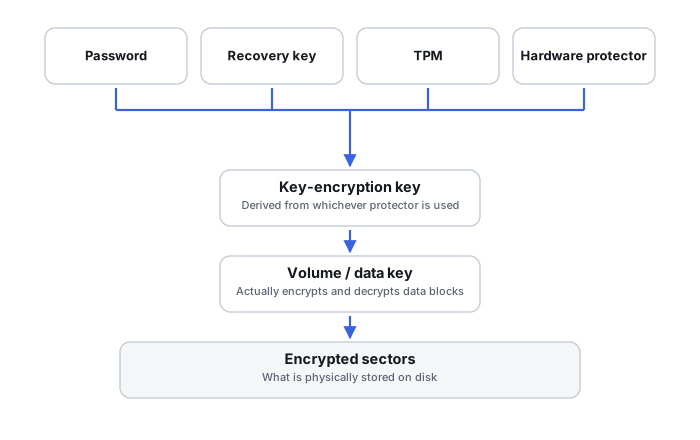
BitLocker, FileVault/APFS encryption and LUKS all separate a password or recovery credential from the key that actually transforms data on disk. A person's credential typically unlocks or derives access to an intermediate key, which in turn protects the real data-encryption key. This is deliberate: it lets a password change without re-encrypting an entire volume, and it means “the password is correct but the drive will not unlock” is not automatically proof that the password is wrong — the layer that connects password to data key can fail on its own.
Data key vs. key-encryption key
Across BitLocker's FVEK/VMK pair, FileVault's volume encryption key wrapped by a KEK, and LUKS's volume key behind one or more keyslots, the same basic shape recurs: one key actually encrypts the data, and a separate wrapping layer controls who can reach that key. Changing an unlock credential normally changes how the data-encryption key is wrapped, not the encryption applied to every data block already on disk. Self-encrypting drives described by the TCG Storage specifications use a comparable split inside the drive: a value derived from the authentication credential serves as a key-encryption key for the media encryption key. A LUKS keyslot contains metadata and protected key material; it is not itself the wrapping key. In the LUKS1 On-Disk Format Specification, a key slot stores an encrypted copy of the master key, keyed by a value derived from the passphrase (§1, §4.2).
The three roles are easy to blur in an intake note, and they are not interchangeable:
Scroll horizontally to see the full table →
| Role | Examples | What it does | What it is not |
|---|---|---|---|
| Authentication credential | Password, PIN, recovery password, startup key, key file, SED authentication credential | Proves authorization, or supplies the input from which a wrapping key is derived or released | Not the key that encrypts sectors; keeping it does not help if the protector it belongs to is gone |
| Wrapping key / key-encryption key | BitLocker volume master key, APFS KEK, a passphrase-derived key used to decrypt LUKS keyslot material, the KEK inside a TCG self-encrypting drive | Protects the data or media key at rest, so credentials can change without re-encrypting data | Not usable without the metadata that stores the wrapped key and records how to apply it |
| Data / media encryption key | BitLocker FVEK, APFS volume encryption key, LUKS volume key, SED media encryption key | Actually encrypts and decrypts the stored blocks | Not something a person normally holds; it may never leave the device in plaintext, and it is not always exportable |
Key protectors are alternate paths to the same key
A single data-encryption key is commonly reachable through more than one protector at once — a TPM, a PIN, a recovery password, a key file, an enterprise recovery agent. Losing or failing one protector does not necessarily mean the underlying key is gone; another protector already attached to the same volume may still reach it. Recovery intake should enumerate every protector that might exist, not stop at the one that just failed.
The alternative path exists only under conditions. The protector has to be a current, supported protector of that volume, the metadata that stores the wrapped key and its relationship to that protector has to be intact, and any policy or hardware conditions attached to it have to be met. A saved recovery file, a remembered PIN or an escrow record is evidence that a protector once existed, not a guarantee that it still opens the volume. Microsoft's BitLocker FAQ, for example, notes that BitLocker can be reconfigured so that the recovery information held in Active Directory no longer unlocks the drive, such as by removing the recovery password key protector, and that old recovery password entries are kept in AD DS by design — so several records may exist for one drive, and the newest is identified by its date.
Key rotation without re-encrypting the volume
Because the wrapping layer is separate from the data-encryption key, a user can typically change a password, rotate a keyslot or issue a new recovery credential without the system re-encrypting every sector on the volume. This is a general principle across BitLocker, FileVault and LUKS, and it is also why an old, no-longer-active credential can sometimes still unlock a preserved header or key backup taken before it was rotated out.
Encryption metadata is recovery evidence, not overhead
The structures that connect a protector to the data-encryption key — key packages, header areas, keyslot data, escrow records — are themselves a recovery-critical asset, separate from both the ciphertext and the credential. Metadata damage can make an otherwise-correct credential functionally useless, because the system no longer has the information needed to apply it. Damage to LUKS header or keyslot material can prevent a correct passphrase from unlocking the volume. A usable header backup can preserve an alternative unlock path. If all required key material is lost and no valid backup or independently available volume key survives, the remaining ciphertext cannot be decrypted merely by knowing the passphrase. Partial damage is assessed on its own terms, and a valid volume key and a credential are different artifacts: cryptsetup-luksDump(8) notes that the volume key can decrypt the container’s data without a passphrase and even without the LUKS header. For BitLocker, Microsoft describes a key package stored in AD DS that helps repair damage which would otherwise prevent standard recovery. Preserving the encrypted volume without preserving this metadata is an incomplete preservation.
Hardware-bound protectors change what “offline” means
Some protectors are bound to specific hardware — a TPM's measured boot state, a Secure Enclave's hardware UID. Apple, for instance, describes the FileVault KEK as protected by a combination of the user's password and the hardware UID, and states that with FileVault off the volume encryption key is still protected by the hardware UID in the Secure Enclave. Where that applies, an imaged or removed storage device alone may not carry everything needed to unlock it independently of the original system. This should be assessed per platform and per generation of hardware rather than assumed universally, since older and newer implementations of the same technology can differ substantially.
Self-encrypting drives: media encryption is not locking
Encryption performed by the storage hardware itself follows a different model from OS-volume encryption. In a self-encrypting drive (SED) that follows the TCG Storage specifications, the drive controller encrypts all user data with a media encryption key (MEK) and keeps any plaintext copy of that key inside the controller. Media encryption and access control are separate ideas:
- Media encryption is a property of the drive: data on the media is encrypted whether or not anyone has set a password. The Opal specification requires full disk encryption of all host-accessible user data.
- Authentication and locking are a configuration: once an authentication credential is set, a value derived from it acts as the key-encryption key for the MEK, and a range configured to deny reads does not expose its user data through ordinary host reads until the required authorization succeeds. Read and write locks are configured per range (TCG FAQ on Opal SSC 2.02). Opal discovery reports media encryption and “locking enabled” as separate indicators, and locking is reported as enabled only once the locking function is in a state other than nonexistent or Manufactured-Inactive. Support for SED or Opal therefore does not show that locking is actually in use.
- The credential is not the media key. The authentication credential (or the controller passphrase that supplies it) unlocks the drive; it is not the MEK, and the MEK is stored on the media only in wrapped form.
This changes what an image can contain. An unlocked or never-secured SED presents decrypted data to the host, so the host normally never sees its ciphertext. A SED range configured to deny reads does not expose its user data through ordinary host reads until the required authorization succeeds; other ranges may remain readable, and drive encryption capability does not establish the current locking configuration. That is different from an OS-encrypted volume whose unreadable-looking ciphertext can still be read and preserved. An Opal drive can also be divided into locking ranges, each with its own MEK and unlocked independently, so part of a drive can be readable while another part is not. Destroying the MEK is how these drives perform a cryptographic erase; operations described as reset, revert or secure erase can therefore make the data permanently unrecoverable and are not diagnostic steps.
Controller and appliance encryption depend on key management
A RAID controller, NAS or storage appliance may manage SED credentials for its member drives or apply encryption of its own. Its keys can be held locally on the controller or obtained at start-up from an external key server, and which arrangement applies is product-specific. As one bounded example, Dell's tech note on SED support for PowerEdge RAID Controllers (PERC 10-era firmware) describes Local Key Management, in which a hash of the user's passphrase is stored on the controller, and Secure Enterprise Key Management, in which the unlock key lives on an external server reached through iDRAC; secured drives moved to another controller need the original passphrase, and under enterprise key management data stays inaccessible until the key server can be reached. The same note says SED drives that were never secured remain readable. Other vendors, models and firmware versions behave differently.
The consequence for recovery is that a correct RAID mapping — member order, stripe size, parity layout — does not replace the keys, the controller or appliance configuration, or the authorized unlock mechanism. Even a perfect geometry assembled from read-locked or controller-encrypted members yields nothing readable without them. Member roles and foreign configurations are covered in RAID Metadata, Member State and Foreign Configurations, and the choice between working through the original NAS and working at member level in Remote NAS Recovery vs. Member-Level Reconstruction.
What belongs in the case record is the dependency, not the secret: whether encryption is configured and at which layer, whether keys are managed locally or externally, which controller, appliance or key server is involved and who administers it, whether configuration or key backups exist, and who holds passphrases or escrowed recovery material. The secrets themselves should travel through a separate protected channel, not in plaintext in an ordinary job report, ticket or email thread.
Header and key-metadata backups can outlive their live counterpart
A preserved backup of header or keyslot metadata, taken while a since-changed credential was still valid, can sometimes still unlock a data-encryption key even after that credential is no longer active on the live volume. For LUKS this is documented directly: the backup file and a passphrase valid at the time of backup allow decryption of the data area even if that passphrase was later changed or removed. Such a backup is not routine diagnostic material — it is sensitive key-adjacent data and should be preserved and protected accordingly. It also has limits: a header backup restores the wrapped-key metadata, not a key held by a TPM, a Secure Enclave, a self-encrypting drive or an external key server, so on its own it does not resolve a hardware-bound case.
Decryption is a dependency of filesystem recovery, not a fixed timeline
An encrypted volume adds a layer between the raw device and its filesystem: device → encryption metadata → key hierarchy/unlock → decrypted logical volume → filesystem → files. A filesystem tool has no reason to recognize ciphertext as a valid NTFS, APFS or ext4 structure, so filesystem analysis is done on a usable decrypted representation wherever encryption really sits between the source and the filesystem. That is a logical dependency, not a universal sequence of actions: what can be acquired, and when, depends on what the source will actually return.
Scroll horizontally to see the full table →
| Situation | What the host can read | Consideration |
|---|---|---|
| OS-level encrypted volume on unstable but readable media | Ciphertext and, usually, the encryption metadata | Acquiring the ciphertext together with its metadata can come first, so unlock and filesystem work happen later on a stable copy |
| Read-locked range of a self-encrypting drive, or a locked controller-managed volume | No user data from the read-locked range through ordinary host reads; other ranges may still be readable | There may be no ciphertext to acquire from that range; the authorized unlock path, configuration and key management decide what is possible |
| Unlocked or never-secured self-encrypting drive | Decrypted data | An image holds plaintext and should be handled as such; the drive's own locking state is still worth recording |
| Running system with a working decrypted view and keys that are unknown or unescrowed | Decrypted data, for now | Whether to capture the decrypted view before shutdown is a separate decision to make first; see Live Systems, Snapshots and Consistent Recovery Copies |
Preserve whatever ciphertext the source returns, the metadata that explains how the data key is wrapped, and a record of the unlock dependencies that are still valid — credentials, protectors, hardware, controller configuration or key server. None of these alone guarantees an unlock: keys are not always exportable, and a header backup does not stand in for a key held by a TPM, a Secure Enclave, a drive or a key server.
Technical references: Microsoft: BitLocker FAQ — FVEK, VMK, key protectors, AD DS records and key package · Apple Platform Security: Volume encryption with FileVault in macOS — VEK, KEK, hardware UID · cryptsetup-luksHeaderBackup(8) — old passphrase plus backup still decrypts · TCG and NVM Express: TCG Storage, Opal, and NVMe — credential, KEK and MEK; locking ranges; crypto erase · TCG Storage Opal SSC v2.30 — full disk encryption required; LockingEnabled reported separately (§2.4, §3.1.1.3). The keyslot description follows the LUKS1 specification; LUKS2 uses a different header layout. The per-range lock statement is from the TCG FAQ, and the PERC example from Dell’s PERC Self-Encrypting Drive (SED) Support and FAQs tech note, which is product- and firmware-specific. Key handling differs between operating-system versions, hardware generations and drive or controller firmware; check the documentation for the exact platform involved.
Related: BitLocker Key Protectors and Damaged-Volume Recovery · FileVault, APFS Encryption and Hardware-Bound Keys · LUKS Headers, Keyslots and Volume-Key Recovery · What a Disk Image Preserves — and What It Does Not · Live Systems, Snapshots and Consistent Recovery Copies · Remote NAS Recovery vs. Member-Level Reconstruction · SAN Storage Stack Reconstruction · Locked Out of an Encrypted Volume · Recovering Encrypted Wallet Files and Keystores · Encryption and Ransomware Recovery Tools