How to Validate Recovered Data
A recovered file can pass one check and fail another, because each kind of check tests a genuinely different claim. Validating recovered data means running several of these independent checks and reporting what each one actually found — not collapsing the result into a single pass/fail confidence score that no individual test can support on its own.
- "Validated" isn't one state: each check tests a different claim about the file.
- Check whether a file's extents overlap unreadable regions from the acquisition map.
- A matching hash proves identity only against that specific reference version.
- Use format-aware checks (full decode, archive CRCs), not just "it opens".
- Report which checks passed, failed or weren't run, and repair only a copy of the recovered file.
Scroll horizontally to see the full diagram →
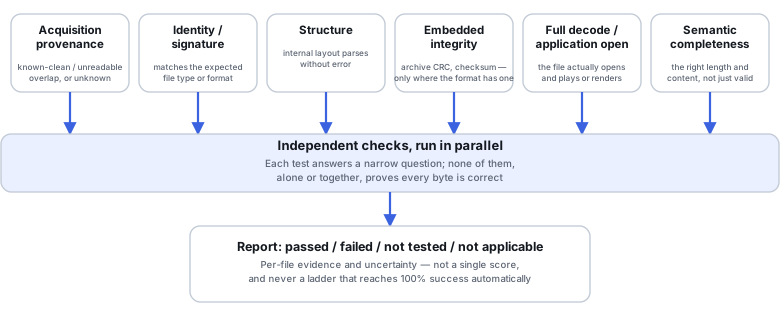
Name the claim, not a single scale
"Validated" is not one state. It helps to name which of several distinct claims a given result actually supports: byte-exact recovery of the original file, usable complete content that may not be byte-identical, partial salvage of some but not all of the original content, a result that is structurally valid but not yet checked at the content level, or confirmed damage. The word "complete" should not be applied to a result without a specific basis for it — a file that opens is not automatically complete, and a directory that looks right is not automatically correct inside.
Six independent dimensions
The following six checks test different things and can disagree with each other. This is not a standardized industry scale, and not every dimension applies to every file — not all formats carry embedded checksums, and acquisition extents are not always known for a given file.
Scroll horizontally to see the full table →
| Dimension | What it tests | What it cannot prove |
|---|---|---|
| Acquisition provenance | Whether the sectors this file's content actually came from were read successfully during imaging | Whether the file's logical content is itself correct — a clean read can still carry stale or reused data |
| Identity / signature | Whether the file's actual type matches its extension or claimed format | Anything about whether the content inside that correctly-identified file is usable |
| Structure | Whether a parser can traverse the file's internal container layout without failing | Whether the content the structure describes is itself correct — a parser's tolerance for minor damage can mask real problems |
| Embedded integrity checks (when present) | Whether the format's own checksums, where the format has any, validate against the stored content | Deliberate or undetectable tampering — a CRC is an error-detection code, not cryptographic proof, and many formats have no embedded check at all |
| Full decode / application checks | Whether the content actually decodes in full, or opens and functions in its real application, rather than merely being readable as a container | Whether the fully-decoded content is semantically what it should be |
| Semantic completeness | Whether the decoded content makes sense on its own terms — expected duration, page count, row counts, or visual completeness | Byte-exact identity with the original file; a semantically sensible result can still differ from the source |
Acquisition uncertainty is its own question
When an error map from imaging records which sectors were unreadable or substituted, check whether a given file's extents actually intersect those regions. When the recovery tool cannot correlate a file's extents with the acquisition map, mark that relationship as unknown rather than assuming it is clean — the absence of an export-time error message does not by itself prove a file is complete.
What a known-good reference hash actually supports
A SHA-256 (or similar) hash that matches a trusted reference copy supports byte-exact identity, but only for that specific version of the reference — a legitimately updated file will not match an outdated reference, and that mismatch does not by itself mean the recovery is wrong. Computing a new hash with no reference to compare it against produces only a fingerprint for future comparisons; it does not, on its own, detect a problem such as a region that was silently zero-filled during a damaged acquisition. A hash changing after a repair operation also does not by itself prove the repair made things worse — the question is whether the repaired content is now correct, not whether its hash changed.
Illustrative example: a hash with no reference misses a zero-filled region
A recovered file is hashed with SHA-256 immediately after recovery, with no known-good reference copy available for comparison.
If part of the file was silently zero-filled during a damaged acquisition, the computed hash describes the file exactly as recovered — zero-filled region included — and gives no indication that anything is wrong.
A fingerprint useful for detecting any future change to this specific recovered file, not a statement about whether this file matches the original source.
Format-aware checks, and their limits
Where a format allows it, test more specifically than "does it open": for an archive, test every entry and its CRC, not just that the archive header is readable; for an image, run a full decode and a visual check, not just a successful open; for a video, check full-duration decode of both audio and video rather than only an opening preview frame; for a document, check every page and embedded object; for a database, run consistency and record-level checks against a copy, not the sole recovered original, and avoid an automatic repair operation on that original. A CRC passing is error-detection, not cryptographic proof against deliberate change, and a parser's tolerance for minor damage can let real damage through undetected.
Illustrative example: a video preview plays, but full decode fails near the end
A recovered video file opens and plays a preview without any visible error.
Decoding the full file end to end fails partway through, in a region the preview never reached.
Opening or previewing is weaker evidence than a full-duration decode; treat an open-without-error as a partial check, not as proof the whole file is intact.
Illustrative example: an archive header reads, but one entry fails its CRC
A recovered archive's header and file listing are readable, so the archive appears intact at a glance.
Testing every entry's own CRC individually shows that one entry fails, while the rest pass.
A readable header and listing is a structural check, not an integrity check of each entry's content — the two need to be reported separately.
Make sampling risk-based, and document its coverage
Where volume allows it, check high-value files as fully as possible. For everything else, concentrate extra scrutiny on large or fragmented files, files whose extents overlap previously-unreadable regions, RAID-reconstructed data, data recovered by carving, and files affected by overwrite — these categories carry more specific, documented risk than an arbitrary file. Sample the rest across directories, file types, dates, sizes and source regions, and record exactly what that sample covered. Without an actual statistical sampling design, do not present a sample's pass rate as a quality percentage for the whole recovered set — it describes the sample, not a proven estimate for everything that was not checked.
Report evidence and uncertainty, not just a verdict
A useful validation report records which specific checks ran, and for each one, whether it passed, failed, was not applicable to that format, or was simply not tested. "Not tested" and "not applicable" and "failed" are three different things, and collapsing them into one global "validated" label discards exactly the information someone would need to judge a result for legal, business or archival purposes.
Scroll horizontally to see the full table →
| Field | Values or purpose |
|---|---|
| path, sizeBytes, recoveryMethod | Identifies the file and how it was produced |
| acquisitionOverlap | known-clean / known-unreadable / unknown — this file's relationship to the acquisition error map |
| checks[] | Each entry: name, status (passed / failed / not-tested / not-applicable), and the evidence behind that status |
| referenceMatch | matched / mismatched / not-available — and note that a match still depends on the reference being the correct version |
| outcome | reference-matched / passed-selected-checks / partial-salvage / confirmed-damaged / uncertain |
| limitations, repairedDerivativeOf | What this result does not establish, and which original recovered file a repaired copy was derived from, if any |
Preserve the recovered original, then repair a copy
When a recovered document, archive, database or media file needs application-level repair to become fully usable, keep the originally recovered version unchanged and perform the repair on a separate copy. Re-run the applicable checks on that copy afterward, and label it clearly as a repaired or salvaged derivative rather than conflating it with the original recovery result. If recovered data will be used to start a system or a virtual machine, do that in isolation on a copy — not by booting the single recovered set directly, which risks changing the only copy of data whose integrity has not yet been fully established.
Which checks does this recovered data actually need?
Answer a short sequence of questions about what you have and what has already been checked. Each result returns a plan of checks to run, not a claim that this guide has verified your file's actual bytes.
This guide also works without JavaScript. The same sequence, as a static walkthrough:
Do you have a trusted, same-version reference copy to compare against?
- Yes → Outcome: Compare against the reference with a byte-exact hash, after confirming it is actually the matching version. See What a known-good reference hash actually supports.
- No or not sure → continue to the next question.
Has this file's relationship to the acquisition's error map actually been checked?
- Yes — a known overlap exists → Outcome: Flag this file as affected by acquisition uncertainty before running any other check. See Acquisition uncertainty is its own question.
- Yes — checked, and no overlap found → continue to the next question.
- Not checked, or can't be correlated → Outcome: Record this file's acquisition relationship as unknown — not as clean — and still run the full format-aware and decode-level checks. See Acquisition uncertainty is its own question, Format-aware checks, and their limits, and Report evidence and uncertainty, not just a verdict.
So far, has this file only been previewed or opened, without a full decode or format-aware check?
- Yes or not sure → Outcome: Run the full format-aware and decode-level checks before treating this file as validated. See Format-aware checks, and their limits.
- No, fuller checks already ran → continue to the next question.
Does this file need application-level repair to become usable?
- Yes → Outcome: Preserve the original recovered file unchanged and perform the repair on a separate, clearly labeled copy. See Preserve the recovered original, then repair a copy.
- No → Outcome: Record the checks already run and their results in a per-file report rather than a single pass/fail label. See Report evidence and uncertainty, not just a verdict.
- Not sure → Outcome: Determine whether this file actually needs application-level repair before deciding anything else. See Preserve the recovered original, then repair a copy.
This guide suggests which checks to run from the information you provide. It does not have access to your file's actual bytes and cannot verify your answers.
Technical references: NIST FIPS 180-4 (SHA-256) — digest detects change since hashing · PKWARE ZIP APPNOTE, §4.4.7 — per-entry CRC-32 · GNU ddrescue manual: mapfile structure — map of unread and failed blocks
Related: Data Recovery Workflow · What a Disk Image Actually Preserves · Metadata Vs Raw Recovery · What Overwrite Actually Destroys · Recovered Files Won't Open · Wallet Seeds, Derivation Paths and Account Reconstruction.