Recovering Encrypted Wallet Files and Keystores
A perfectly recovered wallet file can still be inaccessible without its password, and a known password is useless once the only encrypted container has been overwritten — these are two separate recovery targets, best preserved and pursued in parallel rather than one after the other.
- The encrypted container and its password are two separate recovery targets; pursue them in parallel.
- A file with the right name and size isn't proof that the container is complete.
- A wallet that won't load may be a version-compatibility issue, not corruption.
- Never migrate or open the only copy; hash it and work on duplicates.
- Password search is bounded by remembered structure and the KDF cost, not by guessing at random.
Two separate targets: container and credential
An encrypted wallet file and the password protecting it can each survive or fail independently. A keystore that is present but locked is a credential problem; a password that is known but whose only container was overwritten is a data-recovery problem that credential knowledge cannot fix. Treating “I have the file” and “I know the password” as two separate facts, rather than one combined state, keeps the recovery plan aimed at the right problem.
Common container types
The shape of “the wallet file” varies by software: Bitcoin Core’s wallet database, an Electrum wallet file, an Ethereum Web3 Secret Storage (V3) JSON keystore, a browser extension’s encrypted vault, or a mobile app’s local storage. Each has its own format and, often, its own key-derivation function protecting it — identify which one before choosing a recovery approach. A browser or mobile vault in particular may depend on the specific browser profile, OS, device or other local state beyond the file itself, so a copy of the file alone does not guarantee it can be opened elsewhere. None of these formats should be assumed portable across unrelated software, and carving a wallet file out of raw data by filename pattern or by spotting JSON braces is not a reliable identification method on its own.
Scroll horizontally to see the full table →
| Software/format | Required artifacts | Credential dependency | Compatibility check |
|---|---|---|---|
| Bitcoin Core wallet database | The wallet directory/file (legacy BDB or descriptor-format SQLite) | Wallet passphrase, if encrypted | Wallet format (legacy vs. descriptor) against the Bitcoin Core version actually installed |
| Electrum wallet file | The wallet file itself | Password, if the file is encrypted | Electrum's own wallet-file version against the installed Electrum release |
| Ethereum V3 JSON keystore | The keystore JSON (crypto object with cipher, KDF params and MAC) | The password used to derive the decryption key | KDF type (PBKDF2/scrypt) and parameters inside the file itself |
| Browser-extension vault | Extension storage plus, often, the browser profile it belongs to | Vault password or OS-level unlock | Extension version and, sometimes, the specific browser profile/device |
| Mobile app local storage | App-specific local storage/keychain entry, sometimes tied to the device | App password, PIN or device-level biometric/keystore | App version, and whether storage is bound to that specific device |
What a recovered container might still be missing
A file with the correct name and a plausible size is not proof that it is complete. Depending on the format, a recovered container can be missing its header or schema, part of the encrypted payload, the salt, the IV/nonce, the key-derivation parameters, the authentication tag or MAC, or, for database-backed formats, specific pages or records. A JSON keystore that fails to parse is not automatically irreversibly lost either — a truncated or partially overwritten file can sometimes be repaired or have the missing piece supplied from a duplicate, so “malformed” and “unrecoverable” are not the same finding.
Preserve the container and the credentials in parallel
When the container is missing, treat container recovery and credential recovery as two tracks to pursue together, not as a strict sequence where the password “does not matter yet.” If an independent seed phrase or private-key backup exists outside the wallet software itself, it can sometimes restore access to the underlying funds without the original encrypted container ever being recovered — but that is a separate, parallel path, not proof that the container question is moot: having the seed does not decrypt or recreate the specific file that was lost, and knowing the password does not recreate ciphertext that storage-level overwrite has already destroyed; see What Overwrite Actually Destroys. Once the container is recovered, work from a copy rather than the recovered original; see Recovery Copies.
Ethereum V3 keystores: what a valid container actually contains
An Ethereum Web3 Secret Storage (V3) keystore is JSON with a crypto object holding a cipher (commonly AES-128-CTR) with its IV, the ciphertext, a key-derivation function (PBKDF2 or scrypt) with its own parameters, and a MAC. Per the Web3 Secret Storage specification, the MAC is checked against the candidate password before the ciphertext is decrypted — a verification step performed ahead of decryption, not necessarily a fast one, since it still runs through whatever KDF and cost parameters (iteration count, memory requirement) the keystore specifies. A MAC mismatch means one of two things — a wrong password, or a damaged file (a flipped byte in the ciphertext or MAC itself) — and the symptom alone does not distinguish them; confirming which one requires checking the rest of the file's structure and, where possible, comparing against a known-good duplicate. The MAC itself covers the derived-key portion and the ciphertext, not every field in the JSON — a corrupted IV, for instance, can change the decrypted key without necessarily producing a MAC mismatch, so a successful MAC check is not a substitute for verifying the result against a known derived address.
A file that will not load is not automatically corrupt
Bitcoin Core is a useful cautionary example of version-compatibility risk. It introduced descriptor wallets — which describe script and key construction explicitly, a genuine advantage for reconstruction — in v0.21, and later removed the ability to load legacy wallet-database files directly at all, requiring migration to descriptor format first. A wallet.dat that fails to open in a current Bitcoin Core build may simply be a version mismatch, not damage.
Bitcoin Core’s own migration process creates a backup before converting a legacy wallet, but migration-related wallet bugs have happened — the Bitcoin Core 30.2 release notes list fixes for a legacy-wallet migration failure case and for a walletsdir-deletion issue tied to createfromdump. The release notes don’t themselves enumerate every earlier version that was affected by each issue, so treat a specific “this exact version was broken this way” claim as something to confirm from the linked notes and changelog for the case at hand, not something to assume. Don’t treat 30.2 as necessarily the current recommended release either — check whether a newer release has shipped since, and verify legacy-wallet compatibility details against the version actually installed for this case. Preserve the original file, work from a duplicate, record the exact software version in use, keep any migration-generated backup regardless of how the migration appears to go, and don’t run an old, potentially vulnerable build online just to test it.
A practical recovery sequence
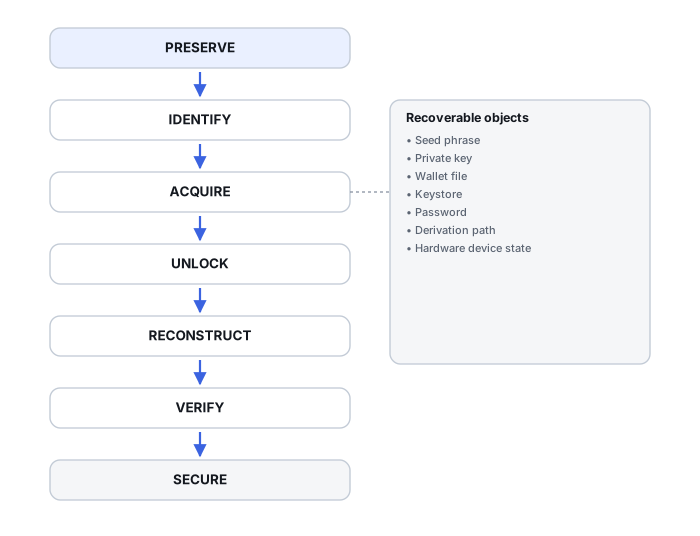
- Preserve the original container and record its hash before touching it further.
- Identify the exact format and software version involved.
- Establish whether whole-file or only partial recovery is possible, using the format's own structure (header, schema, DB pages) as a guide.
- Check for alternative backups — a seed phrase, an exported private key, an older duplicate — in parallel with the container work.
- Open or decrypt a copy of the container in a controlled, offline environment, never the original.
- Verify the result against known addresses and whatever key records are actually needed.
A hash recorded at step one is only useful once it is actually compared: computing a hash of the original there, and then computing and comparing hashes for every later copy, is what shows those copies are identical to what was first preserved. The initial digest alone, left uncompared, proves nothing about any later copy. Even after that comparison, a match is evidence of this copy's own integrity, not of its authenticity or completeness — it says nothing about whether the original container was already incomplete or tampered with before it was first hashed.
Password search is an entropy problem
A wallet password or keystore passphrase with real human structure — a remembered fragment, a likely capitalization pattern, a short known character set — defines a bounded search space, but how practical that search actually is depends on the specific KDF and its cost parameters (iteration count, memory requirement), how much of the structure is genuinely known, and the hardware actually available for the attempt; none of that is guaranteed to be fast just because the space is bounded. A strong, fully random password with no remembered fragments, protected by a modern memory-hard KDF, is not a realistic target to recover regardless of hardware. See Cryptocurrency Wallet Recovery Tools for what that kind of search actually involves.
Verify before exporting anything, and know which level you've reached
Recovery here has three distinct levels, and reaching one does not mean the next is automatic: the container is recovered (the file exists and is structurally readable); a key is decrypted and validated (the password or derivation worked and produced a key that checks out); and the needed wallet addresses or accounts are recovered (everything the case actually required has been found). One matching address confirms that decryption worked — it does not confirm that every account, imported key or change output belonging to the wallet has also been found. Confirm a decrypted or recovered key derives an expected, already-known public address before treating the container as fully recovered, and never paste a decrypted secret into an online “checker” to confirm it. Spending or moving any recovered funds is outside what this article covers.
Taken together, a case against this page's goals usually lands in one of a few outcomes: the container is missing; the container is present but damaged; the container is intact but locked (credential needed); compatibility is unknown pending a version check; or an alternative seed/key backup survives independently of the container. Naming which of these applies is often more useful than a single pass/fail verdict.
Technical references: Ethereum: Web3 Secret Storage — V3 keystore structure · Bitcoin Core 30.2 release notes — legacy-wallet migration fixes
Related: Recovery Copies · What Overwrite Actually Destroys · Wallet Seeds, Derivation Paths and Account Reconstruction · Multisig Wallet Recovery and Descriptors · Cryptocurrency Wallet Recovery Workflow · File-System Recovery vs. File Carving · SSD Recovery Fundamentals · Cryptocurrency Wallet Recovery Tools