What Overwrite Actually Destroys
“Overwritten” is often used as if it were an all-or-nothing state. In practice, new writes may replace directory metadata, allocation records, only some extents of a file, or the entire previous content. Recovery depends on which logical blocks were actually reused, on mapping-layer behavior such as TRIM/deallocation, encryption keys or RAID and thin-provisioning remapping that can affect a block without a conventional overwrite, and on whether an independent historical copy exists elsewhere — not simply on whether the disk was used after data loss.
- Deletion, TRIM/deallocation and overwrite are different events with different consequences.
- A write can destroy metadata about a file without replacing all of its content, and vice versa.
- Partial overwrite is common: some extents of a file survive, others don't.
- Files mixed from different points in time can look normal and even partly open.
- Ordinary recovery software can't restore genuinely replaced content unless an older copy survives in another layer.
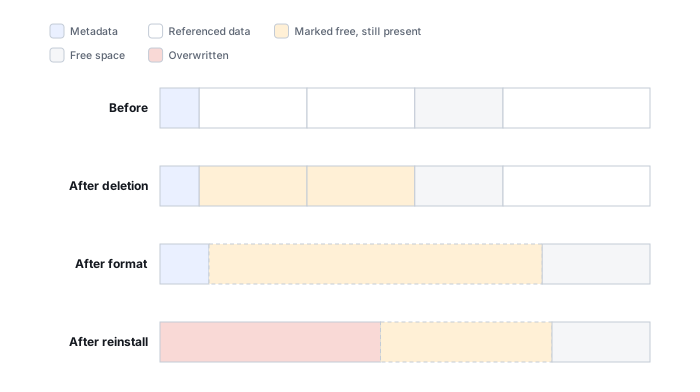
Deletion is not overwrite
Deleting a file normally changes metadata that says the file exists and that its allocated space belongs to it. The former content may remain in those blocks until they are reused, subject to storage-specific mechanisms such as SSD deallocation. Overwrite occurs when later data is actually written to logical locations that held information needed for recovery.
TRIM/deallocation is a different mechanism from direct overwrite
On SSDs, NVMe drives and thin-provisioned storage, a deleted range doesn’t only sit waiting to be directly overwritten by a new file — the file system can also send a TRIM or UNMAP notification telling the underlying storage that those logical blocks are no longer needed. Once that happens, the device is no longer obligated to keep returning the old content for that logical address: it may return zeroes, a deterministic pattern, or reclaim the physical flash internally, all before any visible new file ever touches that same address. “No new file was written there” is therefore not proof that the old content is still retrievable on this kind of storage — TRIM can end logical recoverability on its own, without a conventional overwrite ever occurring.
These mechanisms produce three distinct states that are easy to conflate: a block that is logically overwritten, where a normal read now returns new data; a block that is deallocated, where TRIM/UNMAP has been sent but what a later read actually returns — the old bytes, zeroes, a fixed pattern or an error — depends on the specific device, protocol, internal state and access path, not a guaranteed outcome either way; and a block whose earlier content is still reachable only through a retained historical view or another copy — a snapshot, backup or replica — that happens to hold it. Whether that retained copy is actually independent of the live data is a separate question that needs its own check: a snapshot can share the same underlying pool, blocks and keys as the live volume (see recovering data from snapshots and previous versions), and a replica without its own version history can already contain the same destructive write. TRIM/UNMAP is not proof that every physical cell behind a deallocated block was immediately erased; it only removes the guarantee that the old content is still returned on an ordinary read. Likewise, reading back zeroes or a fixed pattern, without a known prior baseline, does not by itself establish that anything changed at that address — it can just as easily be the block's original content, a sparse or unallocated representation, or the result of a different mechanism entirely.
Scroll horizontally to see the full table →
| State | Does an ordinary read still return the old bytes? | What can still help |
|---|---|---|
| Logically overwritten | No — the address now returns the new data | A retained historical view or another copy, if one actually still holds those old bytes and its own dependencies — base, retention, integrity — can be satisfied; being independent of the live data is a separate, worthwhile check but not a precondition for this |
| Deallocated (TRIM/UNMAP sent) | Not reliably — the device may return zeroes or a fixed pattern instead | Stop further writes; preserve whatever is still accessible; check retained historical views or other copies — ordinary recovery may already be unavailable after deallocation, with no guaranteed window |
| Intact but hidden by metadata loss | Yes, if the physical location is correctly identified | Carving or extent-map reconstruction, within fragmentation limits |
| Preserved in another layer | Yes, through that layer specifically — not through the original logical address | Recovering from that layer directly, respecting its own dependencies |
Metadata and file content are different targets
A write can destroy information about a file without replacing all of its content. Lost directory entries, allocation records or extent maps can remove filenames, timestamps, paths and the knowledge of how fragmented pieces fit together. Conversely, metadata may survive while one or more content extents have been overwritten.
This distinction explains why recovery software may list a file with the correct name and size even though part of its payload is already unrecoverable.
Partial overwrite is often the real case
Files commonly occupy multiple clusters or extents. If only some of those locations are reused, the surviving parts can still be recovered, but the original file is no longer complete. The effect depends strongly on file format: damage to a header, index or central directory can prevent normal opening even when much of the payload survives, while some media formats may tolerate or allow reconstruction around missing regions.
Overwrite is best modeled as extent intersection
Picture an old file occupying four extents: A, B, C and D. If later writes land only on B and D, the outcome is A survives, B is destroyed, C survives, D is destroyed. Recovery software can still know the original filename, size and all four extent locations perfectly — but reading those extents now returns old, new, old, new. Metadata can reconstruct the file’s layout with complete accuracy while its actual payload is a mix of two different points in time. Correct metadata about where B was located does not bring B’s old content back once that extent has genuinely been reused — metadata and payload are recovered independently, and accurate metadata is not evidence that the payload survived. Separately, if an earlier snapshot or backup captured the file before the write that reused B, that retained view or copy may still supply B’s original content even though the live volume no longer can, provided its own dependencies — its base, its retention and its own integrity — are intact, whether or not it is independent of the live volume; see recovering data from snapshots and previous versions.
Mixed-generation files can look deceptively normal
A file reconstructed from extents that belong to different points in time — after a reinstall, a reformat, a failed copy or a RAID mis-reconstruction — can still show a valid-looking signature and the expected file size, and it may even partially open. That’s exactly why validation should ask not just whether a file is structurally legal, but whether it’s internally coherent as a single generation; see validating recovered data.
Fragmentation changes the odds
For a contiguous deleted file, surviving content can sometimes be read as one range even after its metadata is lost. A fragmented file requires a map of which extents belong together. If that map was overwritten, raw carving may recover the first fragment or unrelated pieces without knowing their original order. This is one reason “the file was found” does not mean “the file was recovered intact.”
Formatting and reinstalling do not overwrite everything equally
A quick format primarily creates new file-system structures, so the most immediate damage may be concentrated in metadata regions while other old data remains — but the exact behavior depends on the operating system, the specific utility and options used, the storage medium, and whether a discard/TRIM notification was sent. On Windows, for instance, a quick format skips scanning the volume for bad sectors, but by default it still sends a trim (delete) notification for the volume unless a specific option to skip that is used; see the Windows format command reference. In other words, an ordinary quick format on an SSD can still trigger the same deallocation behavior described above, independent of whether it scans or zeroes anything. “Secure erase” is not one specific operation either: depending on the device and tool, it may overwrite every addressable logical block, or it may be a cryptographic erase that destroys the drive’s internal encryption key, making existing ciphertext permanently unreadable without rewriting most of the stored bytes at all. A full format, subsequent operating-system installation or heavy continued use can still write far more of the address space than a quick format — but no operation’s name alone guarantees a specific outcome; what matters is which ranges were actually changed, and by which mechanism (overwrite, deallocation or key destruction), afterward. These specifics are OS- and utility-version-dependent and worth re-checking against the vendor’s current documentation at the time of the case, not generalized across operating systems.
Overwrite in RAID, virtual disks and layered storage
Logical writes can have broader consequences in layered systems, and it helps to keep the host’s logical block address separate from the physical mapping underneath it — the physical NAND page or RAID member a given logical address lands on is an internal detail that can change without the logical address itself changing. A changed RAID stripe updates both data and parity for that stripe, but the new parity is not a historical copy of the old data: redundancy protects against a missing or failed member, it does not promise that an old user-data block can be recovered once a write to it has completed consistently across the array. A copy-on-write file system may allocate new blocks instead of replacing old ones immediately, which means a superseded block’s content survives only for as long as something — a reference, a retained snapshot — still needs it; once nothing references it and it is reclaimed, the same deallocation logic described above applies. A thin-provisioned LUN can remap logical blocks independently of the physical layout beneath it, and a virtual disk may store changed sectors in a delta file rather than the base image. Recovery must therefore interpret overwrite at the layer where the lost data existed, not assume that a physical sector map directly describes the logical object.
Why software cannot restore genuinely replaced content
Once the storage device returns new data for a logical block and no older copy survives in another layer, ordinary data-recovery software has no source from which to reconstruct the previous bytes. Modern high-density HDDs do not provide a practical software method for reading a usable “previous magnetic version” of overwritten sectors. On SSDs, internal translation, garbage collection, wear leveling and encryption make the physical relationship even less suitable for such claims.
If original bytes have been genuinely replaced and no independent historical copy exists, recovery tools cannot infer arbitrary previous content. The remaining opportunities come from blocks that were not overwritten, surviving metadata, redundancy, snapshots, backups, replicas or other copies.
How to assess an overwrite case
- Stop further writes to the affected storage.
- Preserve the current state with an appropriate image or copy when the source is stable enough to acquire.
- Establish what operation occurred and what was written afterward.
- Prefer file-system metadata and extent information before falling back to carving.
- Check snapshots, previous versions, replicas, cloud history, VM delta chains and backups for older copies.
- Validate recovered files; correct names and sizes are not proof that overwritten regions are intact.
- Treat the size of a new write, or the overall percentage of disk usage, as a contextual clue only — not even a loose boundary on overlap without additional assumptions, since repeated writes, metadata updates, compression and copy-on-write behavior, and allocation strategy can all change how many distinct logical blocks a given write size or usage percentage actually corresponds to.
- Know what a hash actually proves: a single hash computed over a recovered copy, by itself, does not confirm that copy's internal consistency. Comparing hashes between two copies can confirm they are byte-identical to each other; only comparing against an independent, already-known-good hash of the original confirms a match to what was lost — and even that confirms byte identity, not that the content is semantically valid, which still needs its own check.
Technical references: Microsoft: format command reference — quick vs. full format · Linux kernel ABI: queue/discard_zeroes_data — discard read result not guaranteed · Wei et al., FAST '11, §2.2 — logical overwrite vs. physical erase on SSDs · Btrfs: subvolumes and snapshots — snapshots share data blocks. What a deallocated block returns, and when it is physically erased, depends on the device and access path.
Related: Data Overwritten After Deletion or Formatting · Accidental Deletion · Accidental Formatting · TRIM, Deallocation and Garbage Collection · Recovering Data from Snapshots and Previous Versions · Metadata vs. Raw Recovery · File-System Recovery vs. Carving · Validating Recovered Data · Recovered Files Won’t Open · Recovering Encrypted Wallet Files and Keystores · Counterfeit Flash Capacity and Address Aliasing