CHKDSK, fsck and First Aid: Repair vs. Recovery
File-system repair makes on-disk structures acceptable to the file system again; recovery tries to get the specific files you actually need back. Neither "errors fixed" nor a successful mount confirms the other happened. Repair has a legitimate place on a stable source with a verified backup — it is not a safe first move when data is missing or the source itself is unstable.
- Repair makes file-system structures consistent again; recovery gets the specific files you need back.
- "Errors fixed" or a successful mount doesn't prove your files survived.
- "Check" and "repair" modes differ; a scan name alone doesn't guarantee nothing is written.
- When data matters: preserve, recover, validate, and only then consider repair.
- Repair is reasonable first only on a stable source with a verified backup.
Repair and recovery solve different problems
Repair takes a file system's on-disk structures as input and tries to make them internally consistent again, by the rules of that specific file system — its criterion for success is a structurally valid volume. Recovery takes the device (or an image of it) as input and tries to produce the specific files a person needs, whether or not the surrounding structures end up consistent. A volume that mounts cleanly after repair and a folder that contains the files you actually need are two different claims; one does not establish the other.
What a file-system repair may change
Consider a directory entry that points at allocation information that no longer matches what the file system expects. A repair tool facing that mismatch has more than one possible response depending on the specific inconsistency and file system: it might reconstruct the link between the entry and its data if enough information survives, it might disconnect the entry as an orphan and relocate it (NTFS and several Unix file systems surface orphans this way), or it might adjust allocation state to make the structures consistent at the cost of the specific link in question. On a journaling file system, replaying the journal is often the first step and can itself change on-disk state. There is no single algorithm shared by every file system here — what a repair actually does to a specific inconsistency depends on that file system's own rules.
Check modes and repair modes are not interchangeable
The same tool often has a mode that only reports problems and a separate mode that fixes them — and the name "scan" or "check" is not, by itself, a guarantee that nothing gets written. Microsoft's own documentation is explicit that CHKDSK run with no parameters only displays volume status and fixes nothing; /f fixes errors and requires exclusive access to the volume (locking it, or prompting to run at next restart if it can't); /r includes everything /f does and additionally locates bad sectors and recovers readable information, which means a broader read workload across the volume. The NTFS /scan option runs an online scan, but "online" describes when it runs relative to the volume being mounted, not an unconditional guarantee that it writes nothing. On Linux, fsck is a front-end that dispatches to a file-system-specific checker — it is not itself the checker, and for ext2/ext3/ext4 that checker is e2fsck specifically. e2fsck's -n flag opens the file system read-only and answers "no" to every prompt, but this has a documented limit: it is not a valid way to check a currently mounted file system's true state, and combining -n with options like -c, -l or -L changes that behavior in ways that shouldn't be flattened into one simple "read-only and safe" rule. On an actively mounted volume in general, a check tool's results can be inconsistent simply because the volume keeps changing underneath it. On macOS, Disk Utility's First Aid runs this kind of check at whichever level you select — the APFS container, a specific volume within it, or the underlying device — and these are different scopes of the same operation, not interchangeable with one another.
Scroll horizontally to see the full table →
| Tool / mode | What it does | Can it change the source? | What the result does not prove |
|---|---|---|---|
| CHKDSK, no parameters | Displays volume status only | This mode performs no file-system repairs; other activity on an actively mounted volume may still modify the device | Does not confirm the volume is otherwise undamaged |
CHKDSK /f | Fixes errors found on the volume | Yes — requires exclusive (locked) volume access | Fixing errors does not mean nothing was lost in the process; does not check for bad sectors |
CHKDSK /r | Everything /f does, plus locates bad sectors and recovers readable information | Yes — broader read workload across the volume | A more thorough scan does not establish that every recoverable file is safe or intact |
NTFS /scan | Runs an online scan while the volume stays mounted | Can write as part of its process — "online" is not the same claim as "read-only" | Running without dismounting does not mean nothing was written; check the documented behavior for the specific mode used |
e2fsck -n | Opens the file system read-only; answers "no" to all prompts | No, by design — with a documented limit on mounted file systems | Not a valid check of a currently mounted file system's true state; combining with -c/-l/-L is a separate case, not covered by this simple rule |
e2fsck repair modes (-p, -y) | Automatically fixes safe problems, or assumes "yes" to all prompts | Yes | A clean exit does not mean no data was lost during repair |
| Disk Utility First Aid | Checks and repairs formatting and directory-structure errors, at the container, volume or device level selected | Yes | A successful run is a repair operation, not a deleted-file scan, and does not certify every file's content |
Source condition comes before the repair decision
A logical inconsistency on an otherwise stable, reliably-reading source is a different situation from a source that is also producing I/O failures. No file-system repair tool fixes failing heads, worn NAND or a flawed USB bridge — that is simply outside what a logical repair operates on. Running a repair (or a thorough check, which itself reads large portions of the volume) against a source that is already struggling to return reads reliably can use up the source's remaining readable time or attempts without preserving anything, making a bad situation worse rather than better.
Preserve, recover, validate, then consider repair
Where the data matters and the source isn't a simple, confirmed-healthy case, a cautious order looks like this: acquire a master copy first, with a log of how acquisition went, per Disk Imaging vs. Cloning for Data Recovery; analyze that copy read-only to understand what's actually there; export the needed files to a separate destination; and only then, if there's a reason to, use a separate writable working copy to experiment with repair. This is a conditional workflow for cases involving valuable or uncertain data — it is not a mandatory ritual for every healthy, already-backed-up volume with a trivial problem.
When repair is a reasonable first maintenance step
Repair is a reasonable first step when the source is stable, a backup actually exists and has been verified against the files that matter (not just confirmed to exist as a folder), the goal is restoring the volume to working order rather than recovering something specific that's missing, and the operator understands which mode is being run and what rolling back would involve if it goes wrong. A backup's existence is not the same claim as a backup's usefulness — verify it covers what you'd actually need before treating repair as low-risk.
Scroll horizontally to see the full diagram →
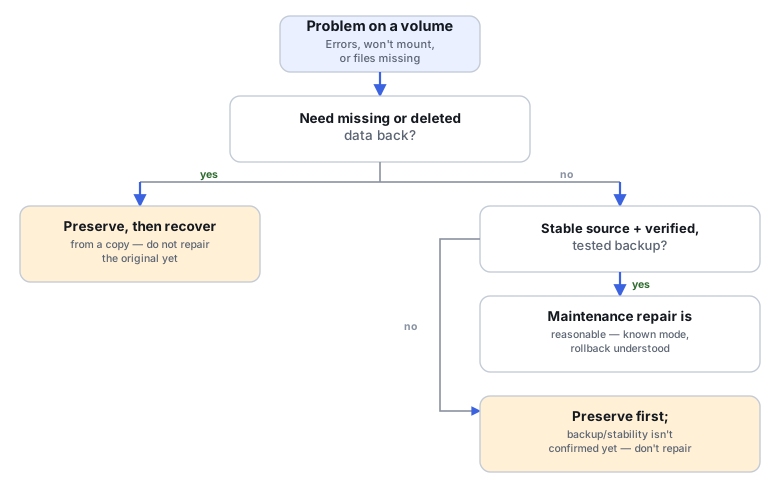
Three decisions in practice
The three training scenarios below apply the same two questions to different starting conditions.
Training scenario: healthy NTFS volume after a power loss, backup is current
The system lost power unexpectedly; the NTFS volume shows minor inconsistencies on next boot. A backup exists and was recently verified against the files that matter.
Stable source, verified backup, and the goal is restoring normal operation — a reasonable case for a maintenance repair.
Run the applicable repair mode, understanding what it does before running it.
Check accessibility, then check the actual files and applications that matter via the backup comparison — a successful repair does not by itself mean deleted or previously-affected files came back.
Training scenario: ext4 volume has a missing directory, the sole disk reads stably
A directory that should exist is gone or unreachable; the disk itself reads consistently with no I/O errors; there is no backup.
Missing data that matters, so the preserve-first path applies even though the source is stable — the source being healthy doesn't change the fact that something needed is missing.
Preserve an image, then do read-only reconstruction and export from the image. Run any repair only against a separate writable copy, never the sole original.
Compare the named files, their sizes and their actual content against what's expected — not just the tool's exit code.
Training scenario: external disk with hangs and read errors, a repair prompt appears
The disk occasionally hangs and produces read errors during ordinary use; the OS offers to run a repair.
A repair prompt appearing does not establish that the cause is purely logical — I/O symptoms point at the source or access path first.
Evaluate the source and access path and prioritize acquisition, per Read Errors, Timeouts and Retries Explained, before running any repair. A map of what's actually affected is needed to scope the problem.
Where file extents can be reconstructed, correlate them with the acquisition's gaps. If that mapping is unavailable, record the limitation explicitly and validate the exported files directly instead of guessing from the map alone.
How to judge the result
Judging the outcome means checking more than one thing separately: whether the file-system check itself now reports clean; whether the specific paths and counts you expected are present; whether the content actually opens correctly in the relevant application (a spreadsheet that opens with its sheets and formulas intact is a different claim from a spreadsheet file that merely exists); whether any gap overlaps a region the acquisition log already flagged as unread or problematic; and the recovery log itself as a record of what was actually done. "The volume mounts" is one data point among these, not the whole answer — and when a full check genuinely isn't possible (for instance, the original application isn't available to verify content), say so explicitly rather than treating a partial check as complete.
Scroll horizontally to see the full table →
| Situation | Priority | Next action | Validation |
|---|---|---|---|
| Stable volume + tested backup | Low urgency | Maintenance repair is a reasonable option | Confirm accessibility, then check the specific files/applications that matter against the backup |
| Missing irreplaceable files | High | Preserve first; recover from a copy before repairing the original | Confirm the needed files are present and open correctly in the recovered output |
| I/O errors or disconnects | High, different kind | Assess the source and access path, then acquire, before any repair | Assess available acquisition logs and the map, and validate the preserved copy; additional reads of the original only when justified by its condition |
| Original has already been repaired | Retrospective | Preserve the current state plus any older copies or logs that exist | Don't promise an undo, and don't treat re-running repair as a way to recover prior metadata |
Technical references: Microsoft: CHKDSK — mode semantics, locking behavior, and the limits of running against an active volume. e2fsprogs: e2fsck(8) — option scope, the mounted-filesystem limitation, and read-only versus repair options. Apple: Use Disk Utility's First Aid — check/repair behavior and the APFS container/volume hierarchy. Don't carry Apple's own "erase and reformat" suggestion for unrepairable errors over into instructions for a source that is still the sole copy of data you need.
Related: Disk Imaging vs. Cloning for Data Recovery · Read Errors, Timeouts and Retries Explained · Filesystem Recovery vs. File Carving