Read Errors, Timeouts and Retries Explained
A read error, a timeout and a slow-but-successful read are three different observations, and none of them establish their own cause. Controlled acquisition treats them differently from ordinary use — it preserves readable data first, revisits difficult regions later, and keeps a map of what was actually read instead of just trying again and again.
- A read error, a timeout and a slow successful read are different observations with no built-in cause.
- Delays from retries can add up across the device, driver and tool layers.
- Controlled imaging captures easy areas first and returns to difficult regions in later passes.
- Keep a map of what was read, skipped and unresolved instead of retrying blindly.
- Disappearing devices, new noises or a worsening error pattern mean pause and reassess.
Error, timeout or slow success?
These are three distinct outcomes and worth naming precisely before interpreting any of them. A read error means a read operation failed; the device, the driver, or the transport layer may be the one that reports the failure, and which layer actually reported it is not yet established by the word "error" alone. A timeout means a deadline was reached without a completion response — the device may still be internally retrying, may have stopped responding, or may be mid-reset somewhere in the path. A slow success means the read eventually completed, but took an unusual amount of time. None of these three, by itself, identifies a physical bad sector — a timeout in particular is a statement about a deadline, not a diagnosis.
Where a read can fail
A failed or slow read can originate at more than one layer. On HDDs, the cause may involve weak media, head positioning problems, or the drive's own internal error-recovery procedure running longer than expected. On SSDs, it may involve flash wear, ECC limits being exceeded, controller firmware behavior, or a flash-translation-layer problem. Above the device itself, interfaces, bridges, cabling and power delivery can introduce their own errors and retries, and can also translate or mask what the device originally reported. Separate the symptom you can observe from the root cause you are hypothesizing about — a disconnect reported by the operating system does not, by itself, identify which layer actually failed.
Why retries can take longer than expected
A single difficult read request can accumulate delay across more than one layer without any single layer being unreasonable on its own: the device's internal error-recovery procedure may already spend extra time before responding; the driver or transport layer may add its own retry attempts on top of that; and a controlled imaging tool may revisit the same region again in a later pass. These are genuinely separate mechanisms, not one counter — a retry limit set in an imaging tool does not control what already happened inside the device or the transport layer before the tool ever saw a result. Because of this layering, a seemingly simple failed read can take much longer to resolve (or to definitively fail) than the nominal time for one request would suggest.
Scroll horizontally to see the full diagram →
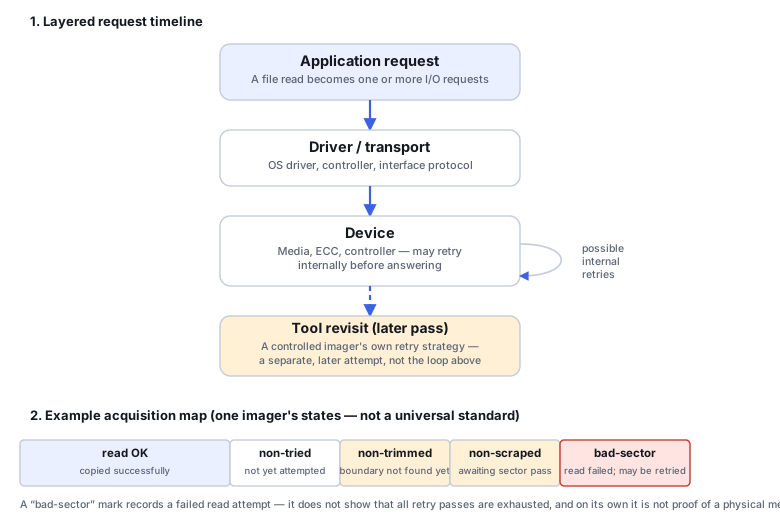
Acquire readable areas before revisiting difficult ones
A controlled imager's main advantage over ordinary copying is being able to skip a difficult region, move on to capture what is still easily readable, and come back to the difficult region in a later, separate pass — rather than spending all of its time retrying the same failing area immediately while other, perfectly readable data sits unpreserved. Smaller reads around a problem area, changing direction, and resuming from a saved map are capabilities a tool may offer, not settings that exist universally or that behave identically across tools and source conditions. What a specific source and a specific tool actually support should guide the acquisition plan, not a generic one-size-fits-all retry recipe.
Timeout controls have different scopes
"Timeout" is not one single setting. A per-command transport deadline is enforced somewhere below the operating system; the OS itself has its own behavior for a device that stops responding; and an imaging tool typically has its own progress-based timeout layered on top of both. These are not interchangeable. For example, GNU ddrescue's own --timeout option is measured as an interval since the last successful read, not a hard per-command deadline guaranteed to interrupt every individual device command, and its --direct option (where supported) bypasses the system cache without itself disabling the device controller's own internal ECC and retry behavior. Treat a tool's documented timeout option as scoped to what that tool actually controls, not as a universal override of everything happening below it.
What the acquisition map actually says
Good imaging practice keeps a map of which ranges were read, skipped, retried, and remain unresolved. That map is a record of what the tool actually attempted and observed — it is not itself a physical diagnosis, and it does not describe the bytes stored at the corresponding offsets in the destination image. A region marked unread in the map and a region that genuinely contains zeros on the source look identical at the byte level in an image that was pre-zeroed or left sparse; only the map (or an explicit record of how the destination was prepared) distinguishes them. GNU ddrescue's own mapfile, as one specific example, tracks block states using single-character symbols: ? non-tried (not yet attempted), * non-trimmed (seen in the fast first pass; the boundary of a failing region not yet pinpointed), / non-scraped (boundary trimmed, awaiting a slower, sector-by-sector pass), - bad-sector (a sector-sized range where a read attempt failed), and + finished (successfully copied). These are that tool's own recordkeeping states, used across its copying, trimming, scraping and retrying phases — not a format shared by every imaging tool. The tool's internal "trimming" phase is a step in its own read strategy and is unrelated to an SSD's TRIM/discard command; the two share a name by coincidence only. A bad-sector mark does not by itself show that every retry pass has been exhausted — the tool can record it during the copying, trimming or scraping phases, before a later retrying pass ever runs — and it does not independently confirm a physical defect; a later attempt, a different retry policy, or a different interface can still succeed.
Scroll horizontally to see the full table →
| State | What it records | What it does not establish |
|---|---|---|
Non-tried (?) | Not yet attempted in any pass | Whether it would succeed or fail — genuinely unknown |
Non-trimmed (*) | Includes a failed block read from the fast first pass; its readable boundaries have not yet been resolved | That this is a confirmed bad sector, or how much of the block is actually unreadable |
Non-scraped (/) | Boundary trimmed; unresolved after a prior difficulty, awaiting a slower, sector-by-sector pass | That the region has failed — it is still unresolved, not confirmed either way |
Finished (+, successfully copied) | These bytes were read and written to the destination, in whichever pass copied them | That the content is correct at a higher level — only that these specific bytes were read |
Bad-sector (-) | A sector-sized range for which a read attempt failed; may be recorded during copying, trimming or scraping, before retry passes are exhausted | That all retry passes have been exhausted, or a physical defect on the medium by itself — a later attempt, a different retry policy or a different interface could still succeed |
Scroll horizontally to see the full table →
| Observation | Possible layers involved | Next investigation | Cannot be concluded from this alone |
|---|---|---|---|
| Read error | Media/ECC, controller/firmware, interface, driver | Compare against logs and passes already available before requesting a fresh read | Which layer is actually at fault |
| Timeout | Device internal recovery, transport reset, application-level deadline | Whether the request eventually completed, per the tool's own log | That a physical bad sector exists |
| Slow success | Internal error recovery that succeeded, a busy interface, a weak-but-readable area | Compare against the existing map and logs; additional reads only as part of a justified acquisition strategy | That the area is safe to read repeatedly without risk |
| Disconnect | Power, cabling, bridge/controller, OS-level reset | Known-good power/interface path before assuming the source is at fault | Which specific component failed |
| Repeated failure at similar offsets | A localized media issue, or a layer consistently struggling with that address range | Compare existing passes and interfaces already on record; further reads only under a justified acquisition strategy | The exact physical cause without further, more specific diagnostics |
When to pause and reassess
Some signals warrant stopping to reassess rather than continuing the same approach: the device disappearing and reappearing repeatedly, new mechanical sounds, or a progress/error pattern that is visibly getting worse as acquisition continues. These are reasons to reassess the approach, not triggers for a fixed universal threshold or a scripted power-cycle recipe — what the right next step is depends on the specific device and symptoms, and a source showing hardware-level distress may call for specialized acquisition rather than continued attempts with the same tool and settings.
Scroll horizontally to see the full table →
| Situation | Suggested direction |
|---|---|
| Stable reads throughout | Normal acquisition, with logs kept as a matter of course |
| Localized difficulties in an otherwise stable source | Controlled revisit of the difficult ranges after the rest of the coverage is secured |
| Systemic disconnects or new mechanical symptoms | Pause and reassess rather than continuing the same approach |
| A usable copy already exists | Analyze the copy; avoid unnecessary rereads of the original |
The four training scenarios below work through specific combinations of these signals.
Training scenario: a localized unread region remains after the first pass
The map shows most of the source copied; a small contiguous range is still marked non-tried or non-trimmed after the fast first pass.
The first pass intentionally prioritized accessible ranges. Non-tried ranges have not yet been attempted at all. Non-trimmed ranges include a failed block read whose readable boundaries have not yet been resolved. Neither state establishes that the region is permanently unrecoverable.
Check whether the unread range overlaps file extents or metadata that actually matter before deciding how aggressively to revisit it. If extent-to-offset mapping isn't available, say so explicitly rather than guessing.
Compare the map's unresolved ranges against what the file-system analysis (or a carving pass) reports it needs, and flag genuine uncertainty rather than assuming the gap is harmless.
Training scenario: an entire USB device disappears mid-acquisition
The device stops responding and disappears from the system partway through imaging.
A media defect is not established by this alone — power delivery, the bridge chip, or a controller/firmware issue are also plausible causes.
Preserve the device's identity and the acquisition log so far; evaluate a compatible power/interface path, accounting for any encryption or geometry handling the current bridge may be doing; compare actual read behavior on retry rather than relying on SMART alone.
The device reappearing is not sufficient by itself. Before resuming acquisition on a different bridge or path, verify the source's identity, exact reported capacity and sector size, and addressing, and confirm that the source ranges still correspond to the same output offsets in the existing map — only then resume from where the map left off, rather than from an unverified fresh start.
Training scenario: the imaging tool appears to hang on one request
Progress stalls; the tool shows no movement on a specific read, and it's unclear whether it is still working.
An application-level progress timeout and the actual completion of a transport-level request are not the same thing — the tool may simply be waiting out a lower-layer delay it does not control.
Consult the tool's documented timeout and retry options rather than assuming any single setting will instantly interrupt a kernel- or firmware-level wait.
Check the tool's own log or map to see whether the stalled request eventually completed, failed, or was abandoned, before drawing any conclusion about the drive.
Training scenario: the output image contains zeros in a range that was not successfully acquired
A region of the destination image reads as all zeros; the map marks that same range as non-tried or non-scraped, not successfully copied.
The map says this range is unread or unresolved — it is not evidence that the source itself contains zeros there.
Check how the destination was prepared (pre-zeroed or sparse versus pre-existing data) before drawing any conclusion from its content, and treat the map's recorded state as authoritative over the raw bytes at that offset.
Cross-check the specific offsets against the map before trusting any content found there in the image.
Validate the copy and the files separately
Coverage percentage, artifact integrity, and the correctness of the files you actually need are three separate checks, not one. A high overall copied percentage can still be missing a small range that happens to hold critical metadata or a file's only remaining extent — so validation should include confirming coverage against what the subsequent file-system reconstruction or carving pass reports it needs, confirming the acquired artifact itself is intact as a file, and then opening the files that matter to check their actual content. None of these three checks substitutes for the other two.
Technical references: GNU ddrescue manual — algorithm phases, mapfile states, timeout options · ddrescue release note (2013) — bad-sector marking during copying · ddrescue 1.30 release notes — current behavior. Phase and symbol details can vary between ddrescue releases; confirm behavior against the manual for the version you run.
Related: Disk Imaging vs. Cloning for Data Recovery · SMART: What It Can and Cannot Tell You · Logical vs. Physical Data Recovery · How to Image a Failing Drive Safely