Disk Imaging vs. Cloning for Data Recovery
A disk image copies sectors into a file on separate storage; a disk clone copies those same sectors onto another block device. Over the same acquisition range, both can end up holding identical bytes — what actually differs is where the copy lives and how convenient it is to work with afterward. The real decision is a workflow question, not a safety one: an image is easier to duplicate, verify and open directly in recovery software, while a clone hands you a device that another tool, system or analyzer can mount on its own. For a failing source, neither destination replaces a controlled acquisition strategy — choosing file over device does not by itself make reads more reliable.
- An image puts sectors into a file; a clone writes the same sectors onto another device.
- On a healthy source, choose by workflow: a file for archiving and repeated scans, a device when a tool needs one.
- On a failing source, the acquisition strategy matters more than the destination type.
- Without a map, unread, zero-filled and never-attempted ranges can look identical in the copy.
- Record exact byte capacity and logical sector size, not the marketing size.
What "imaging" and "cloning" mean in this article
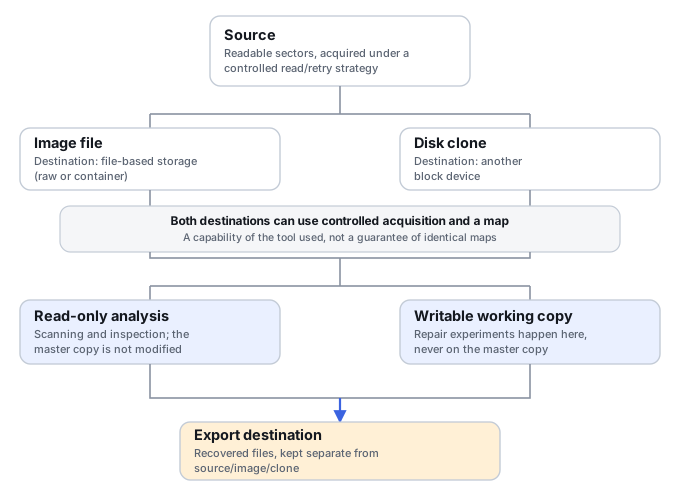
A disk image is a sector-level copy written into a file, or a set of files, on file-based storage: an external drive, a NAS share, cloud storage, or another local filesystem. A disk clone is a sector-level copy written directly onto another block device — a second physical disk or a virtual disk presented the same way. Either destination can hold a sector-level acquisition of the selected address range. Whether the acquisition covers the whole device and whether every requested sector was read successfully are separate questions recorded by its scope and acquisition map.
Consumer backup and "clone" utilities often do something narrower. Many only copy the blocks a filesystem currently marks as allocated, may resize or realign partitions to fit a different target disk, or exist specifically to migrate a working system to new hardware. Those are legitimate operations, but they are not equivalent to a full sector-level copy for recovery purposes: unallocated space, where deleted data often still lives, may simply not be copied. Before relying on any tool's "clone" or "image" feature for a recovery case, confirm what it actually copies.
It is also worth separating three scopes that get used loosely: a disk image covers an entire physical device from its first to its last addressable sector; a partition image covers only one partition's range; and a selected-range image covers an arbitrary address range a tool was told to acquire. Each is useful in different situations, and a tool's default scope is worth checking rather than assuming. For a partition or selected-range image, offset N inside the image file does not automatically equal offset N on the source — the correspondence depends on the recorded source start offset and how the acquisition tool laid out the output, so check the acquisition log rather than assuming a fixed relationship.
The practical difference is the destination
An image's destination is a file (or files) on file-based storage, addressed by filesystem paths. A clone's destination is the address space of another block device, addressed by sector offsets the same way the source was. This is the one structural difference between them; everything else in this comparison follows from it.
Image files come in two broad shapes. A raw image is a byte-for-byte container, with no wrapper format. For a full-device raw image acquired from source offset zero, image offset N corresponds to source offset N. A partition or selected-range image needs the recorded source start offset and output layout to interpret that relationship — see the acquisition-scope note above. A container image adds its own structure on top — optional compression, segmentation into multiple files, embedded checksums, or an acquisition log — defined by that specific format. This article does not try to survey every container format in use; when a format's exact behavior matters (what it compresses, whether it stores a map, how it segments), check that format's own specification rather than assuming.
A file's extension is also not proof of its format. A raw image does not have to end in .img, a container image does not have to carry its tool's native extension, and a file renamed to look like one format can still contain another. When a format matters for compatibility or verification, confirm it from the file's actual structure or from how it was produced, not from the name alone.
Disk image vs. disk clone: comparison
Scroll horizontally to see the full table →
| Criterion | Disk image | Disk clone |
|---|---|---|
| Destination | A file, or set of files, on file-based storage | Another block device; its existing data is replaced |
| Capacity needed | For a full, uncompressed raw image: the size of the acquired address range. A sparse or compressed container's actual size depends on content and settings. | Enough available capacity for the selected range; for a full-disk clone, usually not smaller than the source's addressable range |
| Compatibility | Recovery software must support the image's specific format and any segmentation it uses | The tool or OS reading the clone must correctly interpret its layout and logical sector size |
| Archiving & transport | A file is straightforward to duplicate, checksum and move between machines | Moving a clone's content elsewhere usually means a new acquisition pass, or converting it to a file first |
| Multiple cases / RAID members | Separate image files, plus a record of member identity (serial, slot, capacity, sector size) and an acquisition log | Separate destination devices, or address ranges tracked carefully on a shared one |
| Source protection | Depends on the acquisition procedure and tool, not on the destination type | Same dependency, plus a clear way to tell source and destination apart during the pass |
| Bad reads & resume | Depends on the tool maintaining a map/log of what was read; destination type does not itself determine whether retries or resume happen | Same dependency as imaging |
| Further analysis | Open the supported image format directly in recovery software | Access the physical device, or image it afterward if the workflow needs a file |
| Integrity check | A hash of the image file, read against the acquisition log | A hash of the specific copied range — not assumed to cover a larger or different disk |
| Risk of change after acquisition | Writable access to the image file, or to a volume mounted from it, by any software that writes — not antivirus specifically — can alter the acquired bytes | Automatic writable mounting, journal replay, repair tools or other software that writes to the copied volume can change the clone |
Three consequences follow directly from the destination difference above. Capacity: a clone generally needs a same-size-or-larger physical device on hand before you start, where an image can grow into whatever storage is available and can be compressed or segmented to fit. Compatibility: an image depends on software support for its format; a clone depends on the reading system correctly interpreting a device's layout, which is usually the more universal assumption. Working copies: an image can be duplicated as a file. A disk clone can be copied to another block device, or acquired into an image file. Both operations can use the preserved clone as their source; routine creation of a working copy does not require reading the original device again.
A healthy source: choose around the workflow
When the source is stable and the goal is to preserve its current state before further analysis or repair, either destination can work — the choice comes down to what the rest of the workflow needs. An image suits archiving, hashing, repeated scans with different tools, and keeping several cases organized as files. A clone suits a workflow that specifically needs a physical block device: handing a drive to a tool, analyzer or system that expects to see one directly, without an intermediate file.
One case deserves a separate note: migrating a working system to a new, larger drive for continued use is a different goal from preservation, and it is normally done with layout-aware cloning or restore software rather than a sector-for-sector recovery image. Whether the result boots afterward depends on partition layout, the operating system's own boot configuration and the target hardware — none of which a sector-level copy by itself guarantees.
A failing source: acquisition strategy comes first
Both image and clone destinations can support a controlled acquisition pass — skipping difficult regions, retrying them later with different settings, resuming an interrupted pass, and limiting how long the tool waits on a single read before moving on. Whether any of that actually happens depends entirely on the tool doing the copying, not on whether its output is a file or a device. A naive file-copy or disk-clone utility with no error handling can stall indefinitely on the first bad sector regardless of its destination type.
If a source shows signs of mechanical damage — unusual noises, repeated resets, or a drive that was dropped or has visible physical damage — repeated read attempts of any kind can make the condition worse. That situation calls for a specialist evaluation before further imaging attempts, not a different choice of destination. This article does not provide a universal set of retry counts, timeouts or pass strategies; the right settings depend on the specific failure mode, and How to Image a Failing Drive Safely covers that process in more detail.
What missing reads look like in the destination
A destination range can end up in one of several distinct states, and it matters which one you're looking at. A successfully read zero is a byte the source actually returned, which happened to be zero. An unreadable region is one the tool tried and the source refused to return. A not-attempted region is one the tool has not gotten to yet, often because it is prioritizing easier regions first. And a placeholder or stale byte is whatever already existed at that destination offset before this acquisition pass started — a previous pass's data, a pre-allocated file's padding, or leftover content on a clone target that was not wiped first.
Without a map or log recording which case applies to which offset, these four states can be indistinguishable just by looking at the destination's contents. The GNU ddrescue project documents this explicitly for its own tool: it "does not write zeros to the output when it finds bad sectors in the input, and does not truncate the output file if not asked to" — meaning whatever was already at that location stays there, and only the separate mapfile records that the region was never successfully read. Not every tool behaves the same way, and a zero-filling tool is not necessarily doing something wrong — but the two behaviors are different, and only a map or log resolves the ambiguity. The image or clone's raw contents, by themselves, do not prove acquisition was complete.
Working with the acquired copy
Once a copy exists, the source itself should generally not need to be touched again for routine analysis. A practical working arrangement keeps several things separate: the acquired master copy, treated as read-only and not experimented on directly; a working copy, which absorbs repair attempts, writable mounts or file-system fixes that might alter data; and a separate destination for files actually exported during recovery, so recovered output does not get mixed back into the preservation copies. Recovery Copies: Source, Image, Working Copy and Destination covers this separation in more detail.
Mounting the image or clone as an ordinary writable volume is often unnecessary. Most recovery software can scan a supported image format, or a read-only-mounted device, directly — without exposing it to the filesystem driver's normal mount behavior, which can itself modify metadata (journal replay, for instance). Mount only when a specific step genuinely requires it, and do so against a working copy rather than the master.
Capacity and geometry deserve exact numbers
Compare actual byte capacities, not marketing figures: two devices sold under the same nominal size ("1 TB") can expose a different number of addressable sectors. For a full-disk clone, every offset the source uses has to fit on the destination — a target that is nominally the same size but has fewer actual sectors will not necessarily work.
Shrinking data to fit a smaller target, or copying only currently-allocated blocks to migrate to a new disk, is a different procedure from a full sector clone, and should not be presented as one. It does not preserve unallocated space, where deleted or previous-version data often still lives, and is not a substitute for a forensic or recovery-oriented copy when that history might matter.
Record the source's logical sector size (512-byte or 4096-byte presentation is the common split) alongside capacity in your acquisition notes. A byte-for-byte clone written to a device that reports a different sector geometry than the source is not guaranteed to be interpreted correctly by an operating system reading the resulting layout, even though the underlying bytes are identical.
In a GPT layout, the UEFI GPT specification places the backup header at the device's last LBA; the backup partition-entry array occupies separate blocks before that header. A sector-level clone onto a larger device can leave these structures at offsets corresponding to the original capacity, not the new one. That mismatch is not, by itself, a reason to modify the preservation copy because an operating system suggests a repair. Any layout changes belong on a separate working copy, made after the situation is actually understood.
Missing reads, sparse files and what a hash actually confirms
Two different facts about a destination region are easy to conflate: the byte value stored there, and that region's status in the acquisition map. A sparse hole in a destination file can read back as zeros without a single zero byte having been written or read from the source — the filesystem is just not allocating storage for that range. That is a different situation from a source region that returned actual zero-value data, and different again from a region that was never attempted. None of these should be read as proof that the corresponding area on the source is "empty"; compression and sparse allocation are storage-efficiency behaviors, not claims about source content.
Hashing has a similar scope question. A hash of the raw byte stream and a hash of a container file are not the same thing — if a container compresses, segments or adds metadata, the file's own hash can change on reformatting even when the decoded bytes underneath are identical. For a split image across multiple files, be specific about what a given hash actually verifies: one segment, the full assembled stream, or the container's own internal verification feature, if it has one. A hash confirms that a specific, defined set of bytes matches a specific reference — it does not by itself confirm that acquisition reached every sector that mattered, and it is not worth re-reading an entire failing source a second time solely to recompute one.
It is also worth separating acquisition completeness from point-in-time consistency. A sequential copy of an actively changing volume can technically reach every sector while still mixing data from different moments in that volume's history, because the source kept changing while the copy ran. That is a distinct problem from missing reads, and Live Systems, Snapshots and Consistent Recovery Copies covers it directly.
Which should you choose?
Stable 1 TB HDD, deleted-file recovery
Drive is healthy and fully accessible; some files were deleted and need recovery.
Either destination works technically; convenience for repeated scans is what should decide it here.
Full image on separate storage with enough free space, then scan the copy with recovery software.
An image does not contain data already overwritten before acquisition — it preserves only what was still there.
Unstable, failing HDD
Intermittent read errors, slow response, or occasional resets during access.
Destination choice is secondary here; acquisition strategy is what actually determines the outcome.
Prioritize capturing accessible regions with a map, minimize additional stress on the source, and assess whether specialized handling is needed.
Check the acquisition map's coverage before judging the copy complete, regardless of which destination was used.
RAID with several members
Multiple physical disks belong to one array that needs to be preserved and reconstructed.
Each member needs its own acquisition and identity record before reconstruction is possible.
Image each member separately, recording its serial number, slot, capacity and sector size.
An image of one member is not an image of the finished RAID volume; reconstruct on top of all the copies before trusting the result.
A specific hardware analyzer needs a physical device
The next analysis step requires handing off a physical block device, not a file.
A clone is the practical choice for this workflow constraint.
Clone to a device that meets the analyzer's requirements.
Master preservation and source protection are still separate requirements — a clone is not exempt from either.
Scroll horizontally to see the full table →
| Situation | What matters most |
|---|---|
| SSD or USB flash drive | Neither destination bypasses TRIM/deallocation behavior, firmware translation, encryption, or the simple fact that some old bytes may no longer be returned by the device at all. Destination choice does not change what the source will hand over. |
| Work intended for forensic or legal use | The destination format alone does not create a defensible evidence workflow; chain of custody, write-blocking and documented procedure matter independently of image vs. clone. |
If the source is healthy, pick the destination your workflow is built around — a file for archiving and repeated scans, a device when a tool specifically needs one. If the source is failing, solve acquisition first: a controlled read strategy and an accurate map matter more than whether the result is a file or another disk. Neither destination, by itself, makes reads safer or recovers data that no longer exists on the source.
Technical references: GNU ddrescue manual — mapfile behavior · UEFI specification: GPT format — backup header location
Related: What a Disk Image Preserves — and What It Does Not · How to Image a Failing Drive Safely · Recovery Copies: Source, Image, Working Copy and Destination · Write Blocking in Data Recovery · Live Systems, Snapshots and Consistent Recovery Copies · Logical vs. Physical Data Recovery · Disk Imaging & Cloning Tools.