SQL Server Corruption, Page Restore and DBCC
SQL Server can localize corruption to individual pages and restore just those pages from backup while applying transaction logs — DBCC's own repair options are a structurally destructive fallback, not a substitute for restore.
MDF, NDF and LDF each carry different recovery value
A SQL Server database's primary data file (.mdf), any secondary data files (.ndf) and the transaction log (.ldf) should be preserved together, alongside backup files, FILESTREAM directories, full-text data, memory-optimized containers where applicable, and SQL Server's own error logs. Copying only the .mdf can remove exactly the context — log history above all — that a real recovery attempt would depend on.
Page checksums and torn-write detection create precise evidence
SQL Server can detect checksum failures, torn writes and other I/O-related page corruption, and a damaged page can be tracked in msdb..suspect_pages by its exact file ID and page ID. That precision is the whole reason page-level recovery is possible at all: the engine already knows which specific page is actually in question, rather than treating the entire file as equally suspect.
DBCC CHECKDB is a structural diagnostic, not just a pass/fail verdict
Microsoft documents DBCC CHECKDB as checking physical page consistency, logical consistency, rows, allocation pages, index relationships, system-table integrity and other structural relationships. Its report can identify a specific object-and-page relationship rather than declaring the whole database corrupt, and Microsoft also notes that corruption can originate from the filesystem, hardware, drivers, storage cache, the SAN or I/O path, memory, or SQL Server itself — results that vary between repeated CHECKDB runs specifically suggest a transient I/O, cache or memory issue rather than fixed structural damage.
Page restore recovers from backup plus log, not from the damaged bytes
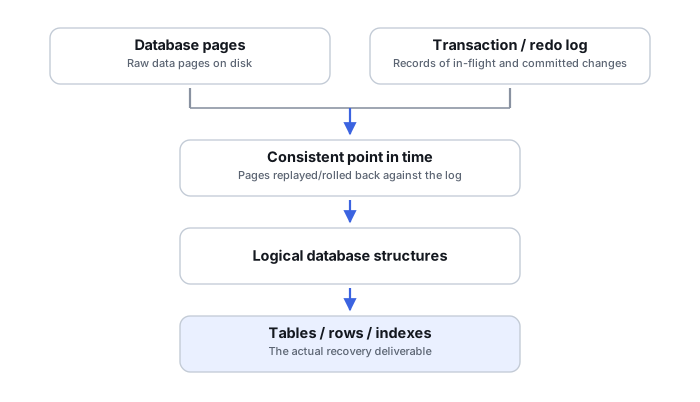
Microsoft documents page restore as a first-class recovery mechanism for isolated damaged pages: it restores the affected page from a backup and then applies transaction-log records to bring that page forward to a state consistent with the rest of the current database. This is recovery built from backup and log history — it is not an attempt to patch the bytes of the damaged MDF directly, and that distinction matters for understanding what the result actually represents.
Page restore has real boundaries
Microsoft explicitly excludes certain structures from page restore, including the transaction log itself, GAM, SGAM and PFS allocation pages, the file boot page, the database boot page, and other special structures. Not all corruption is equally localizable: a single user-data page failure can often be contained and restored in place, while damage to allocation or boot metadata can force a much wider recovery scope than restoring one page ever could.
Secondary indexes are often the least risky corruption to find
Microsoft notes that some secondary-index corruption can be resolved by simply dropping and rebuilding the index, rather than needing page restore at all — because a nonclustered index is typically derived from the underlying heap or clustered index, and can be regenerated from that authoritative source. Corruption in the heap or clustered base rows themselves is a fundamentally more serious event, since that data has no equivalent structure to regenerate it from.
REPAIR_REBUILD and REPAIR_ALLOW_DATA_LOSS are not interchangeable
DBCC CHECKTABLE's REPAIR_ALLOW_DATA_LOSS option can deallocate damaged rows and pages, remove inconsistent structures, and leave logical or business-level inconsistencies behind — it can genuinely lose more data than a proper backup restore would have. Microsoft repeatedly recommends restoring from a known-good backup before resorting to REPAIR_ALLOW_DATA_LOSS; a message reporting successful repair means structural consistency has been restored, not that every original record survived the process.
Validate at the application level after any recovery
A database that starts and passes a subsequent DBCC CHECKDB run has cleared a structural bar, not necessarily a business-logic one. Row counts, referential integrity and representative application queries are the checks that actually confirm the recovered data behaves the way the application expects, and they belong after any restore or repair path, not only after the most destructive one.
REPAIR_ALLOW_DATA_LOSS is explicitly a last resort in Microsoft's own guidance. Attempt restore from a known-good backup with log roll-forward first, and run any repair option against a copy of the database, never the only surviving copy.
Related: Database Page-Level Corruption and Transaction Recovery · Database Corruption (SQL Server, MySQL, and Similar) · InnoDB Tablespaces, Redo Logs and Crash Recovery · Repair vs. Recovery · VM, Database and Application-Container Recovery Tools