Database Corruption (SQL Server, MySQL, and Similar)
A production database that suddenly will not open can be suffering from logical corruption, an incomplete transaction or upgrade, storage faults, memory or controller errors, or application-level damage. The first job is to preserve evidence and determine the scope before using any repair option that may discard data.
Database corruption: what should you do next?
Answer one question about the current state. The result suggests the safer next step rather than diagnosing the failure.
Is the database or application still actively writing to the affected storage?
Stabilize the point in time first.
Avoid ad-hoc repair on the only live copy. Use an appropriate quiesced, snapshot or backup workflow and preserve database files, logs and storage state before repair.
Recover from preserved database state.
Work from a copy of the database and transaction logs. Prefer database-specific consistency checks and extraction before repair options that can discard damaged structures.
This guide classifies the next recovery action from observable information. It does not diagnose hardware condition or estimate a percentage chance of recovery.
What's actually happening
Engines like SQL Server and MySQL's InnoDB storage engine maintain internal consistency checks — page checksums, transaction logs, structural metadata — specifically so that a torn write from an unexpected power loss, a silently failing underlying disk, or an interrupted upgrade or restore gets flagged as corruption rather than served up as valid data. Seeing an explicit corruption error is, in a real sense, the system working as intended: it's refusing to pretend everything is fine.
How recoverable this really is
This depends enormously on scope. A single corrupted page or table is a very different situation from a corrupted transaction log or damage at the storage layer underneath the database file itself. A database with a recent clean backup and an intact transaction log is usually a straightforward restore-and-replay, with little or no real data loss. One without a backup, where the only copy is the corrupted file itself, is a much harder job that has more in common with the RAID and storage-layer cases elsewhere in this catalog than with routine database administration.
Storage recovery and database recovery are different layers
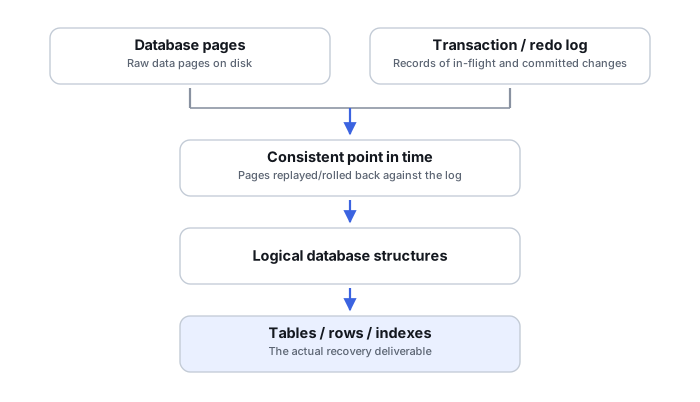
A database can be inconsistent even when every database file is readable, and database files can be damaged because the storage below them returned stale, missing or corrupted blocks. The recovery path therefore depends on whether the problem is transactional consistency, damaged database pages/files, missing logs, or an underlying disk/RAID/VM failure. Application-level repair should not be used as a substitute for stabilizing failing storage.
Preserve a consistent point in time
Copying individual database files from a live system at unrelated moments can create a set that never existed as one consistent database state. Prefer database-aware backups or snapshots with understood consistency guarantees. After an incident, preserve the full database container set together, before experimenting with repair or export tools: primary and secondary data files, transaction/redo/WAL logs, relevant engine metadata and configuration, the backup chain, and the storage snapshot chronology if one exists. Microsoft explicitly recommends physical copies of every database container before running a destructive SQL Server repair.
What you can check safely
Record the database engine and version, exact error messages, whether the service starts, which files are missing or unreadable, the last known-good backup and what happened immediately before corruption. If storage errors, VM snapshot problems or RAID events occurred at the same time, investigate those layers too. A database repair command that can discard damaged pages may restore service while permanently reducing what remains recoverable.
Database corruption is often page-level, not whole-file
SQL Server's consistency checks examine physical pages, rows, allocation structures and index relationships as separate concerns, and a corruption report can point at one specific page rather than condemning the entire data file. That precision is what makes isolated recovery possible — treating every corruption error as “the whole database is gone” skips past the much narrower, often much more recoverable problem that is actually there.
Logs can be part of the database's current state, not just history
A SQL Server transaction log and an InnoDB redo log both record modifications that may not yet be reflected in the data files themselves — recent, already-committed work can exist only in the log until it's applied. Deleting or discarding a log to make a database “start cleanly” can permanently remove changes that exist nowhere else, because the data files and the log describe one transactional state together, not two independent pieces.
Repair and restore are different operations with different costs
Microsoft's own guidance recommends restoring from a known-good backup, with log roll-forward, before resorting to destructive repair options. A repair command reporting success means only that the engine completed the selected repair path, not that every original record survived: some repair modes rebuild structures without data loss, while destructive modes can deallocate damaged rows or pages, or rebuild transactional structures outright. Validate logical consistency and the recovered application data afterward rather than treating a clean repair exit code as proof of completeness. Restore-then-replay and repair-in-place are not interchangeable, and the less destructive option should be tried first whenever a usable backup exists.
Database checksums can expose corruption from the layer underneath
Consistency-check failures that vary between repeated runs against the same file are a specific signal worth investigating: transient I/O, cache or memory problems in the storage path below the database can be the actual cause. This connects database corruption directly to RAID array failure and general storage-layer diagnosis — a database's own checksums can be some of the best available evidence that a lower layer is not behaving correctly.
The general approach
Stop unnecessary write activity and preserve the database files, logs, backups and relevant storage state before attempting destructive repair. If the underlying storage shows read errors or other signs of failure, image or clone that layer first. On healthy enterprise storage, a consistent copy or supported backup/snapshot may be more appropriate than blindly imaging an entire device; the key principle is to preserve an untouched recovery point before repair.
Be careful with destructive engine-specific repair options. SQL Server's REPAIR_ALLOW_DATA_LOSS, for example, may deallocate damaged structures to restore consistency. MySQL recovery procedures depend on the storage engine — REPAIR TABLE is not a general InnoDB corruption remedy — so the exact vendor documentation and engine matter. That's sometimes the right tradeoff and sometimes destroys the exact data being saved. Run these against a copy of the database, never the live production file, and only after understanding precisely what each option discards.
Storage-layer corruption underneath a database shares its logic with RAID Array Failure and Virtual Machine Disk Corruption — in both cases, the container on top looks broken while the storage underneath may still be intact. For the deeper mechanics, see Database Page-Level Corruption and Transaction Recovery, SQL Server Corruption, Page Restore and DBCC and InnoDB Tablespaces, Redo Logs and Crash Recovery. For enterprise-scale storage recovery, the labs in our provider directory generally handle this kind of case.
This page describes the general situation, not a guaranteed fix for your specific case. If you'd rather have someone experienced take a look before you try anything, see what a hands-on evaluation looks like.