Partition Table Recovery and Filesystem Discovery
A partition table is only a map to where filesystems begin and end — if the map is lost, filesystem metadata already sitting at the original offsets can often identify the old boundaries without recreating the partition first.
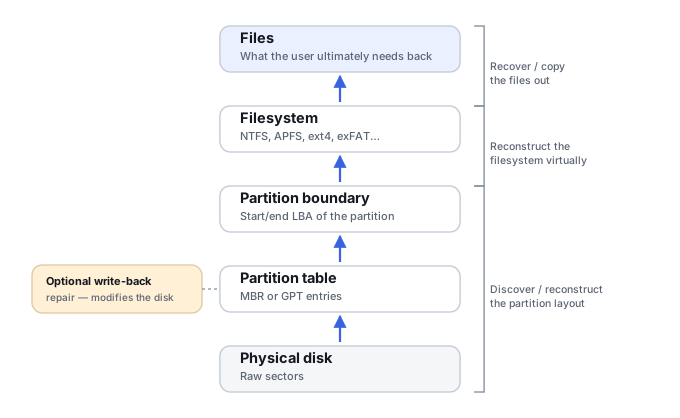
The partition map and the filesystem are different objects
Partition tables describe where logical volumes start and end; they do not normally contain the files themselves. A disk can therefore have a broken GPT sitting directly above an intact NTFS filesystem at its original offset, or a missing MBR partition entry above a perfectly intact ext4 filesystem. Losing the map to a filesystem is a different event from losing the filesystem itself, and recovery can reconstruct the partition boundary from backup partition metadata, the filesystem's own boot sector or superblock, its size fields, known alignment conventions, neighboring partitions, and structural validation of candidate signatures.
GPT keeps intentional redundancy
The UEFI specification defines GPT with a protective MBR at LBA 0, a primary GPT header at LBA 1, a primary partition-entry array, the usable partition region, a backup partition-entry array near the end of the disk, and a backup GPT header at the final LBA — with CRC32 protecting both the header and the entry array. The specification explicitly says software should check the alternate GPT when the primary is corrupt. Practical consequences: primary GPT damage does not necessarily destroy the partition information at all; CRC helps distinguish genuinely valid metadata from a coincidental signature match; and if the disk's reported capacity has changed, the backup header may no longer sit at the currently reported last LBA, which needs accounting for rather than assuming failure.
MBR has much less redundancy
Legacy MBR stores its partition entries in the first sector, with no mandated backup copy anywhere near the end of the disk the way GPT provides. A lost MBR is therefore usually still a partition-discovery problem rather than a reason to fall back to raw file carving — reconstruction just has to rely more heavily on the filesystem's own boot sector, superblock, size and geometry fields than on any built-in partition-table redundancy.
Why Windows offers to initialize a disk
Microsoft's storage API documents disk initialization as an operation that initializes a RAW disk with a partition style such as GPT or MBR. When Windows asks to initialize a disk, that specifically means Windows currently has no usable partitioning structure for that device in the form it expects — it does not mean the disk was never used, that old partitions do not exist, or that files are erased. The same prompt can be produced by GPT/MBR damage, wrong sector presentation, a USB bridge or controller issue, incorrect reported capacity, a storage controller translation problem, an overwritten first sector, or plain device instability. Initializing is a write operation: on a disk that previously held data, the prompt is a diagnostic symptom to investigate, not an instruction to follow.
Finding the filesystem start without trusting the partition table
Rather than trusting a missing or damaged partition table, discovery can scan the disk directly for filesystem boot sectors, superblocks or container signatures, verify each candidate structurally (size fields, geometry, checksums where present), and infer plausible partition boundaries from what is actually found — before ever writing anything back to the disk. Multiple historical signatures can be present on a reused or repartitioned disk, so a signature match alone is not sufficient; it needs structural validation against the candidate offset.
Wrong offsets can imitate filesystem corruption
If an NTFS volume originally started at LBA X and a later, guessed partition recreation starts at X plus some offset, Windows will see an unknown or RAW volume with an apparently invalid boot sector — while the actual filesystem body remains completely intact at the old, now-unreferenced offset. This is exactly why guessing at partition recreation, rather than discovering the real boundary first, can make correct diagnosis significantly harder rather than easier.
Validate before writing anything
A recovery workflow should never stop at “a partition signature was found” — it has to validate the candidate filesystem at that offset before treating the discovery as settled, and it should model any partition reconstruction virtually, against a copy, before writing a new partition table back to the only source. Restoring a partition table is a repair action; it is not a prerequisite for extracting files from a filesystem that has already been located and verified.
Discover the old partition boundary virtually, against a preserved image, before writing any new partition table back to the original disk.
Related: Drive Asks to Be Initialized · Partition Loss · Drive Shows as “RAW” · Drive Shows the Wrong Capacity · Computer Won’t Boot but the Drive May Still Be Healthy · NTFS MFT, Allocation and File Reconstruction · Partition Recovery vs. File Recovery · Hex Editors & Disk Structure Viewers