Cloud Storage & Sync Data Loss
A file that vanishes from Dropbox, Google Drive, or OneDrive feels like ordinary data loss, but nothing about the underlying problem is the same — there may be no local drive containing the authoritative copy and no deleted sectors to scan; recovery instead depends on server-side versions, deleted state, retention and any surviving endpoint replicas, with a clock quietly running on most of it.
Cloud-synced files disappeared: what should you do next?
Answer one question about the current state. The result suggests the safer next step rather than diagnosing the failure.
Is deletion or corruption still synchronizing to other devices or replicas?
Prevent further synchronization first.
Pause sync where appropriate and preserve any offline or unsynchronized copies before reconnecting them. Then inspect provider trash, version history and retention options.
Preserve remaining versions and replicas.
Check provider-side deleted items/version history and any local copies before changing the surviving data. Retention and recovery options are provider- and policy-specific.
This guide classifies the next recovery action from observable information. It does not diagnose hardware condition or estimate a percentage chance of recovery.
What's actually happening
Sync services exist to make every connected device agree on the same set of files, which means they propagate deletions, overwrites, and renames just as faithfully as they propagate anything else — often within seconds and across every device signed into the account. A file deleted on a phone disappears from the laptop too. A file overwritten by an older version pushed from one device replaces the newer version everywhere. None of this is a malfunction; it's the sync working exactly as designed on an action the person didn't mean to take.
How recoverable this really is
Many mainstream sync services keep deleted items and, for some file types or plans, version history for a limited retention period. The exact window and administrator recovery options vary by provider, account type and policy, so the service's current recovery controls should be checked rather than relying on a generic number of days. The real risk is that window quietly expiring before anyone notices the problem, or a paid tier's longer retention never having been turned on. When provider-side retention expires, that provider may no longer supply an older state — but that isn't the same as the data being gone everywhere. Recovery can still depend on independent backups, offline endpoints, exported archives or other replicas that escaped the synchronized loss.
Record the service, account, approximate time of loss, affected folders and devices, and whether any device has been offline since before the incident. Check the provider's web interface for deleted items, version history and account activity before reconnecting a potentially useful offline replica. In an organization, ask the administrator which retention, audit, backup, eDiscovery or restore controls are actually enabled for that service and plan before changing policies or restoring large folder trees — do not assume a longer recoverable history exists without confirming it.
What you can check safely
It also matters whether the event was a deletion, an overwrite, a rename/move, a permissions change or account loss. These can look identical to the user while leaving very different recovery options behind.
What changes the recovery path
The first distinction is whether the missing data still exists somewhere outside the synchronized state. An offline laptop, a device that has not synchronized yet, a downloaded archive, a provider-side version, a team retention policy or a separate backup can all be more valuable than the currently visible folder. Account type matters too: personal and managed business accounts may expose different retention, audit and administrator controls.
The general approach
Check the specific service's own trash and version-history interface before anything else — this is almost always faster and more reliable than any third-party tool, since only the provider actually holds the older versions. For a business or education account (Microsoft 365, Google Workspace, and similar), ask the administrator which retention, audit, backup, eDiscovery or restore controls are actually enabled for that service and plan — do not assume an administrator automatically has a longer recoverable history than what's visible in the ordinary user's own client.
Sync propagates state; it doesn't preserve every historical state
A sync service is built to make every connected device agree on the same files, so it propagates a deletion, overwrite or rename just as reliably as a legitimate edit. The service can still hold older states behind the scenes through trash, version history or retention — but the currently synchronized namespace itself can be wrong on every device at once, and that's a separate question from whether older states still exist somewhere.
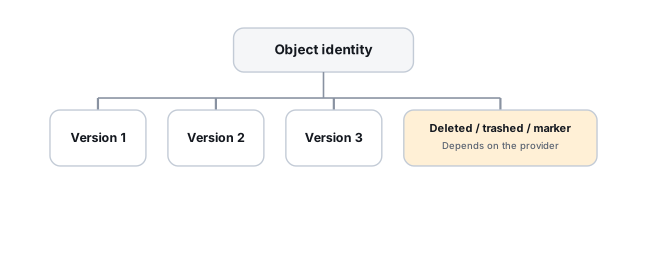
Identify the object ID, not only the path
Where the provider exposes persistent object or item IDs, use them in addition to paths. Microsoft, for example, documents that OneDrive item IDs persist across rename and move — a file can be moved or renamed without losing that identity or its history. Other providers expose their own, different object and revision model, and must be handled according to it; a recovery process that tracks only the path can wrongly conclude that an old file was deleted and an unrelated new one created, when what actually happened was a simple move or rename.
Deleted, moved and inaccessible are different states
A file that's disappeared from view might be genuinely deleted, or moved outside where you're currently looking, or still there but no longer visible because permissions or shared-folder membership changed. These look identical to the person who lost access, but they call for different recovery actions, so it's worth checking which one actually happened before assuming the worst.
Revision history, trash and change feed are different recovery layers
A deleted object calls for the trash/recycle bin, where the provider/account/plan exposes one. An object that's still there but holds the wrong content calls for revision/version history instead, again where that plan includes it. And reconstructing what changed and when, across many files, calls for the provider's change feed or delta API, where the service offers one — three different tools for three different problems, not one generic "recovery" feature, and not every provider or plan exposes all three.
Stop destructive synchronization before evaluating other endpoints
If a device or endpoint hasn't yet received the bad change, letting it keep synchronizing can erase its value as an independent copy of the pre-loss state. Identify which endpoints are already synchronized with the bad state and which might still hold something older before allowing any more changes to propagate.
Ransomware recovery here is often cloud revision recovery
When ransomware encrypts local files that then sync to the cloud, the cloud's current version becomes the encrypted one, and every other connected device receives that same encrypted state in turn. The useful recovery sources are the ones outside that current synchronized state: previous cloud revisions, backup/retention systems, and any endpoint that hasn't synced since before the attack.
API-based recovery becomes useful once an event is large
Checking one file's version history through a web interface works fine for a handful of files. When hundreds or thousands of objects are affected — a ransomware event, a bulk accidental deletion, a migration gone wrong — provider APIs that can enumerate object IDs, revisions and change history in bulk become the practical way to build an actual recovery plan; see Dropbox, Google Drive and OneDrive recovery APIs.
Syncing to three devices is not the same thing as having a backup. Sync mirrors changes, including bad ones — a deletion, an overwrite, or a ransomware encryption pass will propagate to every connected device just as reliably as a legitimate edit does.
For the same underlying problem on a local, non-synced drive, see Accidental Deletion. A genuinely offline backup, not just a second synced folder, is covered in Backup Drive Picks. For an account or business-scale version of this problem, the labs in our provider directory also handle server- and NAS-side recovery beyond what a consumer sync client exposes. For object-ID-based recovery, retention and provider APIs in depth, see cloud file version and deleted-item recovery and cloud change history and sync-state reconstruction.
This page describes the general situation, not a guaranteed fix for your specific case. If you'd rather have someone experienced take a look before you try anything, see what a hands-on evaluation looks like.