Cloud File Version and Deleted-Item Recovery
Cloud recovery starts by working out what kind of loss happened — a deleted object, overwritten content, lost access, a mass change or a copy that survives only on one device — because each points to a different recovery source. Record the object’s metadata and, where the service allows it, take an independent copy of the candidate version before restoring anything: a restore changes cloud state, so it belongs at the end of the process, not the start.
- Deleted objects point to trash or retention, overwritten ones to revisions, lost access to the owner or admin; none is guaranteed to still hold the data.
- A matching path or filename does not prove the same object: a replacement upload, copy or recreated file can have a new identity and no shared history.
- Downloading or exporting a revision and restoring it are different operations; only the restore changes the visible synchronized file, though a download prerequisite can still change metadata.
- An export of a cloud-native document is a conversion into a chosen format, not a byte copy of a stored original file.
- Account-wide rollback can destroy legitimate later changes, so it needs a clear time boundary and a reconciliation plan, not a first-move reflex.
Sync is replication, not backup
The core misconception behind most cloud data-loss cases is some version of “it was in Dropbox/Drive/OneDrive, so deletion can’t matter.” A sync service exists to make every connected device agree on the same files, which means it propagates deletion, overwrite, rename and ransomware-encrypted replacement exactly as faithfully as it propagates a legitimate edit. The service may still preserve historical state behind the scenes, but the current synchronized namespace can be wrong on every device at once.
Choose the recovery source by type of loss
The first decision is not which button to press but which kind of loss this is. The table is a starting point for where to look; it is not a promise that the source still holds the data.
Scroll horizontally to see the full table →
| Situation | Source to check first | Limit to keep in mind |
|---|---|---|
| Object deleted | Trash, recycle bin or deleted-items state; organizational retention if one exists | Trash and retention periods differ by provider, plan and policy; a deleted object may have no accessible revisions |
| Object still exists but holds wrong content | Revision or version history of that object | Listed revisions are not necessarily every revision ever made, and older ones may have been purged |
| Object vanished from one account’s view | The owner, shared-folder admin or organization admin | Loss of access is not deletion; the object may be intact for other accounts |
| Many objects changed at once (ransomware, bulk delete, bad sync) | Revision-level or provider-level rollback, planned with the owner or admin | A broad rollback can overwrite legitimate later changes unless the result is reconciled |
| The only good copy is on one local device | That endpoint, preserved before it syncs again | Reconnecting it can pull the destructive change down and erase its value as an independent copy |
Several rows can apply to the same incident. A ransomware event, for example, can leave overwritten objects in the cloud, deleted originals in trash and one laptop that was offline at the time.
Object identity is not the same as path or name
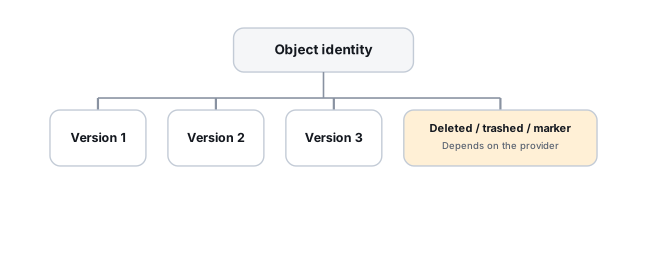
Cloud services commonly maintain an object ID independently of the visible path or filename — a file can move from one folder to another, or get renamed entirely, while keeping the same underlying identity and history. A recovery process that tracks only paths can conclude “old file deleted, unrelated new file created” when what actually happened was a simple move or rename. Recovery work should track object IDs where the service exposes them, not rely on paths alone.
The reverse mistake is just as easy. A file uploaded to replace a lost one, a copy, or a document recreated under the same name in the same folder can be a new object with a new identity and none of the old object’s history, even though the path looks identical. Whether a given operation keeps or replaces the identity depends on the provider, the client application and how the change was made, so it has to be checked for the case at hand rather than assumed. A matching path or name is a reason to look closer, not proof of the same object.
Trash and retention for deleted objects
A file’s disappearance from normal navigation doesn’t mean it’s gone — most providers keep a deleted-items or trash state that exists specifically for this scenario, and it should be checked before anything else, including before uploading a replacement file under the same name. How long items stay there, whether an admin can recover items that a user has already emptied from trash, and whether a separate retention or hold policy keeps copies beyond that, all depend on the provider, the plan and the organization’s configuration. A concrete period should come from the provider’s current documentation for that account type, with the date it was checked.
Revision history for overwritten objects
An object that still exists but now holds the wrong content is a different problem from a deleted object, and it calls for version or revision history rather than a trash search. Retention differs by provider, plan and account type, though — an API or UI that can list revisions doesn’t guarantee every historical revision has actually been retained. In Google Drive, for example, the API documentation says Drive automatically deletes older revisions, that a binary file revision not marked “Keep Forever” is purgeable, and that purgeable revisions are typically preserved for 30 days but can be purged earlier (Google Drive API documentation, checked October 2026; other services and plans behave differently).
Binary files and cloud-native documents
Revisions of an uploaded binary file (a PDF, an image, a spreadsheet saved from a desktop application) and revisions of a document that lives natively in the cloud service are not handled the same way. The list of revisions, what can be downloaded or exported, and what the web interface’s version history offers can each have different capabilities.
Google Drive illustrates the split; the details below are specific to Google Drive. Its API documentation distinguishes binary “blob” files from Google Workspace documents. It says only binary revisions marked “Keep Forever” can be downloaded (so downloading an unmarked one means changing that flag first; see the order below), while Workspace documents are exported by naming a target MIME type, including at an earlier revision. It also says the revision list returned by the API can be incomplete for files with a large revision history, and that the history visible in the Drive interface may be more complete than the API list. An export of a Google Doc is therefore a conversion into a chosen format, such as a word-processing or PDF file. It can be a perfectly useful recovery artifact, but it should not be described as a byte-identical copy of an original binary file, because there is no such stored file to compare it with.
Retention, visibility and permission are separate questions
“Is the old version still there?” mixes four questions that have different answers:
- Retention: what the provider, plan and any organizational policy say is kept, and for how long.
- Visibility: what the web interface, desktop client and API actually show to this account; as the Google example above shows, these can differ.
- Permission: what this account is allowed to see or restore; owners and administrators may have recovery options that an ordinary user or collaborator does not.
- Existence: whether a historical copy still exists at all, which an ordinary user often cannot determine from their own view.
Not every revision or retention copy is advertised to an ordinary user. An empty version list in one account does not prove that nothing survives, and a long-looking list does not prove that the needed version is in it. Universal figures such as “30, 90 or 180 days” are not a safe basis for a decision; the period that matters is the one documented for this provider, plan and configuration at the time of the incident.
Permission loss can look exactly like deletion
In shared or collaborative cloud storage, a file can disappear from someone’s view because the owner revoked access, shared-folder membership changed, or an organizational policy changed — not because it was deleted at all. The first question in a case like this should be whether the object was actually deleted, or whether this particular account simply lost access to it. The answer usually has to come from the owner or an administrator, not from the account that lost the view.
Ransomware in cloud sync
When ransomware encrypts local files that then sync to the cloud, the cloud’s current version becomes the encrypted one, and that propagates to every other connected endpoint in turn. The recovery sources that matter here are the ones outside the current synchronized state: previous cloud revisions, backup and retention systems, and any endpoint that hasn’t yet received the destructive change. Identifying the variant and the encryption pattern is covered in Ransomware Encryption Patterns and Recovery Paths.
Divergent endpoints deserve isolation, not more syncing
If a given endpoint hasn’t yet received the destructive change, letting it keep synchronizing can erase its value as an independent copy. The preservation step is to identify which endpoints are already synchronized and which may still hold a pre-loss state, before allowing more changes to propagate — the same logic as preserving RAID members before a rebuild. When a local copy is the only good copy, preserving that device comes before any cloud-side action.
A safer order: copy first, restore later
Downloading or exporting content is different from restoring it. Some prerequisites can nevertheless change metadata: Google Drive’s documented download path for an earlier blob revision requires it to be marked Keep Forever. If this must be enabled, record the original revision state and the authorized metadata change before proceeding. It does not restore the file’s visible content, but it is not a purely read-only prerequisite. Restoring a revision, restoring from trash or rolling back a folder changes the cloud object, typically creates a new revision or event of its own, and then propagates to every connected device. Keeping the two apart gives a sequence that leaves a way back:
- Record available metadata — object or file ID, current path and parent folder, owner, deletion state, revision IDs and modification times, as far as the service shows them.
- Identify the candidate revision or trash item that most likely holds the needed content.
- Download or export it to an independent location, outside the synchronized folders, if the service allows it.
- Check the content of that copy before anything in the cloud is changed.
- Agree the restore with the owner or administrator, including its scope.
- Reconcile the result with legitimate changes made after the loss, and confirm what the restore did on other endpoints.
Some situations do not allow an independent copy first: a version may be viewable but not downloadable for that file type or account, or recovery may be possible only through an administrator’s restore. There is no universal procedure for that case. The available alternatives depend on the service — for example restoring to a copy or separate location if that option exists, or having the owner or administrator restore after the current state has been recorded and the endpoints that matter have been isolated. The risk to state plainly is that the restore itself becomes the first change to the evidence, so it should happen once and with an agreed scope. Reconstructing a timeline from change feeds and sync state is covered in Cloud Change History and Sync-State Reconstruction; provider-specific API operations are in Dropbox, Google Drive and OneDrive Recovery APIs.
Validate the recovered version
A recovered file is only useful if it is the right file in the right state. Check that it contains the needed content and comes from the intended revision; that it opens in its application and its internal structure is intact; that the set is complete when the loss involved a folder or many files; and, where it matters, that attachments, embedded objects or linked files came back with it. General file-level checks are described in How to Validate Recovered Data.
A hash of the downloaded or exported file is worth recording: it fixes the artifact you obtained so later copies can be compared against it. It does not prove that the artifact matches the historical original unless a known reference hash or copy exists to compare with — and for an exported cloud-native document there is usually no original binary to hash at all.
Why account-wide rollback is not the first move
Account- or folder-wide restore features are useful for mass incidents, but they act on everything inside their scope at once. If one folder was corrupted Monday and a different folder was legitimately edited Tuesday, restoring everything to Sunday recovers the first problem while destroying the second. Prefer object- or revision-level recovery, and reserve account-wide rollback for cases with a clear time boundary and a plan for reconciling what came after it.
Technical references: Google Drive API: Manage file revisions — automatic deletion of older revisions, “Keep Forever” and purgeable binary revisions, possibly incomplete API revision lists and a more complete history in the Drive interface · Google Drive API: Download and export files — blob files versus Google Workspace documents, download of “Keep Forever” revisions only, and export of Workspace documents by MIME type, including at an earlier revision. Both pages describe Google Drive only, as checked in October 2026; Dropbox, OneDrive and other services have their own revision, trash and retention rules, which have to be checked in that provider’s current documentation for the specific plan.
Related: Cloud Change History and Sync-State Reconstruction · Dropbox, Google Drive and OneDrive Recovery APIs · Cloud Storage & Sync Data Loss · Ransomware Encryption Patterns and Recovery Paths · How to Validate Recovered Data · Live Systems, Snapshots and Consistent Recovery Copies