Cloud Change History and Sync-State Reconstruction
Cloud change feeds describe how the synchronized namespace changed, and only with the detail each provider documents. Revision APIs describe the stored content of one specific object. A timeline built from them is often partial, so it should record which source supports each entry, what the timestamps mean, and where the gaps are.
- Change feeds keep a local model of a namespace in step; they are not backups, forensic audit logs or full version histories.
- Microsoft Graph delta returns the latest state of each item, so intermediate renames or edits can be absent from the feed.
- A Google Drive removed entry can mean deletion or loss of access; trash and permissions have to be checked separately.
- A reset or invalid token means a gap in observation; a fresh baseline does not recover the changes that were missed.
- Provider, server, client and local clocks mean different things, and unverified clocks cannot establish an exact order across endpoints.
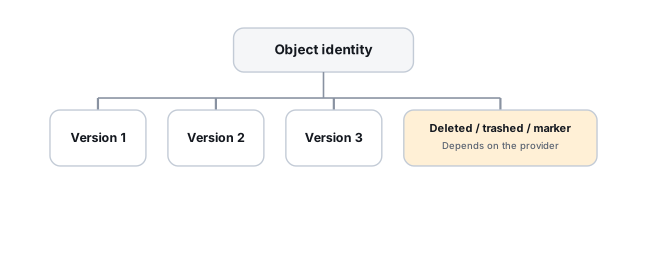
Two different questions, two different sources
“What changed in this account or folder over time?” and “what did this specific file used to say?” are genuinely different questions, and cloud providers generally answer them with two different API families — a change feed for the first, and a revisions endpoint for the second. Conflating them leads to tooling that can tell you something changed without being able to say what it changed from.
The two sources also differ in completeness. A change feed is designed to bring a client’s local model up to date, not to replay every event that happened in between, and what it includes is set by each provider. Revision history depends on what the provider retained for that object and for how long. Neither should be described as a complete record of an incident. Recovering a particular version is covered on Cloud File Version and Deleted-Item Recovery; this page is about what change feeds and sync state can and cannot show.
What each change feed can and cannot show
The three feeds below are often described together, but their documented guarantees are not the same. Do not apply the semantics of one provider to another, and do not assume that every entry carries a revision ID or an exact incident timestamp.
Scroll horizontally to see the full table →
| Feed | What it updates in a local model | What it does not prove | Separate source for content |
|---|---|---|---|
| Dropbox list_folder with a cursor | Entries for files and folders changed since the previous query; with deleted entries included, DeletedMetadata for paths where something used to exist and no longer does | Why a path no longer exists, whether older revisions remain, or every intermediate event between two queries. File entries carry the current rev and modification times, not a full history | Revision listing and restore for the file, while the provider still holds them |
| Google Drive changes with a page token | Change entries per file or shared drive, with the file’s updated state when it has not been removed, a removed flag and a change time | That a removed file was deleted: removal can also mean loss of access. A change entry does not contain earlier file content | The revisions resource for that file ID, plus trash and permission checks |
| Microsoft Graph driveItem delta | The latest state of each changed item since the previous token, including a deleted facet for removed items | Each individual change: an item renamed twice appears once, with its latest name. A deleted facet does not show that every recoverable copy is gone | Version history, recycle bin or retention for that item ID, where available |
Dropbox: cursors, list_folder and DeletedMetadata
Dropbox’s list_folder and its continuation call, driven by a cursor, let an application ask what changed in a folder since its previous query. When deleted entries are requested, the results can include DeletedMetadata, which the API reference defines as an indication that there used to be a file or folder at this path but it no longer exists. That is a real technical distinction from an item simply being absent from a current folder listing. It is still a statement about a path: on its own it does not say why the path no longer exists or whether earlier revisions of the file can still be retrieved. A cursor tells you what changed, not what a file used to contain; content history is a separate revisions lookup.
Google Drive: changes, page tokens and removed entries
Google Drive’s changes API, driven by a start page token, lets an application maintain a model of additions, modifications and removals across an account or shared drive. It is a different tool from the revisions resource that returns a given file’s historical versions.
The removed field needs particular care. Google’s reference describes it as whether the file or shared drive has been removed from this list of changes, for example by deletion or loss of access. A removed entry is therefore not, by itself, evidence that a file was deleted. Three conclusions have to be kept apart:
- Loss of access: the file may still exist, but the account whose feed was read can no longer see it, for example after a sharing change. This is checked through the file’s permission context, as seen by an owner or administrator.
- Deletion: the file was trashed or deleted. Drive search can separately query for trashed items, so checking trash comes before uploading a replacement or drawing conclusions.
- No recoverable content: a separate finding again, which depends on trash, revisions and retention, not on the change entry.
Microsoft Graph: delta and the deleted facet
Microsoft Graph’s driveItem delta endpoint returns incremental changes since a prior state, including a deleted facet for removed items, with nextLink and deltaLink values to continue paging or resume later. Microsoft’s documentation is explicit that the feed shows the latest state of each item, not each change: an item renamed twice appears once, with its latest name. The same item can also appear more than once in a feed, and the documented rule is to use the last occurrence. Items in delta results do not carry a parent path, so they should be tracked by ID rather than by path.
“Deleted” in a delta stream means the item should be removed from the client’s synchronized state. It does not by itself prove that every recoverable historical copy is gone; that is a separate question for version history, the recycle bin or retention.
Paging, resuming and checkpoints
A change query can return its results over several pages, and a timeline is only as complete as the pages that were actually read. A careful collection usually:
- reads every page until the provider indicates the end of the current set (no further nextLink in Graph,
has_morefalse in Dropbox, no further page token in Drive); - keeps the raw responses together with their context: which account, which drive or folder, which starting token, and when each request was made;
- applies the provider’s own rules for items that appear more than once, such as Graph’s rule to use the last occurrence, instead of a generic merge;
- updates the stored checkpoint (cursor, page token or deltaLink) only after the whole set has been read and recorded, so an interrupted run can be repeated from the previous checkpoint.
Tokens, cursors and links should be stored and passed back as the provider returned them. Editing them by hand, or constructing them from guessed values, can produce a feed that silently skips or repeats changes. Graph does document timestamp tokens for OneDrive for Business and SharePoint, but recommends using the returned deltaLink where possible.
When a token or cursor stops working
Providers handle unusable checkpoints differently, and there is no single expiry period that applies to all of them. Microsoft documents cases where the service cannot provide changes for an old token, for example after a long disconnection, and returns 410 Gone with a link that starts a fresh enumeration. Its instructions then differ by error code: one tells the client to replace local items with the server’s version when it is sure the service already had its local changes, the other to upload local items the service did not return, keeping both copies when it is unclear which is newer. These are synchronization-client reconciliation rules, not instructions to apply automatically during recovery evidence collection. Preserve the local and server-side states first. Replacing local items or uploading divergent files changes the evidence and requires a separate recovery decision. Dropbox documents a reset error meaning the cursor has been invalidated, after which a new cursor must be obtained from list_folder. Google’s changes.list reference says its page tokens do not expire (Drive changes.list), but a gap still appears if the stored token was lost or a client started over with a new one.
In every case the result is a break in observation. A resync builds a new baseline of the current state; it does not bring back the intermediate changes that happened while nothing was watching. A local sync database that stores only the latest token or cursor is not a durable historical log on its own. If historical evidence matters, the responses and local change records have to be preserved as they are collected, rather than relying on the provider to remember everything indefinitely.
Push notifications are triggers, not evidence
Google’s documentation is explicit that push notifications don’t contain resource metadata, content or directory paths — the application still has to call the API using the resource ID or changes token provided (Drive push notifications). Treating a notification itself as a historical record is a category error worth avoiding in any recovery tooling built on top of these APIs.
Which clock a timestamp comes from
A timeline usually mixes timestamps that answer different questions:
- Provider change time: the time a provider attaches to a change entry, such as the
timefield of a Drive change. It describes when the provider recorded the change, which is not necessarily when a user acted. - Server modification time: the provider’s record of when a file’s content was last modified, such as Dropbox’s
server_modified. - Client-supplied time: a value sent by a device, such as Dropbox’s
client_modified, which the API reference says is not verified and should be used only for display. - Client observation time and local clock: when a sync client noticed a change or wrote a record, measured by that device’s own clock, which may be wrong, adjusted or in another time zone.
Record which kind each timestamp is and the time zone it is expressed in. Ordering events from different endpoints only by unverified local clocks can produce a confident but wrong sequence. Where the order matters, look for provider-side times, IDs or revision values that support it, and mark the order as assumed where they do not.
Local sync-client databases
Desktop and mobile sync clients keep their own local state, and that state can help answer what existed, when the client saw it change, and which object ID or revision to query server-side, even when the file content is already gone from that endpoint. Which fields exist depends on the client and its version: some clients may record object IDs, paths, revision values, sync status, pending operations or conflicts, and others may not. There is no universal schema, so each field has to be interpreted for the client and version that wrote it.
Work on a copy, not on the live database. A simple copy of an active database file is not guaranteed to be consistent. For SQLite, which many applications use, the project’s documentation warns that a copy taken during a transaction can contain a mix of old and new content, and that any rollback journal or write-ahead log has to be kept together with the database file. Preserve the database with the journal or WAL files that belong to it, if they exist, and record how and when it was collected and from which client version; then analyse the copy. Recovery of damaged database pages is covered on Database Page & Transaction Recovery.
Recording a timeline with its gaps
Put together, a change feed can narrow down which object changed and roughly when, local state can add what one client observed, and a revisions lookup on the same object ID may show what the content looked like, if the provider still holds it. Each entry in the timeline should keep its source and its limits, so a partial timeline is presented as partial.
Scroll horizontally to see the full table →
| Object identity | Event or state | Source | Time and what it means | Candidate revision | Confirmed or assumed | Gaps |
|---|---|---|---|---|---|---|
| Drive file ID A (placeholder) | Listed under a shared folder, last synced | Copy of the local client database | T1: client observation time, local clock of the laptop | Revision value recorded by the client, if that client version stores one | Confirmed that the client saw the file; the time is assumed | Laptop clock not verified |
| Drive file ID A | Change entry with removed set | Drive changes feed of the user’s account | T2: provider change time | None in the entry | Confirmed that the file left this account’s view; the reason is not established | Deletion or loss of access still open |
| Drive file ID A | Present for the owner, not in trash; the user no longer appears in its sharing list | Owner or administrator check of the file and its permissions | T3: time the check was made, not the time of the change | Owner-side revisions to be listed separately | Loss of access confirmed for this account; no deletion found | When and by whom sharing changed is not shown by the feed |
| OneDrive item ID B (placeholder) | Current name differs from the name the user remembers | Graph delta for the drive | T4: time of the delta request; the entry shows the latest state | Current version only | Confirmed current name and location | Intermediate names are not in the feed; only a local record, if one exists, may show them |
Illustrative example: a removed entry for a shared file
A user’s Drive changes feed contains an entry with removed set for a file in a shared folder, and the file has disappeared from the user’s synced folder.
The entry shows that the file left this account’s list of changes. It does not show whether the file was deleted or the account lost access to it, and it says nothing about whether content can be recovered.
Preserve the feed responses and a copy of the local client state, then check trash and the file’s permissions from the owner’s side before uploading a replacement or restoring anything.
Even when the reason is found, the feed does not show intermediate edits or who changed sharing; those need other records, if the provider or the organisation keeps them.
A change token or cursor is a bookmark in a stream, not a copy of what the stream contained. Don’t build a recovery process that assumes the change feed itself is the backup or a forensic audit log.
Technical references: Microsoft Graph: driveItem delta — latest state per item, duplicates, paging, 410 resync, deleted facet, tracking by ID · Google Drive API: Change resource — removed by deletion or loss of access, change time, file state · Dropbox API specification (files.stone) — list_folder cursor and has_more, reset error, DeletedMetadata, rev, server_modified and client_modified · SQLite: How To Corrupt — copying during a transaction, keeping journal and WAL files with the database (sections 1.2–1.4). Feed semantics are product-specific and can change between API versions; check the current reference of the provider involved, and the documentation of the specific sync client for its local database.
Related: Cloud File Version and Deleted-Item Recovery · Dropbox, Google Drive and OneDrive Recovery APIs · Cloud Recovery API Reference · Cloud Storage & Sync Data Loss · Storage Metadata Generations and Consistency · How to Validate Recovered Data