Dropbox, Google Drive and OneDrive Recovery APIs
Provider APIs can show which objects an account can see, which revisions the provider still lists and which items it reports as deleted, and they can often download a retained revision to a separate copy. They cannot return bytes the provider no longer holds, and the operations that restore content are writes to the account — so the inventory and the copies come first, and any restore is a later, deliberate decision.
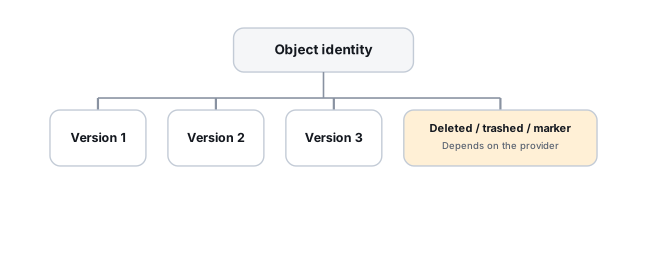
- Object IDs, revision IDs, paths and change cursors answer different questions; none makes history permanent.
- An item missing from a listing is not proof of deletion until paging, recursion and access are checked.
- Listing and downloading are reads; restores and setting keepForever change the account.
- Change feeds are not an audit trail and can force a full resync.
- Graph’s deleted-item restore is documented only for OneDrive Personal; other accounts need their own checked path.
This page is about API semantics, account scope and building an inventory. Choosing a recovery source by type of loss is covered in Cloud File Version and Deleted-Item Recovery; reconstructing a timeline from change feeds and sync clients is in Cloud Change History and Sync-State Reconstruction.
Object ID, revision ID, path and change cursor
Four kinds of identifier appear in these APIs, and mixing them up is the commonest source of wrong conclusions:
- Stable object ID — identifies a file or folder independently of its name and location, so it can survive a move or rename. It identifies the object; it says nothing about how much of the object’s history is still retained.
- Revision or version ID — identifies one stored state of one object. It is only useful while the provider still keeps that revision.
- Path — the object’s current visible location. A path can point to a different object after a delete and re-upload, and it can change without the object changing.
- Change cursor or delta token — a bookmark into a change feed for one scope (a folder, a drive, an account). It records where a client stopped reading, not what the account looked like; it can expire or be invalidated.
All four are scoped. An ID is resolved within a particular namespace, drive or account, and what an API call returns depends on the account and permissions it runs with. Another user, a shared-folder owner or an administrator may see objects, revisions or deleted items that the investigating account does not — and the reverse. An empty result therefore describes this account’s view, not the provider’s storage.
What each API can show, retrieve and change
The table summarizes the operations discussed below, as documented in each provider’s current reference (checked October 2026). It shows where to look and which operations write; it is not a promise that any given account still holds the data.
Scroll horizontally to see the full table →
| Provider API | Evidence available by reading | Retrieval vs restore | Main limitations |
|---|---|---|---|
| Dropbox (HTTP API) | files/list_revisions by path or by file ID; files/list_folder with recursive and include_deleted, returning DeletedMetadata entries; cursors for later changes | files/download can fetch a specific revision (read); files/restore writes a chosen revision to a path (write) | Revisions and deleted entries depend on what the account still retains; a missing entry can be a paging, scope or access gap |
| Google Drive (API v3) | revisions.list and revisions.get for a file; changes.list with removed entries; files that are trashed but not yet deleted | Download of binary revisions is documented only for revisions marked keepForever; setting keepForever is an update (write); Workspace documents are exported to a chosen format | Unpinned binary revisions can be purged; the API list can be less complete than the Drive interface; native documents behave differently from binary files |
| Microsoft Graph (v1.0) | driveItem versions; driveItem delta with the deleted facet | Version content can be read; restoreVersion and driveItem restore are writes | Version retention follows service and admin settings; direct deleted-item restore is documented only for OneDrive Personal |
Dropbox: revisions by ID and deleted entries
In Dropbox’s HTTP API, the route files/list_revisions returns revisions for a file identified by path or by file ID. Its mode parameter matters: the default path mode returns revisions at the same path as the latest entry, while id mode returns revisions with the same file ID and, according to the API specification, is the one to use to follow a file across moves or renames. The result also flags whether the latest entry was deleted or moved and, if it was deleted, when. The route files/restore restores a specific revision to a given path. Route names here are the HTTP API names; the official SDKs wrap them under language-specific method names, which should be checked in the SDK being used rather than assumed.
For the account tree, files/list_folder with recursive set lists subfolders as well, and with include_deleted it also returns DeletedMetadata entries — the specification defines these as indicating that a file or folder used to exist at a path but no longer does. Those options belong together with pagination: while has_more is true, the cursor has to be passed to files/list_folder/continue until the listing is complete. An inventory built from one page, without recursion or without deleted entries, will show items as “missing” that are simply unread. Even a complete listing is only this account’s view: an item can be absent because it sits in a folder the account no longer has access to, not because it was deleted. And a DeletedMetadata entry records that something was removed from that path; it does not by itself show whether revisions of it are still retained.
Google Drive: binary revisions, native documents and keepForever
The Drive API revisions resource lists, gets, updates and deletes revisions of a file. Its behavior differs between uploaded binary (“blob”) files and Google Docs, Sheets and Slides. Google’s revisions guide says Drive automatically deletes older revisions, that revisions not marked to be kept are purgeable and typically preserved for 30 days but can be purged earlier, and that only binary revisions can be deleted. It also says only binary revisions marked “Keep Forever” can be downloaded, while Workspace documents are exported to a chosen format instead.
According to the revisions resource, the keepForever field applies only to files with binary content in Drive, and it can be set on at most 200 revisions of a file. That number is a cap on pinned binary revisions; it is not the number of historical versions that exist or are available for a file, and it says nothing about native documents. Setting keepForever is done with revisions.update, which requires a scope that allows writing (such as the full drive scope or drive.file), not a read-only scope. It is a retention change to the account, not a discovery step, so it should only be made with authorization and after the current revision metadata has been recorded (see the copy-first order).
What the API lists is also not the same as what a user sees. Google’s guide warns that the revision list returned by the API might be incomplete for files with a large revision history, and that the history in the Drive interface might be more complete. For namespace-level evidence, changes.list reports changes with a removed flag, which the Change resource defines as removal from the list of changes “for example by deletion or loss of access” — so a removed entry calls for a check of ownership and sharing before anyone concludes the file was deleted. A search for trashed files is worth running before assuming a missing file is gone. The details in this section are specific to Google Drive.
Microsoft Graph: versions, restoreVersion and deleted-item restore
Graph separates three operations that are easy to confuse:
- List versions (GET on a driveItem’s versions) is a read. Microsoft’s documentation says that, depending on the service and configuration, a new version can be created for each edit, each save, manually or never; that previous versions may be retained for a finite period depending on admin settings that can differ by user or location; and that OneDrive does not preserve the complete metadata of previous versions.
- restoreVersion makes a previous version current by creating a new version with its contents, keeping the existing versions. It needs a write permission and changes the current file, which synchronized devices then pick up.
- driveItem restore restores a deleted item that is currently in the recycle bin. The documentation states it is currently only available for OneDrive Personal, and delegated work or school accounts are listed as not supported.
The last point should not be generalized in either direction. It does not mean the endpoint works for OneDrive for Business or SharePoint, and it also does not mean those deleted items are unrecoverable: other paths, such as the service’s own recycle bin interface or administrator tools, may exist and have to be checked in the current documentation for that account type. Graph’s production v1.0 endpoints are a safer basis for an inventory than /beta ones, which can change.
Change feeds are not an audit trail
Dropbox cursors, Google Drive change tokens and Graph delta tokens exist to keep a client in sync, not to record history. Microsoft’s delta documentation states plainly that the feed shows the latest state for each item, not each change — an item renamed twice appears once, with its latest name — and that the same item may appear more than once, in which case the last occurrence should be used. It also says items should be tracked by ID, because path values are not included in parent references. Three consequences follow for an inventory:
- Read to the end. A Graph enumeration continues through every nextLink until a deltaLink is returned; a Dropbox listing continues while has_more is true. Stopping early leaves a partial picture that looks complete.
- Expect invalid tokens. Graph returns 410 Gone when it cannot provide changes for a token, for example after a long disconnection, together with a new link that starts a full enumeration. Dropbox signals an invalidated cursor with a reset error. After a resync the feed shows current state, not the changes that happened in between.
- Treat deleted and removed entries as leads. A Graph deleted facet, a Dropbox DeletedMetadata entry or a Drive removed change says the item left this view. It does not prove the bytes were destroyed: the item may be in a recycle bin, under retention, or still present but no longer accessible to this account.
Keeping your own dated record of what each enumeration returned is what turns a sync feed into evidence. Timeline reconstruction from these feeds is covered in Cloud Change History and Sync-State Reconstruction.
Reads versus operations that change the account
The distinction that matters most in practice is between operations that only read and operations that change cloud state. Listing folders, revisions, versions and changes, and downloading a retained revision, are reads. Restoring a Dropbox revision, restoring a Graph version or deleted item, and setting keepForever on a Drive revision are writes: they change the current state or retention of the account, may create new revisions of their own and, for content restores, propagate to synchronized devices.
Before any write, preserve what can be preserved by reading: the inventory itself and, where the provider allows it, a downloaded copy of each candidate revision outside any synchronized folder. Record, for each item, the object ID, the revision or version ID, the account and drive or namespace it was read from, the path at the time, and when it was read. A restore performed later can then be compared with what existed before it.
“Dropbox, Google Drive and OneDrive APIs have identical restore semantics” is false in ways that matter — retention, revision limits, the split between binary and native documents, and even whether a direct restore endpoint exists for an account type differ by provider, plan and account. An API also cannot return content the provider has already purged. Confirm the specific service and account’s documented capability before designing a recovery workflow around it.
Inventory, separate copy, validation, then a restore decision
A compact order that keeps the API work reversible:
- Inventory — enumerate the relevant scope completely (all pages, recursive, deleted entries where the API offers them), list revisions or versions for candidate objects, and save the raw results with the account and time.
- Retrieve a separate copy — download each candidate revision that can be downloaded with read operations to an independent location. Where retrieval needs a prerequisite write, as with keepForever in Google Drive, record the original state and get authorization first.
- Validate — check that the copy is the intended revision and that it opens and is complete; see How to Validate Recovered Data.
- Decide on restore — only then, and with the owner or administrator, decide whether a server-side restore is needed at all, its exact scope, and how later legitimate changes will be reconciled.
If the inventory shows no retained revision and no deleted entry, the API route is exhausted for that account’s view. The remaining questions — whether another account, an administrator, an organizational retention policy or an unsynchronized device holds a copy — are outside what these endpoints can answer.
OAuth scope, tokens and rate limits
There is no common read-only scope across the three providers; least privilege has to be worked out per endpoint. In Dropbox the specification assigns files.metadata.read to list_revisions and list_folder, files.content.read to download and files.content.write to restore. In Google Drive, revisions.get accepts read-only scopes such as drive.readonly, while revisions.update requires a scope that can write. In Graph, listing versions and reading delta need Files.Read for delegated access, while restoreVersion needs Files.ReadWrite and driveItem restore Files.ReadWrite.All. Requesting a write scope “just in case” during the inventory phase removes a useful safeguard.
Access and refresh tokens are credentials: keep them out of logs, inventories and reports, which should record the account and scope used instead. Rate limits are provider-specific. Microsoft Graph, for example, returns 429 Too Many Requests with a Retry-After header, and recommends waiting the indicated time, avoiding immediate retries and using exponential backoff when no Retry-After is given. Follow each provider’s documented behavior, and give long enumerations a bounded retry budget and a saved checkpoint rather than an unbounded retry loop.
Technical references: Dropbox API specification (files.stone) — revision, listing and restore routes · Google Drive API: Manage file revisions — binary vs. Workspace revisions, retention · Microsoft Graph: driveItem restore — deleted-item restore and its account scope · Microsoft Graph: driveItem delta — paging, tokens and resync. All are product documentation checked in October 2026; routes, scopes, limits and account support can change.
Related: Cloud File Version and Deleted-Item Recovery · Cloud Change History and Sync-State Reconstruction · How to Validate Recovered Data · Cloud Recovery API Reference · Mobile Device and Cloud Recovery Tools · Cloud Storage & Sync Data Loss