Failed or Interrupted RAID Rebuild
Replacing a failed member and rebuilding can be normal maintenance when the array state is known and the remaining redundancy is healthy. Once a rebuild stalls, is interrupted, or encounters additional read errors, however, the array should be treated as a recovery case rather than simply rebuilt again.
RAID rebuild failed: what should you do next?
Answer one question about the current state. The result suggests the safer next step rather than diagnosing the failure.
Have any rebuild, initialization or member-replacement operations continued since the failure?
Preserve every member and the current state now.
Do not restart or repeat rebuilds. Record member order, controller state and logs, then image relevant members before virtual reconstruction.
Preserve the member set before reconstruction.
Document the array and image relevant members, including a replacement disk if it may contain unique rebuilt regions. Reconstruct virtually rather than writing a new array state.
This guide classifies the next recovery action from observable information. It does not diagnose hardware condition or estimate a percentage chance of recovery.
What's actually happening
Rebuilding a redundant array reconstructs missing member data from parity or surviving mirror copies and writes it to a replacement or spare. The exact read/write pattern depends on the RAID level and controller, but a rebuild can place sustained load on the remaining members. An interruption does not automatically make every array an unusable "hybrid"; the important question is what was written, which members are authoritative, and whether additional errors or configuration changes occurred before the process stopped.
How recoverable this really is
Genuinely one of the harder situations in this catalog, precisely because a partially completed rebuild isn't a clean failure state — different parts of the array may reflect different points in time, and figuring out exactly how far the rebuild got before deciding what to trust is itself a significant part of the work.
Why a failed rebuild is different from an ordinary RAID failure
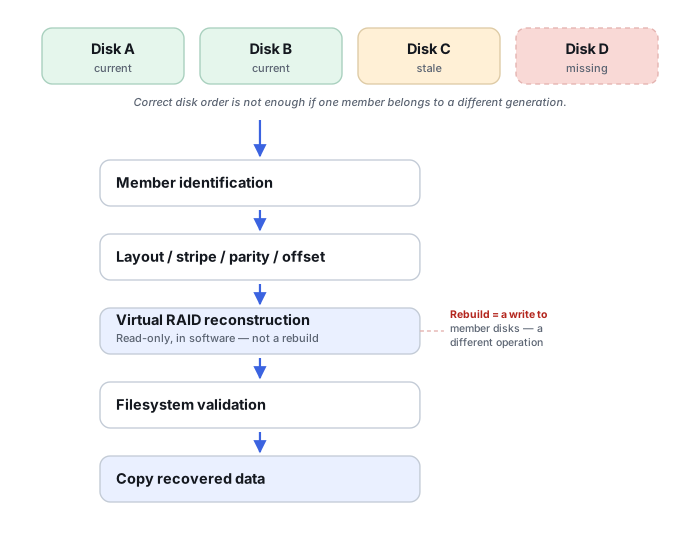
Before a rebuild starts, the surviving members normally describe one array state. Once rebuilding writes reconstructed stripes to a replacement or spare, the system may contain more than one generation of the array at the same time. If the process stops partway through, the replacement can be correct for some address ranges and irrelevant or stale for others.
This is why simply putting the old member back, restarting the rebuild, or declaring the replacement disk authoritative can all be wrong. The important evidence is the sequence of events: which disk dropped out first, what replacement was inserted, whether the array remained writable, how far the rebuild progressed, and what failed next.
A partial rebuild can also create a spatially mixed state rather than a single cutoff point: some address ranges on the replacement may already contain correctly reconstructed newer data while others were never touched by the rebuild at all. “Old member” and “new member” are therefore not always globally correct labels for an entire disk — the correct source can change region by region across the same drive.
What changes the recovery outlook
- Rebuild direction and progress. The regions already written to the replacement may contain useful reconstructed data even when the rebuild never completed.
- Whether the array accepted host writes during rebuild. If it did, old and new members may represent different points in time.
- The condition of the member that triggered the rebuild. A disk removed because of intermittent errors can still contain sectors that are unavailable anywhere else after another member fails.
- Subsequent rebuild attempts. Each additional write-capable attempt can create another state that has to be understood.
Cache and power loss can complicate the sequence further
RAID and SAN controllers commonly acknowledge a write to the host before it is physically persisted to the member disks. If the rebuild failed alongside a power event, the newest writes the host believed were committed may never have reached the disks at all — separately from whatever the rebuild itself did or did not finish. See RAID Metadata, Member State and Foreign Configurations for how controller cache and battery/capacitor state factor into that chronology.
What you can preserve safely
Keep every original member and every replacement involved in the rebuild. Record serial numbers, bay positions, controller messages, rebuild percentage if known, timestamps and the order of interventions. Do not assume a disk is useless merely because the controller marked it failed or because it was removed earlier.
When the members are readable, recovery is normally performed from images or other preserved copies and the competing states are tested virtually. The goal is not to finish the interrupted rebuild on the original disks; it is to determine which member or region supplies the most coherent data for each part of the logical array.
The general approach
Recovery normally starts by preserving the current member set, logs and configuration, then imaging the relevant disks — including a partially rebuilt replacement when it may contain unique state. Reconstruction then determines the correct layout and which member or regions should be treated as authoritative before a virtual array is assembled. This kind of forensic reconstruction is well outside what any consumer or NAS-vendor rebuild tool is designed to figure out on its own.
The moment a rebuild fails, stalls, or throws errors partway through, prevent further rebuild writes when this can be done through a controlled, preserving procedure — don't retry and don't let it attempt the rebuild again automatically merely as a diagnostic experiment. If stopping the process itself would require a risky power or configuration action on an unstable enterprise array, document the state first and follow platform-specific guidance rather than forcing a hard stop. Additional rebuild attempts can change member state and overwrite evidence of the first attempt's progress, reducing the ability to reconstruct the pre-intervention timeline.
For the underlying RAID layouts and failure-tolerance concepts, start with RAID Array Failure. Imaging every disk before attempting any reconstruction, mentioned above, is exactly what professional imaging hardware is built for when one of those disks is also struggling to read cleanly. See Drive Cages & RAID Enclosures for what to check before buying one, if this is prompting a replacement. If the array needs cleanroom-level physical recovery rather than another rebuild attempt, our directory of major physical recovery providers covers the large international networks. For the region-aware reconstruction this scenario specifically calls for, see Recovering After an Interrupted RAID Rebuild and RAID Metadata, Member State and Foreign Configurations.
This page describes the general situation, not a guaranteed fix for your specific case. If you'd rather have someone experienced take a look before you try anything, see what a hands-on evaluation looks like.