RAID Metadata, Member State and Foreign Configurations
A readable member disk is not the same as a current one — RAID metadata records chronology as much as geometry, and a controller calling a disk “foreign” is telling you something useful, not warning you it failed. Before any import, clear or reset, establish which physical disk is which, what role each one held, and when.
- Readable metadata shows what a member last recorded, not that it belongs to the array’s current generation.
- Physical bay, serial or WWN, controller address, metadata role and candidate role are separate facts; an unknown role stays recorded as unknown.
- Keep every potentially relevant disk, including removed, replacement and spare disks; an “extra” disk is not automatically disposable.
- Import and clear are maintenance actions for specific situations, not read-only diagnosis; valid foreign metadata does not prove the data is current or can be unlocked.
- Record what can be read safely; do not power or restart unstable hardware just to complete the record.
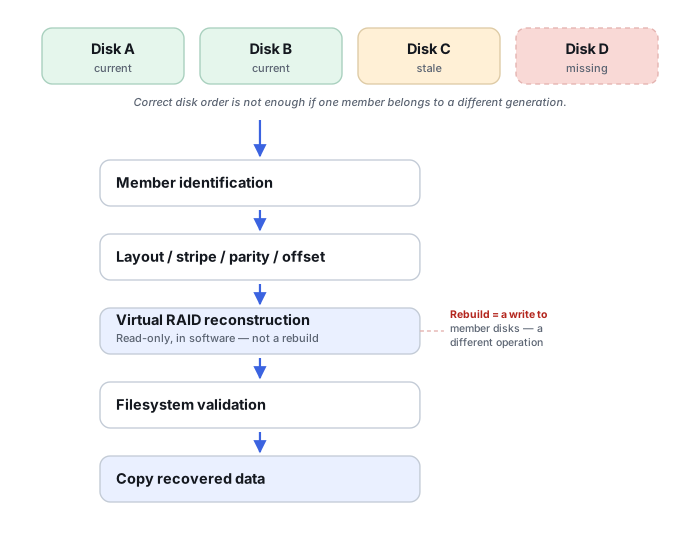
Metadata describes state, not just layout
Linux md, for example, recognizes several on-disk metadata versions (0.90, 1.0, 1.1, 1.2, and external metadata formats), and for each array and member it tracks more than structure: the array’s UUID, each device’s role in the array, and the offset where that device’s array data starts, which is often not LBA 0 (Linux md admin guide). Members also carry an event count: mdadm, for instance, relies on it when deciding whether a returning device can be re-added, and offers a force option to assemble an array “even if the metadata on some devices appears to be out-of-date” (mdadm(8)). Readable metadata therefore never by itself guarantees that a member belongs to the array’s current generation. RAID metadata is not only geometry — it is evidence about chronology and member state. Hardware controllers and NAS appliances keep their own formats with their own fields; how to compare generations across them is covered in Storage Metadata Generations and Consistency.
Foreign configuration is not a failure signal
Hardware controllers such as Dell’s PERC line can detect existing RAID metadata on a disk that does not match the controller’s current active configuration — after disks or a virtual disk move between systems, a controller is installed or replaced, or a RAID set goes offline and later returns (Dell knowledge base article 000122457). “Foreign” does not mean “failed disk.” It means the controller sees RAID metadata that is not synchronized with its current state. Before any import or clear action, record the virtual-disk state, record physical-disk state and slot positions, preserve controller logs, and establish whether every expected member is actually present. The foreign status is one more field in the member record below, not a verdict about the disk.
Bay order is a clue, not proof
Preserve physical bay position, but verify member role independently using serial number, WWN, controller slot, md role, event counters, controller metadata, partition pattern, logs and data signatures. Bay order can mislead after drives are moved between bays, an expansion enclosure re-enumerates, a controller replacement renumbers devices, or an old removed disk gets reinserted.
It helps to keep one compact record per disk in which each of the following is a separate field. They describe different things, they can disagree, and one must not be filled in from another. Where a value is not known, write “unknown” rather than a best guess; a guessed role that later looks like a recorded fact is harder to correct than an honest gap.
Scroll horizontally to see the full table →
| Field | What it records | What it does not establish |
|---|---|---|
| Physical location | Enclosure, bay or slot where the disk was found, and when and by whom that was observed | The disk’s logical role, or where it sat before earlier moves |
| Disk identity | Serial number and WWN, read from the disk label or the device itself | Which array or generation the disk belongs to |
| Controller-reported address | Port, slot, device ID or enumeration the controller or host showed at the time | A stable identity; numbering can change after re-enumeration or controller replacement |
| Metadata role | The role, array identifier and counters the disk’s own metadata records, with the format they were read from | That this role is current; a stale member keeps its old metadata |
| Role in a candidate reconstruction | The position a specific candidate layout assigns to the disk, labelled with that candidate | That the candidate is right; it stays a hypothesis until validated |
| History | Original, replacement, spare or previously removed; when it was removed or added; whether it stayed writable elsewhere afterwards | Physical health; a healthy disk can be stale and a failing one can be current |
Illustrative example: bay positions recorded, member order not confirmed
Disks arrive labelled with the bay numbers they were pulled from, and the owner is not sure whether any were swapped during earlier troubleshooting.
The bay labels are a historical clue about one moment, not proof of member order. Each disk’s metadata, data signatures on its image and any surviving controller or system logs can support or contradict a candidate role.
Record bay, serial or WWN, and metadata role as separate fields, mark unconfirmed roles as unknown, and test candidate orders on images. Do not rearrange the original disks in the enclosure or boot the controller with a different order to see what it accepts.
Parity consistency can support or rule out some candidates, but there is no guarantee that it alone establishes a unique member order, especially with stale members or few distinctive data structures. Some roles may stay unconfirmed.
Assembling and testing candidates in general is described in RAID Reconstruction Basics.
Keep every potentially relevant disk
Keep all disks that may have belonged to the array at any point: the current members, the original disks that were replaced, replacement and spare disks, and any disk removed earlier. A disk that seems surplus after a replacement can be the only source for a region or a moment that the current members no longer hold — for example, a member removed before a failed rebuild, as discussed in Recovering After an Interrupted RAID Rebuild. An “extra” disk is not automatically a disposable spare.
For each one, record its history separately from its physical health: when it left the array, whether it remained writable afterwards (for example, reused, mounted elsewhere or added to another array), and who handled it. A disk that was removed in good condition but later written to is a different piece of evidence from a failing disk that was never touched again.
Controller metadata is evidence, not disposable setup
Controller configuration can be as much a record as the disks. HP’s Array Configuration Utility guide for Smart Array controllers, for example, describes its Clear Configuration task as deleting all logical drives connected to the controller, returning the arrays to unassigned physical drives and resetting controller settings to defaults, with data loss on those logical drives (HP Array Configuration Utility User Guide). Before any controller reset or reconfiguration, preserve what can be read safely: logical-drive definitions, RAID level, member slots and serials, spare assignments, controller logs, and cache or battery/capacitor state, as an exported configuration, logs or screenshots of screens that are already available.
Do not restart, re-power or keep running unstable hardware only to make the record complete; each start can change state or worsen a failing component. Recording that a value is missing, and why it could not be read, is better than an unjustified intervention to obtain it.
Import or clear: different situations, different right answers
Dell’s PERC guidance describes import and clear as answers to different maintenance situations (Dell KB 000122457). Import is described for cases where the original RAID configuration is expected to be intact and the entire virtual disk is offline or failed with foreign disks detected, with a preview of the foreign configuration first. Clearing is described for a single foreign disk while the array remains online or degraded, so that the disk is not imported as a competing array state. The same article warns that importing at the wrong time may result in data loss. These are PERC-specific descriptions of routine administration, not permission to run either action during a recovery.
Neither action is read-only and neither is universally safe: clearing can remove evidence, and importing can make the controller act on the wrong generation. In a recovery, consider either one only after there are sufficient records of every member’s role and generation, the expected member set, the controller and cache state, and, where the array or its disks are locked or secured, the unlock dependencies (see Encryption Key Hierarchies and Recovery Metadata). Valid foreign metadata confirms neither that the data on those disks is current nor that an encrypted volume can be unlocked. Do not import or clear foreign metadata until the complete member state is understood.
Cache can decide the fate of the newest writes
RAID and SAN controllers frequently acknowledge a write to the host before that write is physically persisted to the member disks, so “the host believes the write committed” and “the write reached the disks” are separate facts. Write-back versus write-through mode, battery- or flash-backed cache, capacitor health, dirty cache data held after a crash, controller replacement, cache migration during failover, and the exact sequence of a power-loss event all affect the answer. How a given controller keeps or releases such data is model-specific and has to be checked in that controller’s own documentation. The newest data acknowledged just before a failure may never have reached the member disks at all, even when the RAID geometry itself is perfectly recoverable.
A disk a controller marks as foreign commonly carries completely valid array metadata. The risk is acting on it — importing or clearing — before the full member state across every disk is understood.
Technical references: Linux md admin guide — metadata versions 0.90, 1.0, 1.1, 1.2 and external, per-device role and data offset, array UUID · mdadm(8) — superblock location per 1.x version, data offset gap, re-add based on the device’s event count, and force assembly with out-of-date metadata · Dell KB 000122457 — what a PERC foreign configuration is, its causes, when import or clear is described, preview, and the data-loss warning · HP Array Configuration Utility User Guide — what Clear Configuration deletes and resets on Smart Array controllers. The md sources describe Linux software RAID only; the Dell and HP documents are product-specific (PERC and older Smart Array tooling), and other controllers and newer firmware or tools can behave differently.
Related: RAID Reconstruction Basics · Storage Metadata Generations and Consistency · Recovering After an Interrupted RAID Rebuild · Reconstructing NAS Storage Stacks · Encryption Key Hierarchies and Recovery Metadata · RAID Array Failure