Ransomware Encryption
Ransomware encryption is different from losing the password to your own encrypted volume. Depending on the ransomware family, keys may be generated locally or remotely, reused, exposed by an implementation flaw, or unavailable without the attacker; incident containment and precise identification come before assumptions about decryptability.
Ransomware encryption: what should you do next?
Answer one question about the current state. The result suggests the safer next step rather than diagnosing the failure.
Is the affected system still online, writable or potentially encrypting/synchronizing more data?
Isolate further writes and propagation.
Disconnect affected writable paths as appropriate and preserve encrypted files, ransom notes, logs and backups. Do not destroy evidence by reinstalling first.
Preserve encrypted data and identify the family.
Work from copies, identify the ransomware variant, check trustworthy decryptor resources and backups, and keep originals in case a future decryptor becomes available.
This guide classifies the next recovery action from observable information. It does not diagnose hardware condition or estimate a percentage chance of recovery.
What's actually happening
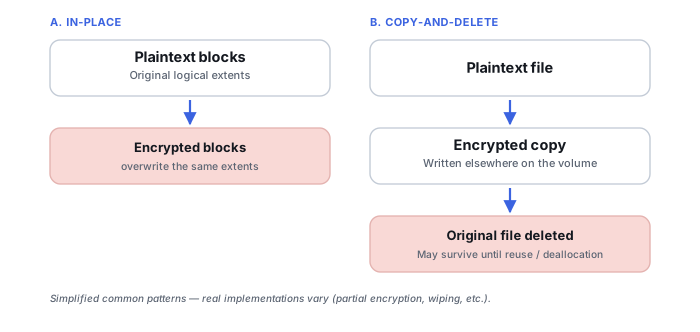
Ransomware may encrypt selected files, accessible shares, backups or larger portions of a system using family-specific key handling, then leave a ransom note. Some variants overwrite files in place; others create encrypted copies and delete originals; behavior varies enough that recovery options cannot be inferred from the ransom note alone. Some ransomware families have implementation flaws that researchers have already broken, meaning a free decryptor already exists for that specific strain; more recent, well-built ransomware generally doesn't have a known weakness.
How recoverable this really is
Varies enormously by which specific ransomware strain is involved, which is exactly why identifying it precisely — rather than assuming the situation is hopeless, or assuming it's easily fixable — is the real first step. There are three genuinely different recovery paths here, and which ones actually apply depends on the strain and what it did: decrypting the encrypted data, where a valid family/key/decryptor path actually exists; restoring an older or plaintext state from backups, snapshots, cloud versions or other replicas the attack didn't reach; and recovering deleted original storage objects, but only when the ransomware's own workflow created a new encrypted copy and left the original recoverable rather than overwriting it in place. Some well-known older strains have free public decryptors; well-implemented current ones generally don't. Where the deleted-original path applies, it works similarly in principle to the accidental deletion scenario, though this varies by ransomware family.
Restoring files does not establish how the intrusion occurred or whether credentials and data were stolen. A business incident may require security investigation, containment and legal or regulatory handling in parallel with data recovery.
Isolate affected systems from networks and shared storage, but preserve the encrypted data and relevant metadata. Check genuinely independent backups before reconnecting them. Do not bulk-rename files, run unknown “decryptors,” wipe the affected systems or overwrite encrypted originals during experimentation. If a reputable decryptor exists, test it on copies first and validate the output rather than assuming a successful run means every file is intact.
Preserve recovery options
The useful evidence can include ransom-note text, encrypted filename extensions, a small sample of encrypted files, matching unencrypted originals, logs and the affected system's timeline. Identification should be based on evidence rather than the extension alone, because extensions and ransom-note names can be reused.
Separate encryption from the other damage
A ransomware incident can involve more than encrypted files. Some families delete originals after creating encrypted replacements; others modify files in place, damage backups, remove snapshots, steal data, or leave partially encrypted large files. Recovery therefore depends on what happened to each data source, not simply on whether a decryptor exists.
Identify the exact variant, not just the extension
A file extension alone is weak evidence — it can be copied by unrelated malware, customized by ransomware-as-a-service affiliates, or shared across multiple variants by coincidence. A ransom note is stronger but still not definitive, since branding, templates and contact addresses get reused and imitated by copycats. The identification that actually matters combines the ransom note, an encrypted sample, file marker bytes, any victim ID, and — where available — a malware sample or logs. Services like ID Ransomware and No More Ransom's Crypto Sheriff work from exactly this kind of evidence, and family identification alone is sometimes still not enough: a decryptor built for one version or key-handling mode of a family can fail against another.
Why a decryptor may exist at all
Free decryptors usually exist because of an implementation flaw, weak or predictable key generation, a static or reused key, an exposed or leaked private key, seized attacker infrastructure, or an attacker releasing keys after a family shuts down. A strain with no known decryptor today can become decryptable later if any of these happen — which is exactly why No More Ransom recommends checking back rather than treating a "no known method" result as final.
How was the plaintext actually destroyed?
Some ransomware encrypts a file in place, overwriting the original content directly — in that case, no plaintext remains in those logical sectors for deleted-file recovery to find, and only backups, snapshots or a working decryptor can help. Other ransomware writes a new encrypted copy and deletes the original afterward, which creates two independent recovery paths: decrypting the copy, or recovering the deleted original if it hasn't been overwritten yet. Recoverability of that deleted original depends on overwrite history, the storage type's deallocation/TRIM behavior, the file system in use, and whatever writes happened afterward; SSD TRIM can sharply reduce this path but it isn't the only variable, and the same question can play out differently on a drive that syncs to the cloud — see Cloud Storage & Sync Data Loss if the encrypted state already propagated to a sync provider, since the useful recovery source there is often a previous cloud revision rather than anything on the local disk. Some ransomware also encrypts only parts of a large file, leaving it partially recoverable through application-aware repair even without a working decryptor. Before assuming decryption is the only path, it's worth determining which of these actually happened.
Decryptor output still needs to be validated
A decryptor reporting success is not proof that a file is intact — even a correctly matched, legitimate tool can fail on an unsupported sub-variant or produce partially damaged output, especially with partial encryption in play. Test any decryptor on copies first, then validate the result by opening it in the relevant application, checking file signatures and checksums, or otherwise confirming the content is actually usable before running it against everything.
The general approach
Isolate the affected system from any network immediately to stop further spread, identify the specific ransomware family from the ransom note or the file extension it appended (projects like "No More Ransom" maintain identification tools and known decryptors), and check for backups untouched by the attack before considering anything else.
Don't pay the ransom as a first move, and don't reinstall the operating system or reformat the affected drives before an expert has looked at what's there. Paying doesn't guarantee a working key even when the attacker is willing to provide one, and a clean reinstall destroys exactly the remnants — deleted originals, ransomware artifacts needed for identification — that a real recovery attempt would need intact.
A backup that's genuinely offline or offsite when the infection hits — not just a second folder on the same network — is the most reliable defense against this scenario specifically, since ransomware that can reach a connected drive will generally encrypt that too. See Backup Drive Picks. For the deeper mechanics, see Ransomware Identification and Decryptor Validation, Ransomware Encryption Patterns and Recovery Paths and Encryption and Ransomware Recovery Tools. A locked-out owner rather than an attacker is a related but different problem — see Locked Out of an Encrypted Volume.
This page describes the general situation, not a guaranteed fix for your specific case. If you'd rather have someone experienced take a look before you try anything, see what a hands-on evaluation looks like.