Locked Out of an Encrypted Volume
An encrypted volume can be inaccessible because required key material is unavailable, because encryption metadata is damaged, or because the storage underneath it is incomplete or unstable. First separate a healthy-but-locked volume from a damaged encrypted source — the two are very different problems, and neither one is solved by brute-forcing modern encryption.
Encrypted volume inaccessible: what should you do next?
Answer one question about the current state. The result suggests the safer next step rather than diagnosing the failure.
Do you have the required password, recovery key, key file or another valid unlock method?
Preserve the encrypted source before repair.
Keep recovery credentials separate and work from a preserved copy where possible. Unlocking and file-system repair are different stages.
Key recovery becomes the first problem.
Do not format, initialize or overwrite the encrypted container. Search for legitimate recovery keys, key files, escrowed credentials and backups before changing the source.
This guide classifies the next recovery action from observable information. It does not diagnose hardware condition or estimate a percentage chance of recovery.
What's actually happening
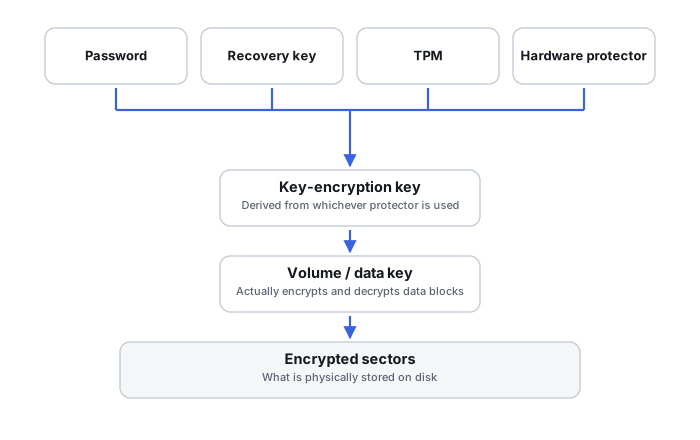
Modern volume encryption — BitLocker, FileVault, VeraCrypt, LUKS, and similar — normally separates the key that actually encrypts stored data from the credential a person enters. Passwords, recovery passwords, key files, TPM or Secure Enclave state, and tokens are used to derive, unwrap or authorize access to a protected volume key, rather than serving as that key directly. This is deliberately one-way without a valid unlock path; encryption that could be casually bypassed wouldn't be protecting anything. Losing the unlock path and losing the encrypted data underneath it are therefore different failure modes: a volume can be perfectly intact ciphertext with no usable key, or it can have a valid key with damaged metadata or an unstable source underneath.
How recoverable this really is
This is genuinely a different category from the rest of this catalog, but it is not a single outcome. Finding a valid recovery credential can solve the key-access branch, but it does not by itself prove that the encryption metadata, the underlying storage or the file system is intact — classify the problem as missing key material, damaged encryption metadata, a hardware-bound unlock failure, or damaged underlying storage before assuming which branch applies. If no key exists anywhere and the password is genuinely forgotten, there is no reliable technical path back into strong modern encryption. Brute-forcing a properly generated password or a real encryption key isn't practically feasible with current computing power, regardless of what recovery software claims to offer.
Separate access failure from data loss
An encrypted volume can become inaccessible because the key or password is unavailable, because the encryption metadata is damaged, because an outer partition/container layer is wrong, or because the underlying device is unstable. These are very different recovery problems. A healthy encrypted payload without the required key material is not a file-system recovery problem, while a known-good key does not help if critical encrypted sectors cannot be read.
What should be preserved
Preserve the entire encrypted source or an image of it, not just the files that appear visible around it. Also preserve recovery keys, key files, TPM-related recovery information, configuration records and any old system backups that may contain encryption metadata. For BitLocker, FileVault, LUKS, VeraCrypt and similar systems, the exact information needed differs, so generic “decrypt” or repair attempts should not be written back to the only copy.
What you can check safely
Identify the encryption technology, whether the volume was previously unlocking normally, what changed immediately before failure, and whether the device still reads consistently. Distinguish a rejected credential from a volume that is not recognized at all. That distinction often determines whether the next investigation belongs at the key-management layer, encryption-metadata layer, file-system layer or physical acquisition layer.
Identify the key hierarchy before assuming the password is the key
BitLocker, FileVault and LUKS all separate the password or recovery credential a person actually holds from the key that encrypts the data itself. BitLocker protects its Full Volume Encryption Key (FVEK) with a Volume Master Key (VMK), which is in turn protected by one or more key protectors. FileVault wraps an APFS volume encryption key with a key-encryption key tied to the user's password and, on modern Macs, hardware. LUKS keeps a volume key behind one or more keyslots, unlocked by a passphrase, key file or token. In every case, the password is an input into that hierarchy, not the raw key — which is why more than one valid unlock path can exist for the same volume at once.
A correct credential can fail when encryption metadata is damaged
“The password is correct but the drive will not unlock” is not proof that the password is wrong. On BitLocker, severe metadata corruption can mean a saved recovery password is no longer enough on its own — Microsoft's own repair workflow can additionally require the volume's specific key package. LUKS versions differ: LUKS2 keeps two metadata copies, while LUKS1 uses a different header and keyslot layout, so identify the format before reasoning about redundancy. In either version, surviving metadata is not the same thing as surviving usable keyslot material — keyslot-area damage can leave a correct passphrase with nothing left to unlock. Encryption metadata is recovery-critical evidence in its own right, separate from both the credential and the ciphertext.
Original hardware may matter
Some unlock paths are bound to specific hardware rather than to the password alone. A TPM-based BitLocker protector checks the measured state of the boot environment, so a firmware or configuration change can trigger a recovery prompt that has nothing to do with disk or file corruption. On modern Apple silicon and T2 Macs, FileVault key handling is backed by the Secure Enclave, combining the password with a hardware UID that never leaves that hardware — so an image of the removed storage alone may not be enough to reach the key, and preserving the original computer can matter as much as preserving the drive.
Encrypted source first, filesystem second
A file-system repair tool has no way to recognize ciphertext as a valid NTFS, APFS or ext4 structure. On unstable media, the safer order is to image the encrypted source, recover enough encrypted sectors to work with, unlock or decrypt, and only then attempt file-system reconstruction — unlocking successfully is not proof that the file system underneath is healthy.
The general approach
First classify the problem as missing key material, damaged encryption metadata, a hardware-bound unlock failure, or damaged underlying storage — credential search dominates only the first branch. Where that branch applies, the productive work is almost entirely about locating an existing key or credential: checking cloud account recovery-key backups, an organization's IT or security team, old printouts, or password manager entries. Where a real credential genuinely can't be found, being honest about that up front matters more than offering a service that can't actually deliver.
Be wary of any service or software claiming it can "decrypt" or "crack" a properly encrypted modern volume without the key. That's not realistically possible for well-implemented encryption, and offers to do it are usually either ineffective or a scam.
For the underlying concepts, see Recovery Key and FileVault, and for the full key-hierarchy picture, see Encryption Key Hierarchies and Recovery Metadata, BitLocker Key Protectors and Damaged-Volume Recovery, FileVault, APFS Encryption and Hardware-Bound Keys and LUKS Headers, Keyslots and Volume-Key Recovery. If the missing credential belongs to a cryptocurrency wallet rather than a disk volume, see Cryptocurrency Wallet Recovery; attacker-controlled encryption is a separate case covered under Ransomware Encryption.
This page describes the general situation, not a guaranteed fix for your specific case. If you'd rather have someone experienced take a look before you try anything, see what a hands-on evaluation looks like.