What a Write Blocker Actually Does
A write blocker controls host-originated modification along a specific, supported path: it does not make a copy by itself, it does not make a failing drive stable, and it does not stop every internal process the storage controller might run on its own. Knowing exactly what is controlled — and what is not — is what makes the protection meaningful rather than assumed.
- A write blocker controls host-originated writes on a specific path; it doesn't make a copy by itself.
- It doesn't stabilize a failing drive or stop the controller's own internal activity.
- Support proven for one interface doesn't carry over to another, or through extra adapters.
- Verify the exact setup on disposable test media before connecting the source that matters.
- Protect the image as well: keep a read-only master and separate working copies.
Where a write blocker sits
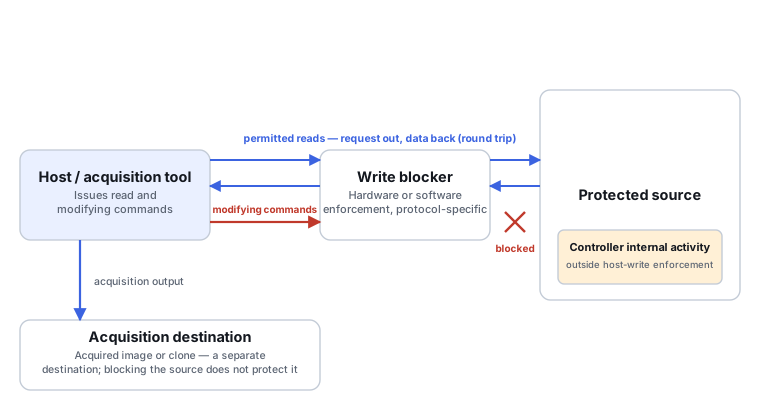
A write blocker sits between the host system and the source, on the path every command takes. A read is a round trip through that path: the host's read request travels host → blocker → source, and the data or status the source returns travels back source → blocker → host; both directions are permitted. Modifying commands originating from the host are intercepted at the blocker and do not reach the source, within the scope of whatever protocol and command set the specific blocker supports. The destination where an acquisition tool writes its output — an image file or a clone target — sits outside this protected path entirely; it is a separate device or file that the host writes to directly, not something the blocker touches.
Which changes need to be controlled
An ordinary WRITE command is the obvious case, but it is not the only one. Depending on the interface and its implementation, other modifying operations exist too — discard/TRIM on SSDs being a common example — and which commands count as "modifying" depends on the specific protocol (ATA, SCSI, NVMe) and how a given blocker implements its policy for that protocol. There is no single command blacklist that is automatically sufficient across every interface and every device; what's actually controlled is scoped to what the blocker was built and verified to handle.
Hardware and software enforcement
A hardware write blocker enforces the restriction in a physical device sitting on the interface path, with a scope defined by the interfaces and command sets it was built for. A software write blocker instead enforces the restriction at a software layer — historically by intercepting disk I/O at the operating-system or BIOS level — which means its effectiveness depends on the operating system, the driver stack, when exactly it was activated relative to the device being attached, and whether an alternative path to the device exists that bypasses that layer. A read-only filesystem mount is a different control again, and a weaker one in scope: it constrains how a mounted filesystem is accessed through that specific mount, but it is not the same guarantee as blocking modifying commands to the underlying device itself, and it should not be treated as equivalent to full device-level write blocking.
What the blocker cannot preserve
Host-write blocking controls commands originating from the host — it does not freeze everything happening inside the device. Internal logs, flash remapping, garbage collection and other autonomous controller activity can continue depending on the device's own controller and power state, and not every such process is guaranteed to occur on every read; this varies by device. A host-level block also does not undo a TRIM/discard command the device already accepted before the block was in place, and it cannot bring back data the device has already discarded as a result.
Interfaces, bridges and device visibility
Verified support for one interface does not establish support for another — a blocker proven on SATA is not automatically proven on NVMe, SAS or USB. An adapter chain between the blocker and the device can itself change what passes through: capacity and sector-size presentation, command translation, and overall device status can all be affected by an intermediate bridge. The device's original bridge or enclosure may also be performing encryption or address translation that is required to interpret the data correctly — bypassing it without first evaluating that is not a default-safe move, even in the name of "simpler" direct access.
Verify the setup before the valuable source
Before connecting the source that actually matters, verify the exact combination — interface, device model, firmware version, operating system and blocker — on disposable test media with a known baseline. Confirm which reads succeed and which write attempts are actually blocked, following a documented test approach rather than improvising. The valuable original is not the place to find out, through trial and error, whether a particular setup behaves the way you assumed; destructive validation belongs on test media, not on the source you're trying to protect.
Protect the copy as well as the source
Once acquisition produces an image or clone, that copy needs its own handling: a master image kept read-only and archived, working copies kept separate from it, and any export kept separate again. Write-blocking the source says nothing about what happens to the image afterward — if that image is later mounted writable, or repair tools are run directly against it, nothing about the original blocking setup protects it at that point. The protection boundary is the source, not everything downstream of it.
Scroll horizontally to see the full diagram →
When the level of protection matters
Personal data recovery and formal evidence handling call for different levels of documentation around the same basic control. A checklist adequate for routine personal recovery work is not the same thing as a forensic process with its own documentation, chain-of-custody and verification requirements — treating a casual household setup as equivalent to a forensic one (or vice versa) misrepresents what was actually done.
Scroll horizontally to see the full table →
| Dimension | Hardware blocker | Software blocker | Read-only filesystem mount |
|---|---|---|---|
| Enforcement layer | A physical device on the interface path | OS, driver or BIOS-level interception | The filesystem driver's mount options |
| Activation timing | In place before the device is attached | Must be active before the device is attached or accessed | Set at mount time; the device may already be writable at a lower level |
| Alternative paths | None, if the device is only reachable through the blocker | Possible, if another driver or access path bypasses the interception layer | Likely — remounting, raw device access, or another tool can bypass it |
| Supported interfaces | Specific to what the hardware was built and tested for | Specific to what the software layer intercepts | Any filesystem the OS can mount; not an interface-level control |
| Command coverage | Scoped to the protocol commands it was verified against | Scoped to the commands the interception layer actually sees | Filesystem-level operations only, not raw device commands |
| Logs / version records | Device identity and firmware version, where supported | Software version and OS/driver versions | Not inherently a logged control |
| Effect on internal device activity | Does not guarantee prevention of autonomous controller changes | Does not guarantee prevention of autonomous controller changes | None by itself |
| Failure / unsupported behavior | Depends on the specific device; not safely assumed to fail closed | Depends on the specific layer and OS; not safely assumed to fail closed | A misconfigured or bypassed mount may simply allow writes |
Scroll horizontally to see the full table →
| Question | Record | Acceptance |
|---|---|---|
| What exactly is the source and the destination? | Model, serial, and role (source vs. destination) for each device | No ambiguity about which device is which at any point in the setup |
| What is the exact capacity and sector size? | Byte capacity and logical sector size as reported | Matches what's expected for that model, or the discrepancy is explained |
| What is the full interface chain? | Every adapter, bridge or enclosure between device and host | Each link identified, not just the first and last |
| What versions are in use? | Blocker firmware/software version, OS version | Recorded at the time of use, not assumed from memory |
| Where can the acquisition actually write? | Destination path(s) for the image and for logs | Confirmed writable and with sufficient space before starting |
| Is auto-mount a risk here? | Whether the OS's auto-mount policy was disabled or accounted for | Explicit, not assumed safe by default |
| Was the blocking behavior actually tested? | Test-media results for this exact configuration | A documented check, not just "it's a blocker so it must work" |
| Were any errors observed? | Any unexpected device behavior during setup | Logged, even if it didn't appear to affect the outcome |
A full reread-and-hash of an unstable original is not required just to fill in this checklist — use the acquisition's own progress and log data where a full verification pass would add unnecessary risk to the source.
The four training scenarios below work through specific setups.
Training scenario: deleted files on a stable SATA HDD
The drive is stable and responds normally; the goal is to recover deleted files without altering the source.
A compatible hardware or software blocker, verified against this interface before connecting the drive, is an appropriate control for this stable, well-understood case.
Acquire an image with logs of the setup and process, following Disk Imaging vs. Cloning for Data Recovery for how to choose the acquisition target.
Validate the image's integrity and scope. A blocked write path does not, by itself, prove the deleted files' bytes still exist on the source — that depends on what has happened to that space since deletion.
Training scenario: a USB external SSD
The drive is an external SSD in a USB enclosure; blocker and bridge support for this specific combination has not been confirmed.
Verified behavior on SATA does not transfer to USB or to this bridge chip; the combination needs its own check.
Verify the documented path on test media first, rather than assuming it behaves like a previously tested SATA setup.
Confirm capacity and sector-size presentation is correct, reads succeed, and documented modifying commands (including TRIM/discard where relevant) are actually handled as expected for this bridge.
Training scenario: a forensic acquisition
The acquisition needs documentation suitable for formal evidence handling, not just routine personal recovery.
Hardware/software identity and the full interface chain need to be recorded, and any relevant published test reports checked against the exact version and interface in use — not assumed to generalize.
Follow the documented chain-of-custody and verification process appropriate to the context, recording the setup as it actually was.
An image hash confirms the copy has stayed unchanged since it was made; it does not, by itself, prove every command class was covered by the blocking setup — those are separate claims.
Training scenario: a clicking HDD
The drive makes an audible clicking sound; a write blocker is attached ahead of an acquisition attempt.
Write blocking protects against host-originated modification; it does not make reading a mechanically distressed drive safe, and it says nothing about the drive's physical condition.
Pause ordinary acquisition and assess the mechanical symptoms before any further reads, per When Software Recovery Is No Longer Appropriate. Preserve any logs already obtained; specialized diagnosis or acquisition may be needed rather than continuing with the same setup.
Review whatever evidence and acquisition outcome already exist after that assessment; don't repeat power cycles or additional reads merely to test whether the blocker is working.
Technical references: NIST CFTT: Hardware Write Block — specifications and test reports; read the scope of the specific test and version before generalizing from it. NIST CFTT: Software Write Block — the software testing framework; note the date and platform it was written for. NIST: command-based testing methodology — why testing at the command level matters alongside checking final bytes; this body of work predates widespread NVMe adoption and should not be stretched to cover every modern NVMe command without separate verification.
Related: Disk Imaging vs. Cloning for Data Recovery · CHKDSK, fsck and First Aid: Repair vs. Recovery · Read Errors, Timeouts and Retries Explained