Corrupted or Deleted Video from a Memory Card
Video files from cameras and drones fail in a couple of very specific, very common ways that photo and document recovery mostly doesn't run into — and the fix usually depends on recognizing which of those it actually is.
Video memory card problem: what should you do next?
Answer one question about the current state. The result suggests the safer next step rather than diagnosing the failure.
Has the card been reused, reformatted, or had new video/photos written after the loss?
Overwrite and fragmentation become central.
Stop using the card immediately. Preserve an image and expect that large fragmented video may require structure-aware reconstruction rather than simple carving.
Image the card before recovery.
Preserve the complete card, then attempt file-system recovery before raw carving. Unfinalized video may also require container repair after extraction.
This guide classifies the next recovery action from observable information. It does not diagnose hardware condition or estimate a percentage chance of recovery.
What's actually happening
Two distinct failure patterns show up constantly here. The first is deletion or card corruption, which behaves like the general cases elsewhere in this catalog — the file's directory entry is gone or the card's file system is confused, but the underlying data is usually intact. The second, specific to video, is the file that exists but won't play or shows as zero bytes: many recorders using conventional non-fragmented MP4/MOV finalize important movie/sample metadata — the index describing how the file's audio and video streams fit together — only when recording stops normally. Other recorders and fragmented formats write these structures differently. If recording is interrupted by the battery dying, the card being pulled, or the card filling up mid-shot, that final index may never get written on a conventional recorder, leaving a file that can contain substantial valid video data but no map telling a player how to read it.
How recoverable this really is
Results vary. A deleted contiguous clip on a card that has not been reused may be straightforward, but large video files are often fragmented, and simple signature carving can recover incomplete or unplayable output when allocation metadata is gone. A clip interrupted before finalization may contain much of its media stream but lack required MP4/MOV metadata; whether it can be repaired depends on the camera, codec, fragmentation and how much of the recording was actually committed to the card.
Why video is harder than ordinary photo recovery
Large video recordings are more likely to be fragmented, and many cameras write media using container structures that are finalized only when recording stops normally. A power loss, crash or card removal can therefore leave a file whose video payload exists but whose MP4/MOV or vendor-specific metadata is incomplete. Simple signature carving may find the beginning of such a recording without reconstructing all of its fragments or playable structure.
What changes recoverability
Card reuse after the incident is often decisive. New recordings can overwrite both file-system metadata and fragments of older video. The camera model, recording format, codec, allocation pattern and whether the recording was completed normally also matter. A reference clip recorded by the same camera with the same settings can sometimes be useful later for understanding the expected container structure, but it should be created on a different card.
What you can check safely
Stop recording to the affected card and, if the card reads stably, preserve a sector image before scanning. Record the camera/device model, resolution and codec settings, approximate clip lengths and what happened at the moment of loss. If the card disconnects, becomes extremely slow or produces read errors, the problem is no longer merely deleted-video recovery; acquisition becomes the priority.
“moov” is mapping metadata, not the video payload
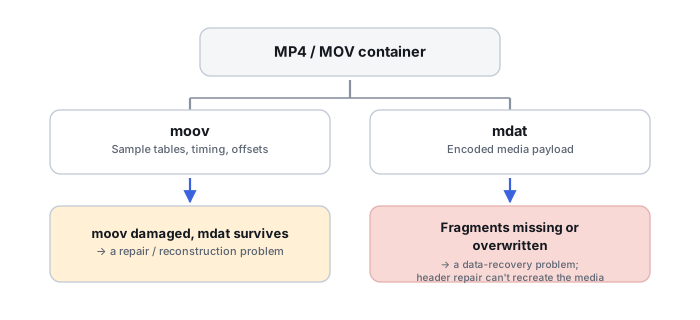
The common phrase “the video's header is missing” oversimplifies what's actually gone. The moov atom is a hierarchy of metadata — track descriptions, sample tables, timing and chunk offsets — that describes how to locate and play the media samples; it isn't the media data itself. A recording can lose or fail to finalize its moov while substantial media payload remains present — but the absence of moov does not by itself prove that every sample was successfully written, retained, correctly ordered or recoverable; the surviving payload still has to be checked for completeness and correct reconstruction. This page asks whether the correct video bytes can be reconstructed from the memory card in the first place; once a complete candidate file already exists and that storage-recovery question is settled, container diagnosis and repair belong to Corrupted Video File (MP4/MOV Won't Play), which covers the unsupported-codec branch, interrupted-finalization classification and full container-repair workflow in depth.
Media payload can survive even when the reconstructed container is not yet playable
MP4/MOV media samples are stored in one or more media-data (mdat) regions, while metadata describes how those samples belong to tracks and time, and Apple's own documentation is explicit that this payload is only understandable through the metadata stored in moov. Losing the map without losing the payload is why a file that's clearly full of data — correct size, non-zero, obviously not empty — can still be completely unplayable; it does not by itself prove the payload was reassembled correctly, only that a repair attempt is worth making.
Not every camera fragments the same way, and that matters for carving
A normal MP4/MOV file typically finalizes its metadata in one place at the end of recording, which is exactly what an interrupted recording leaves incomplete; a fragmented MP4 instead interleaves metadata with each chunk of media throughout the file, so it can remain decodable even after an abrupt interruption. Knowing which style a camera uses matters here mainly because it changes why carving may fail and what a reconstructed candidate file should look like — the header-repair mechanics themselves, including using a reference clip to rebuild expected structure, belong to Corrupted Video File (MP4/MOV Won't Play).
Filesystem fragment reconstruction comes before atom repair
A large, fragmented recording needs its extents correctly reassembled by filesystem-aware recovery before container repair can do anything useful — repairing a moov atom on top of an incompletely or incorrectly reassembled file just produces a differently broken result. Recover the file's true extent layout first, and use the reassembled result to validate that reconstruction actually worked; treat header/container repair itself as the separate second-step job covered next door.
The general approach
For straightforward deletion, standard recovery scanning works the same way it does for any other file type. For files with a missing or damaged index, the goal at this stage is reconstructing a complete, correctly ordered candidate file from the card — fragment-aware carving or file-system recovery rather than simple signature carving. Once that candidate exists, dedicated header/container repair, including using a known-good reference file from the same camera model, is the job covered in Corrupted Video File (MP4/MOV Won't Play), a step generic recovery software typically doesn't attempt at all.
Stop recording and remove the card as soon as something looks wrong, rather than continuing to shoot on it "since it still seems to work." Every additional write, including the camera automatically re-indexing or attempting to repair the card itself, is a chance to overwrite the very data a proper recovery would need.
For the straightforward-deletion case, a free scan is usually enough to check — see free vs. paid recovery software or the full directory of recovery software by vendor. Once a complete candidate file exists and the container itself won't play, see Corrupted Video File (MP4/MOV Won't Play) and the deeper mechanics at MP4 and MOV Container Repair; for the storage-side fragmentation work covered here, see Recovering Fragmented Video from Memory Cards. A meaningful share of cases like this one trace back to the card itself, not just how it was handled — see Memory Card Care & Picks for what actually reduces the odds of ending up here again.
This page describes the general situation, not a guaranteed fix for your specific case. If you'd rather have someone experienced take a look before you try anything, see what a hands-on evaluation looks like.