MP4 and MOV Container Repair
A video file can contain fully intact compressed media while completely lacking the sample tables and timing metadata that map those bytes into a playable track — the payload and the map are separate structures, and losing one does not mean losing the other.
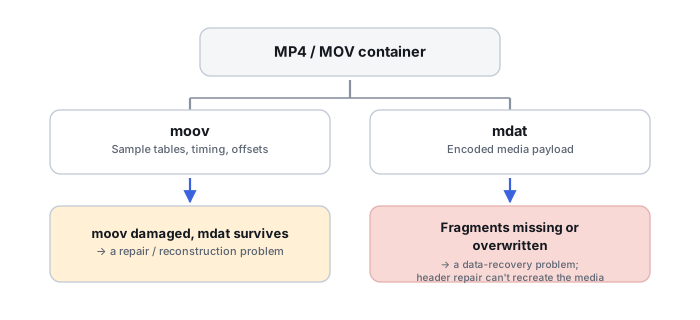
Atoms and boxes are the basic units of the format
Apple documents MOV/MP4 as built from atoms (also called boxes), and a simplified file typically runs ftyp, then either moov or mdat first, followed by whichever of the two comes second, depending on how the recording software wrote it. mdat holds the actual media payload; moov holds the metadata describing how to interpret those samples. Apple states plainly that media data in mdat is understandable specifically through the metadata stored in moov — that relationship is the single technical fact that explains almost every unfinished-recording case in this category.
moov is a hierarchy, not simply “the header”
The common phrase “the MP4 header is missing” is convenient shorthand but imprecise: moov is a hierarchical container holding a movie header, tracks, media descriptions, sample tables, timing information, and chunk-to-sample mapping — the actual media bytes live elsewhere, inside mdat. A more accurate description of an unfinished recording is that it contains media payload but lacks the movie metadata and sample tables needed to locate and time those samples correctly.
Sample tables are a logical mapping layer, much like a filesystem extent map
The movie metadata's sample tables describe sample sizes, sample timing, chunk layout, sample-to-chunk mapping, key frames, and byte offsets into the media data. Resolving a given frame or sample number therefore means walking through the sample table to a chunk, then to a byte offset inside mdat. A damaged moov is structurally analogous to a filesystem losing its extent map: the payload survives untouched, but the mapping that makes it locatable and playable is what is actually missing.
Normal finalization can fail after an interrupted recording
FFmpeg documents that a normal, non-fragmented MOV/MP4 typically stores its packet metadata in one place and commonly writes that metadata only at finalization, once recording stops. If writing is interrupted — by battery loss, a camera crash, media removal, the card filling up, or a filesystem failure — a normal MP4 can be left completely undecodable, because the metadata that was supposed to be written last never actually got written at all.
Fragmented MP4 behaves very differently under interruption
FFmpeg also documents fragmented MP4, which interleaves moof and mdat pairs repeatedly through the file rather than saving all metadata for one final write. This design specifically means a fragmented file can remain decodable even if writing is interrupted partway through — so not every unfinished MP4 has the classic “missing final moov” problem, and recovery should first identify whether the source actually writes normal MP4/MOV, fragmented MP4, or a vendor-specific structure before assuming which failure mode applies.
A reference clip is a structural template, not a drop-in replacement
A clean clip recorded on the same camera model, in the same recording mode, resolution, frame rate, codec profile and ideally the same audio settings, can reveal the expected track structure, codec configuration, timescale, sample description, interleave behavior and manufacturer-specific atoms — genuinely useful for reconstructing a missing moov. But a reference file is a structural template, not a byte-for-byte replacement metadata block; the actual sample counts, offsets and timing for the damaged recording still have to be reconstructed from that specific file's own data.
Container repair and codec recovery are different layers
MP4/MOV is a container that can hold codecs such as H.264/AVC, H.265/HEVC, ProRes, AAC, PCM and others. A repaired container still needs genuinely valid underlying codec streams to actually play — and conversely, valid H.264 NAL units can exist perfectly intact inside an unusable MP4 container. Container repair restores the map; it cannot recreate compressed video data that was itself damaged, never written, or later overwritten.
Atom size fields can prove truncation precisely
Every atom carries a size field, and parsing a file's atom sequence can reveal that an atom's declared size extends past the actual end of the file, that mdat's declared size disagrees with the file's real size, or that expected later structures are simply absent — all of which demonstrate truncation far more precisely than a media player's generic “file is corrupt” message ever could.
mdat is rarely one single stream
Apple documents that audio and video chunks are commonly interleaved together inside the same media data structure, and a single mdat can hold interleaved samples from multiple tracks and codecs at once. Raw extraction cannot treat every byte inside mdat as one contiguous H.264 stream — the sample tables are what normally provide the mapping needed to separate and correctly order those interleaved streams.
Identify whether the source format is normal MP4/MOV or fragmented MP4 before diagnosing an interrupted recording — the two fail very differently, and only one of them typically needs a rebuilt moov.
Related: Media Recovery vs. Photo and Video Repair · Recovering Fragmented Video from Memory Cards · Corrupted or Deleted Video from a Memory Card · File-System Recovery vs. File Carving · How to Validate Recovered Data · VM, Database and Application-Container Recovery Tools