Corrupted Video File (MP4/MOV Won't Play)
A video file can retain fully intact, playable media payload while its container metadata is incomplete, inconsistent or simply unfinished — or it can be genuinely missing the bytes a player needs, truncated, wrongly reconstructed by a previous recovery attempt, or just unsupported by the specific player or codec on hand. Container repair can fix the first kind of problem. It cannot recreate media bytes that were never recorded, never recovered, or already overwritten, so the two must be told apart before any repair tool runs.
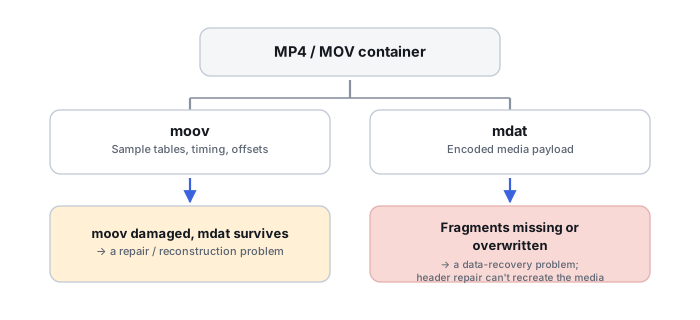
moov) and its media payload (mdat) are separate structures with separate failure modes — a broken map does not mean lost cargo, and intact cargo does not mean a usable map.MP4 or MOV won’t play: what should you do next?
Answer one question about the current state. The result suggests the safer next step rather than diagnosing the failure.
Is this the original video file that stopped playing, rather than a file that was produced by data-recovery or file-carving software from damaged storage?
Classify the damage before choosing a repair.
Work from a copy. An original file can have damaged container metadata, but it can also be truncated, partly overwritten or carry codec-level damage, so being the original does not make it a container-repair case. Use the classification table below and a structural parse (not just a player’s error message) to tell truncation, metadata damage, payload damage and simple compatibility apart before assuming a repair tool will help.
Check how the file was recovered before choosing a repair.
A recovered or carved file can fail for two different reasons. Its bytes may have been assembled from the wrong extents, a false-positive carve or a wrongly ordered fragment sequence; then the fix is to return to storage or fragment recovery. Or recovery may have returned the correct surviving bytes of a recording whose container was never finalized or was damaged; then container repair on a separate copy can be appropriate, as it would be for an original file. Check provenance, extents, completeness and where the file ends before deciding which applies.
Recovered Files Won’t Open → · MP4 and MOV Container Repair and Validation →
This guide classifies the next recovery action from observable information. It does not diagnose hardware condition or estimate a percentage chance of recovery.
First determine whether the file is structurally damaged or merely unsupported
“Corrupted” is doing a lot of work in most reports of a video that won't play, and it can mean several unrelated things. Use the pattern of the failure, not just the player's error message, as a first clue:
| Symptom | Main hypothesis class |
|---|---|
| File size looks plausible, but a parser reports missing or broken movie metadata | Container metadata damage or unfinished finalization |
| File ends abruptly, or is much smaller than expected | Truncation, incomplete recording or an incomplete copy |
| Recovered file has a correct-looking header but decoding fails partway through | Missing or wrong extents, or payload corruption |
| Correct duration, but visual corruption in specific regions | Payload or codec bitstream damage |
| Plays in one decoder or app but not another | Compatibility, codec support or container-interpretation difference |
| Recording stopped after a battery or power failure | Incomplete finalization and/or incomplete media payload |
| A carved video consists of visibly wrong or mismatched fragments | Storage-reconstruction problem, not a container-repair one |
Treat this as a starting hypothesis, not a diagnosis — more than one of these can be true of the same file at once.
Container metadata and media payload are different things
An MP4 or MOV file is built from atoms, also called boxes: chunks of data that either hold a value directly or contain further nested atoms, each carrying its own declared size and type. Apple's own QuickTime File Format documentation separates the file into a movie atom describing the media and a media-data atom holding the media itself, and it states directly that the raw samples in the media-data atom are only interpretable through the metadata the movie atom provides. That separation — a structure describing the media, and a structure holding it — is the single fact that explains most of what follows in this Case: the two can be damaged independently, survive independently, and need to be evaluated independently.
moov is mapping metadata, not “the video”
The phrase “the header is missing” understates what moov actually is. It is a hierarchical container: a movie header, one track atom per audio or video track, media descriptions, and — critically — sample tables recording sample sizes, sample timing, chunk layout and byte offsets into the media data. Losing moov does not erase the recording; it erases the map that turns raw bytes into a sequence of timed, decodable samples. Reconstructing a missing or damaged moov from an otherwise intact recording is repair work in the ordinary sense, covered in more depth in MP4 and MOV Container Repair and Validation.
mdat can survive while the file is still unplayable
mdat holds the actual encoded audio and video samples, but finding an intact mdat atom does not by itself reconstruct track timing, sample offsets or a complete playable structure — media samples may be interleaved or otherwise arranged within one or more media-data regions, while the sample tables in moov are what describe where each track's samples are and how they are timed. A file can therefore contain much or all of its recorded media payload while still being unplayable as a normal MP4/MOV, because the metadata needed to map, time and interpret those samples is missing or inconsistent. Specialized reconstruction may still be possible, but the presence of mdat alone does not prove a playable file can be rebuilt, which is exactly why a plausible file size is not evidence that a video is fine.
Interrupted recording is not the same as a later-corrupted file
Whether an interrupted recording is recoverable depends on how the specific format was being written, not on a single universal rule. Many recorders that produce a conventional non-fragmented MP4 or MOV finalize important movie and sample metadata at the end of recording. If recording is interrupted before that finalization — by a dead battery, a crash, media removal or a full card — the file may contain substantial media payload while required metadata remains absent or incomplete; other recorders and formats may write their structures differently. A fragmented MP4 writes metadata and payload together in repeated pairs throughout the recording, so the same kind of interruption can leave a file that is still substantially decodable. A file that was already a complete, finalized recording and became unreadable later — through storage damage, a bad copy, or an application crash while re-saving it — is a different situation again, closer to ordinary file corruption than to an unfinished recording. Establishing which of these actually happened changes what a repair attempt should even try to do.
A recovered video may be wrong below the container layer
A file produced by data-recovery or file-carving software carries an extra failure mode the two cases above don't: it can have a perfectly normal-looking container built on top of the wrong data. A carving tool can select the wrong extent chain, produce a false-positive match on data that only looks like a video header, or reassemble a fragmented recording's pieces in the wrong order. In that situation, treating the result as an ordinary corrupted file and running container repair on it addresses the wrong layer — the fix, if there is one, is to revisit how the file was reconstructed from storage in the first place. The reverse also happens: recovery can return the correct surviving bytes of a recording that was never finalized, and then container repair on a copy is the relevant step. A recovered origin is a reason to check provenance, extents and completeness first, not a verdict on which layer failed. See Recovered Files Won’t Open and, where the source was a memory card, Corrupted or Deleted Video from a Memory Card.
Reference clips are evidence, not donor payload
A clean, healthy clip from the same device, recording mode, resolution, frame rate and codec settings can be genuinely useful: it can reveal the expected track structure, codec configuration and timing behavior that a damaged file's metadata should have followed. It remains a structural template, not a source of missing content — it can help a technically capable person reconstruct a plausible moov for a specific damaged file's own sample data, but it cannot supply media samples that were never recorded, never recovered, or already overwritten, and successful playback of a reconstructed beginning does not prove the rest of the file is intact.
What you can check safely
Work from a copy, never the only copy of the original. Note the exact file size against what the recording length and settings would predict. Try a second, standards-compliant player or parser rather than concluding “corrupted” from one app's generic error. Check whether the file extension matches the actual container format. If a technically inclined person is available, a structural parse that reads atom size fields can show precisely whether each atom's declared extent fits within the actual file, whether an mdat extent is truncated, and whether expected metadata structures are present, incomplete or outside the available file — far more precise than any player's own error message.
When container repair can help
Container repair is the right tool when the media payload is substantially intact and the problem is genuinely in the metadata: a missing or truncated moov after an interrupted non-fragmented recording, an index that a reference clip's structure can help reconstruct, or atom-level damage that leaves the payload itself untouched. This is repair work in the literal sense — putting a correct map back on top of cargo that is already there.
When it cannot
Container repair cannot recreate media samples that were never recorded, were part of a fragmented or incomplete finalization on the payload side rather than the metadata side, were overwritten after deletion, or were reconstructed from the wrong storage extents by an earlier recovery attempt. It also cannot fix a file that is simply unsupported by a given player or missing the required codec — that is a compatibility question, not a corruption one, and deserves to be ruled out before any repair is attempted. Successful playback of the file's opening seconds does not confirm the rest is intact, and changing a file's extension does not repair its container.
The safer recovery path
Copy first
Work from a duplicate, never the only copy of the file.
Classify
Use the symptom table to form a hypothesis about which layer failed.
Rule out compatibility
Try a second player or parser before assuming corruption.
Check provenance
Confirm whether this is the original file or a recovery/carving result, and for a recovery result, whether its bytes were assembled correctly.
Repair or reconstruct
Apply container repair on a copy when the payload is intact and the metadata is damaged; return to storage or fragment recovery when bytes are wrong or missing.
Validate
Confirm full-length playback and content, not just that the file opens.
Don't assume a missing moov means the video payload is fine, and don't assume a present mdat means the file is one simple contiguous stream. Don't copy a moov atom from an unrelated healthy file expecting it to repair a different recording, and don't treat playback of the first few seconds, or a changed file extension, as proof the file is intact or fixed.
This Case covers a video file that already exists and won't play; if the problem is actually missing or deleted footage on a card that is otherwise readable, see Corrupted or Deleted Video from a Memory Card instead, and if the card itself is not being recognized, see Memory Card Not Recognized or Asks to Be Formatted. For a broader router covering any unusable recovery result, see Recovered Files Won’t Open · MP4 and MOV Container Repair and Validation · File-System Recovery vs. File Carving · How to Validate Recovered Data.
This page describes the general situation, not a guaranteed fix for your specific case. If you'd rather have someone experienced take a look before you try anything, find a recovery provider by region.