Live Systems, Snapshots and Consistent Recovery Copies
Copying every byte does not mean you captured one coherent moment in time. A snapshot can provide a stable view, but coverage, point-in-time consistency, application recoverability and independence from the original storage are four separate properties — check them separately, and validate by actually restoring, not just by confirming the copy finished.
- Copying every byte of a running system doesn't guarantee one coherent moment in time.
- Check coverage, point-in-time consistency, application recoverability and independence as four separate properties.
- Crash-consistent copies may need log replay; application-consistent copies were coordinated with the application.
- A snapshot must cover the whole dependency set: data, logs, extra volumes and VM configuration.
- A recovery set is only proven by actually restoring it to an isolated copy.
A complete copy can mix different moments
If metadata is copied before a change and the related data is copied after it, the resulting copy can contain a state that never actually existed together on the source at any single instant — even though every byte the copy process touched was copied successfully. A sequential acquisition of a changing system has exactly this risk: by the time it reaches the later parts of the source, the earlier parts it already copied may no longer match what's currently on disk. This does not make every live copy useless; it means "complete" and "coherent" are different claims. Successful completion reports the outcome of the requested copy operation; coverage still needs to be checked against its scope, exclusions, dependencies and errors, and coherence requires a separate consistency assessment — neither is established just by the process exiting without error.
Four properties to check separately
Four distinct questions apply to any recovery copy, and a positive answer to one does not answer the others: Is the coverage complete — was everything needed actually copied? Is it point-in-time consistent — does it represent one coherent moment, rather than a mix of moments? Is it application-recoverable — can the specific application actually bring itself to a usable state from this copy? And is it independent of the original storage — does the copy survive if the original device, pool or snapshot chain is lost? A hash confirming the copied artifact hasn't changed since it was made addresses none of these four on its own; it only confirms the artifact's own integrity as a file.
Crash-consistent and application-consistent copies
A copy that is internally consistent at the storage level but was not coordinated with any particular application is typically crash-consistent: recovering from it is similar to what the application would do after an unexpected power loss, which may require replaying logs or running its own crash-recovery procedure before it's usable. An application-consistent copy goes further — it's coordinated using the application's own supported backup procedure (such as flushing caches or rolling logs through that procedure), so the required data and recovery information together form a recoverable set. Restoring it may still require log replay or other application-specific recovery steps; application-consistent does not categorically mean no recovery phase runs, and not every writer's coordination guarantees every open transaction completes or every log rotates — check what the specific application's documented procedure actually guarantees. A file system mounting successfully is not evidence of either kind of consistency at the application level; a database or a multi-service transactional system can have perfectly mountable storage and still be internally incoherent from the application's point of view. The SQL Server VSS Writer backup guide is one concrete example of this: a SQL Server database snapshot obtained through VSS is typically in a non-recovered state and requires recovery before its data can be safely accessed, even though the snapshot itself was application-coordinated.
What a snapshot freezes — and what it depends on
A file-system or storage-level snapshot stabilizes a specific, defined view according to that platform's own semantics — it is not a generic promise that applies identically everywhere. Many snapshot implementations are copy-on-write and depend on the underlying base storage and available capacity; losing that base storage, running out of space, or exceeding a platform's snapshot limits can mean losing the snapshot along with it. This dependency does not automatically extend to every exported or fully-copied-out snapshot — once a snapshot's data has actually been exported to independent storage, that exported copy's fate is no longer tied to the original snapshot's lifecycle. The distinction matters: a snapshot that still exists only on the original storage is not yet a backup in the sense of surviving loss of that storage. A storage-level snapshot also establishes consistency only for the defined storage scope it covers — it does not by itself establish application consistency across multiple hosts, services, or a distributed system. Accept a snapshot as usable based on the specific writers, components, status and any reported errors the coordination mechanism actually recorded, not merely on the fact that a snapshot was created.
Coordinate the whole dependency set
A point-in-time copy needs to cover everything the target actually depends on, considered together: the primary data, any transaction or write-ahead logs, additional volumes or tablespaces that are part of the same logical unit, and — for a virtual machine — the full chain of base disk, active deltas, configuration and any keys required to read it. Deciding the multi-volume point-in-time scope and the application coordination needed is a step that has to happen before copying starts, not something to reconstruct afterward from whatever happened to get copied.
Choose between shutdown, quiescing and live acquisition
For a healthy, available system, the supported workflow for that specific application or platform is usually the right choice — whether that's a clean shutdown, an application-level quiesce, or a live snapshot coordinated through that platform's own mechanism. For an unstable or encrypted system that's still live, the calculus is different and genuinely has competing risks: shutting it down can mean losing access to a decrypted state that isn't trivial to reconstruct, while continuing to run it means active writes and the acquisition itself both carry their own risk on an already-unstable source. There is no universal "always power it off" or "never power it off" rule here — the right choice depends on what's actually accessible, how stable the source is, and what's at stake if the wrong moment is chosen.
Export an independent recovery set
The point of this whole process is an independent recovery set — a backup produced through the application's own native export or backup mechanism, or an image covering every required dependency, landing on separate, healthy storage. Record the scope, the time window, writer/coordination status if applicable, and anything deliberately excluded. A snapshot existing on the original storage is not the same claim as a completed export to independent storage — treat "the snapshot was created successfully" and "the recovery set has actually been exported" as two separate milestones, not one.
Scroll horizontally to see the full diagram →
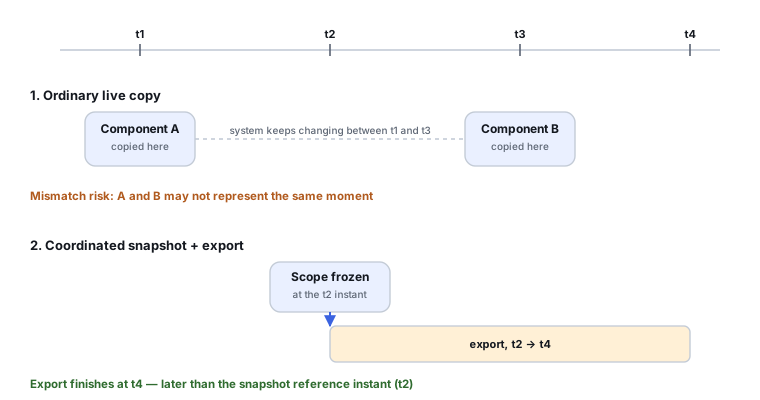
Restore validation is part of the result
Validating a recovery set means actually restoring it: to an isolated working copy, leaving the source or master copy itself unchanged; replaying any required recovery logs through the application's normal, documented workflow; and then checking the application-level objects you actually expect to find. A restore test, by its nature, writes to the working copy — that's a different activity from read-only analysis of the master copy, and the master copy should never become the thing you boot or write to during this test. Don't connect the isolated restore to production network or services unless the validation specifically requires it. Reaching a boot screen or a successful mount is one checkpoint, not the whole validation — confirm the recovery log and the specific expected datasets as well.
Scroll horizontally to see the full table →
| Method | Consistency scope | Depends on original storage? | Best verification |
|---|---|---|---|
| Ordinary live file copy | No guaranteed coherent version of a changing file or the whole set without additional coordination | No, once copied | Compare specific files' content and timestamps against what was expected, not just that the copy finished |
| Sequential block image of a changing device | May mix moments and cannot be assumed crash-consistent; analyze the preserved copy and attempt supported recovery on a working restore | No, once copied | Validate via the file system's/application's own recovery path, rather than assuming crash-consistency in advance |
| Coordinated snapshot (still on original storage) | One defined instant, within the platform's own defined storage scope | Yes, until exported | Confirm the specific writers, components, status and any reported errors — not just that the snapshot was created — and that export to independent storage has actually completed |
| Application-native backup | Consistent per the application's documented backup protocol, not necessarily one literal instant | No, once the export completes | Restore through the application's own supported recovery procedure and check expected objects |
| Clean offline copy (system stopped) | Stable source state if writes have actually stopped; consistency depends on the shutdown state and any pre-existing damage | No, once copied | Can still contain pre-existing corruption from before shutdown — not automatically "guaranteed valid" |
Scroll horizontally to see the full table →
| Component | Why it's needed | Effect if omitted | Validation |
|---|---|---|---|
| Primary data | The actual content being recovered | Nothing to recover | Present and readable from the recovery set |
| Transaction logs / WAL | Needed to bring data to a consistent, recoverable state | Data may be unusable or inconsistent even though it copied successfully | Replay completes through the application's documented procedure |
| Extra volumes / tablespaces | Part of the same logical unit as the primary data | An incomplete, possibly unusable logical unit | All required volumes present and from the same coordinated point in time |
| VM base + deltas / configuration | Required to reconstruct the full virtual machine state | An unbootable or incomplete VM | The full chain is present; boots and reaches the expected state in an isolated test |
| Encryption / recovery credentials | Required to read the data at all | An unreadable recovery set regardless of how complete it otherwise is | Access confirmed through secure handling; credentials never logged in plain text in this kind of record |
| Backup metadata / manifest | Records scope, time window and exclusions | No way to know later what the recovery set does and doesn't cover | Manifest matches what was actually captured |
The four training scenarios below apply these checks to specific situations.
Training scenario: office files change while being copied
A folder of office documents is being copied while people continue editing some of them.
Individual files not open during their own copy may well be usable; the whole-set consistency of the folder as a group is not established just because the copy completed.
Prefer a stable snapshot, or export specific file versions natively where the application/storage supports it, rather than relying on a plain sequential copy of a changing folder.
Verify the specific versions and content needed, file by file, rather than assuming the whole folder is coherent because the copy operation reported success.
Training scenario: PostgreSQL data and WAL live on different volumes
The database's data directory and its write-ahead log are on separate volumes; a backup is needed.
Snapshots of each volume need to be coordinated as simultaneous per the supported procedure, or a native backup approach used instead — copying just the data-directory volume on its own is not a usable backup strategy for this kind of setup.
Follow PostgreSQL's own documented file-system-level backup procedure (coordinated snapshots with the required WAL, or a dedicated base-backup tool) rather than an ad hoc copy of a single file or table.
Validate through an isolated restore and recovery, confirming the specific required database objects are present and the database reaches a consistent state.
Training scenario: a VM has a base disk and an active delta
The virtual machine's storage consists of a base disk image plus an active delta/snapshot layer currently in use.
Copying only one file in this chain does not establish that the complete VM state was captured — the base and the delta (and relevant configuration) are interdependent.
Use the hypervisor's own supported export or backup procedure, which includes the required chain and configuration; the exact steps depend on which hypervisor is in use and should be confirmed against its own documentation.
Boot and test the isolated working restore, confirming it reaches the expected state, rather than assuming success from the presence of the right-looking files.
Training scenario: an encrypted machine stays running despite source instability
The system shows signs of storage instability but is encrypted and currently running (and therefore currently decrypted); shutting it down is a real option but not obviously the safe one.
Shutting down may reduce or remove access to the decrypted state; staying live means both ongoing writes and the acquisition itself carry risk on an unstable source. Neither option is risk-free, and this is not a case for a universal rule.
Document what's actually known about access and key availability, then choose a controlled workflow suited to this specific situation — this is not a step-by-step recipe for memory acquisition or key extraction, which require their own careful, context-specific handling.
Validate the encryption layer and the recovered content as separate checks once a copy exists, rather than assuming one validates the other.
Technical references: Microsoft: Volume Shadow Copy Service overview — the writer/requester/provider coordination framework; VSS is a coordination mechanism, not a guarantee that applies identically to every application. Microsoft: Shadow copies and shadow copy sets — writer freeze/thaw behavior and consistency scope. PostgreSQL: File system level backup — requirements for consistent snapshots, the need for WAL, and simultaneous multi-filesystem scope when data and logs live on separate volumes; confirm the PostgreSQL major version documented at the time of reading, since behavior is version-specific. VM export requirements depend on the hypervisor and disk format; use the documented procedure for that platform — the VM scenario above is illustrative, not a step-by-step tutorial for any specific hypervisor.
Related: Disk Imaging vs. Cloning for Data Recovery · What a Write Blocker Actually Does · CHKDSK, fsck and First Aid: Repair vs. Recovery