Media Recovery vs. Photo and Video Repair
Consumer recovery products increasingly bundle photo recovery, video recovery, enhanced/fragment-reconstructed recovery, video repair, photo repair and AI enhancement under one marketing umbrella. These are different operations working on different problems, and without a common model a comparison table can give two products the same “Video: yes” for entirely different reasons — one because it carves MP4 files off storage, the other because it repairs a corrupted MP4 container that already exists.
Four distinct layers
Media capability claims collapse a chain of genuinely separate operations. Keeping them apart is what makes a comparison table honest:
- Layer 1 — file discovery/recovery: find the file's bytes on storage, from filesystem metadata, deleted records or carving/signatures, and reconstruct the file itself. A deleted clip.mp4 being found and recovered is this layer.
- Layer 2 — fragment reconstruction: determine which non-contiguous media fragments belong to the same recording and rebuild their logical order — especially relevant to cameras, dashcams, CCTV/DVR systems, memory cards and large video files. This is still data recovery, because it operates on storage-level fragments rather than an existing file.
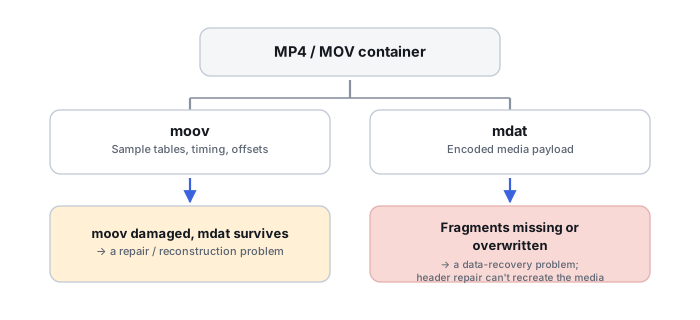
- Layer 3 — container/file repair: take an existing or already-recovered damaged file and rebuild enough internal structure — MP4/MOV
moovmetadata, sample tables and indexes, damaged headers, AVI indexes, broken JPEG structures — for software to actually parse or play it. This is file repair, not sector recovery; see MP4 and MOV Container Repair for the mechanics. - Layer 4 — content enhancement: improve visual or audio presentation after recovery or repair — upscaling, denoising, sharpening, AI enhancement. This does not recover any original missing bytes and shouldn't be counted as a data-recovery capability at all.
Why a recovered file may still not play
A generic “repair video” label hides several fundamentally different causes: some sectors were overwritten; the file was fragmented and only one extent was actually recovered; header or container metadata is missing; sample tables or indexes are damaged; the recording was interrupted before its final metadata was written; the codec stream itself is damaged; an encryption or storage-transform layer was never reconstructed; or the wrong file boundary was chosen during carving. Which of these actually happened determines whether repair can help at all, or whether the missing part is simply gone.
Fragmented video is a recovery problem, not a repair problem
Video files are often large enough to occupy multiple filesystem extents. A simple signature carver finds the header, extracts contiguous sectors, and stops at the first gap or an incorrect boundary — producing a file that looks plausible at the start and fails partway through. Specialized recovery instead tries to identify media fragments, codec/frame patterns, timestamps, the original recording sequence and allocation relationships, and reassemble them properly; see Recovering Fragmented Video from Memory Cards for the full mechanics. Wondershare currently markets exactly this as enhanced photo/video recovery that scans and merges video fragments, and separately describes JPEG/video fragment reconstruction — this belongs in the fragment-reconstruction layer, classified separately from both ordinary carving and from repair.
Container repair: rebuilding structure around surviving payload
A media container generally separates its own metadata — tracks, codec parameters, timing, sample tables, offsets — from the media payload itself. The payload can survive perfectly intact while the metadata needed to locate and interpret it is damaged; repair software's job is reconstructing or regenerating that container metadata, not finding more payload bytes. Stellar's dedicated Repair for Video product describes repairing damaged or unplayable video involving header, sound, slider and movement problems — a clearly different task from locating deleted sectors on a drive. A healthy reference file created by the same camera, phone, recording mode or codec/resolution/settings can sometimes supply the codec parameters, container structure, track layout and metadata pattern needed to rebuild damaged metadata — but it still can't replace unique media payload that's actually missing.
Recovery first, repair second
The workflow that actually makes sense is: preserve the source, recover the best possible original byte stream, validate what came back, and only then — if a file exists but its structure is damaged — repair the container or file, followed by a second validation pass on the repaired result. Repairing a poor carve is not equivalent to first recovering every available fragment correctly; running repair before recovery has actually finished tends to lock in a worse starting point than necessary.
What repair cannot do
Repair software generally cannot reconstruct original unique content that's been overwritten, securely erased, lost after effective TRIM, never recorded in the first place, physically unreadable with no redundancy, or cryptographically inaccessible without the right keys. What it can do is rebuild metadata, salvage playable sections, discard damaged frames, or interpolate and enhance output — none of which is the same as recovering the original missing bytes, however watchable the result looks afterward.
Photo and video: recovery vs. repair, kept as separate capabilities
Photo recovery finds or reconstructs a deleted or lost image file from storage; photo repair attempts to make an existing corrupted image decodable again — rebuilding JPEG headers, quantization/Huffman tables, markers, metadata or thumbnails. A repair tool can sometimes extract an embedded thumbnail when the full-resolution payload can't be reconstructed at all; the thumbnail is genuinely useful but it is not the original image, and shouldn't be presented as equivalent to a full recovery. Stellar explicitly documents this repair-plus-thumbnail-extraction path for severely corrupted JPEG/JPG files. The same recovery/repair split applies to video: video recovery is storage-oriented (metadata recovery, carving, fragment reconstruction, file extraction), while video repair is file/container-oriented (header repair, index reconstruction, container metadata reconstruction, stream salvage). A product can genuinely support both, but a comparison table should still list them as separate capabilities rather than one merged row.
Media enhancement is not recovery
AI enhancement, upscaling, deblurring and denoising are increasingly bundled into recovery products, but the honest editorial label for all of them is post-recovery enhancement — never recovery success, original-data reconstruction, or evidence of recovered fidelity. An enhanced or upscaled frame can contain generated or estimated information that was never present in the surviving source, which is precisely why it shouldn't be counted toward a product's actual recovery or repair capability.
Validating a recovered or repaired media file
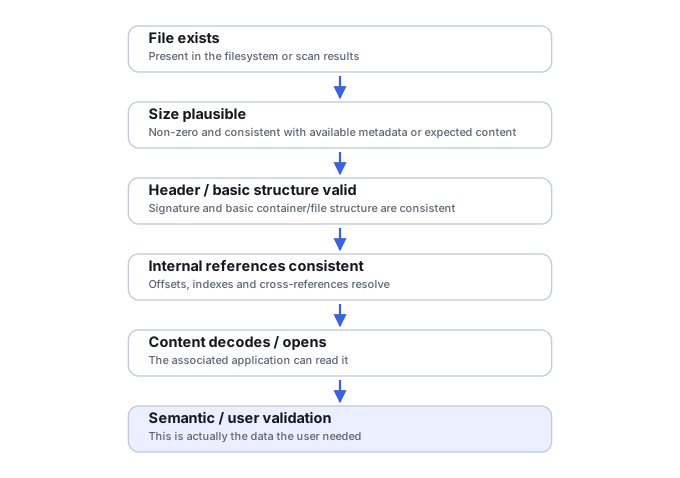
Different checks provide genuinely different levels of confidence, and “it plays” isn't one of them by itself:
- Level 1 — container opens: weak evidence on its own — a container can open while still being incomplete or wrong.
- Level 2 — metadata parses: duration, tracks, dimensions and codec are recognized correctly.
- Level 3 — decode succeeds: frames or audio actually decode through substantial portions of the file, not just the first few seconds.
- Level 4 — timeline continuity: no major gaps, jumps, duplicated sections or incorrect ordering across the file.
- Level 5 — semantic review: the expected event or content is actually present in the result, not just technically playable.
- Level 6 — reference/hash validation: only possible when a trusted original or reference copy exists to compare against.
A file that plays is not necessarily a file that's complete — see How to Validate Recovered Data for the same discipline applied more generally.
Reading a media comparison table
A fair comparison separates recovery capabilities (photo recovery, video recovery, filesystem-aware media recovery, signature carving, fragmented JPEG recovery, fragmented video reconstruction, camera/card-specific recovery, DVR/CCTV support where relevant) from repair capabilities (photo repair, video repair, container/header repair, index/sample-table reconstruction, reference-file repair, partial stream salvage, batch repair), from validation features (preview, decode validation, integrity indication, corrupted/partial-file retention, repair preview), and from enhancement features (AI enhancement, upscaling, denoise/deblur) — visually distinct groups rather than one blended row. Applied to specific products: Recoverit's current official material combines ordinary data recovery, enhanced photo/video recovery, fragment merging/reconstruction, corrupted-video repair and post-recovery AI enhancement, which belong as four or five separate rows rather than one. Stellar maintains clearly separated recovery and repair products/capabilities, which is exactly what makes a Stellar-vs-Recoverit comparison useful, provided recovery and repair aren't collapsed into a single criterion. Ontrack EasyRecovery's upper editions include photo/video repair as an edition-gated feature that shouldn't inflate the product's ordinary storage-recovery capability.
Media recovery is not media repair — one finds bytes on storage, the other rebuilds structure around bytes that already exist. Fragment reconstruction is a distinct recovery capability, not a repair feature and not the same as ordinary carving. Repair can rebuild structure; it cannot recreate unique original payload that no longer survives. AI enhancement is post-recovery processing, not proof of recovered original data — an enhanced result can contain generated content the source never had.
Related: MP4 and MOV Container Repair · Recovering Fragmented Video from Memory Cards · File Carving and Signature-Based Data Recovery · How to Validate Recovered Data