NTFS MFT, Allocation and File Reconstruction
NTFS stores each file as one or more Master File Table records built from attributes — the namespace, cluster allocation and file-extent mapping are related but separate structures, so a file can survive even after its directory entry does not.
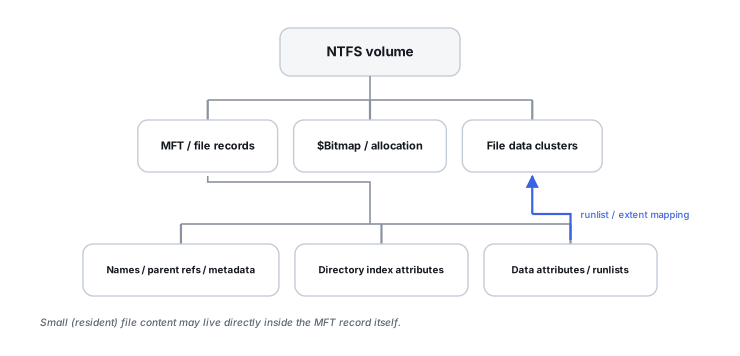
The MFT is the file metadata database
Microsoft documents the Master File Table (MFT) as the structure that stores the information NTFS needs to retrieve files from a volume, with at least one MFT record for every file. A file's information can live directly inside its MFT record or in external clusters that the record's attributes describe. Recovering NTFS is therefore usually a matter of finding and interpreting the right MFT records and their attributes — not simply reading a directory listing.
A file is a collection of attributes
An NTFS file is fundamentally a set of typed attributes attached to one or more MFT records: $STANDARD_INFORMATION (timestamps, basic flags), $FILE_NAME (the name and parent reference), $DATA (the actual content, resident or not), $ATTRIBUTE_LIST (pointing to additional records when one record is not enough), plus security- and index-related attributes for directories. A file can use one base MFT record or several additional records chained through an attribute list — so reconstructing a heavily fragmented or attribute-rich file can mean assembling more than one record.
Resident vs. nonresident data
Small attributes, including some very small file contents, can be resident — stored directly inside the MFT record itself. Larger file data is normally nonresident and described by data runs that map logical file offsets to physical clusters. This has a direct recovery consequence: a small file's entire content can sometimes survive complete inside an old, otherwise-unused MFT record, while a large fragmented file depends entirely on an intact runlist to reassemble in the correct order. Damage to that runlist can leave clusters physically present but logically disconnected from each other — which is exactly the situation carving cannot reliably fix.
$Bitmap: allocation is a separate question from naming
Microsoft's MFT documentation describes $Bitmap as the structure that tracks which clusters are allocated. This creates a distinction worth stating precisely: the directory tree and MFT can say a file is not visible while $Bitmap still says its clusters are in use. Microsoft's own NTFS disk-space troubleshooting documentation specifically notes that $MFT or $Bitmap corruption can produce exactly this kind of lost or misreported disk space. See Allocation Metadata, Orphaned Files and Lost Space for how this generalizes across filesystems.
Directories are indexes, not the files themselves
NTFS directories are index structures that reference file records by name — they are not containers holding the file data. A file can therefore exist as a valid MFT record, with its clusters still allocated, while the directory index entry that would make it visible is damaged or missing entirely. Directory visibility and file-record existence are separate metadata questions, and a recovery tool can potentially rediscover file records directly, independent of whatever the active directory tree currently shows.
Deleted MFT records can survive — for a while
When a file is deleted, Microsoft documents that its MFT entry is marked free and becomes eligible for reuse, not that it is wiped immediately. An unused record can retain useful metadata until something else claims it, and the file's data clusters can be reused independently of the record itself. Practical deleted-file recoverability on NTFS is therefore a race between two separate reuse events: the MFT record being overwritten by a new file's metadata, and the data clusters being overwritten by new content. On an SSD, TRIM/deallocation adds a further, independent layer beneath both of these.
$MFTMirr is a small mirror, not a full backup
A persistent misconception treats $MFTMirr as a complete duplicate of the MFT. It is not: it mirrors only a small, critical beginning portion of MFT metadata, intended to keep key system records recoverable if the very start of $MFT is damaged. The rest of the MFT remains a single structure with no equivalent backup copy built into NTFS. Do not treat “NTFS has a mirrored MFT” as evidence that the whole file-record database is redundant.
Orphaned files sit between clean recovery and carving
An orphaned file — allocation and MFT record intact, but no surviving directory reference — is a distinct, recoverable middle state. Metadata-aware recovery software can often reconstruct the file record, its extents and its timestamps even when the original path and folder name are partly or entirely lost, which is a meaningfully better outcome than falling back to raw signature carving.
Validate recovered extents, don't just trust the filename
A recovered file's name and reported size are not proof that every referenced cluster still holds its original content — those clusters may have been partially reused since the record was last valid. Treat a plausible name and size as a starting point for validation, not as confirmation that the extraction is complete or correct.
An allocated cluster (from $Bitmap) tells you that space is considered in use. An MFT data run tells you which file owns that cluster and in what logical order. Recovery needs both answers, not just one.
Related: Allocation Metadata, Orphaned Files and Lost Space · Filesystem Journals and Crash Consistency · File-System Recovery vs. File Carving · Files Missing but Storage Space Is Still Used · Drive Shows as “RAW”