Allocation Metadata, Orphaned Files and Lost Space
Allocation metadata answers whether a block is considered in use; namespace metadata answers which objects are currently reachable by name — and those are genuinely different questions, on every filesystem this site covers.
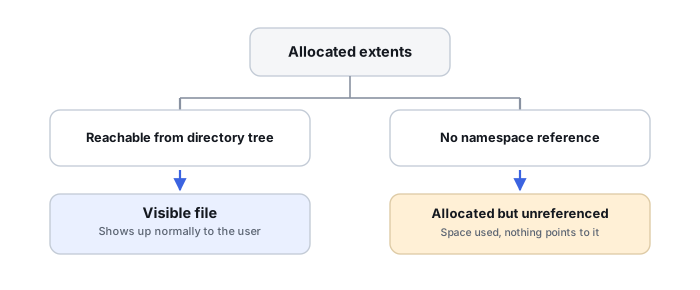
Reachable vs. allocated: the core distinction
Across NTFS, APFS, ext4 and effectively every other filesystem, used-space accounting is derived from allocation or reference metadata, while file visibility is derived from separate namespace or tree metadata. A block can be allocated — considered in use by the filesystem — without currently being reachable from any valid file namespace at all. That single fact is the technical core of “files missing, but the volume still reports used space,” and it applies well beyond any one operating system.
NTFS: $Bitmap vs. directory/MFT visibility
NTFS's $Bitmap tracks which clusters are allocated, independent of whether the MFT record or directory entry that would make those clusters visible is intact. Possible reasons for “files missing but space still used” on NTFS include directory or index corruption, MFT record damage, orphaned metadata, general filesystem inconsistency, hidden or system content, hard links or reparse/mount-point confusion, and features such as snapshots or backup tools operating at another layer entirely. Microsoft's own NTFS troubleshooting documentation specifically calls out $MFT/$Bitmap corruption as a cause of lost disk space.
APFS: snapshots, clones and space sharing
On APFS, snapshots retain extents that the active filesystem tree no longer references, clones share physical extents between what look like two separate files, and container-level space sharing between volumes makes volume-level capacity reporting nonintuitive on its own. The current filesystem tree can lose references to content while the container's underlying allocation remains completely unchanged. See APFS Containers, Object Maps and Snapshots for the full mechanics.
ext4: orphaned inodes and bitmap inconsistency
On ext4, the block bitmap can remain allocated for content whose directory entry has been damaged; the inode and its extent tree can survive independently of that directory entry; and journal or post-repair state can leave the filesystem in a condition where allocation and namespace visibly disagree with each other.
Directory entry vs. file record/inode: the same split, every time
As with NTFS MFT records, an ext4 inode describes a file's metadata and block/extent mapping, while a directory entry only maps a name to an inode number — the two are genuinely separate objects. That means a directory entry can go missing while the inode, its extent tree, and its file content all survive fully intact; a metadata-aware recovery tool can sometimes reconstruct considerably more than what active directory traversal alone would show.
Orphaned files are a specific, recoverable metadata state
An orphaned file means the allocation and the inode or file record both survive while the directory reference does not. Different filesystems repair or clean up orphans differently, but recovery software can potentially reconstruct the file record, its extents and its timestamps even when the original path or name is partly or wholly lost. This sits as a genuine middle ground between fully healthy directory-based recovery and raw carving — not a fallback of last resort, but a distinct and often quite reliable recovery tier of its own.
Hard links, clones and other namespace mechanisms
NTFS hard links let one file's clusters appear under multiple directory entries while consuming storage only once; junctions, mount points and reparse points add further namespace indirection. APFS clones behave similarly for file content specifically. None of these are recovery failures on their own, but they routinely defeat naive directory-size comparisons and should be part of the diagnostic checklist before concluding that space usage is actually wrong.
Allocation corruption and the risk in fixing it
When $MFT/$Bitmap or an equivalent structure is genuinely inconsistent, free space can be marked allocated or vice versa, and a repair tool such as CHKDSK can report corrections to the volume bitmap. But the existence of a repair command does not make repair the first forensic step: preserve or image the source first, determine whether missing files may still be referenced through damaged or orphaned metadata, extract whatever is recoverable, and only repair afterward if restoring the volume for continued use — rather than recovering its data — is actually the goal. A bitmap correction can free clusters that were still associated with ambiguous, not-yet-recovered data.
A fallback hierarchy, not a binary choice
Metadata-aware recovery has several fallback levels worth working through in order: normal filesystem traversal; alternate or redundant metadata; orphaned file records, inodes or B-tree records; partial extent reconstruction; and only then file carving. Recovery is not simply “the filesystem works” versus “carve everything” — there are several genuinely distinct metadata-reconstruction tiers in between, and each one is worth trying before falling back to the next.
“Used space” answers which blocks are considered in use. Directory traversal answers which objects are currently reachable by name. Treat those as two separate questions, and answer both before concluding anything is actually lost.
Related: NTFS MFT, Allocation and File Reconstruction · APFS Containers, Object Maps and Snapshots · ext4 Superblocks, Inodes, Extents and Journal · Files Missing but Storage Space Is Still Used · Metadata Recovery vs. Raw Recovery · File-System Recovery vs. File Carving