Files Missing but Storage Space Is Still Used
When folders disappear but the volume still reports occupied space, the data may still be allocated even though directory paths or visibility metadata are no longer accessible.
Files missing but space still used: what should you do next?
Answer one question about the current state. The result suggests the safer next step rather than diagnosing the failure.
Have you ruled out ordinary visibility causes — a different user profile or mount point, hidden/system attributes, permissions, or content moved or filtered by sync software — as the explanation?
Treat this as a recovery problem.
Preserve the volume and look for orphaned files or damaged directory metadata rather than continuing to browse or write to the source.
Check the simpler explanations first.
Confirm hidden-file settings, other user accounts or mount points, permissions, and sync-client relocation before treating this as data loss.
This guide classifies the next recovery action from observable information. It does not diagnose hardware condition or estimate a percentage chance of recovery.
What this symptom means
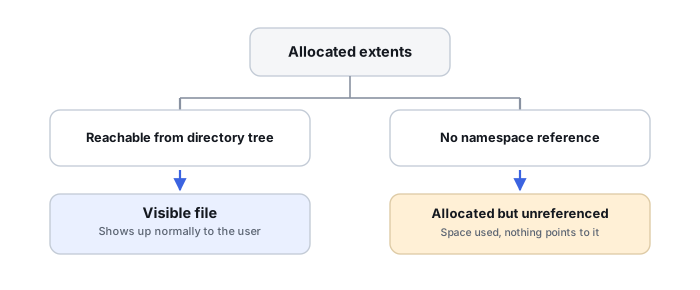
Used-space accounting and directory visibility are not the same thing. A file system may still mark clusters or extents as allocated even when directory records are damaged, moved, hidden or inaccessible. The reverse can also occur: stale accounting can report space that no longer corresponds cleanly to reachable files. Allocation metadata can indicate that space is still associated with filesystem objects or retained structures; it does not prove that the expected file content is intact, correctly mapped or recoverable. The symptom means more evidence is needed, not that the files are already safe.
| Question | If yes, this points toward |
|---|---|
| Are the files simply hidden, or in a different user profile/mount point? | Ordinary visibility — not a recovery problem yet |
| Does filesystem metadata still reference or allocate them? | Orphaned files — a real, often recoverable state |
| Is the space explained by snapshots, clones or system structures? | Legitimate accounting, not necessarily data loss |
| Is the allocation accounting itself inconsistent? | File System Corruption — a different failure class |
First rule out ordinary visibility problems
These are three different classes of explanation, and it helps to check them separately rather than as one blended list:
- Visibility and access — hidden/system attributes, permissions, or the wrong user profile or mount point.
- Relocation — content moved manually, or relocated/filtered by cloud-sync software.
- Accounting semantics — hard links, clones and snapshots, covered in more depth below; these explain used-space numbers rather than missing files, and are usually a secondary check once visibility and relocation are ruled out.
Do this without running repair operations. On a shared or managed system, also consider quotas, alternate user accounts and application-specific storage locations.
When it becomes a recovery problem
If directory trees vanished after an unsafe disconnect, crash, malware event or file-system error, metadata damage becomes more plausible. File-system-aware recovery can scan surviving metadata and reconstruct folders without first “repairing” the source. If the device also has read errors or stalls, preserve it with an image before logical scanning; apparent missing files can be secondary to unreadable metadata sectors.
What changes the outcome
Recoverability depends on whether the file records, directory indexes and allocation metadata survive and whether subsequent writes reused the affected space. A volume showing substantial used space can be encouraging, but it is not a recovery percentage. Encryption, snapshots, deduplication and sparse files can also make simple used/free-space numbers misleading.
Avoid destructive shortcuts
Do not run CHKDSK/fsck merely to make the folders reappear, and do not copy new data onto the same volume. Repair tools are designed to make a file system internally consistent, which can mean discarding orphaned metadata. Recover or image first; repair only after the important data exists elsewhere.
Reachable and allocated are different questions
Every filesystem this symptom shows up on answers “is this space in use” and “which files can I currently see by name” with two separate structures. On NTFS, $Bitmap tracks allocated clusters independently of whether the MFT record or directory entry that would make a file visible is intact — Microsoft’s own NTFS troubleshooting documentation specifically notes that $MFT/$Bitmap corruption can produce exactly this kind of lost or misreported space. On ext4, the block bitmap can stay allocated for content whose directory entry is damaged, while the inode and its extent tree survive independently of that entry. On APFS, snapshots retain extents the active tree no longer references, clones share physical extents between what look like separate files, and container-level space sharing between volumes makes per-volume capacity reporting nonintuitive on its own. See Allocation Metadata, Orphaned Files and Lost Space for the full model across all three.
Orphaned files: a specific recovery state
A file whose allocation and file record or inode both survive, but whose directory reference does not, is called an orphaned file. Metadata-aware recovery software can often reconstruct that file’s record, extents and timestamps directly — independent of the active directory tree — even when the original path or name is partly or entirely lost. This is a genuinely distinct, often reliable recovery tier between full directory-based recovery and raw carving, not a last resort. See NTFS MFT, Allocation and File Reconstruction for how this works in MFT terms specifically.
Hard links, clones and mount points can also explain the numbers
NTFS hard links let one file’s clusters appear under multiple directory entries while consuming storage only once; junctions, mount points and reparse points add further namespace indirection. APFS clones behave similarly for file content. None of these are recovery failures by themselves, but they routinely defeat a naive comparison between visible file sizes and reported used space, and are worth ruling out before assuming metadata corruption.
Do not save recovered files, install software, create partitions, format, initialize or run write-capable repair tools on the only copy of the affected data. When practical, work from a verified image or another preserved copy.
Related reading: Filesystem Corruption · Accidental Deletion · Metadata Vs Raw Recovery · Repair Vs Recovery · File Carving Explained · Allocation Metadata, Orphaned Files and Lost Space · NTFS MFT, Allocation and File Reconstruction · APFS Containers, Object Maps and Snapshots.
This page describes the general situation, not a guaranteed fix for a specific case. If the source is unstable or the data is irreplaceable, consider a professional evaluation before further attempts.