SMART: What It Can and Cannot Tell You
A SMART or NVMe health report is device telemetry — counters, thresholds and logged events — not a check of file-system correctness, deleted-data survival or file content. Use it together with observed symptoms and the access path, then validate the outcome separately from the report itself.
- SMART and NVMe health reports are device telemetry, not a check of files or file systems.
- A PASS status can coexist with unreadable sectors and missing data.
- Trends on the same device say more than a single snapshot of the report.
- Reading health logs is different from starting a self-test, which adds load to a weak drive.
- Record model, serial, tool, interface and timestamp so readings can be compared later.
What a health report measures
A health report is telemetry the device itself keeps: counters, thresholds and, on some models, a short event log. ATA attribute meanings and raw-value encodings often require model-specific interpretation. NVMe defines a standardized SMART/Health Information log layout and field meanings, although some estimates, thresholds and device behavior remain implementation-dependent. Treat the device's overall self-assessment result (PASS/FAIL on ATA, the Critical Warning byte on NVMe) as one summary signal, separate from the individual fields behind it — a clean overall result and a concerning individual field can appear at the same time, and only one of them may be relevant to the problem you're actually trying to diagnose.
ATA attributes: normalized values, thresholds and raw fields
ATA SMART reports each attribute as a normalized value (typically on a vendor-defined 1–254 scale, compared against a threshold) alongside a raw value. The conversion from the raw field to a real-world quantity such as a sector count or a temperature is not fixed by the SMART standard itself — it is defined by the drive's firmware. Some drives report power-on time in minutes rather than hours in the raw field; others pack more than one quantity into the same raw field. A diagnostic tool such as smartctl reports the raw value as the device returns it and does not itself convert between raw and normalized representations. The practical consequence: a raw number from one model's forum thread does not transfer to a different model, and the same attribute ID can mean something different between vendors.
An annotated attribute row such as "Raw_Read_Error_Rate: normalized 118, threshold 6, raw 2061" illustrates the shape of a report, not a real reading from any specific drive. Do not compare it against your own device's numbers — the thresholds and raw-value meaning are set per model and firmware revision.
NVMe health logs use a different model
NVMe does not reuse the ATA attribute/threshold scheme. Its SMART/Health Information log defines its own fields, most relevantly: Critical Warning (a bitfield covering conditions such as degraded or read-only mode from media errors, available spare falling below threshold, a temperature threshold being exceeded, reduced reliability, or backup power/device failure), Available Spare (normalized remaining spare capacity, compared against a manufacturer-defined threshold that can trigger a notification), Percentage Used (an endurance estimate — see below), Media and Data Integrity Errors (a count summarizing unrecovered data-integrity events), and Unsafe Shutdowns (a count of power-loss events without a clean shutdown). These fields are not the same list as ATA's numbered attributes, and a tool that supports one device family does not automatically expose the same vocabulary for the other.
Symptoms and trends change the interpretation
A single snapshot of a health report is less informative than a comparison against an earlier reading of the same field on the same device. A counter that has sat at the same value across multiple checks is not evidence of active, ongoing degradation, even if the value itself is nonzero — it may reflect a past event that has not recurred. A counter that is visibly climbing between comparable readings is a different, more actionable signal. That said, do not run extra self-tests or surface scans purely to manufacture a trend to compare — see below for why that has its own cost on a source that may already be unstable.
Why PASS can coexist with unreadable data
An ATA overall self-assessment or an NVMe Critical Warning of zero summarizes a specific, defined set of conditions — it does not certify that every logical block on the device is currently readable. Several things can sit outside what the summary covers: the thresholds are scoped to particular failure modes the vendor chose to monitor; a USB, RAID or other bridge between the device and the host can limit which telemetry is even passed through; the actual failure may involve an aspect the summary result doesn't track; and the data may simply be logically lost (deleted, reformatted, or otherwise inaccessible) with the device itself perfectly healthy. A clean health summary is not permission to subject a source already showing read instability to a long self-test or a repeated full-surface scan — see the next section for why.
Reading a report is different from starting a self-test
Querying known supported health logs differs from starting a self-test or changing settings. Running a self-test is a separate action: a short self-test typically takes under ten minutes and checks basic electrical, mechanical and read performance; an extended (long) self-test is more thorough and can take anywhere from tens of minutes to several hours; a conveyance test, where supported (availability is ATA- and device-specific), checks for transport damage. Self-tests initiate additional device work; scope and duration depend on the test and device. An extended test may examine much more of the address space. On an unstable source, prioritize preservation over additional testing. Diagnostic tools are also not uniformly read-only: beyond reading logs, the same utilities can start self-tests, clear logs, or change device settings, so "running the SMART tool" is not by itself a safe, side-effect-free action, and a log query or firmware read is not guaranteed to be free of side effects either — check which specific operation a given command performs before running it against a source you have not yet copied.
Scroll horizontally to see the full table →
| Field | May suggest | Does not prove | Context that matters |
|---|---|---|---|
| Reallocated Sector Count (ATA) | Media or ECC events the drive has already remapped | How many files, if any, are affected | Raw encoding and reset behavior are model-specific; compare the same device over time |
| Current Pending Sector Count (ATA) | Logical sectors reported unstable or unreadable, under model-specific rules | A confirmed permanent defect | The count may change after a later successful read or write; nonzero is not automatically terminal, and rewriting the original source purely to test this is not recommended |
| Offline Uncorrectable (ATA) | Sectors that failed during an offline/extended test read | Which files, if any, occupy that region | May be populated by a self-test, a surface scan, or the device's own background offline data collection — requesting a scan carries its own risk |
| Interface CRC Error Count (ATA) | Transport, cabling or connector errors between host and device | Media or flash damage | A static, non-growing count with no other symptom usually points at the connection, not the storage medium |
| Critical Warning (NVMe) | One or more specific defined conditions (media read-only, spare below threshold, temperature, reliability, power/backup) | Any failure mode outside what the bit definitions cover | Check which bit is set, rather than treating the byte as a single bad/good flag |
| Percentage Used (NVMe) | Vendor-modeled write-endurance consumed | A percentage of damaged sectors, corrupted files or unreadable capacity; not a warranty-expiration threshold | High does not invalidate files that read correctly now; low does not exclude a sudden unrelated failure |
| Media and Data Integrity Errors (NVMe) | Detected unrecovered data-integrity events | That every logged device error is a media failure | A summary counter, not the full Error Information Log; read together with Available Spare |
| Unsafe Shutdowns (NVMe) | A history of power loss without a clean shutdown | That any specific file was corrupted by a given event | Context alongside other fields, not a standalone verdict |
| Temperature (ATA/NVMe) | Current or historical operating temperature versus threshold | Sustained thermal stress from one reading alone | Interpret with workload and duration, not as an isolated number |
Four reports, four next steps
The same report can point at different next actions depending on what else is observed. The table below gives four combinations; none of them reduce to a single health percentage.
Scroll horizontally to see the full table →
| Report + symptoms | Interpretation | Priority |
|---|---|---|
| PASS/healthy, stable access, missing or deleted files | Device access does not appear to be the blocker — this reads as a logical-recovery case | Proceed with logical analysis of the needed files |
| PASS/healthy, but intermittent disconnects | A clean health summary does not rule out an access-path or device/controller problem | Investigate the access path and the device/controller itself (cable, bridge, enclosure, port, or a failing device) — do not dismiss the symptom because the summary is clean |
| Warning/failing, source still returns the needed data | The drive is readable now, which may not last | Preserve the data while access is available, following a controlled acquisition workflow |
| Telemetry unavailable (hidden behind a bridge or controller) | Health state is unknown, not healthy | Treat the device cautiously based on observed behavior alone; the state stays unknown unless telemetry becomes available some other way — a direct, bridge-bypassing query is not a required final step |
Scroll horizontally to see the full diagram →
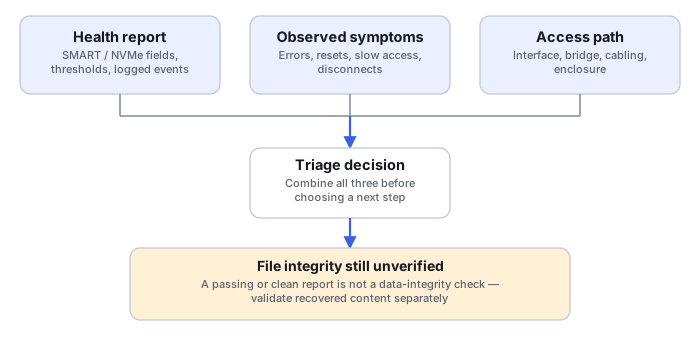
The four training scenarios below work through specific combinations in more detail.
Training scenario: HDD shows PASS but produces repeated read errors
The overall SMART self-assessment reports PASS; copying files from a specific region repeatedly fails, or the drive briefly disconnects during those reads.
The overall result summarizes only the conditions ATA SMART defines; it does not certify that every logical block is currently readable. The observed I/O behavior is the more relevant evidence here.
Preserve the data through a controlled acquisition that can skip and later revisit affected ranges, per Read Errors, Timeouts and Retries Explained, rather than continuing ordinary use of the drive.
The acquisition's map shows address ranges, not filenames; correlate those ranges with recovered file extents only where that mapping is available, and otherwise treat the affected files as unknown until you open and check recovered content directly — PASS does not substitute for that check.
Training scenario: a static SATA interface CRC count, unchanged media indicators
The Interface CRC Error Count attribute shows a nonzero historical value; reallocated/pending counts and read behavior are unchanged since the last comparable reading.
A static, non-growing transport-error count is a plausible sign of a past cabling or connector event — not a confirmed ongoing problem, and not evidence about the platters or flash either way.
If practical and without added risk, compare behavior on a known-compatible connection. Repeated power cycles or connection swaps as a routine diagnostic habit are not recommended.
Compare the same attribute's reading before and after, and confirm read behavior is unaffected; a single static number is not itself an actionable finding.
Training scenario: NVMe Percentage Used is high, files still read normally
The NVMe health log reports a high Percentage Used value; files currently read and open without error.
Percentage Used is a vendor-modeled estimate of endurance consumed, not a percentage of damaged sectors or corrupted files — a high value does not invalidate data that reads correctly right now.
Plan for preservation and eventual replacement given the wear trend, without treating the number itself as a reason to stop using the device immediately.
Verify that the specific files that matter still open correctly and that a current copy exists; a wear estimate is not a substitute for checking the data you actually need.
Training scenario: a USB enclosure that doesn't pass through health data
The connected drive is visible and reads normally, but SMART/NVMe telemetry queries return no data, or are reported as unsupported through the enclosure's bridge chip.
This is a visibility limitation of the current access path, not evidence that the device is healthy or unhealthy — its actual state is unknown from telemetry alone.
Do not remove the drive from its enclosure just to check SMART without first considering what the bridge does — encryption, sector translation or address mapping that reading the bare device directly could break. Weigh that risk against the value of the telemetry.
Base decisions on existing read behavior, logged errors and acquisition progress rather than an absent health badge; recovery triage does not require a test write to the original. If the enclosure is later confirmed safe to bypass, telemetry can be read directly at that point.
What to record and what to validate next
Whatever report you're working from, record enough to make it reproducible and comparable later: the source's identity (model/serial), the timestamp of the reading, the interface and any bridge/controller in the path, the tool and its version, the full relevant output rather than a single extracted number, the symptoms observed alongside it, and whether the data you actually need was confirmed accessible. If SMART or NVMe telemetry could not be read at all, record that explicitly as unknown — not as a default "healthy" or "unknown, treated as fine." None of this replaces validating the recovered content itself once acquisition is complete.
Technical references: smartctl manual (smartmontools project, Debian-mirrored manual pages) — overall self-assessment scope, vendor-specific raw-value encoding, and self-test types; check the specific smartmontools version you are citing output from, since attribute behavior and tool output can change between releases. smartmontools project documentation — tool implementation and provenance, not a replacement for the manual. NVM Express: error reporting, SMART log pages and management capabilities — the NVMe-specific field definitions used above.
Related: Logical vs. Physical Data Recovery · Read Errors, Timeouts and Retries Explained · Disk Imaging vs. Cloning for Data Recovery · SMART glossary entry