Logical vs. Physical Data Recovery
Logical recovery interprets data that the device already hands over reliably; physical and device-level recovery deal with getting reliable sectors out of the device in the first place. The two are useful working categories, not a clean "software vs. clean room" split — plenty of real cases need both, in a specific order. The first question that actually matters is not which category a case belongs to, but which layer of the storage stack is the lowest one that cannot currently be trusted.
- Logical recovery interprets data the device already reads reliably; physical recovery gets reliable sectors out first.
- The useful question is which is the lowest layer of the stack that can't be trusted yet.
- A readable but unstable drive sits between the two and needs controlled imaging before analysis.
- Many real cases need both stages, in a fixed order: device access first, interpretation second.
- New noises, repeated resets or rising read delays mean stop scanning and reassess.
Two different problems: accessing data and interpreting it
A simple way to picture the dependency is a stack: device access at the bottom, logical mappings (partitions, file system, RAID or pool configuration, encryption) above it, and the files the user actually wants at the top. Each layer depends on the one below it being readable. Sectors that come back from the device may already be ciphertext waiting on a key, or members of a RAID set that has not yet been reassembled — readable bytes are not automatically a usable file system, and the absence of a mountable volume does not automatically mean the device itself is broken.
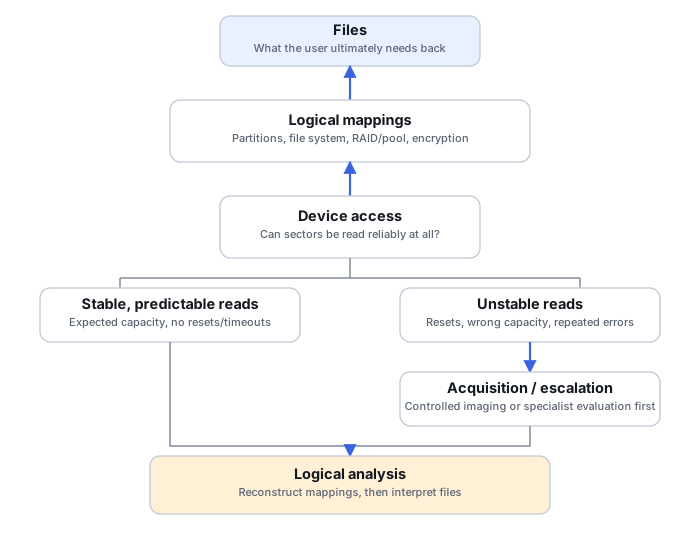
What logical recovery reconstructs
Logical recovery covers deletion, lost or damaged partitions, formatting, corrupted file-system metadata, misconfigured or partially-assembled RAID, and damaged virtual-disk structures — cases where the underlying sectors are accessible but what's built on top of them is not. This work is often done without modifying the source at all: a tool reconstructs the mapping virtually and exports files to a separate destination, rather than writing a repaired structure back.
What physical and device-level recovery address
This category covers mechanical and media damage, failed electronics, and firmware, translation-layer or controller problems that prevent sectors from being read in the first place. Not every source in this category is mechanically broken: a drive can respond to commands while still being unable to deliver consistent data because of a controller or firmware problem. Different service providers and tools draw the line between "physical" and "device-level/firmware" differently, so this article treats them together as problems that block access, as distinct from problems that affect only interpretation. The objective of intervening here is to get stable enough access for acquisition — not necessarily to leave the device in a condition fit for continued everyday use.
Physical recovery here refers to device-level access problems. It is different from physical acquisition, a term used in forensics for obtaining a sector-level copy, which may be performed on a healthy device.
Logical vs. physical recovery: practical comparison
Scroll horizontally to see the full table →
| Dimension | Logical recovery | Physical / device-level recovery |
|---|---|---|
| Lowest failed layer | Above device access: partitions, file system, RAID/pool mapping, encryption | Device access itself: media, electronics, firmware, controller or translation layer |
| Is sector access predictable? | Generally yes | Often no, or only with specialized handling |
| Typical causes | Deletion, formatting, lost partition table, damaged metadata, failed RAID assembly, virtual-disk corruption | Mechanical wear or shock, failed components, firmware corruption, severe media damage |
| First objective | Reconstruct the mapping, then interpret the files | Obtain stable, repeatable sector access |
| Typical intervention | Recovery software analyzing a preserved copy | Specialized acquisition hardware, firmware-level tools, or clean-room work, depending on the specific failure |
| When imaging becomes useful | Usually straightforward once access is stable | Often the acquisition itself is the hard part; imaging strategy matters more than in the stable case |
| What gets handed to the next stage | Extracted files, or a validated logical volume | A stable image or clone, handed off for logical analysis |
| What neither route restores | Content already overwritten or securely erased | Content lost to the same overwrite/erasure, plus anything the original failure destroyed outright (e.g. physically destroyed media) |
Symptoms do not identify the failure by themselves
Scroll horizontally to see the full table →
| Symptom | Possible explanations | Check without a long scan | Next action |
|---|---|---|---|
| No drive letter | Mapping, partition, encryption, file-system or device-access problem | Whether the device and its expected capacity are visible at a lower system level | Identify the actual layer before formatting on the OS's suggestion |
| RAW volume | Damaged structures, an unsupported file system, encryption, or incorrect mapping | Media context and which structures survive on a copy | Logical analysis, after acquisition if the source is not stable |
| Timeouts / resets | Device, cabling, power, bridge or controller issue | Known-good cable/power/interface, without a cycle of repeated reads | Controlled acquisition, or escalate to specialist evaluation |
| Wrong capacity / 0 bytes | Controller/firmware fault, bridge issue, or mapping/configuration problem | Expected capacity, model and connection path | Resolve the access problem before running any file-system scan |
| New mechanical noise after a drop/impact | Likely mechanical HDD damage | Circumstances and any symptoms already observed | Stop repeated power-ups; get a specialist evaluation |
The middle ground: readable but unstable
A drive with growing bad-sector counts, or one that times out and resets intermittently, sits between the two categories. Running a full scan as a diagnostic test on a source like this is a poor idea: it tends to reread the same weak regions repeatedly and can push an already-marginal device further into internal error recovery. SMART health data is useful evidence here, not a verdict — a drive can show clean SMART attributes and still be unstable, and a drive with concerning attributes is not automatically about to fail outright. In this middle ground, specialized acquisition approaches can sometimes recover a working image without physically opening the device at all.
Mixed cases and the order of recovery
Several realistic cases need more than one stage, in a specific order. A failing HDD with a corrupted NTFS volume on it needs stable acquisition first; only once there is a reliable copy does file-system reconstruction make sense — running file-system repair against an unstable source risks making both problems worse. A degraded RAID array with a stale or disconnected member and damaged array metadata needs each member imaged and identified before the array itself can be reconstructed; a rebuild is not a safe first recovery step on an array that is already in a damaged state. A readable, correctly-enumerated encrypted SSD with a confirmed-unavailable key has no access problem at the device layer — the blocker is a missing cryptographic prerequisite, and physical-layer work does not substitute for the key.
Mixed case: failing HDD with a damaged file system
Intermittent read errors and slow response during file browsing; Explorer eventually shows the volume as unreadable.
Unstable reads can make intact file-system structures appear corrupt or inaccessible. Actual on-disk corruption may also coexist, for example after failed writes. Acquisition evidence is needed to distinguish missing reads from damaged stored structures.
Controlled imaging per How to Image a Failing Drive Safely, working from a map of what was actually read.
Confirm the image's acquisition map before running any file-system analysis against it; a list of filenames is not proof the content behind them is intact.
Mixed case: degraded RAID with damaged array metadata
One member is disconnected or marked foreign; the array manager reports a configuration it cannot assemble automatically.
Two layers may both be damaged: the array's own mapping metadata, and potentially one member's media. Each needs to be evaluated on its own.
Image each member separately and preserve its identity (serial, slot position), per RAID Reconstruction Basics, before attempting any reassembly.
Reconstruct the array against the images, not the live members, and verify file-system content on the reconstructed result before trusting it.
Mixed case: readable SSD, missing encryption key
The drive enumerates correctly and responds normally to reads; encryption structures are recognized and parse correctly; the required protector or key is confirmed unavailable.
Device access does not appear to be the problem here; the blocker sits above it, at the encryption layer.
If the encryption metadata is intact and the required key is genuinely unavailable, look for the recovery password, key escrow or another valid protector. Device-level repair does not substitute for the missing key. If unlock fails despite a valid key, investigate the encryption metadata and the underlying data separately.
Confirm unlock succeeds and the resulting volume's file-system structures are coherent before considering the case closed.
When ordinary recovery software is appropriate
Stable, predictable access at the device layer is what makes ordinary logical-recovery software an appropriate first step — it is not, by itself, a guarantee that the wanted data will come back, since overwritten or securely erased content is gone regardless of how stable the device is. If access is unstable, wrong, or the device resets repeatedly, treat that as the problem to solve first.
Stable reads and the expected capacity make logical analysis more practical, but do not prove that previously stored data is still present. An SSD may return a stable logical view after deallocation, and encryption or an incorrect higher-level mapping can still prevent useful interpretation.
Specific triggers for stopping ordinary scans and reassessing: new mechanical noise after a drop or impact; repeated resets during normal use; a sharp increase in read delays partway through a scan; any smell or visible damage to the electronics. The right response is to stop and reassess access, not to keep proving the hypothesis with more surface scans. For RAID, NAS or an actively-used encrypted system, the storage context matters before taking action — see Understanding Storage Layers Before Recovery for how these layers interact before you decide on a next step.
Technical references: GNU ddrescue project — acquisition from a problematic source · Pinheiro et al., FAST '07 — limits of SMART for individual drives. ddrescue is an acquisition tool, not a device-repair tool. A symptom-to-failure claim above that is not backed by a specific cited source is stated as a possible explanation, not a diagnosis.
Related: Understanding Storage Layers Before Recovery · When Software Recovery Is No Longer Appropriate · How to Image a Failing Drive Safely · Disk Imaging vs. Cloning for Data Recovery · SMART Health: Useful Signal, Not a Verdict · SSD Recovery Fundamentals · RAID Reconstruction Basics.