Power Surge or Electrical Failure
A drive that stops responding after a power surge, failed power supply or other electrical event may have damage anywhere along the power, interface or device-electronics path. The recovery problem is to determine where that damage stopped before assuming the storage media itself is lost.
Power surge failure: what should you do next?
Answer one question about the current state. The result suggests the safer next step rather than diagnosing the failure.
Does the device now behave completely normally and remain stably readable?
Preserve data before trusting the device.
Electrical events can damage more than one component. If the device is readable, copy or image important data before stress-testing or returning it to service.
Do not repeatedly power-cycle the device.
No detection, abnormal behavior or unstable access after a surge calls for hardware/electrical diagnosis before ordinary recovery scans.
This guide classifies the next recovery action from observable information. It does not diagnose hardware condition or estimate a percentage chance of recovery.
What's actually happening
An electrical event can affect the external supply, cable, enclosure or bridge, input protection and regulation, drive PCB, or internal electronics. Damage may stop at one layer or affect several. The fact that the failure followed a surge tells you the incident history, not which component failed.
What to check without stressing the device
Start with the event history rather than another power-on test. Note whether the surge affected the whole computer or only an external enclosure, whether there was a burnt smell or visible PCB damage, whether a USB/SATA bridge or power adapter also failed, and whether the storage device has been powered since. If the device already behaves normally, preserve the data before running diagnostics. If it does not, repeated power cycles add little useful information.
For an external drive, remember that the enclosure electronics and the storage device are separate layers. A failed USB bridge or power adapter can make a healthy SATA drive appear dead, while some external products use bridge-level encryption or integrated USB electronics that make bypassing the enclosure less straightforward. The first task is therefore to identify which layer stopped working, not to assume the media itself was damaged.
What changes the recovery outlook
- Where the electrical damage stopped. Protection components or the drive PCB may fail while the heads, platters or NAND remain unaffected; a stronger event can reach the preamplifier, controller or flash power domains.
- HDD versus SSD. HDD recovery may depend on preserving ROM/adaptive information and determining whether internal head electronics survived. SSD recovery can depend on the controller, firmware, translation metadata and encryption state.
- Whether the original electronics are still available. Unique calibration, ROM or security information can matter even when a donor board is physically compatible.
- What happened after the surge. Incorrect replacement power supplies, repeated power-up attempts or improvised board swaps can create secondary damage that was not present in the original event.
How recoverable this really is
The prognosis can be good when the electrical event is confined to a replaceable part of the power or interface path and the storage media remains intact. The complication is that a visually identical donor board is rarely enough information by itself. Modern HDD families can store drive-specific ROM or adaptive data that must stay associated with the original mechanism, while SSDs may depend on controller-specific firmware, translation metadata and encryption. If the surge has reached internal head electronics or damaged NAND/controller circuitry, the case moves beyond a simple board-level repair.
The general approach
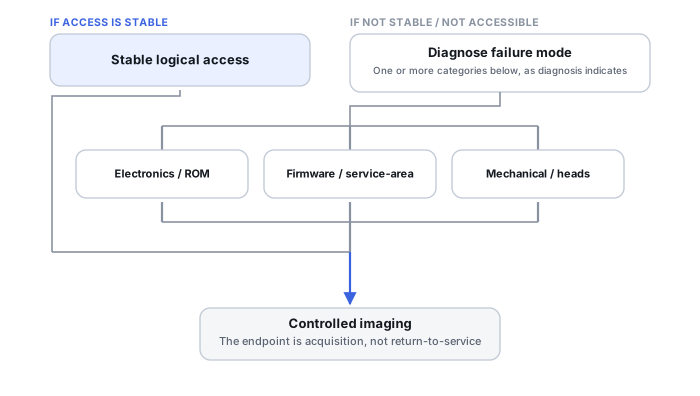
Diagnosis first separates host power, enclosure/bridge, device PCB and internal media-side failures. For an HDD, a specialist may repair the original electronics or use compatible donor electronics while preserving the drive-specific ROM/adaptive information needed for initialization. For an SSD, the route depends much more strongly on the controller and board design. The goal is not to return the device to normal service, but to restore stable enough access to acquire the data once and continue recovery from a preserved copy. On an SSD specifically, restoring electrical power is not the same as restoring logical access — controller firmware, translation state, encryption context and any NAND-side damage can all still block clean access even once the power path itself is fine again.
Power surge describes the incident, not the failed component
An electrical event can damage the external supply or charger, a cable or enclosure/USB bridge, input-protection or power-regulation components, the drive's own PCB electronics, or — depending on the drive — the preamplifier and heads sealed inside an HDD or the controller and NAND-side circuitry on an SSD. Damage can stop at any of these stages; it does not automatically progress from one to the next. "Power surge" describes an event history, not a final diagnosis — where the damage actually stopped is what determines the prognosis.
Donor-PCB compatibility is family-dependent
Many modern HDD families rely on drive-specific ROM or adaptive information for correct initialization. A visually matching donor PCB may therefore still fail to initialize the patient drive correctly unless that patient-specific state is transferred or reconstructed — depending on the family, a part-number match is not always a match in the way that actually matters. See HDD PCB, ROM and adaptive data recovery.
A donor board that clicks isn't conclusive proof of head damage
A donor-board test that produces clicking is ambiguous by itself — it doesn't distinguish an adaptive-data mismatch from a genuine head problem unless the donor electronics and the patient's own firmware/adaptive state are already known to be compatible. That ambiguity is a reason to rule out a mismatch before concluding the heads themselves need replacement.
Protection-circuit damage can be a contained failure
Drive PCBs commonly include protection components against abnormal supply conditions, and in some overvoltage cases one of those components fails in a way that makes the whole board look completely dead while the rest of the electronics remain intact. That's a diagnostic fact for a specialist to evaluate, not a basis for a do-it-yourself bypass or component-removal procedure.
Don't plug the drive back in "just to check" after a suspected surge, and don't attempt a board swap with a donor board bought online without confirming it's a genuine match. Repeated power attempts or an incompatible donor board can add electrical or mechanical complications and make the original failure harder to diagnose or recover from.
This is board-level electronics repair, not something recovery software touches at any point — see software vs. hardware recovery tools for how that distinction plays out across this catalog. A surge that takes out one drive's electronics generally can't do the same to a second copy stored separately — see Backup Drive Picks. Board-level repair like this is exactly the kind of physical work covered by our directory of major physical recovery providers. See also HDD firmware, service area and translator recovery for what happens when a surge reaches beyond the PCB.
This page describes the general situation, not a guaranteed fix for your specific case. If you'd rather have someone experienced take a look before you try anything, see what a hands-on evaluation looks like.