HDD Firmware, Service Area and Translator Recovery
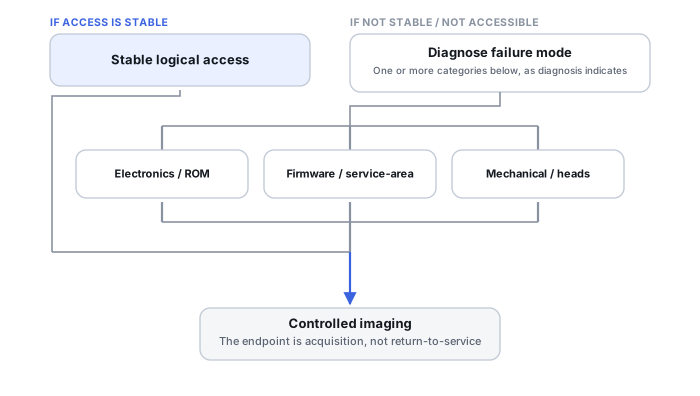
A hard drive can stay inaccessible even with working electronics if it cannot load or interpret the service information it needs to present its user area. Recovery at this level means identifying which layer is actually failing, preserving what exists before anything is changed, and restoring just enough access for controlled imaging — not reflashing a single firmware file.
- Service information is distributed between PCB-side storage and reserved areas on the platters; a working PCB alone proves little.
- BSY, not-ready or wrong capacity are symptoms with several possible causes, not proof of translator damage or intact media.
- Preserve the original ROM, adaptive data and readable service data, with provenance, before any write; donor modules are not universally interchangeable.
- A firmware update is not service-area recovery, and persistent service writes can change how sectors are mapped.
- Stable identify and capacity are only a starting point; readiness is shown by controlled acquisition across several areas.
Firmware is split between the PCB and the platters
“The firmware is on the PCB” is a common oversimplification. Professional HDD tools distinguish ROM/flash/NVRAM associated with the PCB and controller from service-area structures stored on reserved tracks of the platters, plus adaptive/calibration information, translator and defect data, and drive-family-specific logs and service structures. A working PCB alone does not guarantee the drive can load the service information it needs to expose user-visible LBAs — and the reverse is also true: a readable service area does not mean the PCB-side data matches it.
Service tracks, modules and redundancy
The service area holds structures a drive needs to complete initialization. Some drive families keep more than one copy of some of these structures, or keep copies in more than one location; whether a usable redundant copy exists, and how it can be reached, depends on the family and on the condition of the heads and media that hold it. Recovery work in this area is family-specific: professional tools describe access to particular service structures, loaders, head configuration data and defect tables, not a single generic “firmware file.”
Loaders and vendor-specific access
For some drive families, professional tools can place a drive into a restricted, vendor-specific access mode, sometimes with a loader supplied by the tool, even when the drive cannot reach a normal ready state for the host. Whether such a mode exists, and what it allows, varies by family and by tool version. Where it is available, it exists to let a technician read service data, work out which structure is missing or damaged, and decide whether a targeted repair is justified. It is a diagnostic and recovery mechanism, not a normal operating mode the drive is meant to stay in.
What the translator does — and what it is not
The translator is the drive's logic for turning the logical block addresses the host uses into internal physical locations, taking defect management into account. It is not a simple universal CHS-to-LBA formula: how zones, spare areas and defect lists feed into that mapping depends on the design of the drive family. Some drives add further internal state on top of it — for example, drive-managed SMR drives handle their sequential-write constraint inside the drive firmware — but that behavior belongs to those designs and should not be generalized to every HDD.
When translator information is damaged or cannot be loaded correctly, a drive can report the wrong capacity or fail to expose some or all of its user LBAs. That is one possible explanation for those symptoms, not the only one, and it says nothing on its own about the state of the media underneath.
Symptoms are not a diagnosis
Busy and not-ready. BSY is an interface status bit meaning the drive is not accepting commands at that moment. A drive that stays busy or not-ready has not completed something it needs to do, but that observation alone does not say what: a missing or unreadable service structure, a firmware inconsistency, a head that cannot complete a required read, a power problem, or an adapter or bridge that handles the state badly are all possibilities. Interpreting it needs context — power behavior, which command was sent, how long it was waited for, the exact model and family, and the interface or adapter in the path.
Wrong capacity. A capacity that looks wrong can come from several different layers: the native capacity the drive reports through ATA identify; a USB bridge or controller that presents the device differently; a partition or volume that is smaller than the device; or a simple decimal-versus-binary units difference (GB versus GiB). Drives can also carry configured capacity restrictions: hdparm(8) describes the Host Protected Area as a lower “max visible number of sectors” than the native limit, and a Device Configuration Overlay as a way for vendors to disable features and accessible capacity. The same manual labels changing these settings as very dangerous, with data loss likely. A restriction is a possibility to identify and document, not something to remove as a first step.
Failures to read service data are not purely a firmware question either. Service structures live on the platters and are read by the same heads, so a failure to read them can be connected to weak heads or damaged media. “The media is intact” describes one possible case; it cannot be concluded from a busy state or a capacity reading.
Scroll horizontally to see the full table →
| Observation | Possible layers | Safer decision | What it does not prove |
|---|---|---|---|
| Abnormal reported capacity | Translator or service data; configured capacity restriction; bridge or controller presentation; partition size; units | Record native identify values, the adapter used and any history; compare layers before changing anything | That the translator is damaged, or that the missing area was erased |
| Unstable or changing identify | Power or interface; PCB-side data; service data that loads intermittently; heads | Stop repeated power cycles; document each identity seen; move to qualified diagnosis | That the problem is only firmware, or that it is only electronic |
| Persistent busy or not-ready | Initialization blocked by service data, heads, media, power or the adapter in use | Note the conditions (command, wait time, adapter, power); avoid repeated attempts that keep the drive working on a failing read | That platters and heads are healthy, or that the case is easier than a mechanical one |
| Errors concentrated in ranges | Surface damage; a weak head on some surfaces; defect handling or translation affecting a region | Treat as an unstable source; plan prioritized acquisition rather than a full scan | Which of these causes applies, or that other ranges will stay readable |
Preserve before anything is changed
Before any write to the drive's service structures, a careful workflow records and keeps what already exists. That typically means:
- full identification of the patient drive: model, serial number, firmware revision, family and the PCB in use;
- the original ROM and adaptive data, and any service-area copies that could be read, each with a note of where and how it was obtained;
- the tool, its version and the family profile used, since what a tool reads or writes can differ between versions;
- a log of earlier interventions, including anything done before the drive reached the current technician.
When a service structure cannot be read, its state is unknown — not missing, and not automatically replaceable. Copying a similar-looking module from a donor drive in its place is not a neutral step: ROM content and adaptive data can be specific to the individual drive, and they are not universally interchangeable between drives, even of the same model.
Reading, temporary access and persistent writes
Three kinds of operation are often lumped together as “firmware repair,” and they carry very different risk:
- Diagnostic reading of identify data, logs and service structures changes nothing persistently, although it still puts work on the heads and media.
- Temporary access, such as a loader or a setting held only in RAM for one session, is meant to disappear at the next reset; whether a given operation is genuinely temporary depends on the family and the tool.
- Persistent service writes change what the drive will do from then on. Translator regeneration, clearing defect lists and firmware writes can change which physical location a given LBA maps to. Whether such a change can be reversed depends on what was preserved beforehand and on the family.
A generic firmware update from a manufacturer is a different thing again. It replaces drive firmware with a newer release for specific models, and it is not a way of recovering damaged service structures; on a drive that cannot initialize properly, an update may fail or change evidence, and it is not a substitute for diagnosis and targeted recovery. “Firmware recovery” likewise does not mean flashing one file once: it means working out which of several structures is at fault and restoring access to the user data with as few persistent changes as possible.
Stable identity is the start, not the result
When a drive that was busy or unreadable starts reporting a plausible identity and capacity, that is a starting point, not proof that it is ready for filesystem recovery. Plausible numbers can coexist with a weak head, a damaged region or a translation problem affecting only part of the address space. Readiness is shown by reading: samples from several areas of the drive, then an acquisition map that records what was read and what was not, and controlled imaging (see how to image a failing drive safely).
The objective is still temporary restoration: enough of the service and translator layer to expose readable sectors for acquisition, with all further work done on the image. A full surface scan “to prove the drive is stable” spends the drive's remaining capability on a test instead of on data. If access is partial or a head appears unstable, prioritizing the ranges that hold the needed data may matter more than complete coverage. Whether the recovered files are actually complete and consistent is a separate check (see validating recovered data).
PCB, ROM, firmware, service area and translator are five related but distinct things. A fix at one layer doesn't imply the others are fixed, a symptom doesn't name the failing layer, and identifying which layer actually failed — without overwriting the evidence — is most of the work in a case like this.
Technical references: hdparm(8) — HPA and DCO capacity restrictions; changes flagged dangerous · Zoned Storage: SMR hard disks — drive-managed SMR handled in drive firmware. hdparm is a Linux utility and its option set varies by version; the Zoned Storage documentation is published by Western Digital. The two references cited here do not document the family-specific service-area, loader or translator procedures; consult the documentation of the specific family and recovery tool before relying on any such detail.
Related: HDD PCB, ROM and Adaptive Data Recovery · HDD Heads, Platters and Mechanical Failure · Professional HDD Recovery Hardware · How to Image a Failing Drive Safely · How to Validate Recovered Data · Drive Not Detected or Keeps Disappearing · Drive Shows the Wrong Capacity · Power Surge or Electrical Failure