Data Recovery Workflow: Source to Validation
Start by establishing the goal, the source, the layer you can actually read, and the risk; preserve the representation that matters; analyze a copy and reconstruct only the layers that are missing; export to a separate destination; then validate the result. This is a model with conditional branches, not a mandatory ladder every case has to climb. If the needed data already sits in a verified, tested backup, an ordinary restore can be the right path on its own. If live decrypted access depends on hardware staying powered, the decision to shut it down is made separately, on its own evidence.
- Define the goal first: specific files, a database, a VM, a past state or a working volume.
- Identify the source and the lowest layer you can actually read before choosing a tool.
- Decide to continue, acquire or escalate; these are different branches, not one severity scale.
- Reconstruct only the missing layers, and export to a destination outside the source and its image.
- Validate the result and keep a short job record so decisions can be retraced.
Scroll horizontally to see the full diagram →
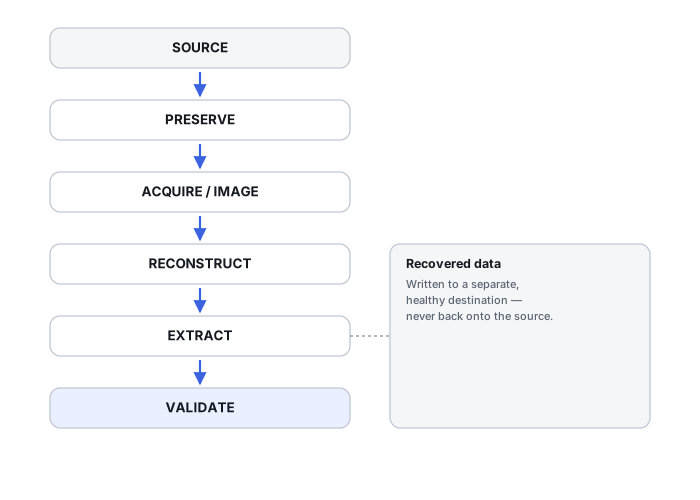
Define the recovery goal before choosing a tool
Needed files, deleted data, a database, a virtual machine, a past state, or a working volume are different goals, and they lead to different plans. Before touching the source, put together a minimal inventory of what's actually needed, note any changes already known to have happened, and set priorities. Check for an independent backup or version source first — a tested, current one can answer the whole question without placing any further load on the original.
Identify the source and the layer you can actually read
The source might be a physical device, a set of array members, a LUN, a reconstructed virtual volume, an encrypted or already-decrypted view, a chain of virtual-disk files, or a live application copy. Capacity, logical sector size, a source identifier, and any keys or dependencies involved are part of describing the source — identifying it is not, by itself, a reason to start scanning.
Decide whether to continue, acquire or escalate
Stable access with manageable read errors, visible degradation or mechanical symptoms, and a lost key or lost mapping are different branches, not points on one severity scale. The absence of mechanical symptoms does not confirm that a device is healthy — it only means that one category of warning sign hasn't appeared yet. See When Software Recovery Is No Longer Appropriate for how to read these signals before deciding.
Preserve the best available representation
What to preserve follows from the goal, not from habit: acquisition does not always mean a full physical image, and sometimes preserving the most valuable readable set first matters more than attempting full coverage immediately. On an unstable source, keep the read map and the acquisition's progress state together with whatever has been captured so far — see How to Image a Failing Drive Safely for the operational plan.
Reconstruct only the layers that are missing
RAID → pool or volume manager → file system is one example chain of dependencies, not a universal order every source follows. A layer that's already reliably accessible does not need to be reconstructed again. Candidate layouts are changed virtually, on a copy; repairing the source itself is not a prerequisite for acquisition, and in most cases it should happen later, if at all.
Extract to a separate destination
Export recovered files outside the source and outside the image or working copy being analysed. Separate healthy storage provides additional protection, while separate directories on one healthy destination keep roles organised but share the same device-failure risk; preserve the dependencies an application object actually needs (configuration, logs, linked files) alongside the files themselves. A scan session running against a candidate layout is not the same thing as an image file or a set of exported files — don't conflate the two when deciding what's safe to discard.
Validate what was recovered and record uncertainty
Coverage against what was needed, unreadable extents, metadata plausibility, format- or application-level checks, and comparison against a known-good copy where one exists are different checks, not one pass/fail gate. A file being present is not the same claim as a file being verified; describe results as complete, damaged or uncertain within the scope of the checks that were actually performed, not beyond it.
Keep a record that lets you repeat a decision
A short job record (template below) that references the map, the parameters used, the sources consulted and the checks performed makes it possible to retrace a decision later without guessing what was done. Repeating an analysis on preserved data is different from repeating a read against a failing source — the record should make clear which one actually happened.
Scroll horizontally to see the full table →
| Gate | What must be known | Output | What stays unchanged | When to stop |
|---|---|---|---|---|
| Source identified | What the object is, how it's currently reached, and whether access is stable enough to read from safely | A description of the source and the layer that will actually be read | The source itself — identification should not require writes | Stop ordinary exploration if access is worsening. Controlled acquisition may be appropriate when reads remain manageable; new mechanical symptoms or uncontrolled instability call for assessment before further reads |
| Acquisition chosen | Whether a verified backup already covers the goal, or a live or offline acquisition is actually needed | An acquisition plan matched to the source's current condition | Source state — choosing a plan is not performing it | Don't wait for full certainty about total scope before preserving what's urgently readable now |
| Candidate layer assembled | Which storage layers are genuinely missing versus already reliably available | A reconstructed view, built virtually from the acquired data | The acquisition and the original source — reconstruction works on a copy | Skip reconstructing a layer that's already reliably accessible |
| Files exported | Which specific objects are actually needed, and what each depends on | Extracted files and their dependencies on separate, healthy storage | The acquisition and any candidate view used only for analysis | Preserve the candidate parameters and the export; whether further candidate work on a copy is needed is decided by validation results, not by export alone |
| Result validated | What checks were actually performed and what remains unresolved | A complete/damaged/uncertain breakdown, not a single pass/fail label | Nothing further needs to change at this point | Re-validating from preserved data is not the same as re-reading a failing original |
Scroll horizontally to see the full table →
| Situation | First priority | Appropriate branch | Result to verify |
|---|---|---|---|
| Deleted files on a stable disk | Preserve the relevant block-level representation before scanning | Acquire, then reconstruct or carve on a copy | The specific needed files are present and open correctly |
| Unreadable source | Stabilize or image what's readable rather than repeating ordinary access | Acquisition-first; reconstruction waits for a usable image | Acquired ranges actually cover the files that matter |
| Readable array members, no volume | Preserve member state and configuration before any rebuild | Acquire members, reconstruct the volume virtually | Reconstructed geometry produces a candidate matching expected content |
| Unlocked encrypted live volume | Assess a consistent priority export before changing power state | Live acquisition, or a controlled shutdown, depending on dependencies | The exported copy opens and matches the needed scope |
| Missing VM dependency | Identify the full chain (base disk, deltas, configuration) before treating one file as sufficient | Preserve the whole chain; reconstruct only the piece that's actually missing | An isolated restore reaches the expected state |
| Intact, tested backup | Confirm the backup is actually current and complete for this goal | Ordinary restore — acquisition and reconstruction of the original are not needed | Restored objects match what was needed, not just that restore reported success |
A job record template
The fields below are placeholders for a short record kept alongside a case, not a real example. Mark anything genuinely unknown as unknown rather than leaving it blank or guessing.
Scroll horizontally to see the full table →
| Field | Placeholder entry |
|---|---|
| Goal | Recover specific documents named in the request; database content not required |
| Source identifiers and scope | Device serial: unknown. Reported capacity: ~2 TB. Single physical disk, no array. |
| Reported sizes | Logical size as reported by the acquisition tool once started; unknown beforehand |
| Access path | Internal SATA connection; no bridge or enclosure in the path |
| Known history | Reported intermittent disconnects before the source was brought in |
| Key or dependency location | Reference to where recovery credentials are stored, without recording the credentials themselves here |
| Acquisition or map version | Tool and version used; map/log reference, filled in once acquisition runs |
| Candidate parameters | Reconstruction attempted virtually against the acquired copy; original left unmodified |
| Output path | Separate, healthy destination storage, distinct from the acquisition |
| Performed checks | Coverage against the known file list; hash of the acquired artifact; sample files opened |
| Unresolved items | Any ranges or files not yet confirmed, marked unknown rather than assumed lost |
The three training scenarios below work through specific situations in more detail.
Training scenario: a stable disk, a deleted folder, and no usable backup
A disk reads consistently; a folder was deleted; no independent backup or version history covers it.
The relevant block-level representation is still present and can be preserved before any scanning starts. Where file-system metadata survives, it generally gives more reliable relationships than content-only carving alone.
Preserve the needed representation, reconstruct the file-system structure on a copy where metadata helps, and fall back to carving only where it doesn't; export recovered items to separate storage.
Open the specific documents that were needed and confirm their content; record any that remain missing rather than assuming the folder is fully recovered.
Training scenario: a NAS does not mount a volume, but every member reads
Every physical member of an array reads individually without error, but the storage system does not present a usable volume.
Readable members do not establish that the stack above them — geometry, pool mapping, file system — is intact. The failure may sit entirely above the member layer. Healthy members are not the same claim as a healthy stack.
Preserve member state and configuration before any rebuild or initialization; plan acquisition of the members; reconstruct the virtual stack on copies, never on the original configuration.
Confirm the reconstructed geometry produces a candidate whose structure and files match expectations, not just that some volume appears.
Training scenario: a live decrypted volume holds critical files, and key availability after a restart is unknown
A system is currently running with an unlocked, decrypted volume that holds files that matter. Whether the key material would still be available after a restart or shutdown has not been established.
Powering the system down is not automatically the safer choice here. If key availability after restart is genuinely uncertain, shutting down can turn a currently-accessible source into an inaccessible one.
Assess a consistent priority export of the needed data together with the key and dependency situation before changing power state. This is a case-specific judgment, not a rule to always keep equipment running, and not a rule to always shut it down.
Validate the exported copy independently once it exists, rather than treating the system's continued availability as proof the data is already safe.
This page is the control-level decision chain for a recovery job. It doesn't repeat the imaging mechanics in Read Errors, Timeouts and Retries Explained, file-system-specific algorithms, format-by-format acceptance criteria, or a tool catalog — those live on their own pages.
Technical references: GNU ddrescue manual — acquisition, map and resume principles referenced in the preservation step; confirm specific options against the manual for the version in use. Microsoft: Volume Shadow Copy Service — writer/provider/requester coordination referenced for the live-volume scenario; a Windows-specific example, not a universal consistency guarantee. QEMU: qemu-img — backing-chain and active-image risk referenced for the VM dependency case; commands are not applicable to every VM disk format.
Related: When Software Recovery Is No Longer Appropriate · How to Image a Failing Drive Safely · What a Disk Image Preserves — and What It Does Not · Recovery Copies: Source, Image, Working Copy and Destination · Understanding Storage Layers · Validating Recovered Data · Live Systems and Consistent Copies