When Software Recovery Is No Longer Appropriate
Switching applications does not fix unstable access. First establish whether the source is actually safe to keep reading, whether the scanner is even looking at the right storage layer, and whether the keys or dependencies it needs still exist. An ordinary file scanner can be the wrong tool without "software" being finished altogether — recovery-oriented imaging and virtual reconstruction are software actions too, and a complex RAID failure doesn't automatically mean every path forward requires a lab.
- Switching to another program doesn't fix unstable access to the source.
- Mechanical symptoms, unstable access and missing keys are three different limits with different responses.
- Abnormal noises after an impact, grinding or repeated resets mean stop ordinary scans.
- A missing RAID, pool or VM layer can still be a software problem of mapping, not hardware.
- Before handing a case over, preserve identifiers, a history of attempts, images, maps and logs.
Three limits that need different responses
Three different limits can each look like "software isn't working," but they call for different responses. Unstable access means the source itself can't be read reliably yet. A wrong or incomplete representation means the tool is looking at the wrong layer — a RAID member instead of the reconstructed volume, for instance — not that the data is gone. Information no longer available means the specific bits, key material or mapping actually needed don't survive anywhere reachable. The table in the next section keeps these apart; collapsing all three into one "escalate to hardware" decision skips steps that matter.
Mechanical symptoms change the next step
New abnormal sounds, an impact followed by abnormal operation afterward, scraping or grinding, and genuine instability are reasons to stop ordinary scans and consider a professional diagnosis. A sound by itself does not diagnose which specific head or surface is affected — it's a reason to stop and assess, not a self-contained diagnosis.
Scroll horizontally to see the full diagram →
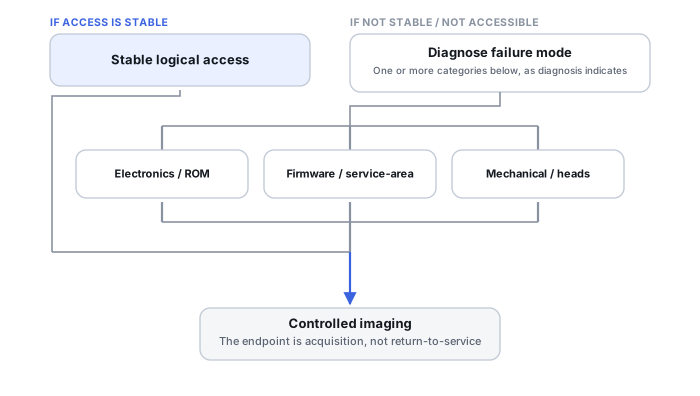
Unstable access is not fixed by a longer scan
Disconnects, repeated resets, severe slowdowns, and inconsistent reported capacity or readability can originate from the drive itself, from power delivery, from a cable, from a bridge, or from a controller. None of these symptoms by itself identifies which layer is actually at fault, and running several long scans back-to-back is not a diagnostic test — it's additional load placed on a source that's already struggling.
Controlled imaging may still be appropriate
Once a device is identified and reads in a controlled, predictable way, acquisition with a read map can still be the right next action — it changes how the workload is applied, prioritizing what's readable and recording what isn't. Specialized imaging hardware gives more control over that process; it doesn't repair mechanical damage and doesn't guarantee a particular outcome.
A missing storage layer can still be a software problem
Readable array members with no usable volume, damaged pool metadata, or a virtual-machine chain missing its parent disk are, first, dependency and mapping problems. Virtual reconstruction performed on copies can be entirely appropriate here; rebuilding or repairing the original configuration is a separate action with its own risk, and the two shouldn't be treated as the same step.
Key loss and overwrite are different limits
Intact, correctly implemented strong encryption without the required key material isn't resolved by reading the device more carefully. Credential recovery, damaged key metadata, and hardware-bound access are separate problems with separate paths — not one generic "encryption is broken" case. Bytes that have actually been overwritten are not recoverable from the current representation of that range; an independent backup, version history, or replica is a different source of that content, not a technique for recovering the overwritten range itself.
Use a stop/continue decision, not a success percentage
The table below is phrased as stop or continue, not as a success percentage or a fixed retry count. Neither this page nor the source itself can promise what fraction of the data a given approach will actually recover.
Scroll horizontally to see the full table →
| Observed symptom | What it does not prove | Next priority | Ordinary scan? | Appropriate escalation |
|---|---|---|---|---|
| Stable logical deletion | Nothing about hardware health | Preserve the relevant representation | Appropriate, once preserved | Not usually needed |
| Read errors under controlled access | That the whole device is failing, or which layer caused a given error | Acquisition with a read map, not repeated plain reads | Not as a repeated diagnostic — a controlled, map-aware pass instead | Imaging hardware, if access stays unreliable |
| Recurring disappearance | Which component — drive, power, cable, bridge, controller — is responsible | Stabilize the access path before any further reading | No | Device-level or access-path diagnosis |
| Post-impact abnormal HDD | Exactly which head or surface is affected | Stop powering it for ordinary use; preserve history | No | Physical diagnosis |
| Expected members readable, no RAID volume | That the files are irrecoverable | Preserve member state and configuration | A member-only scan may be incomplete or use the wrong layer; whether a member exposes usable standalone data depends on the layout | Storage-stack reconstruction, on copies |
| Encrypted access failure | That the key is unrecoverable, or that bypass is possible | Identify whether this is a credential, metadata or hardware-bound case | No | Legitimate key/credential recovery, case-specific |
| Wrong reported capacity | A specific firmware fault | Check the bridge, translation layer and connection first | Not until capacity is explained | Access-path or device-level diagnosis, as the cause indicates |
| Known overwrite | That no other source (backup, version, replica) holds the content | Check independent sources of that content | Not applicable to the overwritten range itself | Not a device-level case for that range |
Scroll horizontally to see the full table →
| Type of assistance | What it may add | What it cannot promise |
|---|---|---|
| Image from existing copies | Analysis without further risk to the original | Recovery of data the existing copies don't already contain |
| Controlled acquisition | A stable, map-aware representation of a readable-but-unstable source | That every requested range will become readable |
| Device-level diagnosis | Identification of a specific hardware fault | That the fault is repairable, or that data survives it |
| Storage-stack analysis | A reconstructed view of RAID/pool/volume relationships | That the reconstruction matches the original configuration exactly |
| Legitimate key/access restoration | Access through a supported credential or recovery path | Bypassing intact, correctly implemented encryption |
What to preserve before handing the case over
Before a case moves to someone else, preserve source and configuration identifiers, a chronology of what was already tried, any images, maps and logs already produced, and dependency or key information passed through a protected channel rather than written into a plain report. None of this requires powering the original back on to fill in details that are missing.
The four training scenarios below work through specific situations in more detail.
Training scenario: a USB disk resets during a scan, mechanically quiet
An external USB disk disconnects and reconnects repeatedly during an ordinary file scan; there are no unusual sounds.
The underlying access-path problem is unresolved — it could be the drive, the enclosure's bridge chip, the cable, or the port, and nothing here identifies which.
Stop running full scans against the unstable connection; record the access path and the errors actually observed; perform a limited assessment or a controlled acquisition matched to what the situation supports.
Validate coverage of the acquired image rather than assuming the scan's results were complete. Bypassing the original enclosure isn't required to proceed — it may be performing translation or encryption that a bare-device read would lose.
Training scenario: RAID members are stable, but the scanner only finds fragments
Every physical member of the array reads without error, but a file scanner run against the storage finds only fragments of the expected files.
This does not establish that the missing files are unrecoverable — the scanner may simply not be looking at the reconstructed volume the files actually live on.
Preserve the member images and configuration; assemble the appropriate layers virtually; validate a candidate reconstruction before exporting anything from it.
Confirm the reconstructed geometry produces the expected files, not just that some data is visible somewhere in the member images.
Training scenario: a dropped HDD now grinds or scrapes
A hard drive was dropped; it now produces grinding or scraping sounds during operation that weren't present before.
This is a reason to stop, not a reason to test further — continued operation risks worsening mechanical damage, and the sound alone doesn't identify which component is affected.
Stop powering the drive for ordinary scans; preserve its history and the device itself; seek a physical diagnosis.
A diagnostic result from that assessment should not be read as confirming a specific recoverable percentage — it identifies the problem, not the outcome.
Training scenario: an intact encrypted volume, recovery credential absent
The volume's encryption appears intact and correctly implemented; the recovery credential or key that would normally unlock it isn't available.
This is a key/access-context problem rather than something a more intensive file scan can resolve by itself. Other surviving protectors, recovery records or hardware-bound dependencies may still provide a legitimate access path.
Preserve any key metadata that does exist and check legitimate recovery sources (account recovery, escrowed keys, organizational records); reading the drive alone cannot substitute for the missing key.
Confirm the result against what actually opens the data: the needed representation becomes accessible through a surviving protector, and the needed files are present on the preserved copy. If that doesn't happen, record the unknown or missing dependency rather than treating the absence of a bypass as validation on its own.
Technical references: GNU ddrescue manual — the distinction between ordinary copying and map-aware, rescue-oriented acquisition referenced in the controlled-imaging section; confirm specific switches against the manual for the version in use. Linux kernel documentation: dm-crypt — encrypted block-device mapping and parameters referenced in the key-loss section; this is not a source for every self-encrypting-drive or TPM-based implementation. QEMU: qemu-img — dependency chains and active-image caution referenced for the VM-chain case. Mechanical and vendor-specific diagnostics require their own model-specific documentation; where none is cited here, the text stays at the level of symptom-based triage rather than naming a specific component.
Related: Logical vs. Physical Data Recovery · How to Image a Failing Drive Safely · Read Errors, Timeouts and Retries Explained · RAID Reconstruction Basics · Encryption Key Hierarchies in Recovery · What Overwrite Destroys · Data Recovery Providers