ext4 Superblocks, Inodes, Extents and Journal
ext4 recovery can draw on redundant superblocks, group descriptors, allocation bitmaps, inodes, extent trees and directory blocks as separate, cross-checkable pieces of evidence — but none of them guarantees that a deleted or damaged file survives, and its JBD2 journal restores structural consistency, not a historical backup of user files. The useful output is a set of structure candidates with stated confidence, exported elsewhere and checked, not a volume that merely mounts again.
- Names, inodes with extents, and allocation bitmaps are separate evidence that cross-check each other, not one chain.
- A backup superblock is a geometry candidate to verify; it does not bring back inode tables or extents.
- A missing name, an unlinked file and a reused inode are different states; an inode number alone does not promise undelete.
- Even a read-only ext4 mount can replay the journal; work from an image.
- A volume that mounts again is not proof of recovery; export and validate candidates.
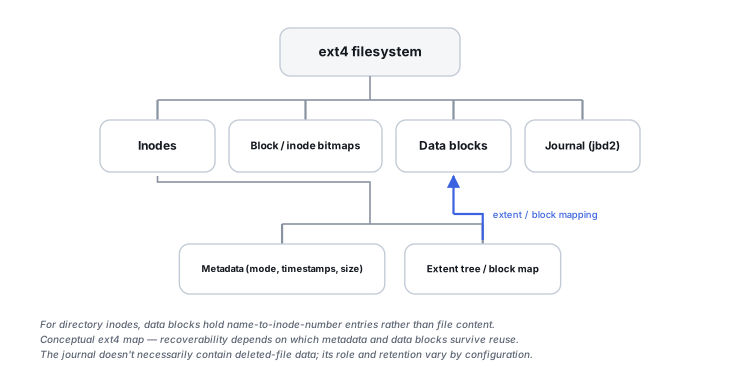
Separate structures, separate evidence
Linux kernel documentation describes ext4's global structures as a superblock, block group descriptors, a block bitmap, an inode bitmap, an inode table and a journal, with dynamic structures — inodes, extent trees, directory entries and hash-tree directories — built on top of them. For reconstruction it helps to keep three relationships apart rather than reading them as one chain:
- Name → inode number. A directory is stored in a directory inode’s data blocks as entries that map a name to an inode number (Directory Entries).
- Inode → metadata and mapping. An inode holds mode, size, timestamps and link count, and its
i_blockarea holds a block map or the root of an extent tree; an inode number also determines which group’s inode table the record sits in (Index Nodes). - Bitmaps → allocation state. Block and inode bitmaps record which blocks and inodes are in use. They are evidence about allocation, not a link that must be followed to reach each inode, and they can disagree with inodes after damage or an interrupted update.
Layout is feature-dependent. With flex_bg, bitmaps and inode tables of several groups can be packed together; meta_bg moves group descriptors; and with lazy-initialization flags some bitmap blocks are computed rather than stored on disk (Block Groups). A parser that assumes one fixed per-group layout can therefore misread a perfectly valid volume.
This makes ext4 a clean, non-NTFS, non-APFS example of the general principle: metadata-aware recovery cross-checks these structures directly instead of trusting whatever the active directory tree currently shows.
Scroll horizontally to see the full table →
| Structure | Useful evidence | Limitation |
|---|---|---|
| Superblock and its backups | Block size, group geometry, UUID, feature flags, checksum | Copy locations depend on features; a backup describes geometry, not files |
| Group descriptors | Where each group’s bitmaps and inode table are located | Placement varies with flex_bg and meta_bg; a stale copy can point to wrong locations |
| Block and inode bitmaps | Which blocks and inodes were marked in use | Allocation state only; may be computed rather than stored, and may disagree with inodes |
| Inodes | Type, size, timestamps, link count, mapping root | A record can be cleared or reused after deletion; plausible fields are not proof of the original file |
| Extent trees | Logical-to-physical mapping, including unwritten ranges | A wrong or stale candidate can yield plausible but incorrect fragments |
| Directory blocks and HTree | Names and the inode numbers they point to | A name says nothing about whether the inode or data still belong to that file |
| Journal (JBD2) | Recent committed metadata, and data only in some modes | Short, circular, configuration-dependent; not a history of file content |
Backup superblocks are structural redundancy, not full backups
Kernel documentation states that redundant copies of the superblock and group descriptors are written to some block groups, and which ones depends on features: without sparse_super copies are kept in all groups, with it only in group 0 and groups that are powers of 3, 5 or 7, and with sparse_super2 the superblock names the two groups that hold backups (Super Block; Block Groups). Block size and group size also vary, so there is no universal offset table for “the” backup copy.
A candidate copy is only a hypothesis until it agrees with the volume around it: block size and blocks-per-group consistent with the partition size and with where other copies are found, the same UUID as other copies, feature flags that make sense together, a valid checksum where metadata_csum is enabled, and group descriptors that point to plausible bitmaps and inode tables. An older copy may describe a geometry from before a resize. Even a correct backup restores only geometry and group-level parameters — it does not bring back damaged inode tables, extent trees or directory blocks, and pointing a repair tool at the wrong copy can write a large amount of metadata based on an incorrect assumption.
Missing names, unlinked files and reused inodes
Name and file-metadata object are not the same thing, as on NTFS, but three different states are easily confused:
- Directory corruption. A damaged directory block can lose names while the inodes, their extent trees and their content survive. This is where metadata-aware recovery can sometimes show considerably more of a volume than directory traversal does — files may come back without their original names or paths.
- Unlink or deletion. Once the last link is removed and no process still holds the file open, the inode and its blocks are freed. Depending on the implementation and what happened next, the inode’s mapping and metadata may be cleared, truncated or left partly in place; a recorded deletion time is evidence that a delete happened, not that the content is still recoverable.
- Overwritten or reused inode. Once the inode number or the blocks are allocated to something else, the record describes the new file. Old names in directory blocks can still point to that number and give a misleading match.
An inode number alone is therefore not an undelete promise. Whether anything usable remains is decided by checking the record, the mapping and the content against each other; when the mapping is gone, the fallback is carving, with the limits described in File-System Recovery vs. File Carving. On SSDs, discard or TRIM after deletion can remove the data itself (see TRIM, Deallocate and Garbage Collection).
Extent trees: logical ranges, not proof of old content
Modern ext4 commonly uses extent trees rather than long arrays of individual block pointers. Each extent records the first logical file block it covers, a length and a physical start; an extent can also be marked uninitialized (unwritten), meaning the space is allocated but has not been written with data (The Contents of inode.i_block). Logical ranges not covered by any extent are holes in a sparse file. Small files can also be stored inline in the inode where the inline-data feature is enabled.
For recovery this means that allocated does not always mean “old user payload”: an unwritten range or a hole should not be read back as file content, and blocks that were previously part of another file can sit behind a newly allocated extent. If an extent tree is damaged, the underlying blocks may still physically survive while their logical ordering becomes uncertain, leaving carving able to recover only recognizable fragments or contiguous portions. A wrong or stale extent candidate is a specific risk: it can produce output with a plausible size and header that is assembled from the wrong blocks. Extent blocks carry a magic number and, with metadata checksums, a checksum tied to the inode, which helps reject candidates but does not confirm the data they point to.
HTree directory indexing is not file content
Large ext4 directories can use hashed-tree (HTree) indexing. The interior index nodes are hidden inside the directory file as apparently empty entries, while the leaf blocks look like classic linear directory blocks (Directory Entries). Corruption of the index can make files hard to enumerate through normal directory lookups while the leaf blocks still hold valid entries, which is one reason directory visibility is only one metadata layer among several.
The reverse does not follow automatically: a damaged index does not prove that the leaf blocks, the inodes they name or the file data are intact. Each has to be checked on its own, for example against directory-block checksums where metadata_csum is enabled.
Orphan tracking and metadata checksums
ext4 tracks orphan inodes as crash-recovery bookkeeping. Kernel documentation lists two cases: inodes unlinked from the directory hierarchy but still open, and inodes being truncated or extended when the operation cannot fit in a single journal transaction, so that extra blocks can be cleaned up after a crash (Orphan file). Not every orphan is a usable deleted file: it may be a file that was meant to be freed, or one mid-way through a size change.
How the tracking is stored depends on features. Without the orphan-file feature, the superblock holds the last orphan’s inode number and each orphan’s deletion-time field is reused to point to the next, forming a list; with orphan_file, a special inode holds the entries and an ro-compat flag marks that valid entries may be present (Orphan file; Index Nodes). A tool that reads only one of the two schemes can misreport orphans on the other.
Where metadata_csum is enabled, the superblock, inodes, extent blocks and directory blocks carry checksums that help validate structures before trusting them. A valid checksum shows that a structure is internally consistent with the filesystem it claims to belong to; it does not show that the structure is the current or correct version. Both orphan records and checksums are useful evidence, and neither substitutes for imaging the source before any repair pass that could alter or discard them.
JBD2 protects consistency, not user-data history
ext4 uses the JBD2 journal to protect the filesystem against metadata inconsistencies after a crash. By default only metadata goes through the journal; data=journal sends data too; transactions without a valid commit record, or with mismatching checksums, are discarded during replay; and fast commits store only minimal metadata deltas (Journal (jbd2)). A journal block or a valid block checksum does not by itself establish that its transaction committed; that requires the matching transaction context and commit record, with the relevant integrity checks. Even a committed transaction is not a complete history of a file’s content. How replay compares with NTFS logging, and why replay can overwrite older evidence, is covered in Filesystem Journals and Crash Consistency.
Read-only mounts, replay and no-replay views
The kernel’s ext4 administration guide notes that ext4 will replay the journal, and thus write to the partition, even when mounted read-only, and that skipping replay on a filesystem that was not unmounted cleanly leaves it containing inconsistencies (ext4 mount options). Two practical consequences follow:
- Mounting or running a repair tool on the original device is not a neutral look; both can change the evidence. Analysis belongs on an image, made as described in How to Image a Failing Drive Safely, with the mount-level choices discussed in Why Mounting a Damaged File System Can Be Risky.
- A no-replay view is a different state, not a “fixed” one. It can show metadata from before the last committed transactions, and it can be internally inconsistent; differences between replayed and non-replayed views of copies of the same image are themselves evidence to record.
A recovery tool or parser that rejects a volume because of an unsupported feature flag has not shown that the filesystem is destroyed. ext4 feature flags are split into compatible, incompatible and read-only-compatible sets precisely so that software can tell what it does not understand (Super Block); a refusal can simply mean the tool is older than the features in use.
What a reconstruction result actually is
The practical output of ext4 reconstruction is a set of candidates — a geometry, inode records, extent mappings, directory entries — each with a stated confidence and its known limits, such as missing names, uncertain extents or ranges that may belong to a later file. Files are exported to other storage, never written back to the source, and their content is then checked: opening, structure checks, hashes or comparison with known versions, as described in How to Validate Recovered Data.
A volume that mounts again is not the same as recovered data. A repair can produce a consistent filesystem by discarding inodes, truncating files or moving entries to lost+found, and a mount that succeeds says nothing about whether individual files contain what they used to.
Treat ext4’s superblock copies, group descriptors, bitmaps, inodes, extent trees and directory blocks as separate evidence that has to agree. A damaged directory tree does not mean the inodes and extents beneath it are gone — and a surviving inode or extent does not, by itself, mean the original content is still there.
Technical references: Linux kernel: ext4 Super Block — backup copies, features, checksums · Linux kernel: The Contents of inode.i_block — extents and unwritten ranges · Linux kernel: ext4 Orphan file — orphan list and orphan_file · Linux kernel: ext4 administration guide — replay on read-only mount, noload. Other kernel ext4 pages are cited inline; the administration guide was checked in its current and 6.12 versions, and other kernels and tools can differ.
Related: NTFS MFT, Allocation and File Reconstruction · Filesystem Journals and Crash Consistency · Allocation Metadata, Orphaned Files and Lost Space · Why Mounting a Damaged File System Can Be Risky · File-System Recovery vs. File Carving · How to Validate Recovered Data · File System Corruption