BitLocker Key Protectors and Damaged-Volume Recovery
BitLocker protects the FVEK through the VMK and one or more key protectors — a normal recovery password can unlock a healthy volume, while severe BitLocker metadata corruption can additionally require the matching key package before recovery tools can do anything at all.
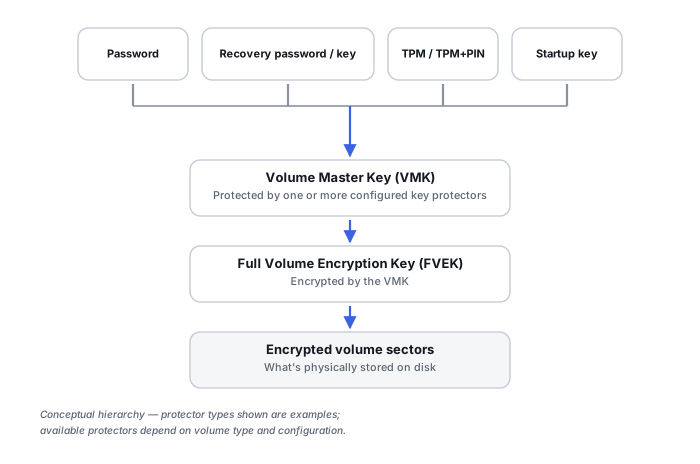
FVEK and VMK: two keys, not one
Microsoft documents raw BitLocker volume data as encrypted with a Full Volume Encryption Key (FVEK). The FVEK itself is then encrypted with a Volume Master Key (VMK), and the VMK is encrypted by whatever protector is configured. The familiar 48-digit recovery password does not decrypt every sector directly — it unlocks the VMK, which in turn unlocks the FVEK actually protecting the volume data.
Key protectors are alternate unlock paths to the same VMK
Microsoft's supported protector types include TPM alone, TPM with PIN, TPM with startup key, TPM with PIN and startup key, a password, a recovery password, a recovery key file, a certificate protector on supported data drives, an Active Directory account or group protector in some data-volume scenarios, and a Data Recovery Agent for enterprise deployments. Several of these can exist on one volume at once, all reaching the same underlying VMK. Failure of the normal boot-time protector therefore does not by itself mean the volume key is lost.
TPM/PCR recovery events are not proof of a damaged drive
Microsoft documents TPM-based BitLocker protectors as relying on PCR measurements of the boot environment. Firmware changes, boot-configuration changes, a measured-boot mismatch, or some updates and security-state changes can all trigger BitLocker's recovery screen. A recovery prompt after one of these events can be a security-policy response to a changed system state, with the encrypted data itself remaining completely healthy — this should be diagnosed separately from actual filesystem or media damage before assuming either one.
Recovery password, recovery key and key package are three different artifacts
Microsoft distinguishes the 48-digit numerical recovery password, an external recovery key file (commonly .bek), and a key package — a special recovery package tied to a particular BitLocker volume. Microsoft's documentation states that when BitLocker metadata is corrupt, repair-bde can require the key package in addition to the recovery password or recovery key. A saved recovery password can therefore be entirely sufficient for a healthy locked volume while still being insufficient on its own for a severely corrupted one.
repair-bde is salvage, not normal unlocking
Microsoft describes repair-bde as a tool that attempts to reconstruct critical parts of a severely damaged BitLocker drive and salvage recoverable data. Documented behavior includes requiring valid recovery credentials, potentially requiring the matching key package when metadata is corrupt, writing recovered content to a separate target volume or image rather than the source, and having real limitations, including for drives that failed while encryption or decryption was actually in progress. The source should never be the only copy, and it should never be the repair destination.
BitLocker metadata is recovery-critical evidence
BitLocker needs enough surviving metadata to identify the volume, locate its encrypted key structures, select the correct protector data, and apply the right VMK/FVEK relationship. Damage to that metadata can make an entirely correct credential appear useless, because the system no longer has a coherent way to apply it. Preserve the entire encrypted volume, its partition boundaries, the recovery key ID, the 48-digit recovery password, any .bek files, AD DS/Entra/Microsoft-account escrow information, the key package where available, relevant TPM/boot context, and any older system backups or images.
Suspended is not the same state as decrypted
Microsoft documents suspension as a state where data remains encrypted and a clear key is stored so the VMK can still be unlocked during the suspended period, whereas decryption actually removes protection and returns the volume to plaintext. A “BitLocker-protected” system can be temporarily suspended without being unencrypted at all, and the two states should never be treated as interchangeable during recovery planning.
Damaged BitLocker plus damaged NTFS is two problems in sequence
A volume can have both corrupted BitLocker metadata and underlying NTFS corruption at the same time. The recovery chain runs: reconstruct the encrypted source, recover the BitLocker key relationship, decrypt the logical sectors, then reconstruct NTFS. Unlocking successfully is not proof that the filesystem underneath is healthy, and filesystem corruption cannot be meaningfully diagnosed through the ciphertext alone.
A BitLocker key package is volume-specific. Preserve it together with the matching recovery credential, not as an optional extra beyond the recovery password.
Related: Encryption Key Hierarchies and Recovery Metadata · Locked Out of an Encrypted Volume · Computer Won’t Boot · NTFS MFT, Allocation and File Reconstruction · Encryption and Ransomware Recovery Tools