Reconstructing NAS Storage Stacks
A NAS volume that won’t mount is rarely one problem — it’s usually several independent mappings stacked on top of each other, and repairing the wrong one first can erase what a lower layer still knows. Reconstruction means proving each of those mappings on copies, from the lowest uncertain layer up, and a correct map gives you an addressable volume, not necessarily readable data: where encryption is used, unlocking it is a separate dependency.
- A NAS volume is several stacked mappings; repairing a higher layer is premature until the layer feeding it has been validated.
- Correct member roles, RAID and pool maps are not plaintext and do not guarantee an unlock; encryption can sit at several levels, depending on the implementation.
- A running NAS may present a decrypted view that removed members do not, and access to one share does not show the whole pool is reachable.
- Vendor PC reassembly suits supported, consistent configurations; it is not a read-only workflow for stale or conflicting members or encrypted volumes.
- A result counts only with a defined logical object, stated assumptions and gaps, and file-system or application validation on a copy.
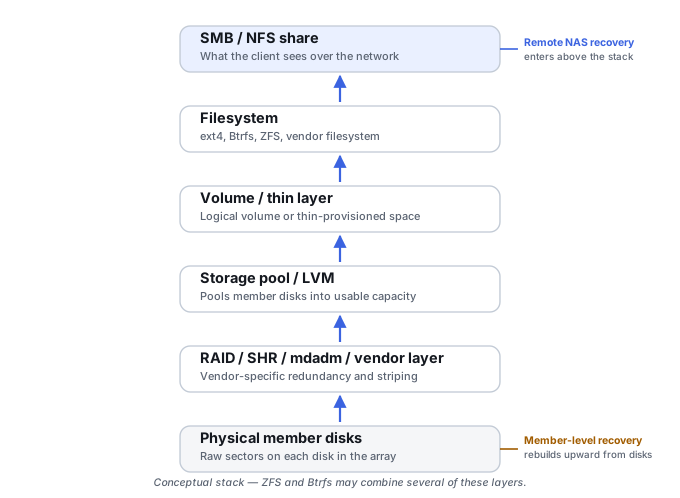
Start below the file system
A useful diagnostic model treats a NAS as a stack of layers: physical media, member identity and controller metadata, RAID or mirror geometry, pooling or LVM, thin/sparse/snapshot allocation, the host-visible volume, and finally the file system and application data on top. See Understanding Storage Layers Before Recovery for the general version of this stack. The question that actually matters is: at which layer did logical addressing stop being trustworthy? A hardware controller losing its virtual-disk configuration is a failure at the geometry layer. A Synology array that assembles fine but whose LVM is damaged is a failure one layer up. A QNAP thin pool with damaged allocation metadata is a failure at the allocation layer. In every case, a higher-layer repair should never be trusted until the lower layer feeding it has been validated.
This page is about which layers a NAS can have and how to prove them. Which recovery entry point and tool capability fit a given failure is covered in Remote NAS Recovery vs. Member-Level Reconstruction; recording member roles and metadata history before anything is changed is covered in RAID Metadata, Member State and Foreign Configurations.
A correct storage map is not plaintext
Getting member roles, RAID geometry and pool or LVM maps right produces an addressable block device — the address space the layer above expects. It does not, by itself, produce readable data, and it does not guarantee that an encrypted layer can be unlocked. Encryption can sit at several levels of a NAS: inside the drives themselves, in a RAID controller or bridge, in the appliance’s volume or pool layer, on individual shared folders or datasets, or on a host that writes to an iSCSI LUN. Which of these are present, and in what order they sit relative to RAID, pooling and thin allocation, depends on the product and its configuration; there is no single NAS position for it.
The practical consequence is that a stack can be reconstructed correctly and still return only ciphertext, and an unlock depends on keys and key metadata that may live outside the members being reconstructed. How data keys, key-encryption keys and protectors relate — and why decryption has to come before file-system recovery rather than replace it — is covered in Encryption Key Hierarchies and Recovery Metadata.
Which representation can actually be read
The same NAS can offer more than one representation of the same data, and they are not equivalent evidence:
- The running appliance. After its own unlock step, a working NAS may serve decrypted shares, volumes or LUNs. That view exists only while the appliance has the keys loaded.
- Removed member disks. The same members read on another machine may hold only ciphertext at the encrypted layer, or may be locked entirely if the drives encrypt themselves.
- Partial views. Access to one share does not show that the whole pool is reachable: other shares or volumes may be encrypted and locked separately, or may sit on a different pool.
Not every encrypted NAS volume unlocks automatically at boot. In Synology’s description of DSM volume encryption, auto-unlocking at startup is something administrators can enable, keys are held in an Encryption Key Vault kept locally or on a separate KMIP server, and an encrypted shared folder remains inaccessible without its key even if the drives are removed from the device (Synology blog, product-specific). In OpenZFS native encryption, keys are loaded per encryption root, loading a key does not mount the dataset, and pool-structure metadata such as dataset names and properties stays unencrypted — so a pool can be visible, and even scrubbed, while dataset contents remain unreadable (zfs-load-key(8)). Other products differ; how a specific model behaves has to come from its own documentation and configuration.
Working outside the original unit
When the original chassis has failed or the members have to be removed, two dependencies can leave with the enclosure. The first is keys and security configuration: a key vault, auto-unlock material, a key server address or a drive-locking setup may belong to the appliance or its environment rather than to the member disks. The second is sector presentation: a RAID controller, an enclosure bridge or a drive’s own encryption can make the host-visible sectors differ from what a bare drive returns on another interface, which changes what an image of that drive actually contains (see What a Disk Image Preserves — and What It Does Not). Recording the slot order, drive serials, encryption settings and where keys are held, before members are removed, keeps both options open.
The opposite generalization is also wrong. Many NAS stacks built on Linux software RAID keep the configuration they need on the members themselves, and for supported, internally consistent configurations the original appliance is not required to reassemble them. Whether a given NAS needs its enclosure depends on its encryption, its controller or bridge, and the state of its members.
Synology SHR is often several RAID arrays joined by LVM
Synology’s own documentation describes SHR as potentially consisting of multiple Linux MD RAID arrays integrated into one storage pool through LVM. A mixed-capacity example: two 4 TB drives and two 6 TB drives contribute a common 4 TB slice from every disk to one RAID 5 array, while the extra 2 TB on the larger pair forms a second, smaller RAID 1 array — both arrays then join through LVM into one logical volume carrying Btrfs or ext4. The exact segmentation varies by disk mix, but the recovery principle holds: identify every member partition, identify every required md array, reconstruct those arrays individually, reconstruct or activate LVM on top of them, then interpret the file system. SHR is not simply a strange RAID 5.
Synology also documents a PC-based recovery procedure that assembles the MD arrays and activates LVM on a separate Linux computer — evidence that the physical NAS unit is not always required. That procedure is vendor guidance for the configurations and conditions its documentation covers, and those conditions have to be checked before relying on it. It assembles the stack as found, so it is not a universal read-only recovery workflow: with stale members, an interrupted rebuild or conflicting metadata, assembly lets the tools rather than the evidence choose which generation wins, and work on the original members can change them. For an encrypted volume, a successful MD and LVM assembly still yields only the encrypted layer until it is unlocked.
System RAID and data RAID can share the same disks
Synology-style disks commonly carry more than one RAID signature — a small system array alongside the data array, plus swap or cache-related partitions. Do not reconstruct the first valid MD set found on a disk and assume it is the user-data array; identify the purpose of every RAID signature present before choosing which one to rebuild.
Btrfs and ZFS can help validate the layers beneath them
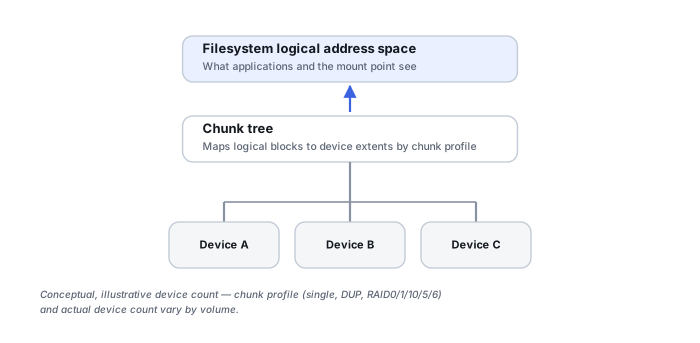
Btrfs adds copy-on-write metadata, generation numbers, multiple tree roots and snapshot/subvolume structures, and by default checksums both metadata and file data, verifying them after blocks are read from the devices (Btrfs documentation, Checksumming). This cuts both ways for recovery: Btrfs’s checksum and tree-consistency checks can help assess whether a reconstructed RAID/LVM layer is plausible, and its copy-on-write design means damage to the newest root does not automatically destroy every historical tree. But Btrfs repair cannot repair a false block device produced by a wrongly reconstructed RAID or LVM layer underneath it. A checksum or tree failure says that what was read does not match what Btrfs expected; it does not say why. A wrong member order or offset, a stale member, unreadable ranges on a copy, data still encrypted at a lower layer, or genuine file-system damage can all produce failures, so a failure is a reason to re-examine the lower layers rather than a final diagnosis that they are wrong — and a clean result on the structures sampled does not prove that every stripe is mapped correctly.
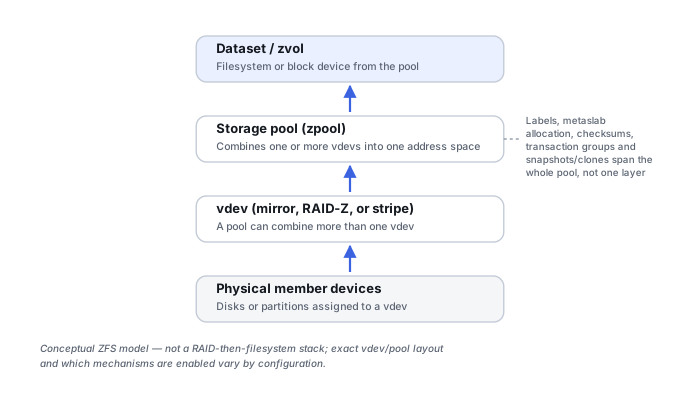
QNAP’s QuTS hero is ZFS-based and should never be treated as a QTS variant. OpenZFS contributes a genuinely different model: pooled storage across VDEVs, end-to-end checksums, datasets, snapshots and clones built on copy-on-write, and transaction groups rather than in-place updates. ZFS snapshots are read-only views that initially share blocks with the active dataset, so a deleted or changed file may still be referenced by a snapshot, and destroying snapshot metadata can make those retained blocks reclaimable. QuTS hero recovery is ZFS pool and dataset recovery, not generic mdadm/ext4 QNAP recovery. QNAP’s documented architecture can also combine multiple RAID groups into one ZFS storage pool, including striping at the pool level across vdevs — reconstructing each RAID group separately does not necessarily recreate the complete storage-pool address space.
Static, thick and thin QNAP volumes are different recovery stacks
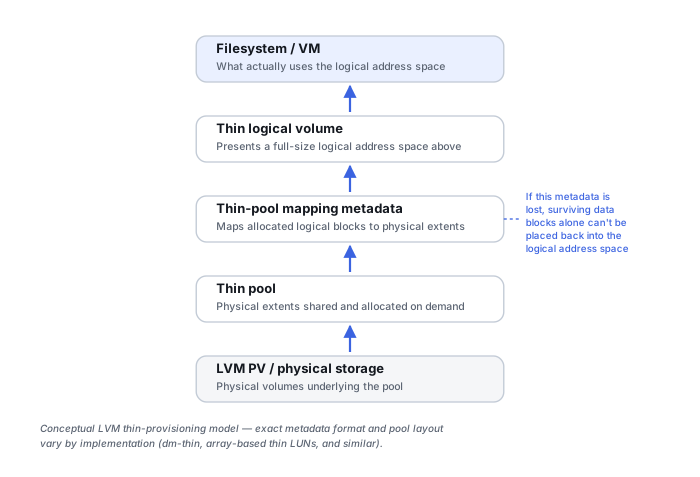
QNAP’s Flexible Volume Architecture separates a static volume (members directly forming the file system, parented by one RAID group), a thick volume (parented by a storage pool, with fixed allocation), and a thin volume (space allocated on demand from the pool, with over-allocation explicitly permitted) (QNAP FAQ, product-specific). The distinction matters because a thin volume adds a genuine layer of state: the logical-to-physical allocation map is part of the data, and a raw scan of pool sectors cannot by itself reconstruct the original block order of a thin volume. Thin reference maps and snapshot lineage are covered in LUN, Thin Provisioning and Snapshot Recovery.
A storage pool can contain more than one RAID group
QNAP documents that one storage pool can aggregate several separate RAID groups (QNAP Flexible Volume Management tutorial, product-specific). Recovery can therefore find multiple perfectly valid RAID groups and still be only halfway finished — the remaining question is how those groups were combined into the pool. Do not concatenate discovered RAID groups by capacity or apparent creation order without reconstructing the actual pool metadata that describes how they were joined.
Classify every flash device before deciding what to do with it
An SSD inside a NAS can be serving as read cache, write cache, a metadata device or tier, a full storage-pool member, a ZFS log/cache/special-vdev role, or a tiering participant. These are not interchangeable, and blanket advice like “just remove the SSD cache” can discard something the pool actually depends on. Classify each flash device’s role before treating it as disposable or as authoritative.
If the file system above a NAS stack is not receiving the same logical block addresses it received before the failure, repairing that file system is premature — the layer beneath it still needs proving.
Settle dependencies before exhaustive scanning
Deep scanning or carving across raw members is the most expensive step and the easiest to misread: scanning ciphertext, or an address space assembled in the wrong order, produces noise that can look like partial results. A practical order of analysis settles the dependencies first. It is a checklist, not a fixed sequence — some items run in parallel, and some do not apply to a given NAS:
- Member health. For members that are unstable, plan health assessment, stabilization and acquisition before anything else reads them heavily (see How to Image a Failing Drive Safely).
- A still-accessible decrypted view. If the appliance still serves the data, decide whether a priority export of the most important data is worth doing now, weighing the consistency of a copy taken from a live system (see Live Systems, Snapshots and Consistent Recovery Copies) against the extra load on weak members. There is no universal answer on keeping the unit powered or shutting it down.
- Unlock dependencies. Which layers are encrypted, which keys or recovery keys exist, and whether they depend on the appliance, a key server or the drives.
- Acquisition representation. Whether the evidence will be raw members, a logical volume exported by the appliance, or a decrypted file-level copy — each preserves different layers and loses others.
- Member roles and history. Roles, generations and changes, recorded before any assembly (see RAID Metadata, Member State and Foreign Configurations).
- Layer-by-layer reconstruction on copies, and only then exhaustive scanning of the levels that remain unresolved.
Training scenario: an encrypted volume is still served while a member reports errors
A NAS with an encrypted volume still boots and serves its shares after an administrator unlocks it, but one member reports read errors and the pool is degraded. Nobody is sure whether a recovery key was ever exported.
The decrypted view may exist only on this running unit. Removed members could yield a correct RAID and pool map that still contains only the encrypted layer, and without a key the reconstruction stops there.
Establish where the keys are and whether a recovery key exists, then weigh a priority export of the most important data from the running unit against the load on the weak member; plan imaging of the members separately, without changing the pool.
A copy taken from a live, degraded system may be incomplete or internally inconsistent, and the weak member may fail during the export. Neither path is guaranteed; the decision depends on the member’s condition and the value of the data.
What counts as a reconstructed result
A NAS reconstruction is finished when its output can be described, not when a volume mounts. That means a defined logical object (which pool, volume, LUN, dataset or share), the dependency and state assumptions behind it (member set and generation, key or protector used, snapshot or point in time), the known gaps (unreadable ranges, missing members, absent thin-map or pool metadata), and file-system or application validation performed on a copy. Encryption unlock and storage-mapping validation are separate results, and one does not prove the other:
Scroll horizontally to see the full table →
| Result | What it shows | What it does not show |
|---|---|---|
| Storage map validated | Member roles, RAID geometry and pool or LVM maps produce a consistent address space on copies | That the data is plaintext, or that the file system on it is intact |
| Encryption unlocked | The key or protector is accepted and the encrypted layer can be read as plaintext | That every range beneath it is mapped correctly; a header can be readable while later stripes are out of order |
| File system consistent on a copy | Metadata structures check out for the objects examined | That file contents are complete or from the expected point in time |
| Application data validated | Files open, and databases or virtual disks pass their own checks | Anything about objects that were not tested |
How to choose and record validation at each of these levels is covered in How to Validate Recovered Data.
Technical references: Synology: How encryption works — volume encryption keys in an Encryption Key Vault kept locally or on a KMIP server, optional auto-unlocking at startup, a recovery key, and shared-folder encryption that stays inaccessible on removed drives · OpenZFS zfs-load-key(8) — keys loaded per encryption root, loading not mounting a dataset, unencrypted pool-structure metadata, and scrub or resilver without keys · Btrfs documentation, Checksumming — default checksums for data and metadata, verified after reading · QNAP Flexible Volume Management — storage pools with multiple RAID groups. The Synology and QNAP sources describe those vendors’ products only, and behaviour can change between firmware and OS versions; other NAS vendors have to be checked in their own documentation.
Related: Remote NAS Recovery vs. Member-Level Reconstruction · Encryption Key Hierarchies and Recovery Metadata · RAID Metadata, Member State and Foreign Configurations · What a Disk Image Preserves — and What It Does Not · LUN, Thin Provisioning and Snapshot Recovery · Live Systems, Snapshots and Consistent Recovery Copies · SAN Storage Stack Reconstruction · Storage Metadata Generations and Consistency · RAID Reconstruction Basics · Sparse, Thin-Provisioned and Virtual Storage Recovery · NAS Device Failure