What a Disk Image Preserves — and What It Does Not
An image preserves the data representation that the imaging tool could reach through a defined address space, within a defined time window. A correct logical length, a successful export or a matching hash do not by themselves establish access to every historical byte, to structures hidden from ordinary reads, or to the keys a representation may depend on. Whether deleted data survives depends on what the source itself still returns — not on the image file's extension.
- An image preserves what the tool could reach in a defined address space and time window.
- Firmware areas, SSD spare area, raw NAND and keys stored elsewhere are outside a normal image.
- An image of one RAID member, one LUN or an encrypted device means something different from the volume above it.
- A correct length or a matching hash doesn't prove completeness or usability.
- Ship the acquisition map together with the image.
An image preserves a defined address space
Record, for any image, the source's own identifier, its logical size, its logical sector size, the start and end of the acquired range, the tool and time of acquisition, and the encryption state at the time of the read. A "whole device" image here means the whole exposed logical address space the tool could read — it should not be called a raw NAND dump or a complete physical-media capture, which are different, lower-level things entirely.
What readable sectors can contain
Within scope and where actually readable, an image can contain partition and file-system metadata, allocated payload, unallocated remnants, and on-disk member metadata for a storage layer such as RAID. None of this guarantees that deleted data specifically survives after the space it occupied has been overwritten or deallocated — what's readable is what's still there, not a promise of recoverability.
What a normal logical image does not include
A normal logical image does not include hidden firmware or service-area structures, the flash translation layer or spare area behind an SSD controller, raw NAND pages, independent device telemetry, or keys and configuration stored outside the acquired address space. The fact that this information physically exists inside the device does not mean an ordinary logical read can reach it.
The layer changes the meaning of the image
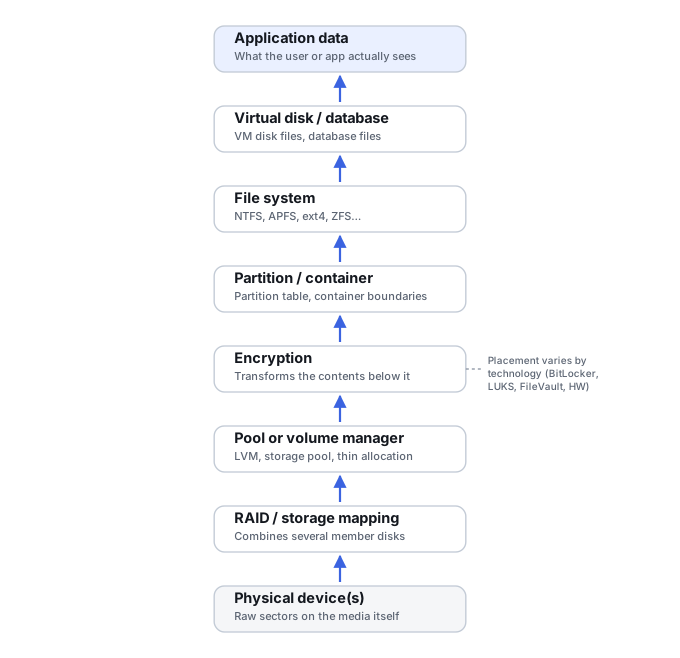
An image of one RAID member is not the same thing as an image of the reconstructed virtual RAID volume; an image of one LUN is not the same as images of the physical disks behind a SAN; an encrypted block device image is not the same as a decrypted volume image; and a virtual-machine image-file container is not the same as the flattened, guest-visible view inside it. Each of these layers has its own map and its own offsets — a member's LBA cannot be applied directly to a file-system extent without going through the mapping that connects them. The storage dependency stack below sets out this relationship in more general terms; for how a flash translation layer specifically maps host addresses to physical NAND, see Flash Translation Layer Reconstruction rather than treating that detail as part of this page's scope.
Scroll horizontally to see the full diagram →
Missing reads, zeros and sparse storage are different facts
An unknown acquisition range, a sector that was successfully read and genuinely contains zeros, a hole in a sparse file representation, and an application's own virtual zero range are four different facts with four different kinds of evidence behind them. The content of a zero-looking range does not by itself reveal which of these it is — that distinction lives in the acquisition map and its provenance, not in the bytes. A read map also needs to account for address translation and offsets correctly; a map built against the wrong base offset can misreport which ranges were actually covered.
Encryption and translation affect what the tool receives
A locked self-encrypting drive may refuse to return sectors at all. A controller-encrypted RAID member may return sectors that are valid, readable ciphertext at the member level, while the decrypted view sits at a different layer entirely. These are genuinely different mechanisms and shouldn't be collapsed into one another. The original bridge or controller sometimes performs encryption or sector translation as part of normal operation; imaging through a different bridge or controller can change what representation is actually obtained, which is the real access-path consideration here.
A live image may combine more than one moment
A source that keeps changing during acquisition can produce an image that mixes more than one point in time, unless the source is quiesced or captured through a consistency mechanism scoped to that purpose. Crash consistency and application consistency are different guarantees; see Live Systems and Consistent Copies for that distinction. A dependency outside the acquired volume, such as a virtual machine's parent disk chain, is a separate concern from the consistency of the volume itself.
Completeness, copy integrity and usability need different checks
Extent coverage against the map, a hash of the acquired artifact, comparison against a known-good reference, and file-system or application-level validity are four different checks, and none of them substitutes for the others. A hash confirms the identity of the acquired artifact only within its documented algorithm, scope and time — a full logical length is not the same as coverage, and a container-level check does not verify every file inside that container. The manifest below gives a compact way to record what was actually established.
Scroll horizontally to see the full table →
| Representation | Preserves within scope | Not included or conditional | Extra dependencies |
|---|---|---|---|
| Whole exposed logical device (not raw physical media) | Everything reachable through the device's normal logical read interface | Firmware/service-area internals, FTL/spare/raw NAND, anything behind the controller | Reads back without needing the original device again; interpreting, validating or re-accessing the source may still need keys, geometry, the map and configuration |
| Partition image | Content within that partition's own address range | Data outside the acquired partition range; other partitions; disk-level layout metadata outside that range | Partition table and layout context |
| RAID member image | Readable sectors for that one physical member | The reconstructed volume — member reads alone don't describe it | Other members; array configuration/metadata |
| Reconstructed virtual disk / LUN | The assembled view once the relevant members and mapping are combined | Guarantees that the reconstruction matches the original configuration exactly; a LUN is not automatically a reconstructed RAID volume | Original member images and the mapping used are needed for provenance and reconstruction validation, not necessarily to open an already-assembled, standalone export |
| Decrypted volume | Guest-visible content once mapped through the correct key | Anything outside the decrypted address range; the key itself is not "in" the image | Not needed to read this already-decrypted copy; the key is needed to re-access the original encrypted source, and the plaintext copy's confidentiality now depends on how it's handled |
| VM image chain | The container's own recorded state, including backing-chain history if preserved | A flattened copy loses snapshot/container history; its hash is not equivalent to the container's hash | Referenced backing files (see qemu-img's backing-file chain documentation) are needed to open it, unless the image was made independent or flattened — a standalone container doesn't automatically include its external parents |
| Selected file export | The specific files exported, as a comparison copy | Unallocated ranges and most deleted-data remnants — this is not a sector image | Whatever metadata the export tool happens to preserve |
Scroll horizontally to see the full table →
| Observation | Possible meaning | Evidence needed | Safe conclusion |
|---|---|---|---|
| Correct logical length | The output's logical length matches the source's reported size — which can happen because reads succeeded, or because the output was preallocated or extended to that size | Comparison against the source's reported size | Expected length matches; coverage is established separately, from the map/log and the acquisition's actual scope, not from length alone |
| Hash exists | The artifact's identity is checkable against this specific hash | The documented algorithm, scope and time it was computed | Not proof the content inside is complete or correct |
| Zeros in an unknown range | Could be a genuine read, a sparse hole, or a substituted placeholder | The acquisition map's record for that exact range | If the map marks the range failed or unattempted, it isn't a confirmed genuine read either; a true zero needs a documented successful read, and the original history behind it is still a separate question |
| Sparse allocation | A storage-representation detail of the destination — which can also be how successfully read zeros are stored efficiently, not only a sign of an unwritten acquisition range | Whether the gap originates from the source or from destination sparseness | Not evidence about the source's original content; the acquisition's defect map and the destination's allocation map are not interchangeable |
| Encrypted, random-looking bytes | May be ciphertext or other high-entropy data; a random appearance alone doesn't establish encryption | Which encryption mechanism and layer produced this view, from context, metadata or configuration — not from the bytes' appearance | Not evidence the content is unrecoverable, nor that it's already accessible |
| Container opens | The container format parsed successfully | Validation of what's actually inside, not just that it opened | Never "Yes = complete" |
An acquisition manifest, with placeholder fields
A portable acquisition package should include its own map rather than assuming one will travel with it separately. The fields below are illustrative placeholders, not a record of any real case.
Scroll horizontally to see the full table →
| Field | Placeholder entry |
|---|---|
| Acquisition object / layer | unknown — e.g. "RAID member 2 of 4" |
| Identifiers | unknown — serial or device ID, as available |
| Exposed byte length | unknown |
| Logical sector size | unknown |
| Scope / offsets | unknown — full device or a specific range |
| Access path | unknown — direct, bridged, or through specialized hardware |
| Date / time interval | unknown |
| Tool / version | unknown |
| Image / container format | unknown |
| Map version / hash reference | unknown — map is not always embedded in the image file itself |
| Substitution / padding behavior | unknown — tool- and version-specific |
| Encryption / dependency notes | unknown — describe the mechanism, never record the secret itself |
| Performed verification | unknown — state the exact scope of what was checked |
| Known exclusions | unknown — what this image does not cover |
The four training scenarios below work through specific interpretation situations in more detail.
Training scenario: an HDD image with the expected length and a zero-looking gap
The image's logical length matches the source's reported size, but one region in the middle reads back as all zeros.
The acquisition map for that region shows it as failed or unattempted, not as a region that was successfully read and happened to contain zeros.
Preserve the map alongside the image and mark any files that depend on that range as uncertain, rather than treating the zeros as the source's original content.
Cross-check the specific range against the map before drawing any conclusion about what the source originally contained there.
Training scenario: one RAID member image is readable, but there's no volume
One array member images cleanly with no read errors, but no usable RAID volume can be mounted from it alone.
A single member's image scope is not sufficient to describe the layer that actually holds the files — that requires the other members and the array's configuration as well.
Preserve the other members and the configuration metadata; perform virtual reconstruction rather than expecting this one image to be self-sufficient.
Validate the derived, reconstructed view specifically — a readable member image on its own doesn't validate anything about the volume.
Training scenario: a decrypted live-volume image opens, but a dependency sits outside it
An image of a decrypted live volume opens and appears usable, but a virtual machine using that volume has a parent disk located outside the acquired image.
This acquired view does not equal a completed application-level backup — the dependency chain is incomplete without that parent disk.
Preserve the full dependency set, not just the volume that happened to be in scope; treat the acquisition as partial until the chain is complete.
Run an isolated consistency check against the complete dependency set before relying on the application data inside it.
Training scenario: an SSD returns zeros for deallocated LBAs
An SSD image reads back as zeros across logical block addresses that were previously deallocated (trimmed).
The image faithfully preserves the view the device actually returned — it does not establish anything about whatever physical NAND charge may or may not still exist underneath.
Do not assume this image enables a raw-NAND-level rescue; that would require a fundamentally different acquisition approach, if one is possible at all for this device.
Treat the device's original physical history as unconfirmed by these logical reads — they describe what the controller returned, not the medium's full history.
Technical references: QEMU: qemu-img — logical vs. allocated size, backing chains · GNU ddrescue manual — acquisition map and resume · Microsoft: Volume Shadow Copy Service — point-in-time consistency for live images · Linux kernel: dm-crypt — encrypted vs. decrypted block views. Version and scope caveats: a QEMU allocation map is not an acquisition defect map; ddrescue output semantics can vary by version; VSS is a Windows-specific example; dm-crypt does not describe self-encrypting drives.
Related: Disk Imaging vs. Cloning · How to Image a Failing Drive Safely · Recovery Copies: Roles, Dependencies and Rollback · Live Systems and Consistent Copies · SSD Recovery Fundamentals · RAID Reconstruction Basics · How to Validate Recovered Data