Recovered Files Won’t Open
A recovery program finding filenames is not the same as recovering valid file content; unusable results usually point to overwrite, missing extents, wrong reconstruction, or carving limitations.
Recovered files won't open: what should you do next?
Answer one question about the current state. The result suggests the safer next step rather than diagnosing the failure.
Do the broken files share a consistent pattern — same format, a similar point of corruption, or the same source and tool?
Use the pattern to narrow the hypothesis before retrying.
A consistent pattern can narrow the failure to a smaller set of causes — for example overwrite, fragmentation/reassembly, wrong reconstruction parameters, format-level damage or a carving limitation — but it rarely identifies a unique cause by itself.
Validate structurally before assuming success.
Check file headers and internal structure, not just that a file partially opens, before trusting any recovered batch or trying a different tool.
This guide classifies the next recovery action from observable information. It does not diagnose hardware condition or estimate a percentage chance of recovery.
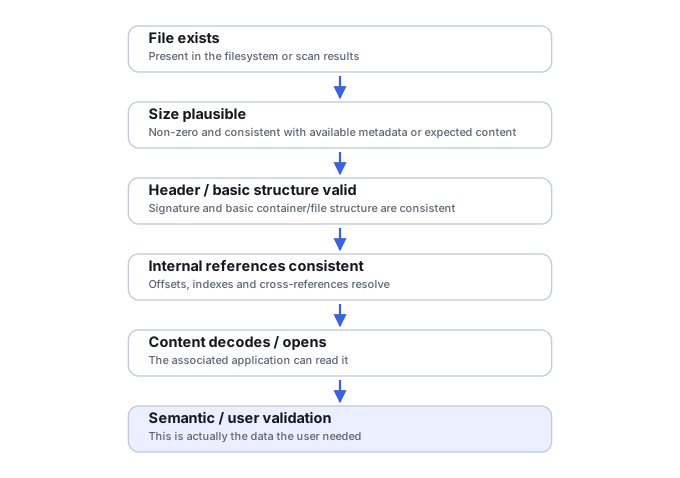
Why a “recovered” file can still be bad
Recovery software may know a filename, size and timestamps from surviving metadata while some of the file’s data blocks have already been overwritten or are unreadable. A carved file may have no trustworthy metadata at all and can end at the wrong boundary. On RAID, NAS or virtual storage, perfectly readable sectors can still produce corrupt files if the storage geometry or snapshot chain was reconstructed incorrectly.
Seven ways a recovered file can end up unusable
Most unusable recovery results fall into one of seven broad classes, grouped by where the failure actually happened:
Recovery interpretation or reconstruction failures — a different pass or corrected parameters can fix these without any new source data:
- Wrong type/false positive. A signature-based carver identified a file header that wasn’t actually the start of the object it thinks it found — the result has a plausible-looking beginning but isn’t the intended file at all.
- Fragmented incorrectly. The original file was split across non-contiguous extents, and the pieces were reassembled in the wrong order or with unrelated data stitched in between — the output can have a correct signature and a plausible size while still being internally wrong.
- Wrong lower-layer reconstruction. On RAID, NAS or virtual storage, the member order, stripe size, data offset or parity rotation used to reconstruct the array or virtual disk was wrong — every sector can be perfectly readable and the files can still come out systematically corrupt. Validate the reconstruction itself (see RAID Array Failure) before repairing individual files.
Missing source data — the needed bytes are genuinely no longer on the source:
- Truncated or incomplete. The recovered data ends before the file’s required end-of-file marker or closing structures. This can mean the source ran out of readable extents, the carver stopped too early, the source image itself is incomplete, the recovered extent chain is missing a piece, or size/length metadata was wrong or damaged.
- Overwritten internally. Some of the file’s original extents now hold newer, unrelated data — see what overwrite actually destroys for how this happens even when metadata survived intact.
Format/application-layer damage:
- Container metadata missing. The actual payload survived, but the index or structure needed to interpret it didn’t — an MP4 missing its
moovatom (see MP4 and MOV container repair), a ZIP missing its central directory, a database with a damaged B-tree root (see database page-level corruption and transaction recovery), or a PST/OST file whose node B-tree is unreachable (see PST and OST internal structure recovery).
Access dependency:
- Valid but inaccessible for another reason. The file recovered correctly but needs something else to open it — an encryption key (see encryption key hierarchies and recovery metadata), a specific application version, or a missing external dependency.
| Pattern in recovered output | More likely classes | What to verify next |
|---|---|---|
| Correct filename/size but unrelated content | Stale metadata, overwrite, or wrong extent mapping | Map metadata to actual sectors; validate before reconstructing again |
| Small files work; many large files fail | Fragmentation, partial overwrite, or read loss on large extents | Inspect extent mapping and the source image's own defect map |
| Most files from one reconstructed RAID are corrupt | Array geometry, member order, offset or parity reconstruction is wrong | Validate the RAID reconstruction before repairing individual files |
| Carved files lack names/paths but content opens | Expected limitation of carving, not damage | Prefer metadata-based recovery if directory structures still survive |
| MP4/MOV has media payload but will not play | Container/index/header damage | Format-aware container repair may help |
| Office/archive/image file fails structural checks | Partial, truncated or wrong content | Validate before attempting a structural "repair" |
| File is structurally valid but requests a key | Encryption or access dependency | Recover the key/metadata; another scan will not bypass encryption |
A pattern narrows the hypothesis; no single pattern proves a cause by itself.
Patterns that are useful evidence
Check whether all files fail or only some types; whether small files work but large files do not; whether files have plausible sizes; whether headers belong to the claimed format; and whether damage appears at consistent offsets. A folder full of correctly named files that all contain unrelated data suggests a different problem from a few partially damaged photos after overwrite.
Validate before changing tools
Keep the original source/image and the first recovery output. Test representative files with format-aware validators or applications that report structural errors. Compare duplicate copies or known checksums where available. If a recovery came from RAID or a VM chain, validate the reconstruction itself before assuming every individual document needs repair.
When file repair helps—and when it cannot
Container or document repair can sometimes rebuild indexes, headers or internal tables when the underlying payload survives. It cannot recreate sectors that were overwritten with unrelated data. Likewise, renaming an extension or copying a “correct” header onto a file does not restore missing content. Determine whether the problem is structural damage, incomplete data or a wrong recovery mapping first.
A better second attempt
If metadata-based recovery produced damaged files, preserve the result but rescan the unchanged image with another recovery strategy. Raw carving can sometimes recover content whose metadata points to reused blocks; metadata-aware recovery is usually better for fragmented files. The goal is to change the interpretation method, not repeatedly modify the source.
Do not save recovered files, install software, create partitions, format, initialize or run write-capable repair tools on the only copy of the affected data. When practical, work from a verified image or another preserved copy.
Related reading: Validating Recovered Data · Metadata Vs Raw Recovery · File Carving Explained · Raid Array Failure · What Overwrite Actually Destroys · MP4 and MOV Container Repair · PST and OST Internal Structure Recovery · Encryption Key Hierarchies and Recovery Metadata.
This page describes the general situation, not a guaranteed fix for a specific case. If the source is unstable or the data is irreplaceable, consider a professional evaluation before further attempts.