File Carving, Explained
Most recovery tools rebuild files from the file system’s own records — the directory tree and allocation map that say which file lives where. File carving finds files a different way: by recognizing file content itself, starting with the byte patterns that mark the start of a known file type. It does not need an intact directory tree, but that does not mean it ignores the volume entirely, and it cannot recover data that is unreadable, overwritten or still encrypted.
- Carving locates files by content, so it can work when the directory tree is damaged or gone.
- Implementations may still use file-system details such as block size or free-space maps, or combine metadata with carving.
- Original paths and folder names are usually lost; some names or times can come from metadata embedded in the file.
- Fragmented files are a limit for simple carving, not an automatic dead end for every tool.
- A carved file that opens is not proof it is complete; validate it on a copy.
How it actually works
Most file formats start with a distinctive sequence of bytes — a “signature” or “magic number.” A JPEG typically starts with the bytes FF D8 FF; a PDF starts with %PDF; a ZIP file starts with PK. A carving tool scans raw data for signatures and, depending on the format and implementation, uses end markers, internal length fields, structural parsing or other validation to estimate where a candidate file ends. Simple header-to-footer carving works for some formats but is not a universal model.
Because it recognizes content rather than following directory entries, carving can still find files when the file system is badly damaged, unrecognized or replaced by a new one. That is different from saying it never touches file-system information. PhotoRec’s documentation, for example, describes two scan scopes — the whole partition (useful when the file system is corrupted) or only unallocated space — and, in the unallocated-only case, uses the block size found in the file-system structure; otherwise it estimates block size from the first files it finds. Some tools combine metadata-based recovery and carving in one scan. Check what your tool reads before assuming which scope it covers.
Search modes have different limits
“Carving” covers several techniques. They fail in different ways, so a poor result from one does not settle what another could do:
Scroll horizontally to see the full table →
| Approach | What it relies on | Main limit |
|---|---|---|
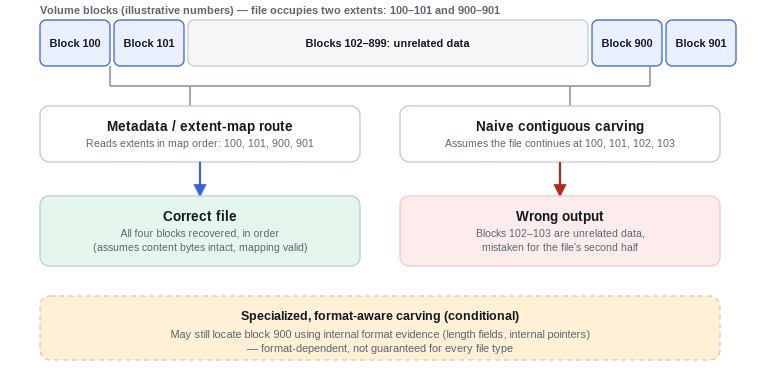
| Contiguous header/footer or header/size | A start signature plus an end marker, a size field or the next header found | Assumes the file is stored in one continuous run; a gap pulls in unrelated data or truncates the file |
| Structure-aware carving | Parsing the format’s internal structure (lengths, chunk tables, pointers) to decide where the file ends and whether it is plausible | Only as good as the tool’s support for that format; damaged or unusual structures can still be cut wrongly |
| Fragment reconstruction | Searching for and testing candidate continuations of a file, often format-specific | Format-dependent and computationally heavier; may recover some fragmented files but not guaranteed for any given one |
| Combined metadata and carving | File-system records where they survive, carving for the rest or for free space | Results from the two routes carry different evidence; keep track of which file came from which |
PhotoRec is one example of how these mix: its documentation says it can take the original file size from some file headers, stops appending data when it meets a new file header, recovers “some fragmented files” from its second pass onward, and offers a CPU-intensive bruteforce mode aimed at more fragmented JPEG files.
When carving fits — and what to settle first
Carving is a fit when metadata-based recovery has little or nothing usable to work from:
- File system corruption too severe for structure-based recovery to reconstruct.
- A volume reformatted or rebuilt, where the old directory records have been replaced.
- Memory cards and cameras with a damaged or missing index — see Corrupted or Deleted Video from a Memory Card and Fragmented Video Recovery from Memory Cards.
A drive showing as RAW is a symptom, not by itself a reason to go straight to carving. RAW can mean an unsupported or encrypted volume, a wrong partition or offset mapping, damaged metadata, or a device that is not returning readable data. First make sure the tool is looking at a correct, readable representation of the data — a stable image or the right logical volume, unlocked if it is encrypted. A signature scanner cannot find file headers inside ciphertext, and carving does not fill in sectors that were never read or were overwritten.
What it costs you
File carving isn’t a strictly better version of metadata-based recovery — it usually trades away information the file system kept:
- Original paths and folder structure. Carved files usually come back without their file-system names and folders. PhotoRec, for instance, names files from the sector where they were found.
- File-system timestamps. The file system’s own dates are usually lost. Some formats carry their own metadata — a document title, EXIF capture time, an embedded filename — and some tools use it: PhotoRec’s documentation says it may rename a document to include its title and set the modification time from time information in the file header, when available. That is the file’s internal metadata, not the original file-system record.
- Fragmentation. Files not stored in one continuous run are hard for contiguous carving and can come back truncated or mixed with unrelated data. Structure-aware or fragment-reconstruction methods can sometimes do better, depending on the format.
- False positives and partial files. A short signature can match by coincidence, and a valid header followed by the wrong data still looks like a file. A recognized header does not prove the file is complete or genuine.
Judging a carved result
Treat carved output as candidates. Check files with format-aware tools on a copy — does the whole file decode, not just the first part — and where a reference copy or hash exists, compare against it. A corrupted result can come from fragmentation, but also from missing or unreadable sectors, a wrong offset or volume mapping, a false positive, overwritten data, encryption or a damaged container. One bad file does not tell you which. See How to Validate Recovered Data and Metadata Recovery vs. Raw Recovery.
Practical housekeeping is separate from validation: PhotoRec’s own documentation warns against writing recovered files to the file system that held the data, and its “After using PhotoRec” page points to third-party scripts and exiftool for sorting and renaming carved files from embedded metadata afterward.
Carving tends to do better on smaller, self-contained files — photos, individual documents — and is less predictable on large files such as video, which are more likely to be fragmented. PhotoRec is one widely available open-source example of a signature-based carver; it is a member of this class, not a definition of what every carver can or cannot do.
For the mechanism in more depth, see File Carving and Signature-Based Data Recovery and File-System Recovery vs. File Carving.
If carved results are incomplete or you are unsure what the device is actually returning, a recovery provider can assess the case. Find a recovery provider by region.
Technical references: PhotoRec documentation — scan scopes, block size, file size from headers, fragmented files, embedded titles and times. PhotoRec FAQ: original filenames — names from embedded data or sector numbers. After using PhotoRec — sorting and renaming carved files. The documentation pages are TestDisk/PhotoRec 7.2 documentation and the FAQ was last edited in May 2019; they describe PhotoRec only, not other carvers.
Related: File Carving and Signature-Based Data Recovery · File-System Recovery vs. File Carving · Metadata Recovery vs. Raw Recovery · Fragmented Video Recovery from Memory Cards · How to Validate Recovered Data · Filesystem Structure and Metadata Recovery Tools