Flash and SSD Controller Recovery Tools
No single tool covers flash and SSD recovery end to end. Logical imaging, controller diagnostics, controller-specific platforms, NAND readers, reconstruction software, ISP/monolith equipment and capacity testers each work at a different layer, read or change different state, and produce a different kind of output.
- A logical image records what the host was given; it does not freeze the controller or the NAND.
- Identity and health queries are not the same as service-mode access, firmware writes or translator rebuilds.
- Controller and reconstruction support is a documented scope per controller, firmware, NAND and security setup.
- A raw NAND dump is not a disk image and not automatically plaintext.
- F3 programs differ: f3write writes, f3read verifies, f3probe writes to the block device; none belong on media with unrecovered data.
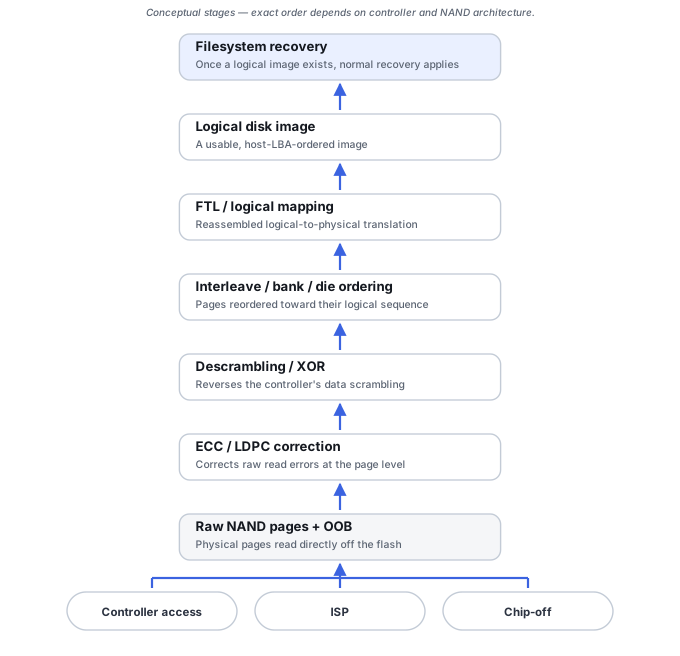
Seven tool roles, one flash stack
- Logical imaging tools preserve the current host-visible view when the controller still provides coherent LBAs — handling unstable reads with the same discipline covered in Disk Imaging & Cloning Tools and Recovery Copies. This can be the highest-value step while it is still available, but it does not stop the controller: a powered drive can keep doing its own internal work, as described in Keep logical access stable. Depending on the device’s state, the image may hold zeros for deallocated ranges, ciphertext where an encryption layer is not unlocked, or whatever a degraded or fallback mapping returns.
- Controller diagnostics and identity tools read model, firmware revision, reported capacity, NVMe or SATA identify and log data, USB VID/PID, and SMART or health data where it is actually meaningful. The claim of not changing the device applies to these query operations only; the same utility may also offer firmware update, format, sanitize or vendor-specific commands, which are a different class of action.
- Controller-specific recovery platforms provide technological or service-mode access, translator reconstruction and controlled reading for particular controllers. These are interventions, not diagnostics: service-mode entry, firmware writes and translator changes are model- and version-specific and can alter state that the recovery depends on. Support is a documented scope for an exact controller, firmware revision, NAND configuration and security setup, and success with one revision is not evidence for another. See SSD Firmware, Translator and Controller-Level Recovery for why this route can outperform chip-off on modern SSDs.
- NAND readers handle raw chip acquisition through package adapters, with voltage control and reread capability for marginal pages — the acquisition half of Chip-Off, ISP and Monolithic Flash Recovery. Their output is a physical dump of pages and spare areas, not a disk image, and not plaintext where the controller encrypted data before writing it (see Encryption is a separate layer).
- NAND reconstruction software performs the harder half: ECC correction, XOR/descrambling, bad-block handling, page-layout analysis, interleave/bank reassembly and translator reconstruction, as explained in Flash Translation Layers and NAND Mapping. Each step needs a supported profile or recovered parameters plus enough intact data; a tool cannot be assumed to assemble an arbitrary raw dump. Product-specific examples: Rusolut’s ECC article for Visual NAND Reconstructor treats physical-image ECC correction as a mandatory step, notes that some dumps need un-XOR before ECC, and says its ECC autodetection does not always find a match; the Flash Extractor site describes a library of supported models extended as new devices are analysed, with manual controller layouts for unknown ones.
- Monolith and ISP equipment covers test-point access, pinout discovery work and logic-analyzer use for devices with no removable NAND package to work from directly. It is not an unconditional alternative to the controller path: pinout, voltage, board compatibility and controller-side security all limit it, and a successful read still produces a raw dump that needs the same reconstruction.
- Counterfeit-capacity testers such as the F3 project’s programs check whether a device’s claimed capacity is genuine. That is a question about reusing the device, not a recovery step — see the section below and Counterfeit Flash Capacity and Address Aliasing.
What each class reads, changes and produces
Scroll horizontally to see the full table →
| Class | Reads / changes | Output | Main limit |
|---|---|---|---|
| Logical imaging | Reads host LBAs; read workload on a weak device | Image of the host-visible view | Controller keeps running; zeros, ciphertext or fallback mapping are imaged as-is |
| Diagnostics / identity | Identify, log and health queries | Model, firmware, capacity, health record | Other commands in the same utility may change state |
| Controller-specific platform | Service-mode access; may write firmware or translator state | Controlled reads or a rebuilt logical view | Exact controller/firmware/NAND/security scope; interventions can alter state |
| NAND reader | Reads removed or exposed chips | Raw page dump with spare areas | Not a disk image; ciphertext if the controller encrypted |
| Reconstruction software | Processes dumps offline | Logical image, where supported | Needs ECC, XOR, layout and mapping parameters plus intact data |
| ISP / monolith access | Reads NAND through board points | Raw dump | Pinout, voltage, compatibility and security limits |
| Capacity tester | Writes test data (f3write, f3probe); f3read reads it back | Verdict on real capacity | Not for media holding unrecovered data |
Capacity testers: three F3 programs, three operations
The F3 documentation separates the roles. f3write fills the free space of a mounted file system with 1 GB test files and does not overwrite existing files unless they use its own file names. f3read reads those test files back and checks their contents; it verifies rather than creates them. f3probe works on the unmounted block device with superuser rights and writes only part of the device; its default mode saves and restores the blocks it uses, but the documentation warns this does not work if the program crashes and may not restore the exact original state on some fake drives, and a destructive mode disregards existing content altogether. The author marks f3probe as experimental. A related program, f3fix, writes a new partition table sized to the usable capacity — a reuse workaround, not recovery.
f3write and f3probe write to the device and f3fix changes its partition table. On a fake-capacity device, writes that target “free space” can alias onto addresses that hold other content, so even a free-space-only test can destroy it; F3’s own documentation warns that testing a non-empty card may erase the old files. Reading is also workload on a weak device. A capacity test is not a diagnostic prerequisite for recovery: preserve and recover the data first, and test only afterwards if the device is to be reused.
This is not a ranked product list
The point of this page is which layer’s question a tool class actually answers, not which specific product is “best.” The same controller-specific platform that reconstructs one drive family may have no support at all for another, and the right choice depends on the exact controller, firmware revision, NAND configuration, security setup and failure mode involved in a given case. Naming a tool here is not a recommendation to run it on the original device.
Technical references: F3 usage documentation — roles of f3write, f3read, f3probe and f3fix · F3 project README — overview and destructive-mode warning. F3 documentation checked on the master branch (release 10.0); vendor pages above describe their own products, not the whole class.
Related: SSD Recovery Fundamentals · SSD Firmware, Translator and Controller-Level Recovery · Flash Translation Layers and NAND Mapping · Chip-Off, ISP and Monolithic Flash Recovery · Counterfeit Flash Capacity and Address Aliasing · Disk Imaging & Cloning Tools · SMART & Drive Diagnostic Tools · Software vs. Hardware Recovery