Counterfeit Flash Capacity and Address Aliasing
A counterfeit flash device can advertise far more logical capacity than its real NAND can hold — and once writes exceed the real capacity, address aliasing can create genuine, physical overwrite of earlier data.
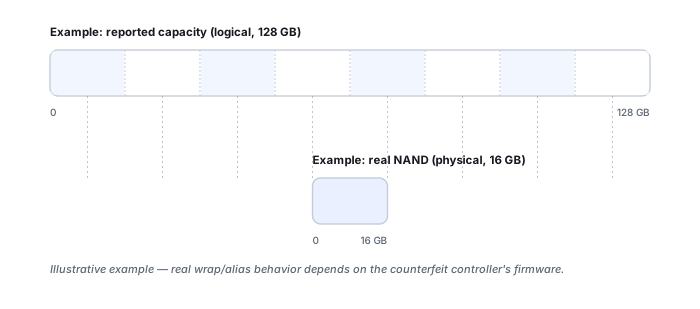
Reported capacity vs. physical NAND
A counterfeit USB or SD device can have its controller report a logical capacity much larger than the NAND actually installed — the F3 (Fight Flash Fraud) project documents real examples of media advertising 128 GB while containing under 8 GB of genuine storage. The host happily creates a 128 GB filesystem, because the controller accepts write and read commands across that entire advertised address range. This is a firmware-level misrepresentation of the address space, not a partition-table trick that a repartition could undo.
Why the filesystem initially looks completely normal
Nothing about a fresh, lightly used counterfeit device looks wrong: the reported capacity matches what the box claimed, the filesystem mounts, small test files write and read back correctly, and directory listings look ordinary. The fraud becomes visible only once enough unique data has been written to exceed the real physical capacity — a device can pass casual inspection for a long time before that threshold is reached.
Alias/wrap behavior once real capacity is exceeded
Once writes exceed the genuine NAND capacity, many counterfeit designs behave approximately like an address that wraps or aliases: later logical writes land on physical storage that earlier logical addresses were already using. Effects can include logical addresses that appear to alias onto the same physical area, newer writes silently overwriting older data, reads returning repeated or simply incorrect blocks, and filesystem metadata that continues to look normal until the point where enough data has actually been written to expose the aliasing.
When this becomes genuine overwrite, not just a metadata lie
This is the point worth treating carefully in a recovery case: once firmware aliasing has occurred, the damage is not merely “wrong capacity metadata” that a fix would restore — real earlier data may have been physically replaced by later writes that landed on the same NAND, exactly as covered generally in What Overwrite Actually Destroys. No recovery software can reconstruct content from a physical location that has genuinely been reused, whether the device is a legitimate SSD or a counterfeit flash drive.
Detecting fraud by write/read verification — and why the test is destructive
The robust way to test claimed capacity is to write unique or pseudorandom data across the entire claimed address space, read it back, and verify that each location actually returns its own expected data rather than a repeat of something written earlier. The F3 project implements exactly this model: f3write fills the device with test data and f3read verifies it, while f3probe can estimate real capacity more quickly but has an explicitly destructive mode that writes directly to the raw device. This kind of full-capacity verification is appropriate for new or already-empty media — never for a device whose existing data still needs recovering. Running f3probe --destructive, or any similar full-capacity write test, on a device carrying unrecovered files will overwrite them.
Formatting does not fix fake capacity
Formatting a suspected counterfeit device rewrites the partition table and filesystem metadata; it does not add physical NAND. A tool such as f3fix can create a partition sized to only the detected real capacity, which is a legitimate way to make the remaining genuine space usable going forward — but it is a reuse workaround, not data recovery, and it does not restore the capacity that was never physically there.
Do not assume the first N gigabytes are automatically the good region
It is tempting to assume the earliest logical addresses map to the real, physically distinct NAND and everything past the real capacity threshold is the aliased region, but counterfeit controller designs vary and that assumption is not safe in general. A more defensible recovery approach is to preserve a full logical image while reads remain stable, analyze the pattern of repetition or aliasing actually observed, identify which logical ranges demonstrably map to distinct physical storage, and reconstruct overwrite chronology from that evidence rather than from an assumed layout.
Fake flash vs. failing flash
A device can be fraudulent but physically healthy, legitimate but genuinely worn or failing, or both at once — F3's documentation separately describes a “flaky flash” class where sporadic corruption persists even after capacity is corrected. Corruption beyond a certain size does not, by itself, prove intentional fraud; capacity verification, repeatability of the errors, controller identity and physical NAND identification together give a much more reliable picture than either symptom alone.
Was the capacity always wrong, or did it change after a failure?
This single question does most of the diagnostic work: a device that reported the correct capacity for years of normal use and then suddenly reports something different has almost certainly suffered a firmware, translator, controller or bridge failure — see SSD Firmware, Translator and Controller-Level Recovery — rather than having been counterfeit from the start. Counterfeit capacity is the more likely explanation only when the wrong capacity was present from first use.
Full-capacity write/verify testing is exactly what its name implies: it writes test data across the device. Run it only on new or already-empty media, never on a device whose existing files have not yet been recovered.
Related: Drive Shows the Wrong Capacity · What Overwrite Actually Destroys · SSD Firmware, Translator and Controller-Level Recovery · Flash and SSD Controller Recovery Tools · USB Flash Drive Failure