Accidental Formatting
Formatting can mean very different things. A quick format typically creates or replaces filesystem structures while leaving many other regions untouched, although the exact writes depend on the filesystem and formatting implementation, so much of the old file content may remain recoverable; a full format or secure erase can overwrite or discard data and needs to be treated as a different case.
Formatted drive: what should you do next?
Answer one question about the current state. The result suggests the safer next step rather than diagnosing the failure.
Was this a full format, secure erase, or another operation that intentionally wrote across the data area?
Overwrite may dominate the outcome.
Do not run further recovery or repair operations on the source. Determine exactly what operation completed and how much of the address space it wrote before estimating recoverability.
Preserve before reconstruction.
For a quick format or uncertain formatting event, avoid writing a new file system or copying files onto the source. Image first when the data matters, then reconstruct from the preserved copy.
This guide classifies the next recovery action from observable information. It does not diagnose hardware condition or estimate a percentage chance of recovery.
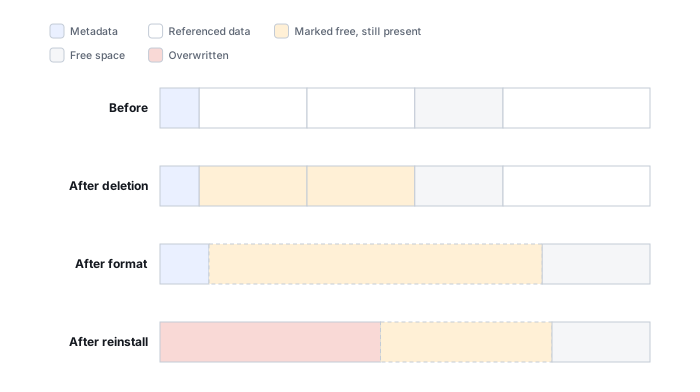
Classify the operation before estimating recoverability
“Formatted” is a description someone gives after the fact, not a technical event on its own — and the different operations that all get called “formatting” leave very different footprints. Classify what actually happened first. Storage type and whether writes continued afterward then modify that outcome; they are not separate kinds of format.
| What actually happened | Primary concern |
|---|---|
| Quick format | New filesystem metadata replaces some old structures/regions |
| Full format | Broad writes and/or deallocation may dominate the outcome, depending on OS/tool and storage type |
| Secure erase / sanitize | The operation is specifically intended to make old data inaccessible |
| Partition deleted/recreated | Old filesystem may remain, but layout/offset information changed |
| Reformatted to another filesystem | New metadata layout may collide with different old regions |
| OS installer format | Formatting is followed by substantial additional writes |
Storage type and continued use are modifiers on any of these rows, not rows of their own.
SSD or thin-provisioned storage: discard, TRIM or UNMAP can change whether old logical blocks still return their previous contents, independent of what the format operation itself wrote. HDD: outcomes are generally tied more directly to which sectors were actually written. Continued use: creating a new volume, restoring files, installing an OS or just carrying on with normal work afterward is a separate recovery factor regardless of how the format started — and it can consume far more of the drive than the format itself did.
A quick format still replaces the previous file table or root-directory structures — it just skips the sector-by-sector bad-area scan, and the writing that goes with it, that a non-quick format performs. Microsoft's own documentation for the Windows format command draws a similar line: the quick option skips that scan, while an ordinary full format performs it without necessarily overwriting the entire volume. Running repeated overwrite passes across a volume is not an automatic property of an ordinary full format — that behavior belongs to explicit overwrite-pass options, such as the format command's /P switch, or to a separate sanitize/secure-erase operation. Read "quick format" as "some structures were replaced, most regions were probably left alone" rather than as proof nothing was written.
Secure erase and sanitize are a different intent, not a more thorough format. Current sanitization guidance (NIST SP 800-88 Rev. 2) treats overwrite, block erase and cryptographic erase as distinct techniques precisely because sanitizing media is a deliberate attempt to make old data permanently inaccessible — not a side effect of reformatting a volume for reuse. If the operation that actually happened was a sanitize or secure-erase command rather than an ordinary quick format, this is no longer an accidental-formatting recovery case in the usual sense: by design, the honest answer is often that recovery isn't possible.
How recoverable this really is
After a genuine quick format, recovery can be good if little or nothing has been written afterward, but results still depend on the file system, the storage type, and exactly what the formatting operation changed. New file-system metadata may overlap old metadata, so original names, directory structure, timestamps and fragmentation information can be damaged even when some file content remains intact — formatting with a different file system can place new metadata in regions that do not correspond to the old file system's metadata layout, so the pattern of damage can differ from recreating the same file system. On SSDs, deallocation and controller behavior can reduce recoverability further, on top of whatever the format itself changed.
What you can check safely
Work through this in order rather than reaching for a recovery tool first:
- Identify the operation. Which row in the table above actually happened — quick format, full format, secure erase/sanitize, partition delete-and-recreate, filesystem conversion, or an OS installer's format step?
- Identify the storage type. HDD, SSD, NVMe or another flash-based device — this decides whether deallocation is a relevant modifier at all.
- Determine whether writes continued. Was anything created, copied, installed or updated on the volume after the format completed?
- Preserve the source. Stop using the volume for anything but recovery once the data looks like it matters.
- Assess old filesystem/extent survival. Only after the first four are answered does it make sense to estimate how much of the old file system and content likely survived.
Record the operating system or device that performed the format and the old and new file-system types if known — if the format was interrupted partway through, the amount and location of changed data may differ from a completed operation. Do not repeat the format just to confirm what happened.
The general approach
If useful metadata from the old file system survives, recovery software can sometimes reconstruct original names, directories and file extents. Where that metadata is gone, the fallback is the same signature-based carving used for plain deletion: scanning raw sectors for recognizable file structures. This can recover some content, but results depend heavily on fragmentation and file format, and original names and directory paths are generally unavailable.
Don't format the drive again "to see if that fixes it," and don't save anything new to it while deciding what to do next. A second format is one of the more common ways this situation goes from recoverable to not, because it gives the new file system's metadata a second chance to land on top of whatever survived the first time.
After a quick format on a healthy device, file-system-aware recovery software can scan the old volume and, where metadata survives, reconstruct more than signature-based carving alone — see Metadata vs. Raw Recovery and the directory of recovery software by vendor. If the formatted device is an SSD, also read SSD deletion and TRIM before assuming the same recovery expectations as a hard drive. A format that turns out to have written or deallocated more than expected shades into Data Overwritten After Deletion or Formatting and What Overwrite Actually Destroys; a "formatted" drive that instead shows unallocated space with the old file system still intact underneath may actually be Partition Loss.
This page describes the general situation, not a guaranteed fix for your specific case. If you'd rather have someone experienced take a look before you try anything, see what a hands-on evaluation looks like.